
20 JNI Java Native Interface 2002 1 21
- Slides: 18
20장 JNI (Java Native Interface) 김대성 2002. 1. 21 yalli 2@freechal. com http: //www. jabook. org 소설같은자바 ppt ver. 1. 0
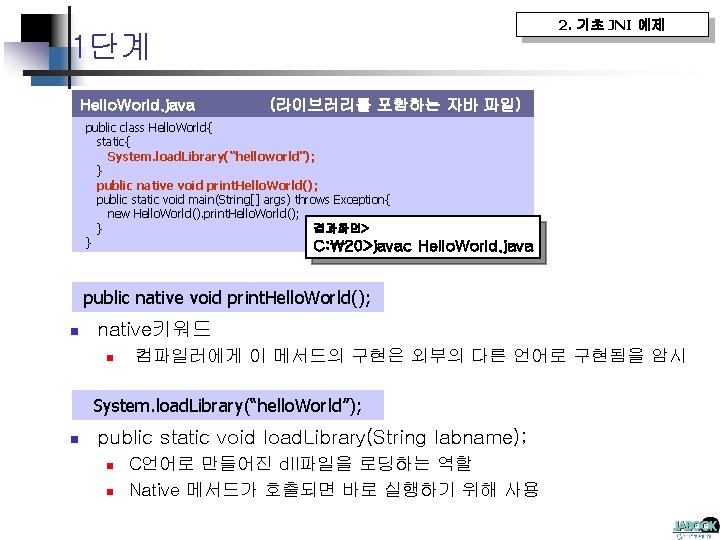
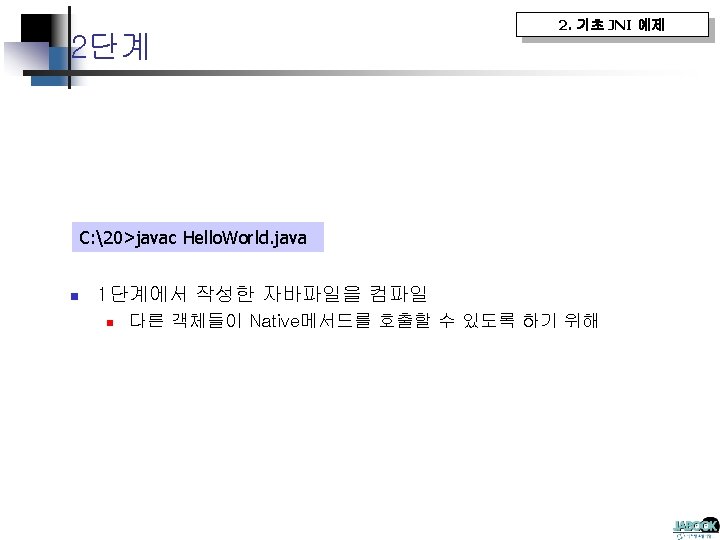
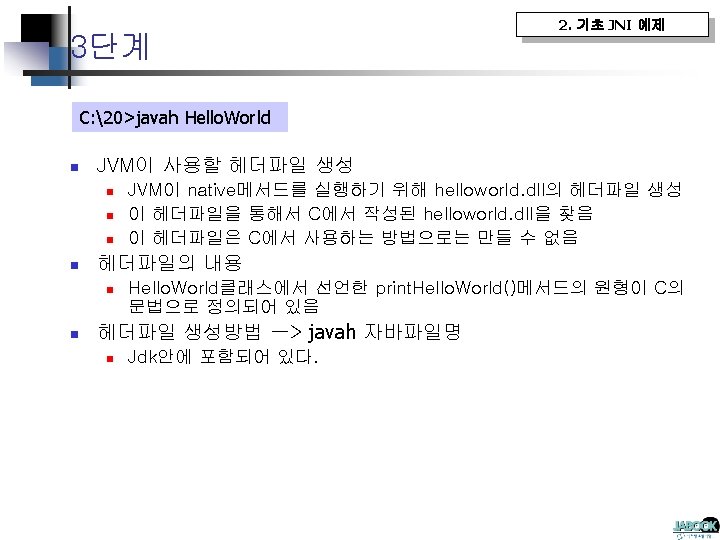
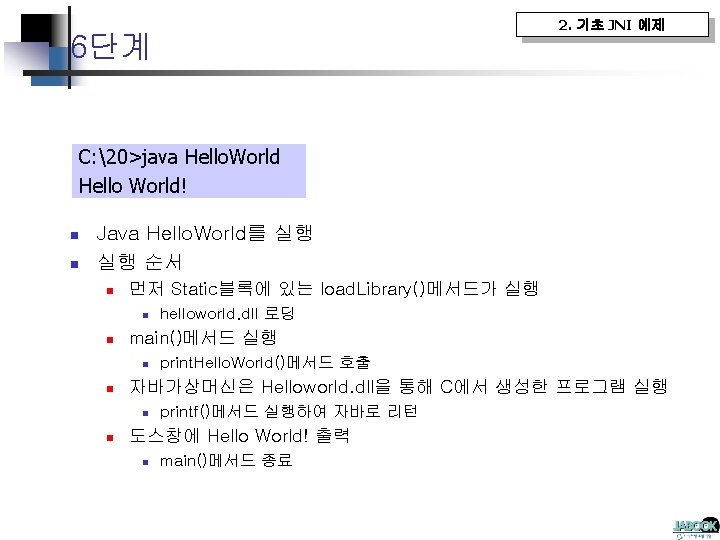
2. 기초 JNI 예제 1단계 Hello. World. java (라이브러리를 포함하는 자바 파일) public class Hello. World{ static{ System. load. Library(“helloworld"); } public native void print. Hello. World(); public static void main(String[] args) throws Exception{ new Hello. World(). print. Hello. World(); 결과화면> } } C: 20>javac Hello. World. java public native void print. Hello. World(); n native키워드 n 컴파일러에게 이 메서드의 구현은 외부의 다른 언어로 구현됨을 암시 System. load. Library(“hello. World”); n public static void load. Library(String labname); n n C언어로 만들어진 dll파일을 로딩하는 역할 Native 메서드가 호출되면 바로 실행하기 위해 사용
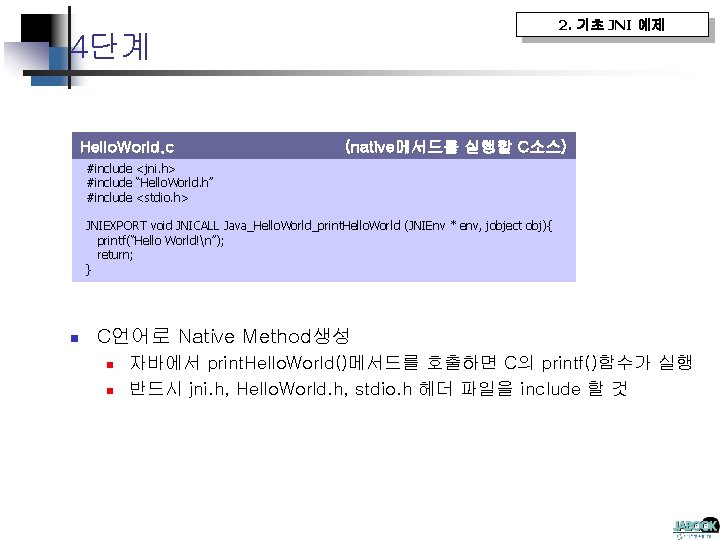
2. 기초 JNI 예제 4단계 Hello. World. c (native메서드를 실행할 C소스) #include <jni. h> #include “Hello. World. h” #include <stdio. h> JNIEXPORT void JNICALL Java_Hello. World_print. Hello. World (JNIEnv * env, jobject obj){ printf(“Hello World!n”); return; } n C언어로 Native Method생성 n n 자바에서 print. Hello. World()메서드를 호출하면 C의 printf()함수가 실행 반드시 jni. h, Hello. World. h, stdio. h 헤더 파일을 include 할 것
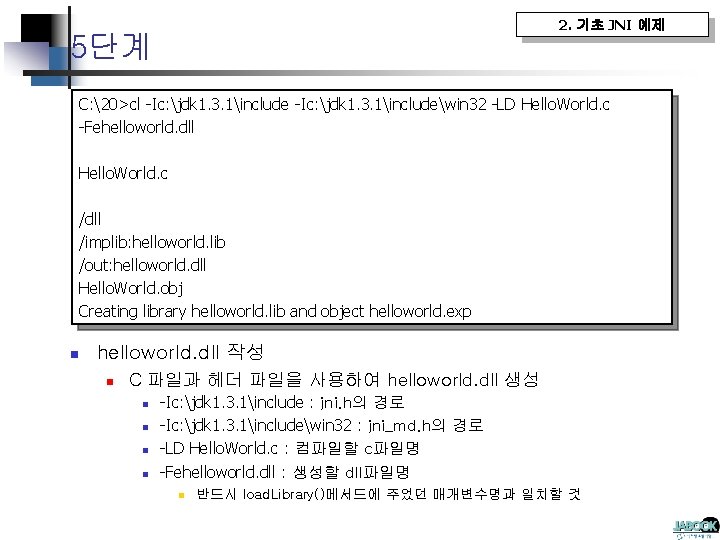
2. 기초 JNI 예제 5단계 C: 20>cl -Ic: jdk 1. 3. 1includewin 32 -LD Hello. World. c -Fehelloworld. dll Hello. World. c /dll /implib: helloworld. lib /out: helloworld. dll Hello. World. obj Creating library helloworld. lib and object helloworld. exp n helloworld. dll 작성 n C 파일과 헤더 파일을 사용하여 helloworld. dll 생성 n n -Ic: jdk 1. 3. 1include : jni. h의 경로 -Ic: jdk 1. 3. 1includewin 32 : jni_md. h의 경로 -LD Hello. World. c : 컴파일할 c파일명 -Fehelloworld. dll : 생성할 dll파일명 n 반드시 load. Library()메서드에 주었던 매개변수명과 일치할 것
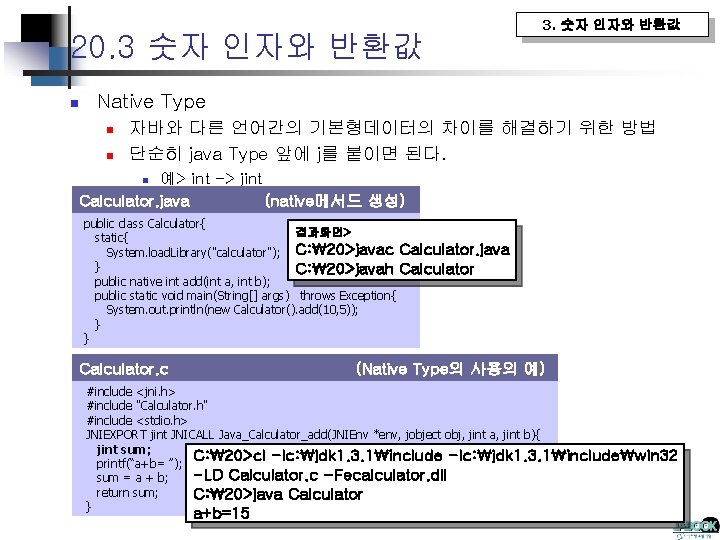
20. 3 숫자 인자와 반환값 n 3. 숫자 인자와 반환값 Native Type n n 자바와 다른 언어간의 기본형데이터의 차이를 해결하기 위한 방법 단순히 java Type 앞에 j를 붙이면 된다. 예> int -> jint Calculator. java (native메서드 생성) n public class Calculator{ 결과화면> static{ System. load. Library("calculator"); C: 20>javac Calculator. java } C: 20>javah Calculator public native int add(int a, int b); public static void main(String[] args) throws Exception{ System. out. println(new Calculator(). add(10, 5)); } } Calculator. c (Native Type의 사용의 예) #include <jni. h> #include "Calculator. h" #include <stdio. h> JNIEXPORT jint JNICALL Java_Calculator_add(JNIEnv *env, jobject obj, jint a, jint b){ jint sum; C: 20>cl -Ic: jdk 1. 3. 1includewin 32 printf(“a+b= ”); -LD Calculator. c -Fecalculator. dll sum = a + b; return sum; C: 20>java Calculator } a+b=15
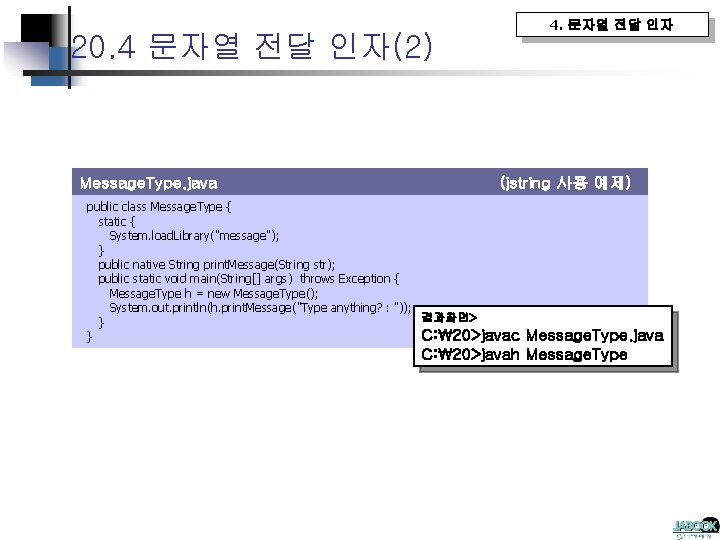
4. 문자열 전달 인자 20. 4 문자열 전달 인자(2) Message. Type. java (jstring 사용 예제) public class Message. Type { static { System. load. Library("message"); } public native String print. Message(String str); public static void main(String[] args) throws Exception { Message. Type h = new Message. Type(); System. out. println(h. print. Message("Type anything? : ")); 결과화면> } C: 20>javac } Message. Type. java C: 20>javah Message. Type
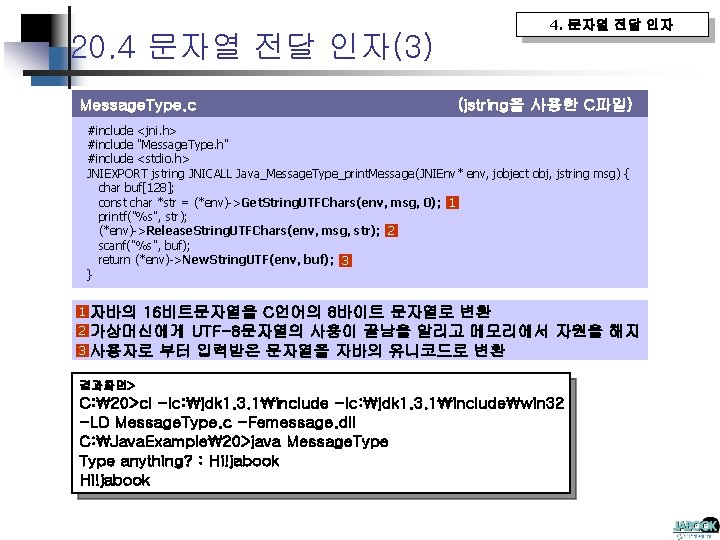
20. 4 문자열 전달 인자(3) Message. Type. c 4. 문자열 전달 인자 (jstring을 사용한 C파일) #include <jni. h> #include "Message. Type. h" #include <stdio. h> JNIEXPORT jstring JNICALL Java_Message. Type_print. Message(JNIEnv* env, jobject obj, jstring msg) { char buf[128]; const char *str = (*env)->Get. String. UTFChars(env, msg, 0); 1 printf("%s", str); (*env)->Release. String. UTFChars(env, msg, str); 2 scanf("%s", buf); return (*env)->New. String. UTF(env, buf); 3 } 1 자바의 16비트문자열을 C언어의 8바이트 문자열로 변환 2 가상머신에게 UTF-8문자열의 사용이 끝남을 알리고 메모리에서 자원을 해지 3 사용자로 부터 입력받은 문자열을 자바의 유니코드로 변환 결과화면> C: 20>cl -Ic: jdk 1. 3. 1includewin 32 -LD Message. Type. c -Femessage. dll C: Java. Example20>java Message. Type anything? : Hi!jabook
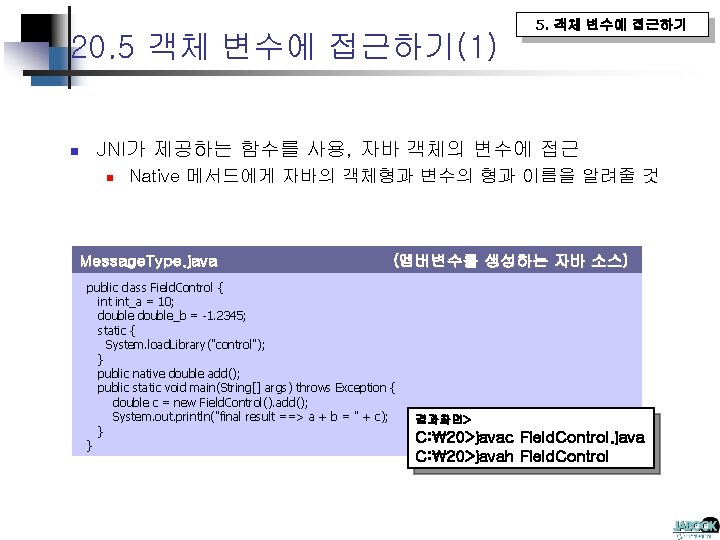
20. 5 객체 변수에 접근하기(1) n 5. 객체 변수에 접근하기 JNI가 제공하는 함수를 사용, 자바 객체의 변수에 접근 n Native 메서드에게 자바의 객체형과 변수의 형과 이름을 알려줄 것 Message. Type. java (멤버변수를 생성하는 자바 소스) public class Field. Control { int_a = 10; double_b = -1. 2345; static { System. load. Library("control"); } public native double add(); public static void main(String[] args) throws Exception { double c = new Field. Control(). add(); System. out. println("final result ==> a + b = " + c); } } 결과화면> C: 20>javac Field. Control. java C: 20>javah Field. Control
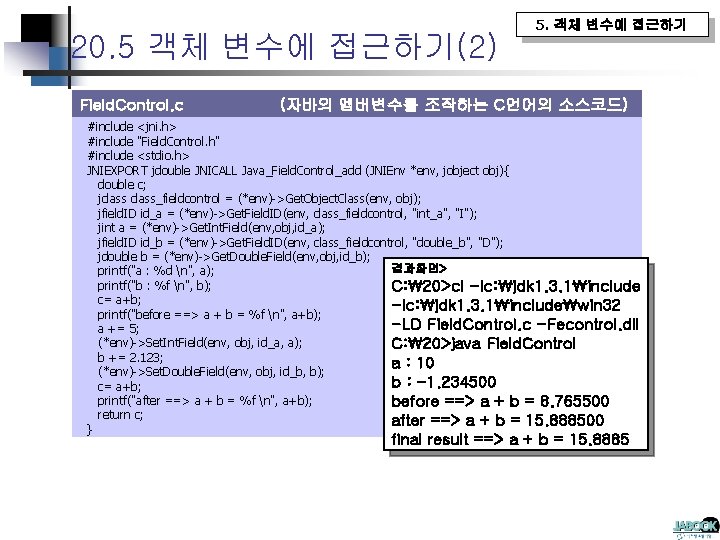
20. 5 객체 변수에 접근하기(2) Field. Control. c 5. 객체 변수에 접근하기 (자바의 멤버변수를 조작하는 C언어의 소스코드) #include <jni. h> #include "Field. Control. h" #include <stdio. h> JNIEXPORT jdouble JNICALL Java_Field. Control_add (JNIEnv *env, jobject obj){ double c; jclass_fieldcontrol = (*env)->Get. Object. Class(env, obj); jfield. ID id_a = (*env)->Get. Field. ID(env, class_fieldcontrol, "int_a", "I"); jint a = (*env)->Get. Int. Field(env, obj, id_a); jfield. ID id_b = (*env)->Get. Field. ID(env, class_fieldcontrol, "double_b", "D"); jdouble b = (*env)->Get. Double. Field(env, obj, id_b); 결과화면> printf("a : %d n", a); printf("b : %f n", b); C: 20>cl -Ic: jdk 1. 3. 1include c= a+b; -Ic: jdk 1. 3. 1includewin 32 printf("before ==> a + b = %f n", a+b); -LD Field. Control. c -Fecontrol. dll a += 5; (*env)->Set. Int. Field(env, obj, id_a, a); C: 20>java Field. Control b += 2. 123; a : 10 (*env)->Set. Double. Field(env, obj, id_b, b); b : -1. 234500 c= a+b; printf("after ==> a + b = %f n", a+b); before ==> a + b = 8. 765500 return c; after ==> a + b = 15. 888500 } final result ==> a + b = 15. 8885
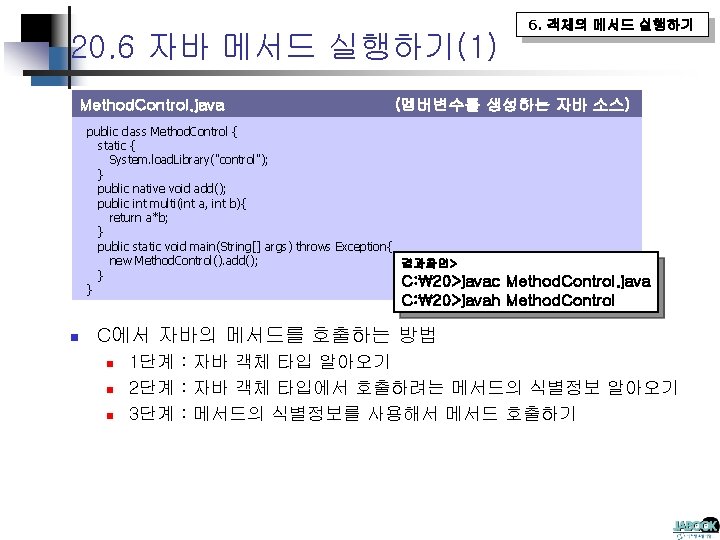
20. 6 자바 메서드 실행하기(1) Method. Control. java 6. 객체의 메서드 실행하기 (멤버변수를 생성하는 자바 소스) public class Method. Control { static { System. load. Library("control"); } public native void add(); public int multi(int a, int b){ return a*b; } public static void main(String[] args) throws Exception{ new Method. Control(). add(); 결과화면> } C: 20>javac } Method. Control. java C: 20>javah Method. Control n C에서 자바의 메서드를 호출하는 방법 n n n 1단계 : 자바 객체 타입 알아오기 2단계 : 자바 객체 타입에서 호출하려는 메서드의 식별정보 알아오기 3단계 : 메서드의 식별정보를 사용해서 메서드 호출하기
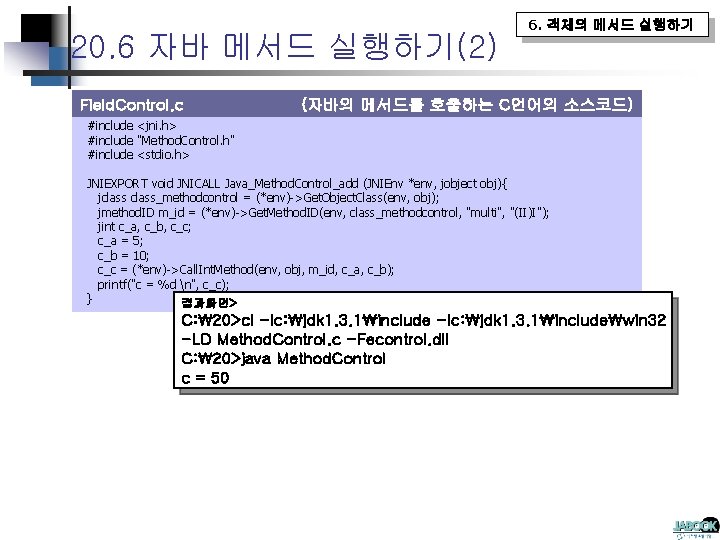
20. 6 자바 메서드 실행하기(2) Field. Control. c 6. 객체의 메서드 실행하기 (자바의 메서드를 호출하는 C언어의 소스코드) #include <jni. h> #include "Method. Control. h" #include <stdio. h> JNIEXPORT void JNICALL Java_Method. Control_add (JNIEnv *env, jobject obj){ jclass_methodcontrol = (*env)->Get. Object. Class(env, obj); jmethod. ID m_id = (*env)->Get. Method. ID(env, class_methodcontrol, "multi", "(II)I"); jint c_a, c_b, c_c; c_a = 5; c_b = 10; c_c = (*env)->Call. Int. Method(env, obj, m_id, c_a, c_b); printf("c = %d n", c_c); } 결과화면> C: 20>cl -Ic: jdk 1. 3. 1includewin 32 -LD Method. Control. c -Fecontrol. dll C: 20>java Method. Control c = 50