
17 Performing Flashback Copyright 2005 Oracle All rights
17 Performing Flashback Copyright © 2005, Oracle. All rights reserved.
Objectives After completing this lesson, you should be able to: • Describe Flashback Database • Restore the table content to a specific point in the past with Flashback Table • Recover from a dropped table • View the contents of the database as of any single point in time with Flashback Query • See versions of a row over time with Flashback Versions Query • View transaction history or a row with Flashback Transaction Query 17 -2 Copyright © 2005, Oracle. All rights reserved.

Flashback Technology: Benefits • • The Flashback technology is a revolutionary advance in recovery. Traditional recovery techniques are slow. > Overview Database Table Drop Query Versions Transaction – The entire database or a file (not just the incorrect data) has to be restored. – Every change in the database log must be examined. • Flashback is fast. – Changes are indexed by row and by transaction. – Only the changed data is restored. • Flashback commands are easy. – No complex multiple-step procedures are involved. 17 -3 Copyright © 2005, Oracle. All rights reserved.

When to Use the Flashback Technology Object Level Uses Affects Database Truncate table; Undesired multitable changes made Database Flashback logs True Table Drop table Drop Recycle bin True Update with the wrong WHERE clause Table Undo data True Compare current data with data from the past Query Undo data False Compare versions of a row Version Undo data False Investigate several historical states of data Transaction Undo data False Tx 17 -4 Scenario Examples Flashback Technology Copyright © 2005, Oracle. All rights reserved.
Flashing Back Any Error • • • 17 -5 Flashback Database brings the database to an earlier point in time by undoing all changes made since that time. Flashback Table recovers a table to a point in time in the past without having to restore from a backup. Flashback Drop restores accidentally dropped tables. Copyright © 2005, Oracle. All rights reserved.
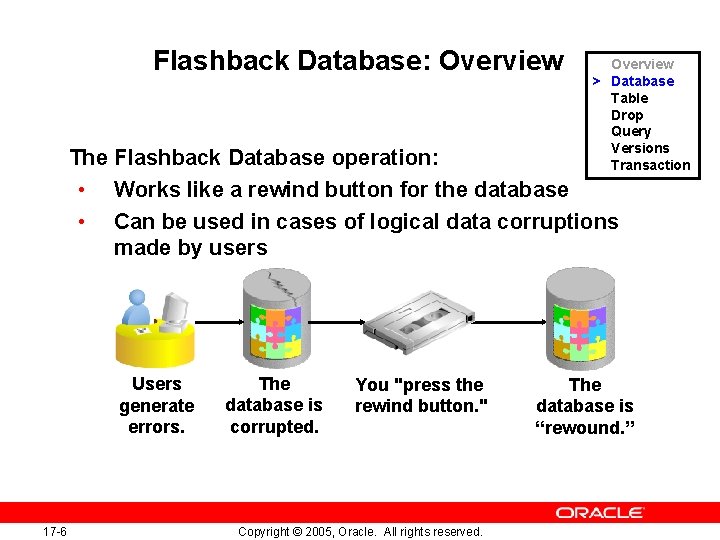
Flashback Database: Overview > Database Table Drop Query Versions Transaction The Flashback Database operation: • Works like a rewind button for the database • Can be used in cases of logical data corruptions made by users Users generate errors. 17 -6 The database is corrupted. You "press the rewind button. " Copyright © 2005, Oracle. All rights reserved. The database is “rewound. ”
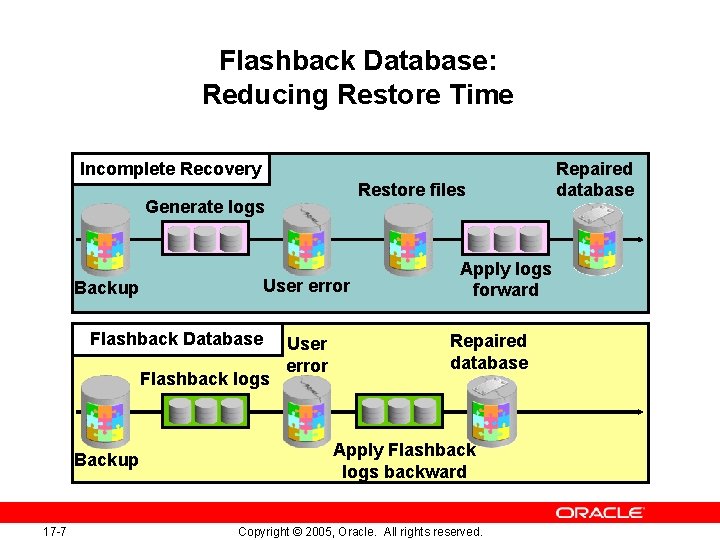
Flashback Database: Reducing Restore Time Incomplete Recovery Restore files Generate logs User error Backup Flashback Database Flashback logs Backup 17 -7 User error Apply logs forward Repaired database Apply Flashback logs backward Copyright © 2005, Oracle. All rights reserved. Repaired database
Flashback Database: Considerations • When the Flashback Database operation completes, the database must be opened by using one of these methods: – In read-only mode to verify that the correct target time or SCN has been used – With the RESETLOGS parameter to allow for updates • 17 -8 The opposite of flash back is recover. Copyright © 2005, Oracle. All rights reserved.

Flashback Database: Limitations You cannot use Flashback Database in the following situations: • The control file has been restored or re-created. • A tablespace has been dropped. • A data file has been shrunk. Flashback target time 17 -9 Drop tablespace. Shrink data file. Re-create control file. Copyright © 2005, Oracle. All rights reserved. Present
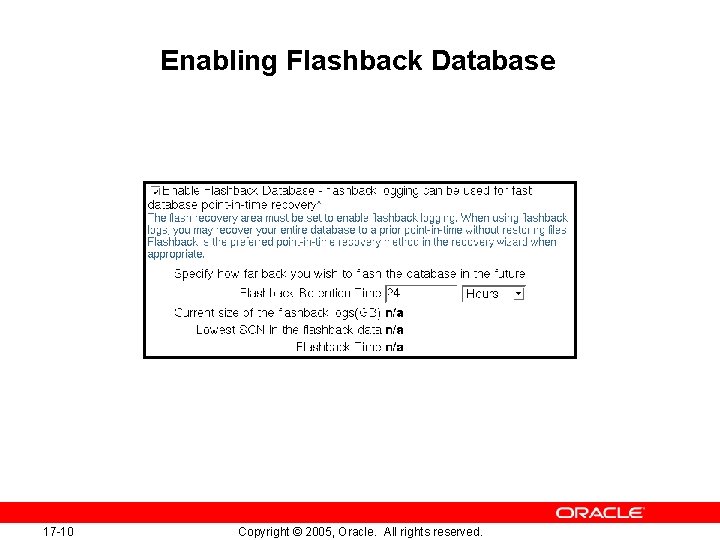
Enabling Flashback Database 17 -10 Copyright © 2005, Oracle. All rights reserved.
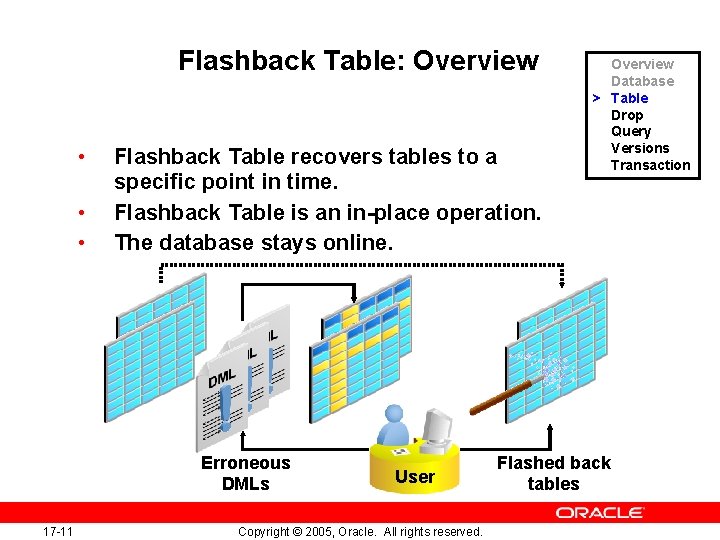
Flashback Table: Overview • • • Flashback Table recovers tables to a specific point in time. Flashback Table is an in-place operation. The database stays online. Erroneous DMLs 17 -11 User Copyright © 2005, Oracle. All rights reserved. Overview Database > Table Drop Query Versions Transaction Flashed back tables
Flashback Table • • 17 -12 Using Flashback Table, you can recover a table or tables to a specific point in time without restoring a backup. Data is retrieved from the undo tablespace to perform a Flashback Table operation. The FLASHBACK TABLE privilege is required to flash back a table. Row movement must be enabled on the table that you are performing the flashback operation on. Copyright © 2005, Oracle. All rights reserved.
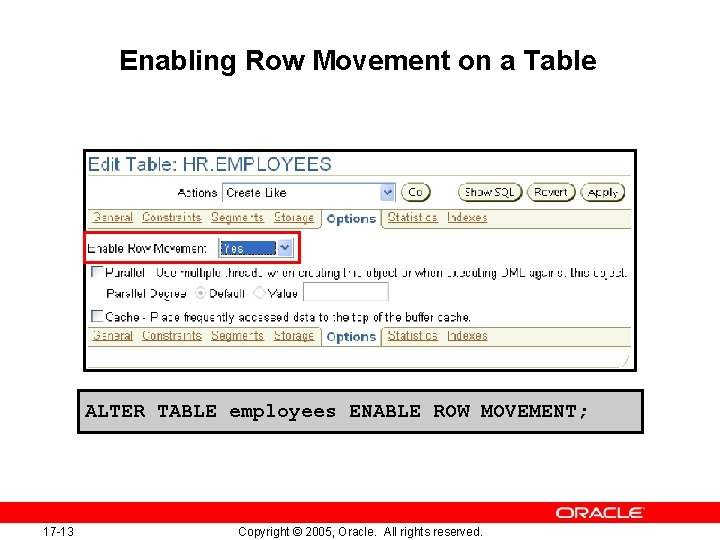
Enabling Row Movement on a Table ALTER TABLE employees ENABLE ROW MOVEMENT; 17 -13 Copyright © 2005, Oracle. All rights reserved.

Performing Flashback Table FLASHBACK TABLE hr. employees TO TIMESTAMP TO_TIMESTAMP('2005 -05 -05 05: 32: 00', 'YYYY-MM-DD HH 24: MI: SS'); 17 -14 Copyright © 2005, Oracle. All rights reserved.

Flashback Table: Considerations • • The FLASHBACK TABLE command executes as a single transaction, acquiring exclusive DML locks. Statistics are not flashed back. Current indexes and dependent objects are maintained. Flashback Table operations: – – 17 -16 Cannot be performed on system tables Cannot span DDL operations Are written to the alert log file Generate undo and redo data Copyright © 2005, Oracle. All rights reserved.

Flashback Drop: Overview Recycle Bin DROP TABLE employees; Mistake was made. 17 -17 FLASHBACK TABLE employees TO BEFORE DROP; Copyright © 2005, Oracle. All rights reserved. Overview Database Table > Drop Query Versions Transaction
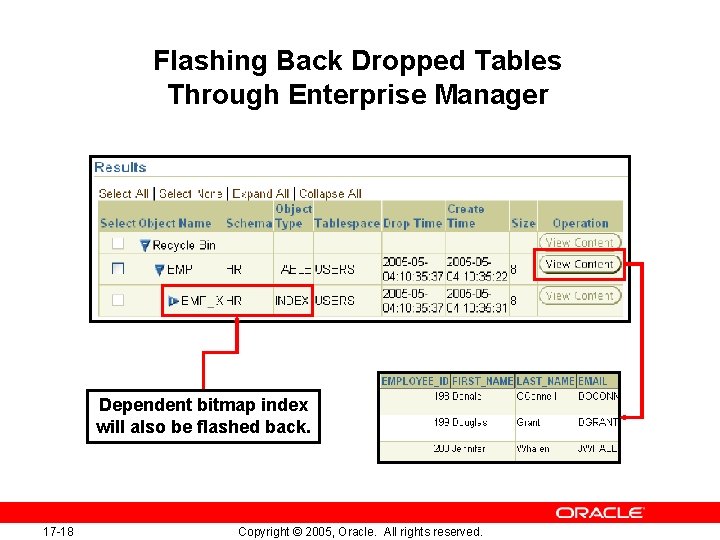
Flashing Back Dropped Tables Through Enterprise Manager Dependent bitmap index will also be flashed back. 17 -18 Copyright © 2005, Oracle. All rights reserved.
Flashback Drop: Considerations • Flashback Drop does not work for tables that: – Reside in the SYSTEM tablespace – Use fine-grained auditing or Virtual Private Database – Reside in a dictionary-managed tablespace – Have been purged, either by manual purging or automatic purging under space pressure • The following dependencies are not protected: – – 17 -19 Bitmap-join indexes Materialized view logs Referential integrity constraints Indexes dropped before tables Copyright © 2005, Oracle. All rights reserved.
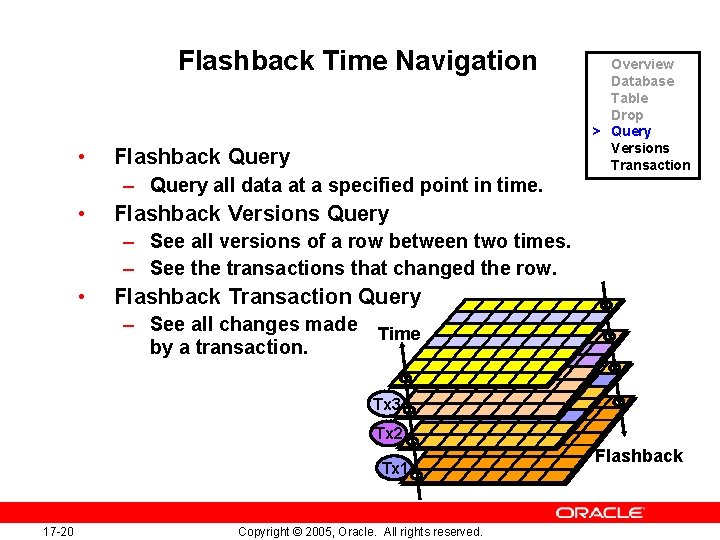
Flashback Time Navigation • Flashback Query Overview Database Table Drop > Query Versions Transaction – Query all data at a specified point in time. • Flashback Versions Query – See all versions of a row between two times. – See the transactions that changed the row. • Flashback Transaction Query – See all changes made by a transaction. Time Tx 3 Tx 2 Tx 1 17 -20 Copyright © 2005, Oracle. All rights reserved. Flashback
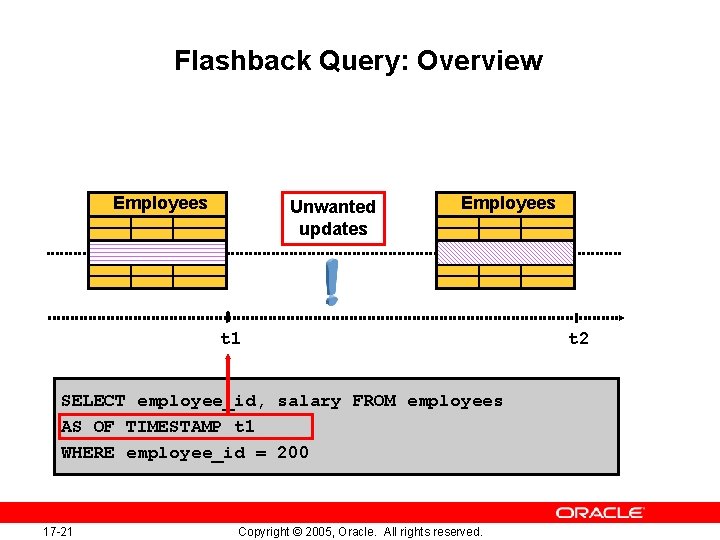
Flashback Query: Overview Employees Unwanted updates Employees t 1 SELECT employee_id, salary FROM employees AS OF TIMESTAMP t 1 WHERE employee_id = 200 17 -21 Copyright © 2005, Oracle. All rights reserved. t 2
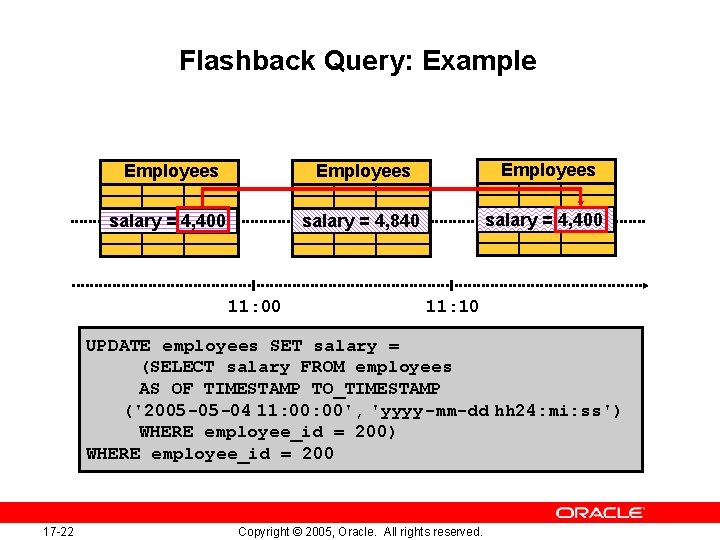
Flashback Query: Example Employees salary = 4, 400 salary = 4, 840 salary = 4, 400 11: 10 UPDATE employees SET salary = (SELECT salary FROM employees AS OF TIMESTAMP TO_TIMESTAMP ('2005 -05 -04 11: 00', 'yyyy-mm-dd hh 24: mi: ss') WHERE employee_id = 200 17 -22 Copyright © 2005, Oracle. All rights reserved.
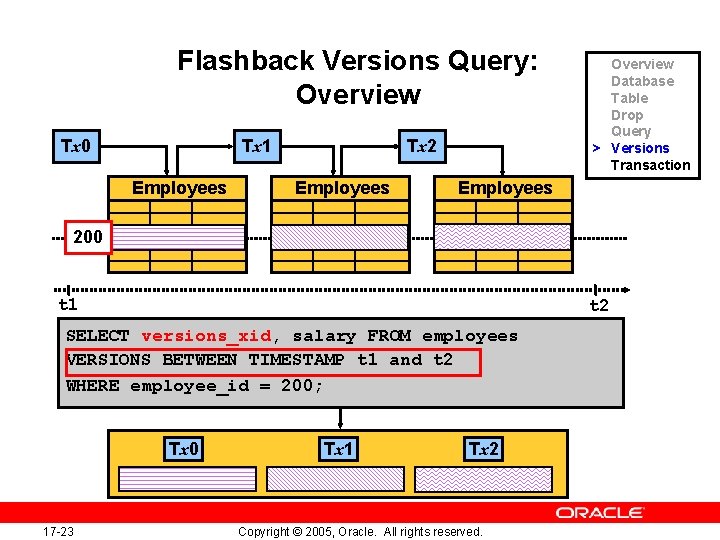
Flashback Versions Query: Overview Tx 0 Tx 1 Employees Tx 2 Employees Overview Database Table Drop Query > Versions Transaction Employees 200 t 1 t 2 SELECT versions_xid, salary FROM employees VERSIONS BETWEEN TIMESTAMP t 1 and t 2 WHERE employee_id = 200; Tx 0 17 -23 Tx 1 Tx 2 Copyright © 2005, Oracle. All rights reserved.
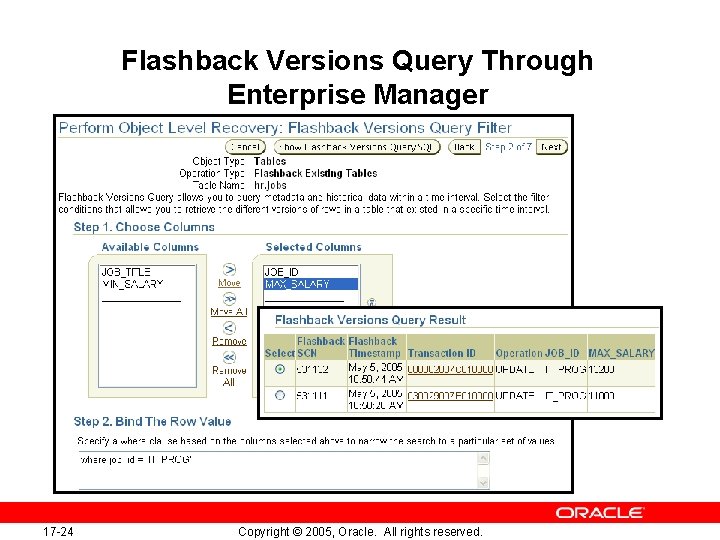
Flashback Versions Query Through Enterprise Manager 17 -24 Copyright © 2005, Oracle. All rights reserved.
Flashback Versions Query: Considerations • The VERSIONS clause cannot be used to query: – – • • 17 -25 External tables Temporary tables Fixed tables Views The VERSIONS clause cannot span DDL commands. Segment shrink operations are filtered out. Copyright © 2005, Oracle. All rights reserved.
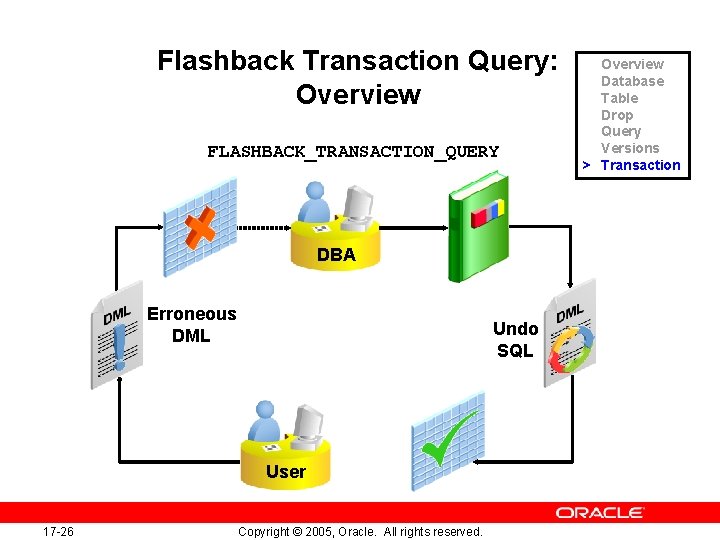
Flashback Transaction Query: Overview FLASHBACK_TRANSACTION_QUERY DBA Erroneous DML Undo SQL User 17 -26 Copyright © 2005, Oracle. All rights reserved. Overview Database Table Drop Query Versions > Transaction
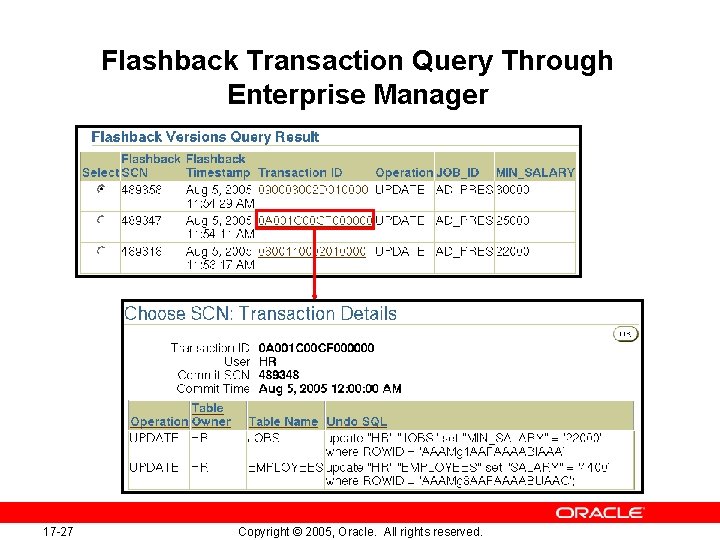
Flashback Transaction Query Through Enterprise Manager 17 -27 Copyright © 2005, Oracle. All rights reserved.
Flashback Transaction Query: Considerations • • • 17 -28 DDLs are seen as dictionary updates. Dropped objects appear as object numbers. Dropped users appear as user identifiers. Copyright © 2005, Oracle. All rights reserved.
Summary In this lesson, you should have learned how to: • Describe Flashback Database • Restore the table content to a specific point in the past with Flashback Table • Recover from a dropped table • View the contents of the database as of any single point in time with Flashback Query • See versions of a row over time with Flashback Versions Query • View transaction history or a row with Flashback Transaction Query 17 -29 Copyright © 2005, Oracle. All rights reserved.
Practice Overview: Using Flashback This practice covers the following topics: • Using Flashback to recover a dropped table • Performing Flashback Versions Query 17 -30 Copyright © 2005, Oracle. All rights reserved.
- Slides: 29