
15 441 Computer Networking Lecture 25 The Web
15 -441 Computer Networking Lecture 25 – The Web
Outline • HTTP review and details (more in notes) • Persistent HTTP review • HTTP caching • Content distribution networks Lecture 19: 2006 -11 -02 2
HTTP Basics (Review) • HTTP layered over bidirectional byte stream • Almost always TCP • Interaction • • Client sends request to server, followed by response from server to client Requests/responses are encoded in text • Stateless • Server maintains no information about past client requests Lecture 19: 2006 -11 -02 3
How to Mark End of Message? (Review) • Size of message Content-Length • Must know size of transfer in advance • Delimiter MIME-style Content-Type • Server must “escape” delimiter in content • Close connection • Only server can do this Lecture 19: 2006 -11 -02 4
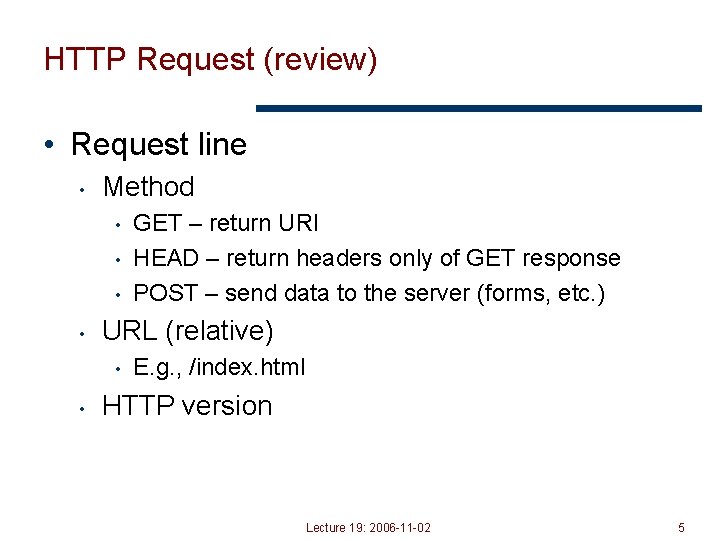
HTTP Request (review) • Request line • Method • • URL (relative) • • GET – return URI HEAD – return headers only of GET response POST – send data to the server (forms, etc. ) E. g. , /index. html HTTP version Lecture 19: 2006 -11 -02 5
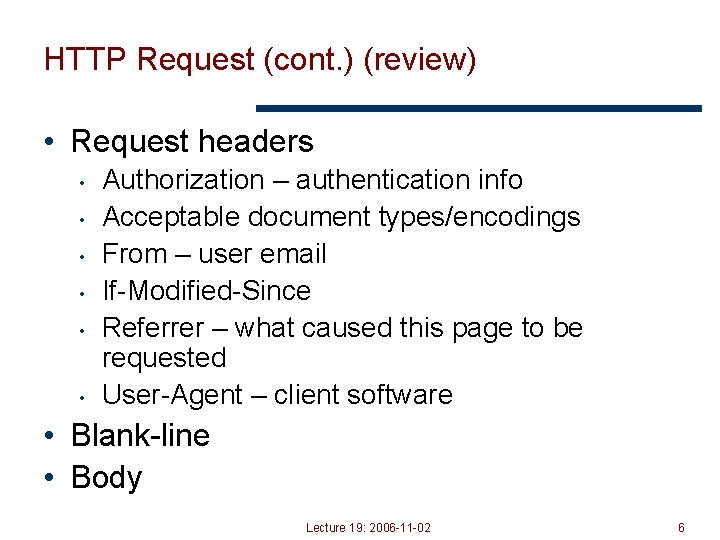
HTTP Request (cont. ) (review) • Request headers • • • Authorization – authentication info Acceptable document types/encodings From – user email If-Modified-Since Referrer – what caused this page to be requested User-Agent – client software • Blank-line • Body Lecture 19: 2006 -11 -02 6
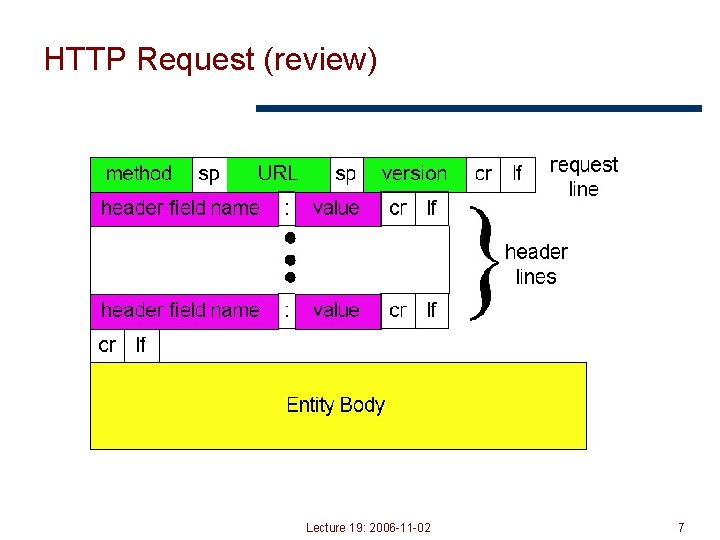
HTTP Request (review) Lecture 19: 2006 -11 -02 7
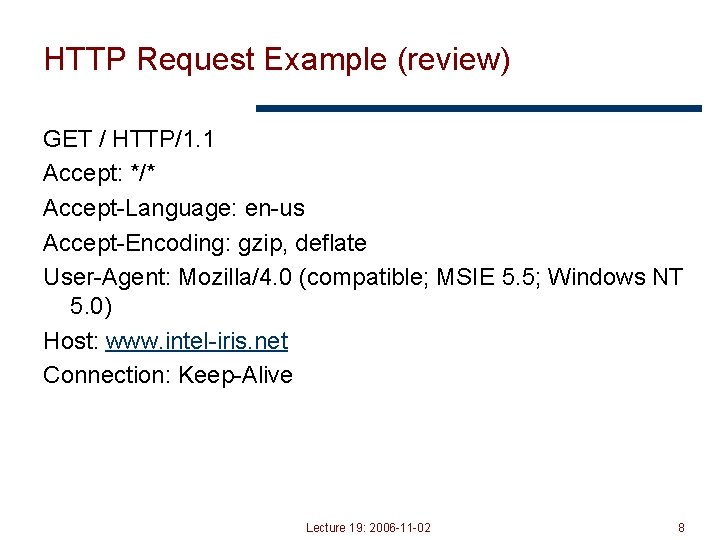
HTTP Request Example (review) GET / HTTP/1. 1 Accept: */* Accept-Language: en-us Accept-Encoding: gzip, deflate User-Agent: Mozilla/4. 0 (compatible; MSIE 5. 5; Windows NT 5. 0) Host: www. intel-iris. net Connection: Keep-Alive Lecture 19: 2006 -11 -02 8
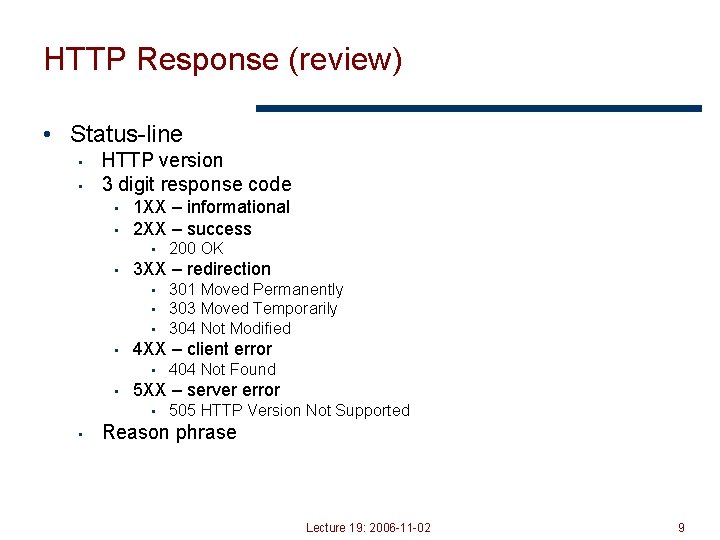
HTTP Response (review) • Status-line • • HTTP version 3 digit response code • • 1 XX – informational 2 XX – success • 200 OK • 3 XX – redirection • 301 Moved Permanently • 303 Moved Temporarily • 304 Not Modified • 4 XX – client error • 404 Not Found • 5 XX – server error • 505 HTTP Version Not Supported • Reason phrase Lecture 19: 2006 -11 -02 9
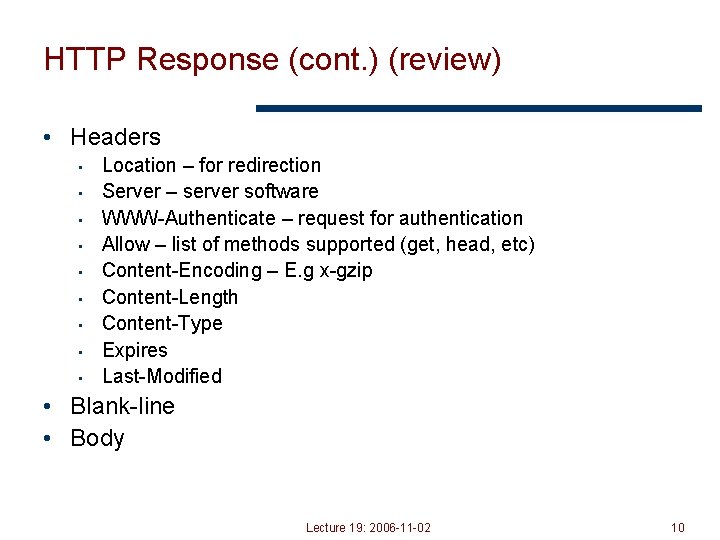
HTTP Response (cont. ) (review) • Headers • • • Location – for redirection Server – server software WWW-Authenticate – request for authentication Allow – list of methods supported (get, head, etc) Content-Encoding – E. g x-gzip Content-Length Content-Type Expires Last-Modified • Blank-line • Body Lecture 19: 2006 -11 -02 10
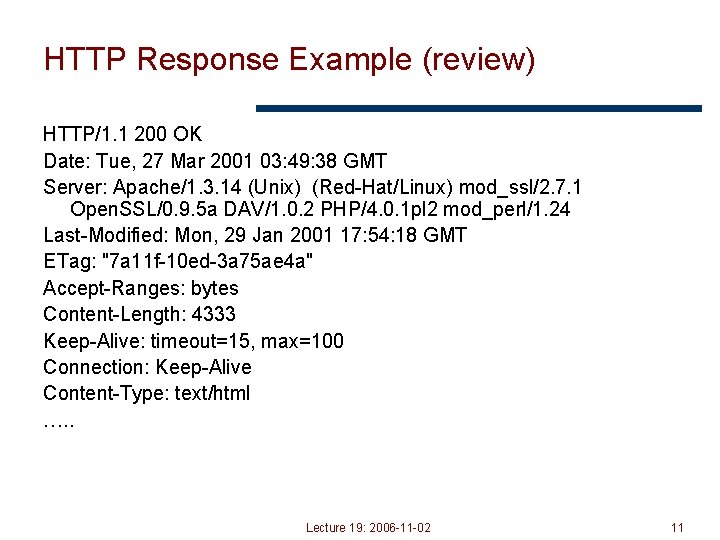
HTTP Response Example (review) HTTP/1. 1 200 OK Date: Tue, 27 Mar 2001 03: 49: 38 GMT Server: Apache/1. 3. 14 (Unix) (Red-Hat/Linux) mod_ssl/2. 7. 1 Open. SSL/0. 9. 5 a DAV/1. 0. 2 PHP/4. 0. 1 pl 2 mod_perl/1. 24 Last-Modified: Mon, 29 Jan 2001 17: 54: 18 GMT ETag: "7 a 11 f-10 ed-3 a 75 ae 4 a" Accept-Ranges: bytes Content-Length: 4333 Keep-Alive: timeout=15, max=100 Connection: Keep-Alive Content-Type: text/html …. . Lecture 19: 2006 -11 -02 11
Outline • HTTP intro and details • Persistent HTTP • HTTP caching • Content distribution networks Lecture 19: 2006 -11 -02 12
Typical Workload (Web Pages) • Multiple (typically small) objects per page • File sizes • Heavy-tailed • • Pareto distribution for tail Lognormal for body of distribution -- For reference/interest only -- • Embedded references • Number of embedded objects = pareto – p(x) = akax-(a+1) Lecture 19: 2006 -11 -02 13
HTTP 0. 9/1. 0 (mostly review) • One request/response per TCP connection • Simple to implement • Disadvantages • Multiple connection setups three-way handshake each time • • Several extra round trips added to transfer Multiple slow starts Lecture 19: 2006 -11 -02 14
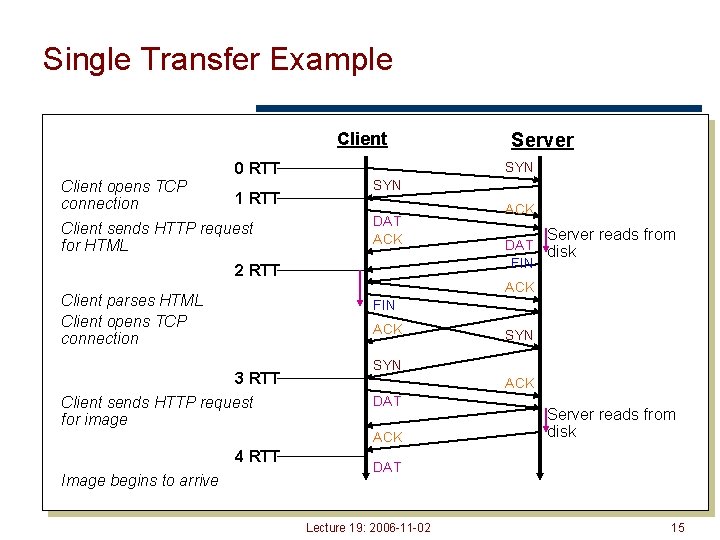
Single Transfer Example Client 0 RTT Client opens TCP connection 1 RTT Client sends HTTP request for HTML SYN DAT ACK 2 RTT ACK Server reads from DAT disk FIN ACK Client parses HTML Client opens TCP connection FIN ACK 3 RTT Client sends HTTP request for image 4 RTT SYN ACK DAT ACK Image begins to arrive Server reads from disk DAT Lecture 19: 2006 -11 -02 15
More Problems • Short transfers are hard on TCP • • Stuck in slow start Loss recovery is poor when windows are small • Lots of extra connections • Increases server state/processing • Server also forced to keep TIME_WAIT connection state -- Things to think about - • • Why must server keep these? Tends to be an order of magnitude greater than # of active connections, why? Lecture 19: 2006 -11 -02 16
Persistent Connection Solution (review) • Multiplex multiple transfers onto one TCP connection • How to identify requests/responses • • • Delimiter Server must examine response for delimiter string Content-length and delimiter Must know size of transfer in advance Block-based transmission send in multiple length delimited blocks Store-and-forward wait for entire response and then use content -length Solution use existing methods and close connection otherwise Lecture 19: 2006 -11 -02 17
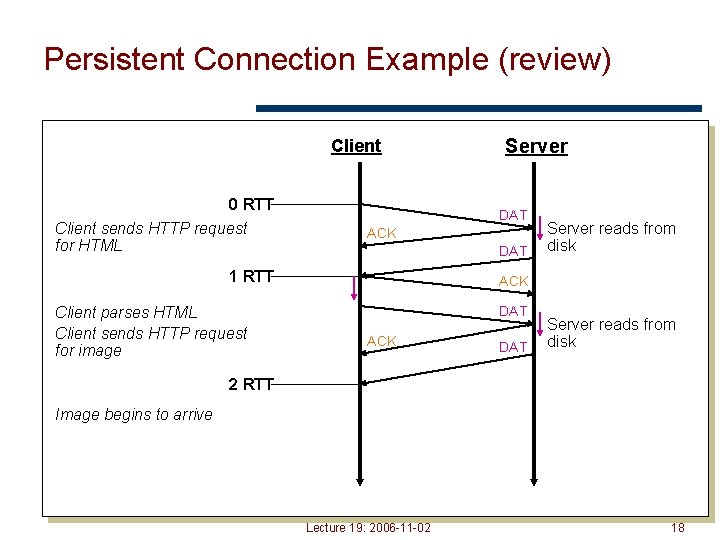
Persistent Connection Example (review) Client 0 RTT Client sends HTTP request for HTML DAT ACK DAT 1 RTT Client parses HTML Client sends HTTP request for image Server reads from disk ACK DAT Server reads from disk 2 RTT Image begins to arrive Lecture 19: 2006 -11 -02 18
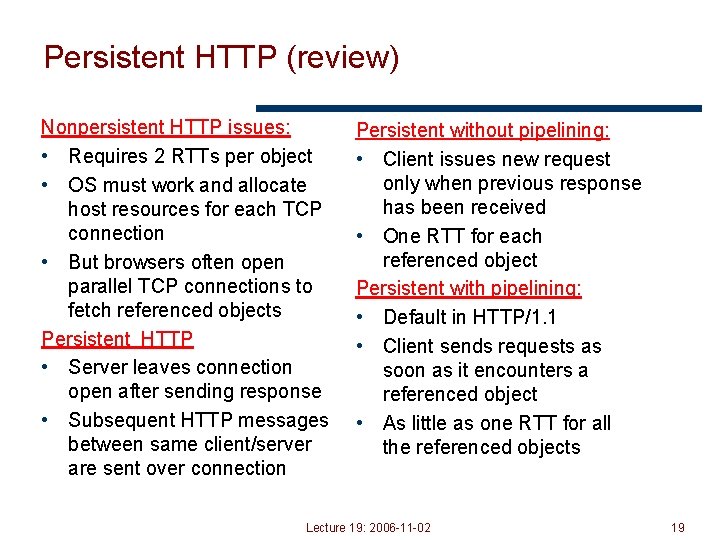
Persistent HTTP (review) Nonpersistent HTTP issues: • Requires 2 RTTs per object • OS must work and allocate host resources for each TCP connection • But browsers often open parallel TCP connections to fetch referenced objects Persistent HTTP • Server leaves connection open after sending response • Subsequent HTTP messages between same client/server are sent over connection Persistent without pipelining: • Client issues new request only when previous response has been received • One RTT for each referenced object Persistent with pipelining: • Default in HTTP/1. 1 • Client sends requests as soon as it encounters a referenced object • As little as one RTT for all the referenced objects Lecture 19: 2006 -11 -02 19
Outline • HTTP intro and details • Persistent HTTP -- new stuff -- • HTTP caching • Content distribution networks Lecture 19: 2006 -11 -02 20
HTTP Caching • Clients often cache documents • • Challenge: update of documents If-Modified-Since requests to check • • HTTP 0. 9/1. 0 used just date HTTP 1. 1 has an opaque “entity tag” (could be a file signature, etc. ) as well • When/how often should the original be checked for changes? • • • Check every time? Check each session? Day? Etc? Use Expires header • If no Expires, often use Last-Modified as estimate Lecture 19: 2006 -11 -02 21
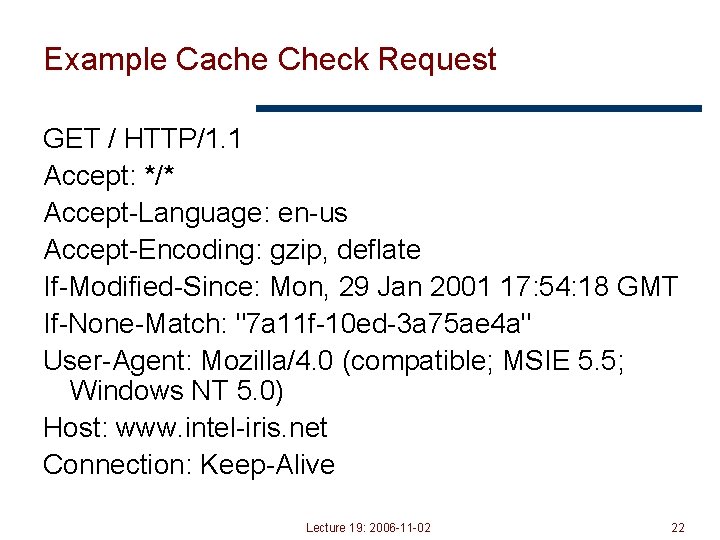
Example Cache Check Request GET / HTTP/1. 1 Accept: */* Accept-Language: en-us Accept-Encoding: gzip, deflate If-Modified-Since: Mon, 29 Jan 2001 17: 54: 18 GMT If-None-Match: "7 a 11 f-10 ed-3 a 75 ae 4 a" User-Agent: Mozilla/4. 0 (compatible; MSIE 5. 5; Windows NT 5. 0) Host: www. intel-iris. net Connection: Keep-Alive Lecture 19: 2006 -11 -02 22
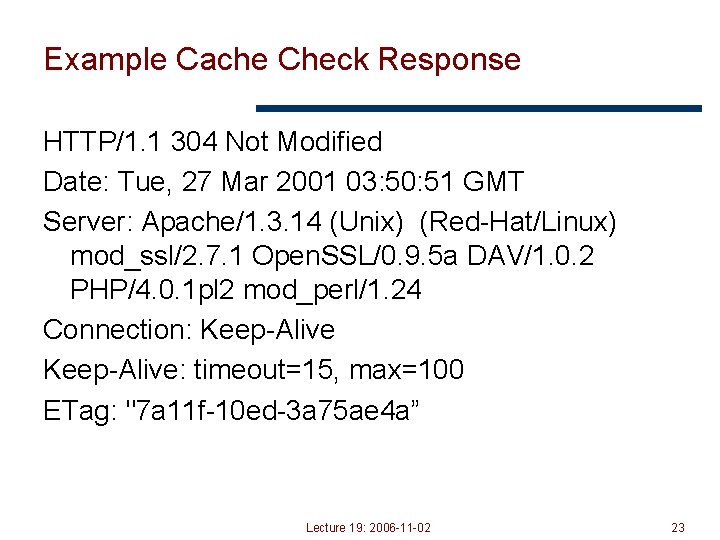
Example Cache Check Response HTTP/1. 1 304 Not Modified Date: Tue, 27 Mar 2001 03: 50: 51 GMT Server: Apache/1. 3. 14 (Unix) (Red-Hat/Linux) mod_ssl/2. 7. 1 Open. SSL/0. 9. 5 a DAV/1. 0. 2 PHP/4. 0. 1 pl 2 mod_perl/1. 24 Connection: Keep-Alive: timeout=15, max=100 ETag: "7 a 11 f-10 ed-3 a 75 ae 4 a” Lecture 19: 2006 -11 -02 23
Ways to cache Client-directed caching: Web Proxies Server-directed caching: Content Delivery Networks (CDNs) Lecture 19: 2006 -11 -02 24
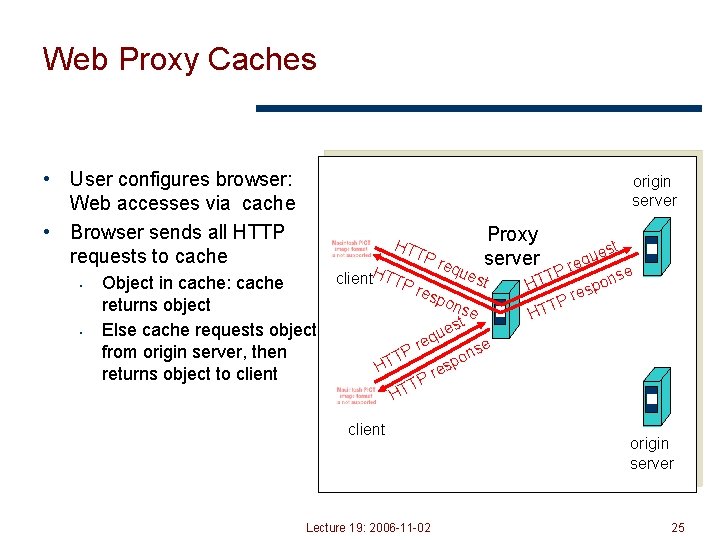
Web Proxy Caches • User configures browser: Web accesses via cache • Browser sends all HTTP requests to cache • • origin server HT Object in cache: cache returns object Else cache requests object from origin server, then returns object to client. HTTP TP req H ues t res pon se t es u TT Proxy server eq r P st e u req P se T n o HT p res P T HT e ns po es r P T HT client Lecture 19: 2006 -11 -02 origin server 25
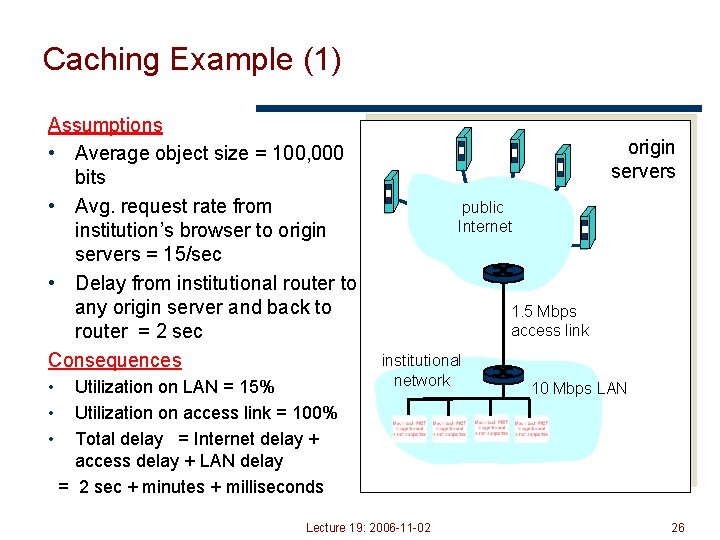
Caching Example (1) Assumptions • Average object size = 100, 000 bits • Avg. request rate from institution’s browser to origin servers = 15/sec • Delay from institutional router to any origin server and back to router = 2 sec Consequences • • • Utilization on LAN = 15% Utilization on access link = 100% Total delay = Internet delay + access delay + LAN delay = 2 sec + minutes + milliseconds origin servers public Internet 1. 5 Mbps access link institutional network Lecture 19: 2006 -11 -02 10 Mbps LAN 26
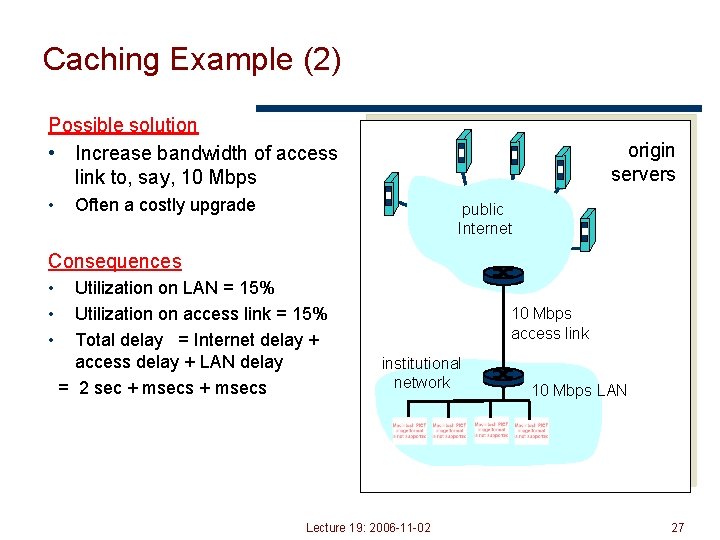
Caching Example (2) Possible solution • Increase bandwidth of access link to, say, 10 Mbps • origin servers Often a costly upgrade public Internet Consequences • • • Utilization on LAN = 15% Utilization on access link = 15% Total delay = Internet delay + access delay + LAN delay = 2 sec + msecs 10 Mbps access link institutional network Lecture 19: 2006 -11 -02 10 Mbps LAN 27
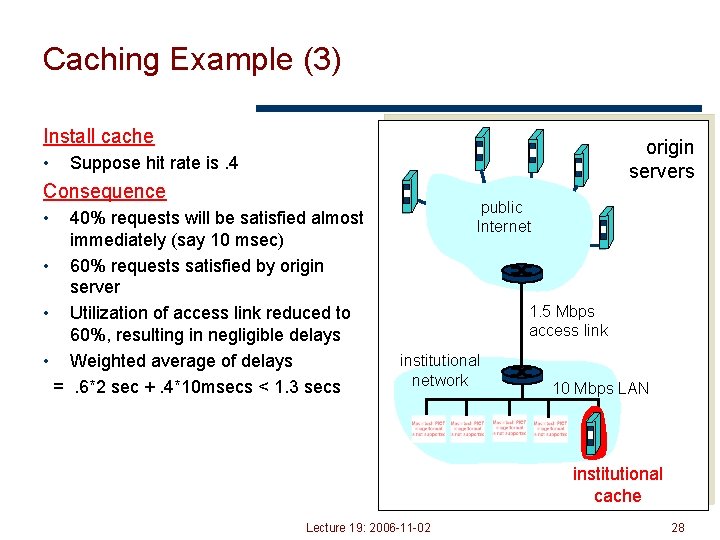
Caching Example (3) Install cache • origin servers Suppose hit rate is. 4 Consequence public Internet • 40% requests will be satisfied almost immediately (say 10 msec) • 60% requests satisfied by origin server • Utilization of access link reduced to 60%, resulting in negligible delays • Weighted average of delays =. 6*2 sec +. 4*10 msecs < 1. 3 secs 1. 5 Mbps access link institutional network 10 Mbps LAN institutional cache Lecture 19: 2006 -11 -02 28
Problems • Over 50% of all HTTP objects are uncacheable – why? • Not easily solvable • • Dynamic data stock prices, scores, web cams CGI scripts results based on passed parameters • Obvious fixes • SSL encrypted data is not cacheable • • • Most web clients don’t handle mixed pages well many generic objects transferred with SSL Cookies results may be based on passed data Hit metering owner wants to measure # of hits for revenue, etc. • What will be the end result? Lecture 19: 2006 -11 -02 29
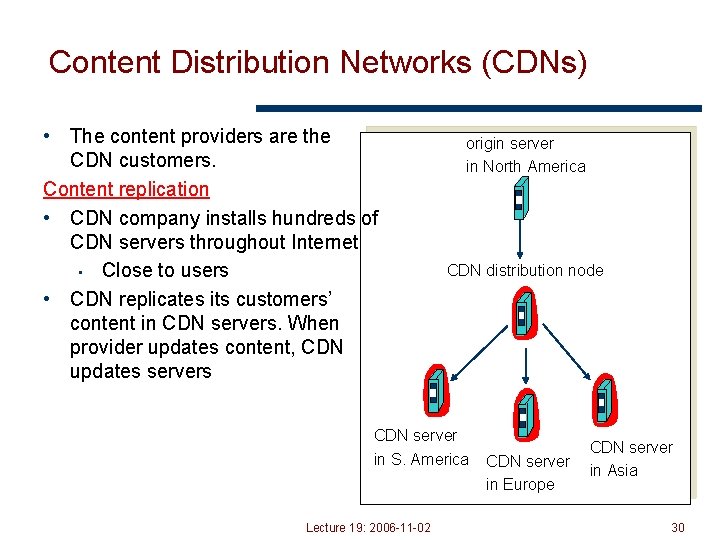
Content Distribution Networks (CDNs) • The content providers are the CDN customers. Content replication • CDN company installs hundreds of CDN servers throughout Internet • Close to users • CDN replicates its customers’ content in CDN servers. When provider updates content, CDN updates servers origin server in North America CDN distribution node CDN server in S. America Lecture 19: 2006 -11 -02 CDN server in Europe CDN server in Asia 30
Outline • HTTP intro and details • Persistent HTTP • HTTP caching • Content distribution networks Lecture 19: 2006 -11 -02 31
Content Distribution Networks & Server Selection • Replicate content on many servers • Challenges • • • How to replicate content Where to replicate content How to find replicated content How to choose among know replicas How to direct clients towards replica Lecture 19: 2006 -11 -02 32
Server Selection • Which server? • • Lowest load to balance load on servers Best performance to improve client performance • • Based on Geography? RTT? Throughput? Load? Any alive node to provide fault tolerance • How to direct clients to a particular server? • As part of routing anycast, cluster load balancing • • • Not covered As part of application HTTP redirect As part of naming DNS Lecture 19: 2006 -11 -02 33
Application Based • HTTP supports simple way to indicate that Web page has moved (30 X responses) • Server receives Get request from client • • Decides which server is best suited for particular client and object Returns HTTP redirect to that server • Can make informed application specific decision • May introduce additional overhead multiple connection setup, name lookups, etc. • OK solution in general, but… • • HTTP Redirect has some flaws – especially with current browsers Incurs many delays, which operators may really care about Lecture 19: 2006 -11 -02 34
Naming Based • Client does DNS name lookup for service • Name server chooses appropriate server address • A-record returned is “best” one for the client • What information can name server base decision on? • • Server load/location must be collected Information in the name lookup request • Name service client typically the local name server for client Lecture 19: 2006 -11 -02 35
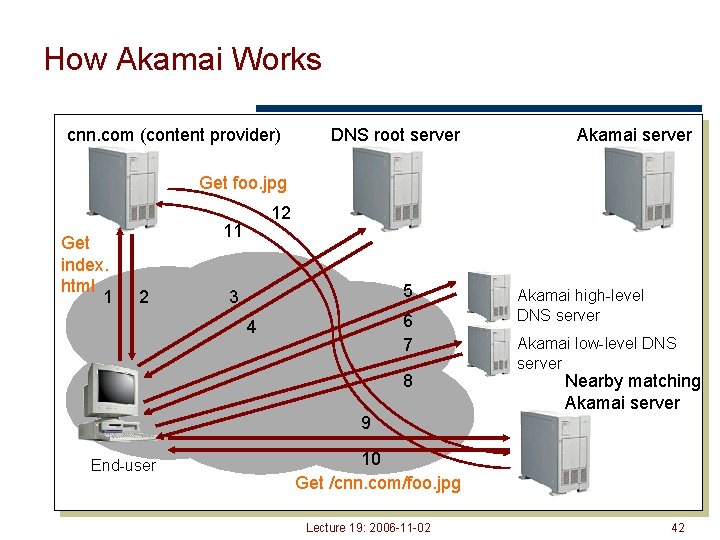
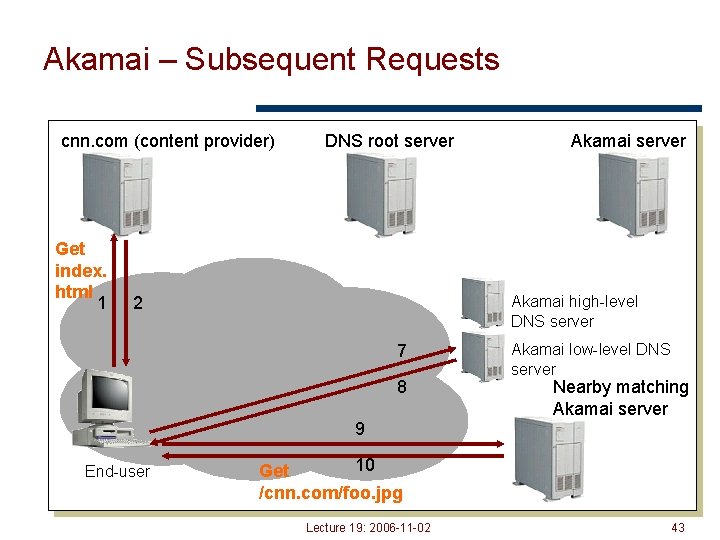
How Akamai Works • Clients fetch html document from primary server • E. g. fetch index. html from cnn. com • URLs for replicated content are replaced in html • E. g. <img src=“http: //cnn. com/af/x. gif”> replaced with <img src=“http: //a 73. g. akamaitech. net/7/23/cnn. com/af/x. gif”> • Client is forced to resolve a. XYZ. g. akamaitech. net hostname Lecture 19: 2006 -11 -02 36
How Akamai Works • • How is content replicated? Akamai only replicates static content (*) Modified name contains original file name Akamai server is asked for content • • First checks local cache If not in cache, requests file from primary server and caches file * (At least, the version we’re talking about today. Akamai actually lets sites write code that can run on Akamai’s servers, but that’s a pretty different beast) Lecture 19: 2006 -11 -02 37
How Akamai Works • Root server gives NS record for akamai. net • Akamai. net name server returns NS record for g. akamaitech. net • • Name server chosen to be in region of client’s name server TTL is large • G. akamaitech. net nameserver chooses server in region • • • Should try to chose server that has file in cache - How to choose? Uses a. XYZ name and hash TTL is small why? Lecture 19: 2006 -11 -02 38
Simple Hashing • Given document XYZ, we need to choose a server to use • Suppose we use modulo • Number servers from 1…n • • Place document XYZ on server (XYZ mod n) What happens when a servers fails? n n-1 • • Same if different people have different measures of n Why might this be bad? Lecture 19: 2006 -11 -02 39
Consistent Hash • “view” = subset of all hash buckets that are visible • Desired features • • Balanced – in any one view, load is equal across buckets Smoothness – little impact on hash bucket contents when buckets are added/removed Spread – small set of hash buckets that may hold an object regardless of views Load – across all views # of objects assigned to hash bucket is small Lecture 19: 2006 -11 -02 40
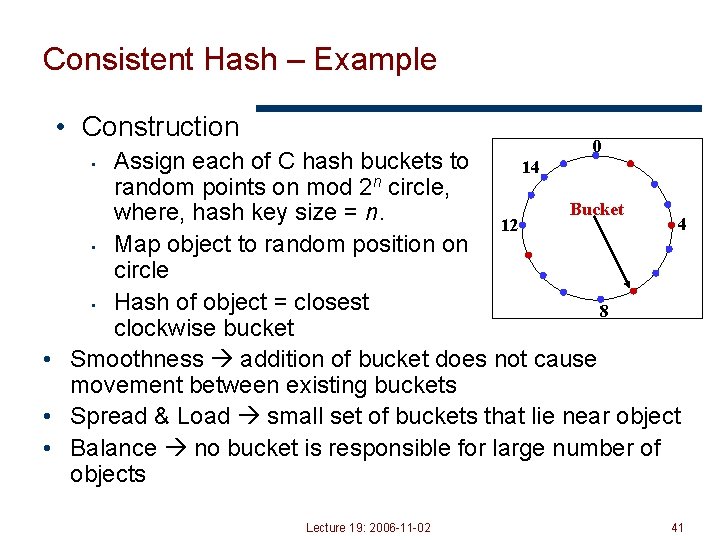
Consistent Hash – Example • Construction 0 Assign each of C hash buckets to 14 n random points on mod 2 circle, Bucket where, hash key size = n. 4 12 • Map object to random position on circle • Hash of object = closest 8 clockwise bucket • Smoothness addition of bucket does not cause movement between existing buckets • Spread & Load small set of buckets that lie near object • Balance no bucket is responsible for large number of objects • Lecture 19: 2006 -11 -02 41
How Akamai Works cnn. com (content provider) DNS root server Akamai server Get foo. jpg Get index. html 1 12 11 2 5 3 6 7 4 8 Akamai high-level DNS server Akamai low-level DNS server Nearby matching Akamai server 9 End-user 10 Get /cnn. com/foo. jpg Lecture 19: 2006 -11 -02 42
Akamai – Subsequent Requests cnn. com (content provider) Get index. html 1 DNS root server Akamai high-level DNS server 2 7 8 Akamai low-level DNS server Nearby matching Akamai server 9 End-user 10 Get /cnn. com/foo. jpg Lecture 19: 2006 -11 -02 43
Impact on DNS Usage • DNS is used for server selection more and more • • • What are reasonable DNS TTLs for this type of use Typically want to adapt to load changes Low TTL for A-records what about NS records? • How does this affect caching? • What do the first and subsequent lookup do? Lecture 19: 2006 -11 -02 44
HTTP (Summary) • Simple text-based file exchange protocol • Support for status/error responses, authentication, client-side state maintenance, cache maintenance • Workloads • • Typical documents structure, popularity Server workload • Interactions with TCP • • Connection setup, reliability, state maintenance Persistent connections • How to improve performance • • • Persistent connections Caching Replication Lecture 19: 2006 -11 -02 45
Typical Workload (Server) • Popularity • • Zipf distribution (P = kr-1) surprisingly common Obvious optimization caching • Request sizes • • In one measurement paper median 1946 bytes, mean 13767 bytes Why such a difference? Heavy-tailed distribution • Pareto – p(x) = akax-(a+1) • Temporal locality • • Modeled as distance into push-down stack Lognormal distribution of stack distances • Request interarrival • Bursty request patterns Lecture 19: 2006 -11 -02 47
Caching Proxies – Sources for Misses • Capacity • • How large a cache is necessary or equivalent to infinite On disk vs. in memory typically on disk • Compulsory • • First time access to document Non-cacheable documents • • • CGI-scripts Personalized documents (cookies, etc) Encrypted data (SSL) • Consistency • Document has been updated/expired before reuse • Conflict • No such misses Lecture 19: 2006 -11 -02 48
- Slides: 47