
15 440 Distributed Systems RAID Thanks to Greg
15 -440 Distributed Systems RAID Thanks to Greg Ganger and Remzi Arapaci-Dusseau for slides
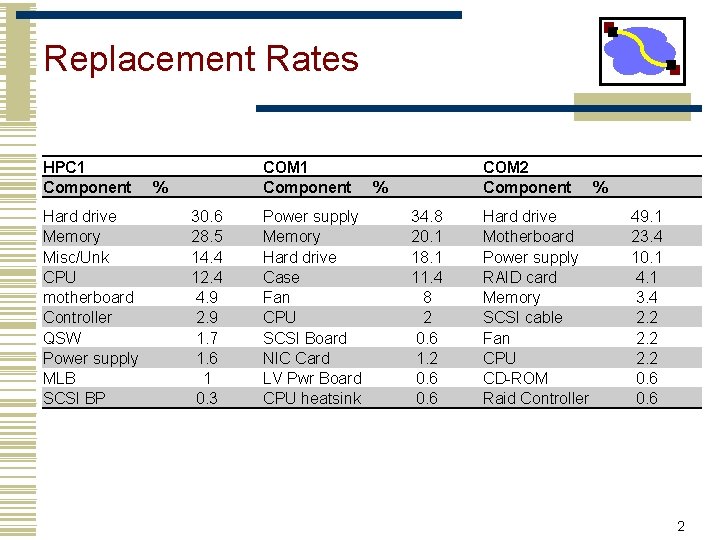
Replacement Rates HPC 1 Component Hard drive Memory Misc/Unk CPU motherboard Controller QSW Power supply MLB SCSI BP COM 1 Component % 30. 6 28. 5 14. 4 12. 4 4. 9 2. 9 1. 7 1. 6 1 0. 3 Power supply Memory Hard drive Case Fan CPU SCSI Board NIC Card LV Pwr Board CPU heatsink COM 2 Component % 34. 8 20. 1 18. 1 11. 4 8 2 0. 6 1. 2 0. 6 Hard drive Motherboard Power supply RAID card Memory SCSI cable Fan CPU CD-ROM Raid Controller % 49. 1 23. 4 10. 1 4. 1 3. 4 2. 2 0. 6 2
Outline • Using multiple disks • Why have multiple disks? • problem and approaches • RAID levels and performance • Estimating availability 3
Motivation: Why use multiple disks? • Capacity • More disks allows us to store more data • Performance • Access multiple disks in parallel • Each disk can be working on independent read or write • Overlap seek and rotational positioning time for all • Reliability • Recover from disk (or single sector) failures • Will need to store multiple copies of data to recover • So, what is the simplest arrangement?
Just a bunch of disks (JBOD) • Yes, it’s a goofy name • industry really does sell “JBOD enclosures” 5
Disk Striping • Interleave data across multiple disks • Large file streaming can enjoy parallel transfers • High throughput requests can enjoy thorough load balancing • If blocks of hot files equally likely on all disks (really? ) 6
Now, What If A Disk Fails? • In a JBOD (independent disk) system • one or more file systems lost • In a striped system • a part of each file system lost • Backups can help, but • backing up takes time and effort • backup doesn’t help recover data lost during that day • Any data loss is a big deal to a bank or stock exchange 7
Tolerating and masking disk failures • If a disk fails, it’s data is gone • may be recoverable, but may not be • To keep operating in face of failure • must have some kind of data redundancy • Common forms of data redundancy • replication • erasure-correcting codes • error-correcting codes 8
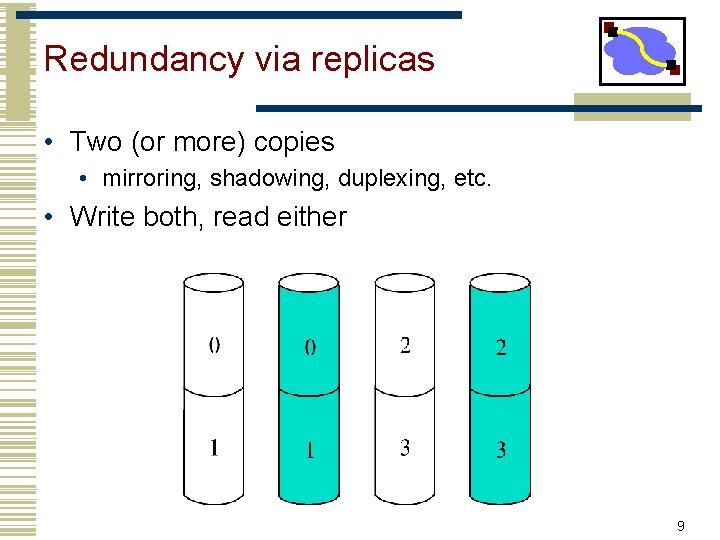
Redundancy via replicas • Two (or more) copies • mirroring, shadowing, duplexing, etc. • Write both, read either 9
Mirroring & Striping • Mirror to 2 virtual drives, where each virtual drive is really a set of striped drives • Provides reliability of mirroring • Provides striping for performance (with write update costs) 10
Implementing Disk Mirroring • Mirroring can be done in either software or hardware • Software solutions are available in most OS’s • Windows 2000, Linux, Solaris • Hardware solutions • Could be done in Host Bus Adaptor(s) • Could be done in Disk Array Controller 11
Lower Cost Data Redundancy • Disk failures are self-identifying (a. k. a. erasures) • Don’t have to find the error • Fact: N-error-detecting code is also N-erasurecorrecting • Error-detecting codes can’t find an error, just know its there • But if you independently know where error is, allows repair • Parity is single-disk-failure-correcting code • recall that parity is computed via XOR • it’s like the low bit of the sum 12
Simplest approach: Parity Disk • Capacity: one extra disk needed per stripe 13
Updating and using the parity 14
Performance • • Suppose 1 drive gives bandwidth B Fault-Free Read = 3 B Degraded Read = 1 B Fault-Free Write = 0. 5 B • But can do 2 B Fault-Free Read at the same time • Degraded Write = 1 B 15
The parity disk bottleneck • Reads go only to the data disks • But, hopefully load balanced across the disks • All writes go to the parity disk • And, worse, usually result in Read-Modify-Write sequence • So, parity disk can easily be a bottleneck 16
Solution: Striping the Parity • Removes parity disk bottleneck 17
Outline • Using multiple disks • Why have multiple disks? • problem and approaches • RAID levels and performance • Estimating availability 18
RAID Taxonomy • Redundant Array of Inexpensive Independent Disks • Constructed by UC-Berkeley researchers in late 80 s (Garth Gibson) • RAID 0 – Coarse-grained Striping with no redundancy • RAID 1 – Mirroring of independent disks • RAID 2 – Fine-grained data striping plus Hamming code disks • Uses Hamming codes to detect and correct multiple errors • Originally implemented when drives didn’t always detect errors • Not used in real systems • • • RAID 3 – Fine-grained data striping plus parity disk RAID 4 – Coarse-grained data striping plus parity disk RAID 5 – Coarse-grained data striping plus striped parity RAID 6 – Extends RAID 5 by adding another parity block RAID 10 – RAID 1 (mirroring) + RAID 0 (striping) 19
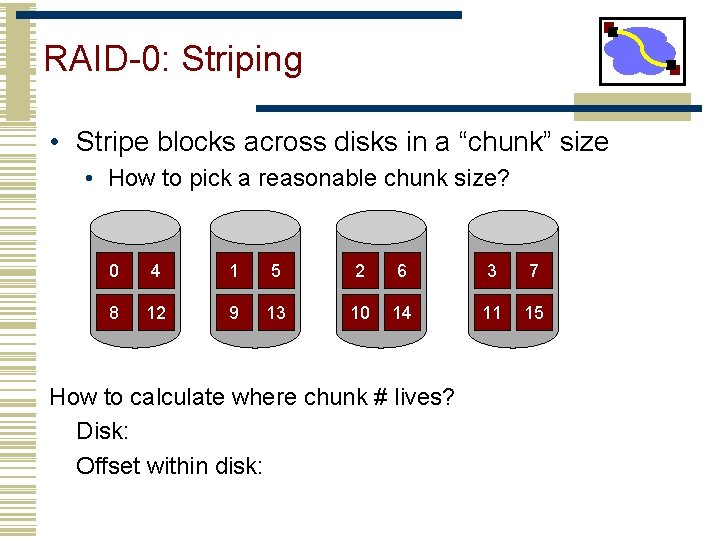
RAID-0: Striping • Stripe blocks across disks in a “chunk” size • How to pick a reasonable chunk size? 0 4 1 5 2 6 3 7 8 12 9 13 10 14 11 15 How to calculate where chunk # lives? Disk: Offset within disk:
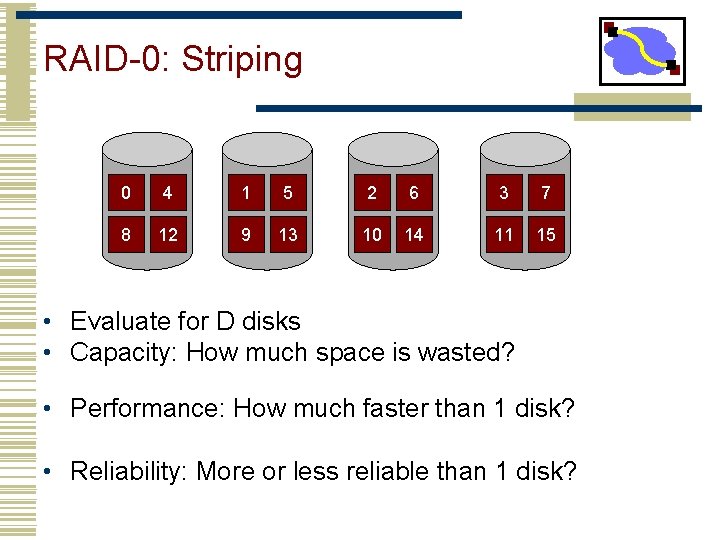
RAID-0: Striping 0 4 1 5 2 6 3 7 8 12 9 13 10 14 11 15 • Evaluate for D disks • Capacity: How much space is wasted? • Performance: How much faster than 1 disk? • Reliability: More or less reliable than 1 disk?
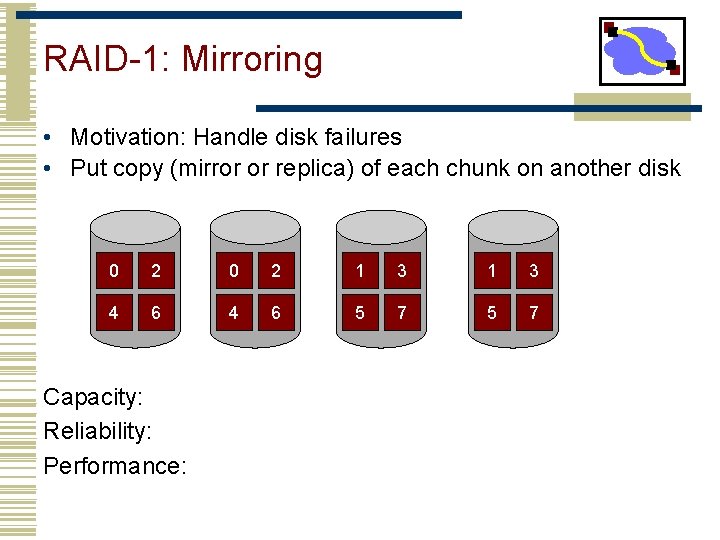
RAID-1: Mirroring • Motivation: Handle disk failures • Put copy (mirror or replica) of each chunk on another disk 0 2 1 3 4 6 5 7 Capacity: Reliability: Performance:
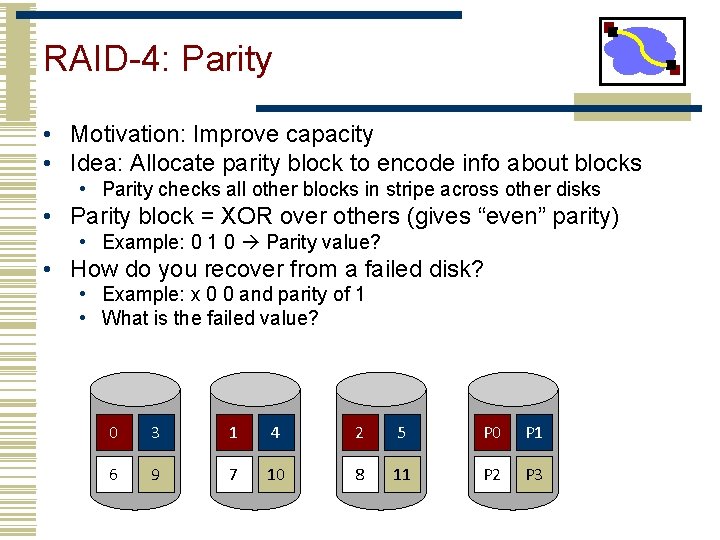
RAID-4: Parity • Motivation: Improve capacity • Idea: Allocate parity block to encode info about blocks • Parity checks all other blocks in stripe across other disks • Parity block = XOR over others (gives “even” parity) • Example: 0 1 0 Parity value? • How do you recover from a failed disk? • Example: x 0 0 and parity of 1 • What is the failed value? 0 3 1 4 2 5 P 0 P 1 6 9 7 10 8 11 P 2 P 3
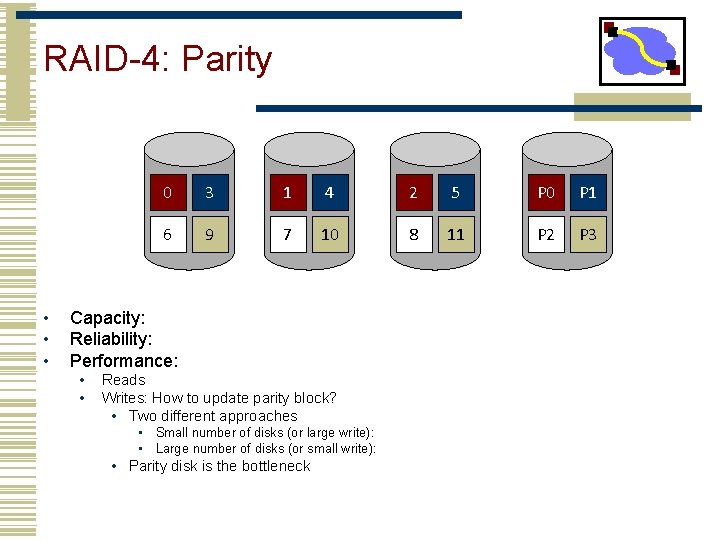
RAID-4: Parity • • • 0 3 1 4 2 5 P 0 P 1 6 9 7 10 8 11 P 2 P 3 Capacity: Reliability: Performance: • • Reads Writes: How to update parity block? • Two different approaches • Small number of disks (or large write): • Large number of disks (or small write): • Parity disk is the bottleneck
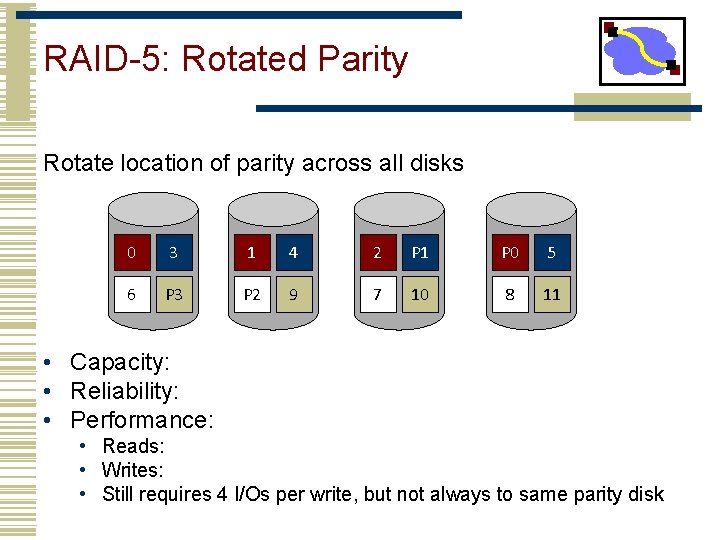
RAID-5: Rotated Parity Rotate location of parity across all disks 0 3 1 4 2 P 1 P 0 5 6 P 3 P 2 9 7 10 8 11 • Capacity: • Reliability: • Performance: • Reads: • Writes: • Still requires 4 I/Os per write, but not always to same parity disk
Comparison N x R Key takeaways: writes are expensive, small writes are really expensive! File systems may help (see LFS) 26
Outline • Using multiple disks • Why have multiple disks? • problem and approaches • RAID levels and performance • Estimating availability 27
Sidebar: Availability metric • Fraction of time that server is able to handle requests • Computed from MTBF and MTTR (Mean Time To Repair) 28
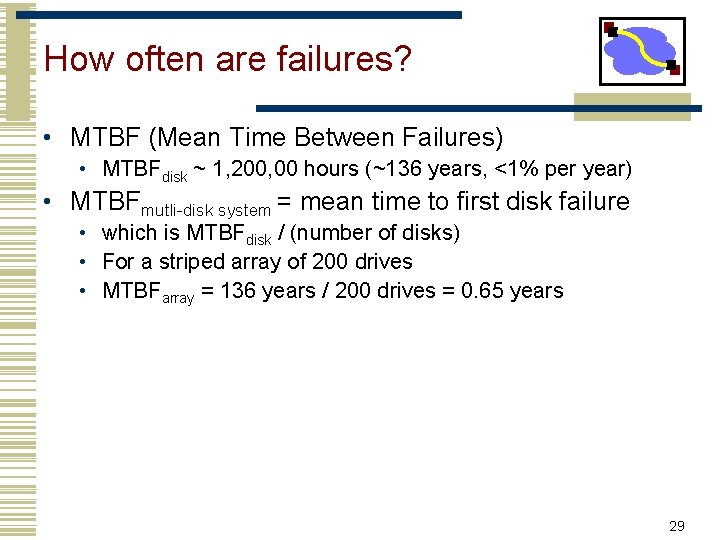
How often are failures? • MTBF (Mean Time Between Failures) • MTBFdisk ~ 1, 200, 00 hours (~136 years, <1% per year) • MTBFmutli-disk system = mean time to first disk failure • which is MTBFdisk / (number of disks) • For a striped array of 200 drives • MTBFarray = 136 years / 200 drives = 0. 65 years 29
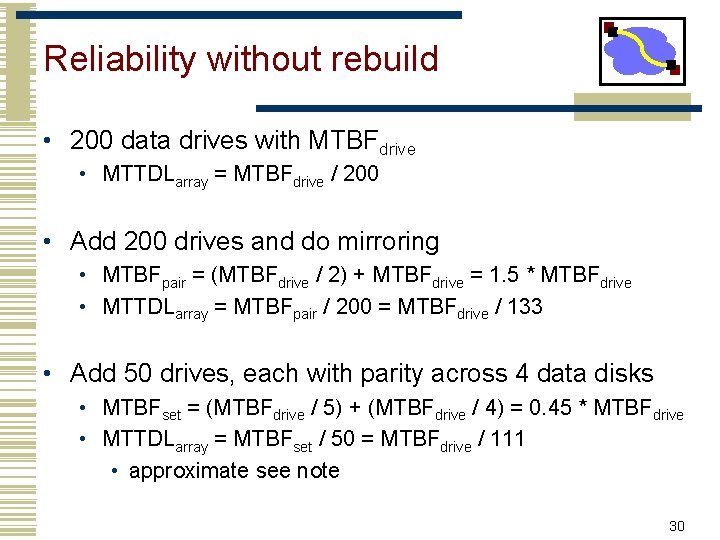
Reliability without rebuild • 200 data drives with MTBFdrive • MTTDLarray = MTBFdrive / 200 • Add 200 drives and do mirroring • MTBFpair = (MTBFdrive / 2) + MTBFdrive = 1. 5 * MTBFdrive • MTTDLarray = MTBFpair / 200 = MTBFdrive / 133 • Add 50 drives, each with parity across 4 data disks • MTBFset = (MTBFdrive / 5) + (MTBFdrive / 4) = 0. 45 * MTBFdrive • MTTDLarray = MTBFset / 50 = MTBFdrive / 111 • approximate see note 30
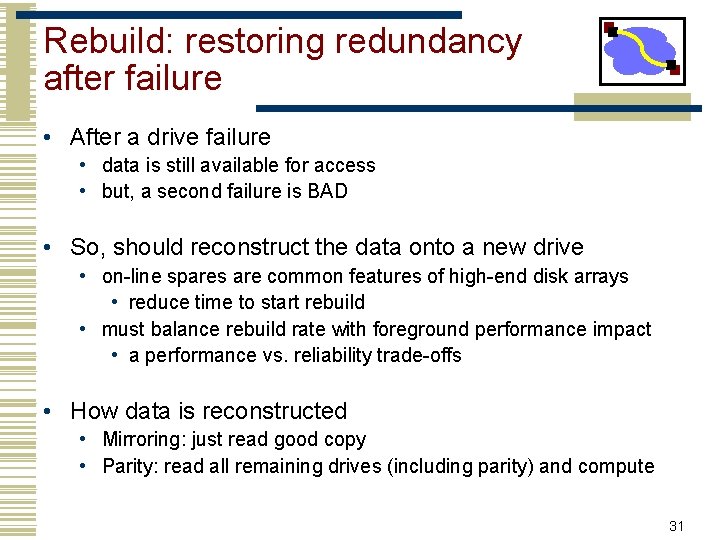
Rebuild: restoring redundancy after failure • After a drive failure • data is still available for access • but, a second failure is BAD • So, should reconstruct the data onto a new drive • on-line spares are common features of high-end disk arrays • reduce time to start rebuild • must balance rebuild rate with foreground performance impact • a performance vs. reliability trade-offs • How data is reconstructed • Mirroring: just read good copy • Parity: read all remaining drives (including parity) and compute 31
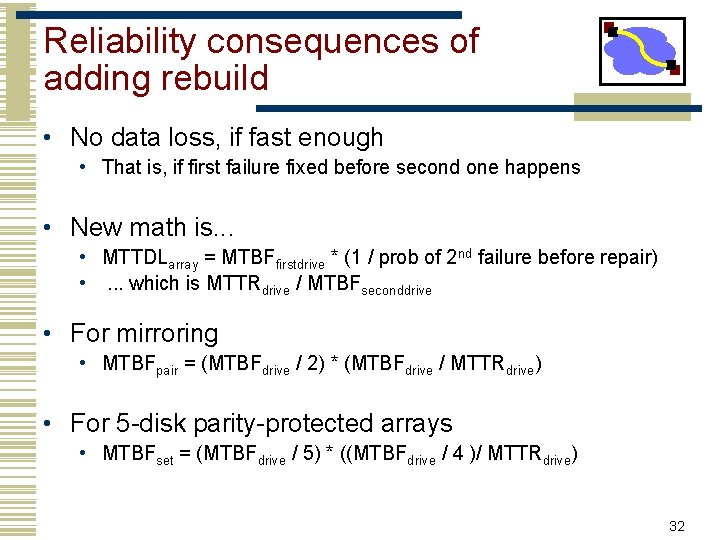
Reliability consequences of adding rebuild • No data loss, if fast enough • That is, if first failure fixed before second one happens • New math is. . . • MTTDLarray = MTBFfirstdrive * (1 / prob of 2 nd failure before repair) • . . . which is MTTRdrive / MTBFseconddrive • For mirroring • MTBFpair = (MTBFdrive / 2) * (MTBFdrive / MTTRdrive) • For 5 -disk parity-protected arrays • MTBFset = (MTBFdrive / 5) * ((MTBFdrive / 4 )/ MTTRdrive) 32
Three modes of operation • Normal mode • everything working; maximum efficiency • Degraded mode • some disk unavailable • must use degraded mode operations • Rebuild mode • reconstructing lost disk’s contents onto spare • degraded mode operations plus competition with rebuild 33
Mechanics of rebuild • Background process • use degraded mode read to reconstruct data • then, write it to replacement disk • Implementation issues • Interference with foreground activity and controlling rate • Rebuild is important for reliability • Foreground activity is important for performance • Using the rebuilt disk • For rebuilt part, reads can use replacement disk • Must balance performance benefit with rebuild interference 34
Conclusions • RAID turns multiple disks into a larger, faster, more reliable disk • RAID-0: Striping Good when performance and capacity really matter, but reliability doesn’t • RAID-1: Mirroring Good when reliability and write performance matter, but capacity (cost) doesn’t • RAID-5: Rotating Parity Good when capacity and cost matter or workload is read-mostly • Good compromise choice
- Slides: 35