
14 848 CLOUD INFRASTRUCTURE BIG TABLE BIG STORAGE
14 -848: CLOUD INFRASTRUCTURE BIG TABLE: BIG STORAGE FOR STRUCTURED DATA LECTURE 13 * FALL 2018 * KESDEN Adapted from: Chang, et al (Google, Inc), “Bigtable: A Distributed Storage System for Structured Data”, OSDI 2006.
BIG TABLE: OVERVIEW • Google Paper: OSDI 2006 • Chang, et al (Google, Inc), “Bigtable: A Distributed Storage System for Structured Data”, OSDI 2006. • Store petabytes (and more) of structured data • Support applications ranging from batch-processing to real-time • Richer data layout than key-value store • Client controlled structure • But without the impossible constraints of relational databases
DATA MODEL • A Table is a sparse, distributed, persistent, multi-dimensional sorted map • Indexed by a row key, column key, and timestamp • (row: string, column: string, time: int 64) string • Values are uninterpreted arrays of bytes
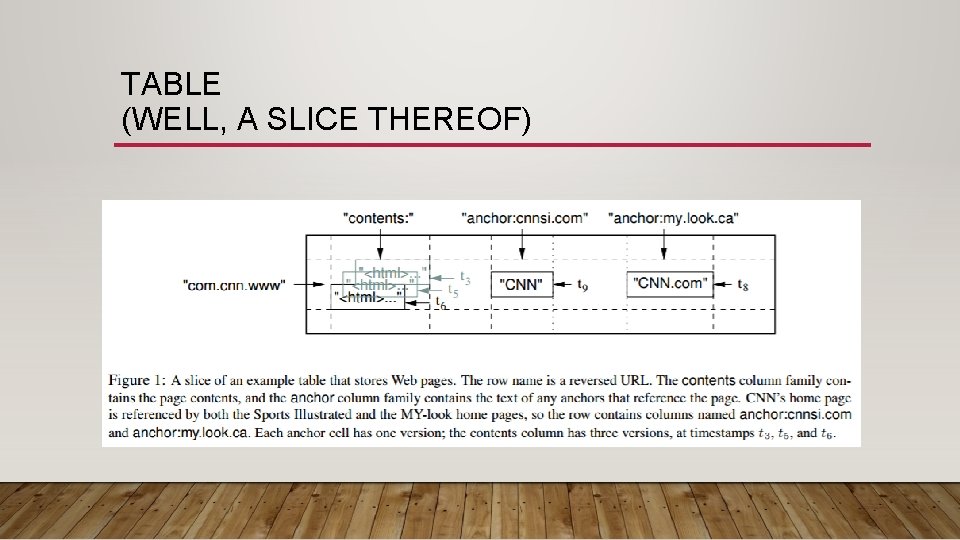
TABLE (WELL, A SLICE THEREOF)
ROWS • Arbitrary strings • Reads and writes of rows are atomic (even across columns) • Makes it easier to reason about results • Data is lexicographically sorted by row
TABLETS • Row range partitioned into tablets • Used for distribution and load balancing • Reads of short row ranges are efficient • If data has good locality w. r. t. tablets, efficiency boost • In earlier example, grouping Web pages by reverse domain made it efficient to find them by domain.
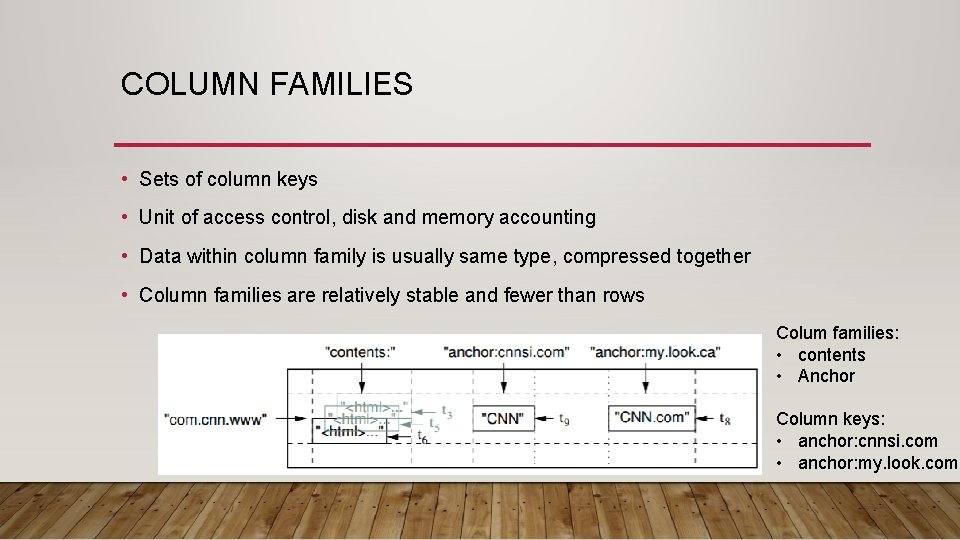
COLUMN FAMILIES • Sets of column keys • Unit of access control, disk and memory accounting • Data within column family is usually same type, compressed together • Column families are relatively stable and fewer than rows Colum families: • contents • Anchor Column keys: • anchor: cnnsi. com • anchor: my. look. com
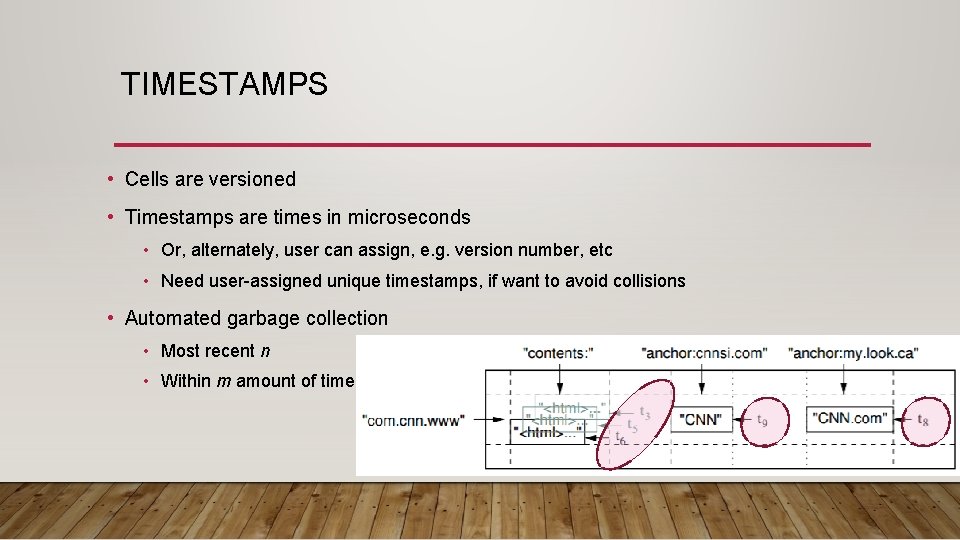
TIMESTAMPS • Cells are versioned • Timestamps are times in microseconds • Or, alternately, user can assign, e. g. version number, etc • Need user-assigned unique timestamps, if want to avoid collisions • Automated garbage collection • Most recent n • Within m amount of time
API • Create and destroy tables and column families • Change metadata, e. g. access control, etc • Write or delete values • Iterate across rows • Iterate over subset of data • Single row transactions (read-update-write) • Cells to be used as counters • Client-provided server-side scripts for transformation, filtering, summarizationetc.
INFRASTRUCTURE: HOST SERVERS • Able to run on a general purpose cluster • Shares cluster of servers with other applications • Resources are managed by the cluster manager • Scheduling • Resource management • Managing failure • Monitoring • Etc.
INFRASTRUCTURE: FILE SYSTEMS • GFS or other distributed file system designed for big data • Large block size • Replication for robustness and throughput • Random writes not required due to timestamping • Random reads are required to support queries
BUILDING BLOCKS: SSTABLES • SSTable used to store tables (Sorted String Table) • Each SSTable contains • A sequence of datablocks • A sorted index of keys • Index is loaded into memory when table is opened • Then can be searched in memory • One disk access per lookup. • Small SSTables can be cached in memory
IMMUTABILITY • Only memtable allows reads and writes • Everything else is versioned • Allows asynchronous deletes • Mitigates need for locking.
INFRASTRUCTURE: CHUBBY COORDINATION SERVICE • Provides locks • Keeps access control lists • Ensures not more than one active master (and, mostly, exactly one) • Keeps track of location of tablet servers • Keeps schema information • Etc.
BUILDING BLOCKS: CHUBBY • Distributed lock service • 5 active replicas, one is master • Only master serves requests • Needs majority to work • Paxos based • Namespace is directories and tiny files • Directories and files can be used as locks • Locks are leased and callbacks can be requested

IMPLEMENTATION • Client library • Tablet servers • Stores, provides access to, and manages tables • Can be added and removed • Splits tablets as they grow too large. (Initially each table is one tablet) • Master server • Assigns tablets to tablet servers, load balances tablet servers, garbage collection, • Schema changes
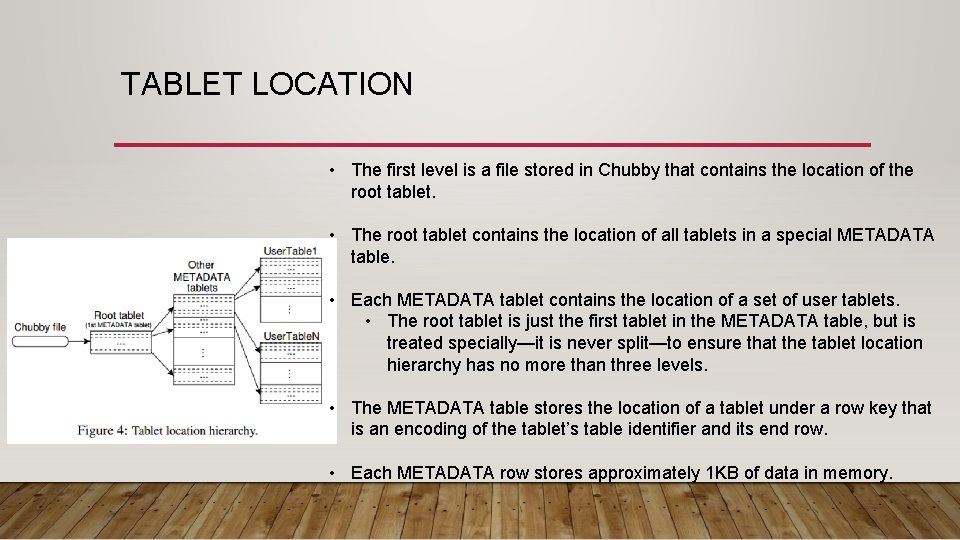
TABLET LOCATION • The first level is a file stored in Chubby that contains the location of the root tablet. • The root tablet contains the location of all tablets in a special METADATA table. • Each METADATA tablet contains the location of a set of user tablets. • The root tablet is just the first tablet in the METADATA table, but is treated specially—it is never split—to ensure that the tablet location hierarchy has no more than three levels. • The METADATA table stores the location of a tablet under a row key that is an encoding of the tablet’s table identifier and its end row. • Each METADATA row stores approximately 1 KB of data in memory.
TABLET ASSIGNMENT • Each tablet is owned by on one server at a time • But, data is redundant in the file system • Master keeps track of live tablet servers and assignments • Chubby used to keep track of tablet servers • Master monitors Chubby directory • Tablet servers can’t serve if they lose exclusive lock on tablet • Tablets reassigned when not reachable • Notify master if lost lock • Master heartbeats (asks for status of lock from tablet server)
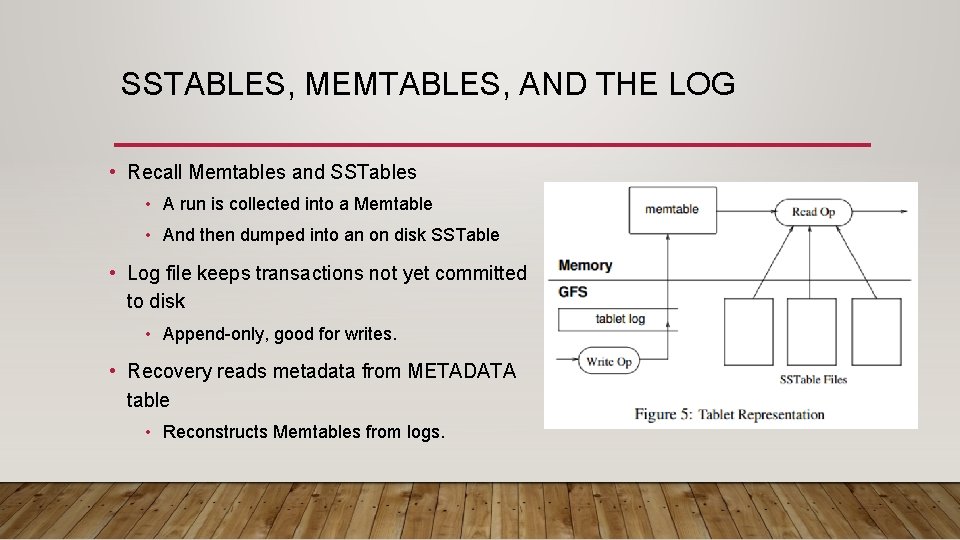
SSTABLES, MEMTABLES, AND THE LOG • Recall Memtables and SSTables • A run is collected into a Memtable • And then dumped into an on disk SSTable • Log file keeps transactions not yet committed to disk • Append-only, good for writes. • Recovery reads metadata from METADATA table • Reconstructs Memtables from logs.
LOCALITY GROUPS • Grouping of multiple column families together • Separate SSTable for each locality group • Makes it faster to access data that is accessed together • Can assign other attributes, such as to keep in memory.
COMPRESSION • Per block or across blocks • Per block enables small portions to be read without decompression of larger block • Sometimes 2 pass schemes • Want to emphasize speed over compression
2 -LEVEL READ CACHING • Scan cache • Key-value pairs from sstable • Temporal locality • Block cache • Sstable blocks read from GFS • Spatial locality
BLOOM FILTERS • Reads need to read from all SStables that make up table • Bloom filters reduce the number that are accessed by don’t have matching row/column pair. • Ditto for non-existent pairs
COMMIT LOG • Use one per tablet server, not one per tablet • Reduces the number of files written, improves seek locality, reduces overhead, etc. • Different files would mean different locations on disk • Complicates recovery • Few log entries relate to any one tablet server • Parallel sort by key first, then entries for one server are together.
TABLET MIGRATION • Process • Compact • Freeze • Compact • Migrate • Log is clean for move with only a short freeze time
- Slides: 25