
1099 Reporting Best Practices AuthorPresenter Names Here Regional
1099 Reporting Best Practices Author/Presenter Names Here Regional Chapters
Agenda § Understanding how GP records 1099 amounts § Researching and validating 1099 data § How to edit 1099 data § TIN Matching § 3 approaches to managing 1099 s Printing / Filing § Q & A Regional Chapters
Understanding how GP records 1099 amounts • 1099 amounts are stored in the vendor summary records • AP determines transaction by transaction where amounts record • Prior to GP 2010 need PSTL to update 1099 amounts • GP 2010 - Update 1099 Information & amounts all or nothing • GP 2013 -2016 – edit 1099 transactions by transaction Regional Chapters
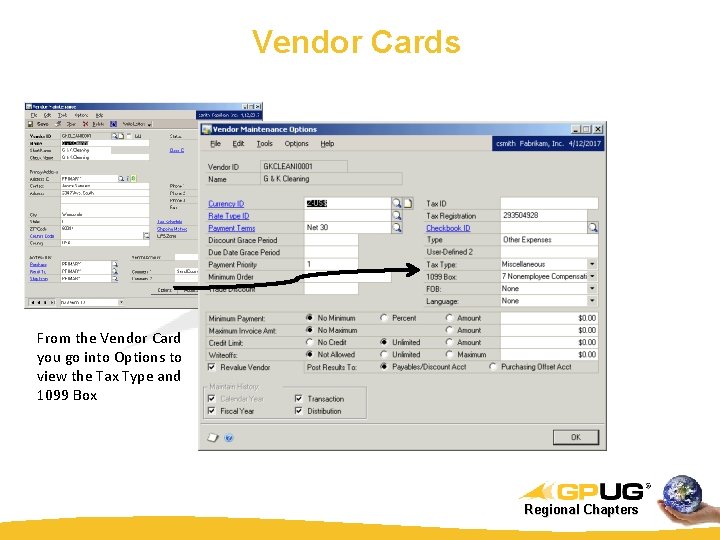
Vendor Cards From the Vendor Card you go into Options to view the Tax Type and 1099 Box Regional Chapters
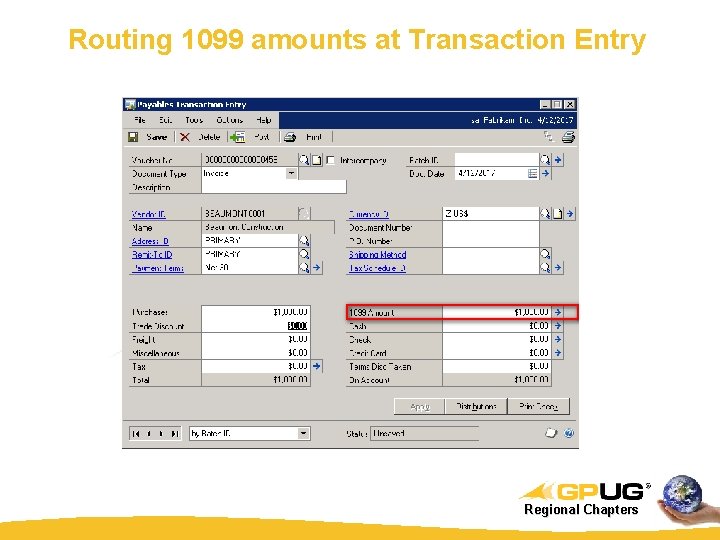
Routing 1099 amounts at Transaction Entry Regional Chapters
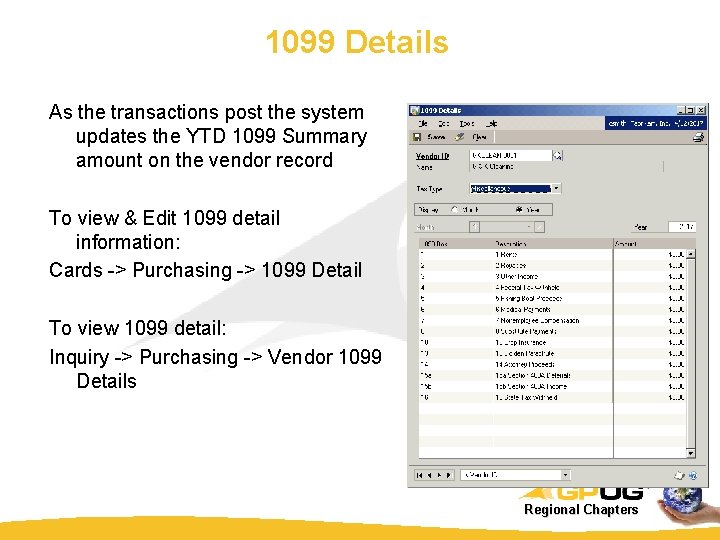
1099 Details As the transactions post the system updates the YTD 1099 Summary amount on the vendor record To view & Edit 1099 detail information: Cards -> Purchasing -> 1099 Detail To view 1099 detail: Inquiry -> Purchasing -> Vendor 1099 Details Regional Chapters
Why would a 1099 Summary be wrong? § The Vendor Summary buckets update with appended amounts from each transaction as the transaction posts. § You can change a vendor’s “ 1099 Type” at will, as many times as you wish. § Prior posted transactions do not change automatically, new posted transactions will accumulate in the new bucket… Regional Chapters
Researching and validating 1099 data § Recipients (start with Smart. Lists) – Addresses – 30 character length limitations with GP, State abbrev. Refer to USPS website – Formal Name per IRS records – Tax. ID – SSN vs EIN – Vendor Classes are useful § Box Types § 1099 vs. non-1099 qualified payments to 1099 -vendors Regional Chapters
Compare Transaction Summaries to 1099 Amounts If you don’t “Trust” your 1099 summaries, you can review transaction summaries with the following SQL Query Disclaimer: SQL Scripts can damage or destroy data. Use these scripts with caution on a test system first. Backup your database before using. Use the following script is at your own risk. We take no responsibility for any harm or data loss caused by these scripts nor do we warranty the validity of the results. The script is provided to assist your 1099 research activities, and must be independently validated against core system reports should you attempt to use these for final data extraction. Regional Chapters
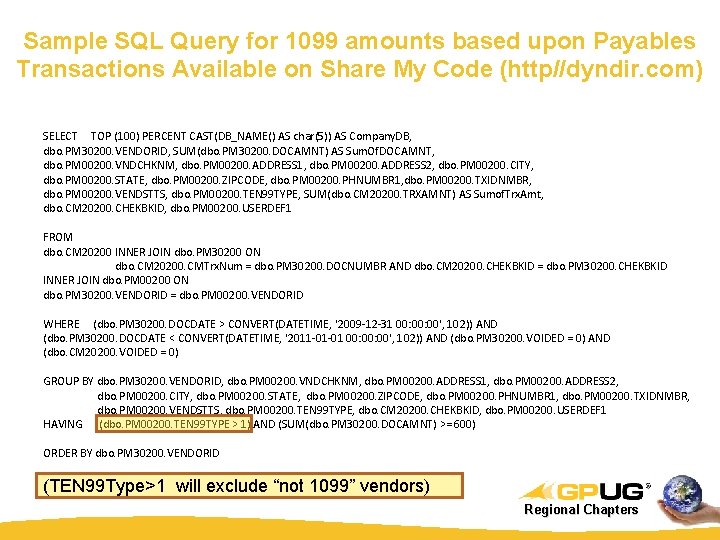
Sample SQL Query for 1099 amounts based upon Payables Transactions Available on Share My Code (http//dyndir. com) SELECT TOP (100) PERCENT CAST(DB_NAME() AS char(5)) AS Company. DB, dbo. PM 30200. VENDORID, SUM(dbo. PM 30200. DOCAMNT) AS Sum. Of. DOCAMNT, dbo. PM 00200. VNDCHKNM, dbo. PM 00200. ADDRESS 1, dbo. PM 00200. ADDRESS 2, dbo. PM 00200. CITY, dbo. PM 00200. STATE, dbo. PM 00200. ZIPCODE, dbo. PM 00200. PHNUMBR 1, dbo. PM 00200. TXIDNMBR, dbo. PM 00200. VENDSTTS, dbo. PM 00200. TEN 99 TYPE, SUM(dbo. CM 20200. TRXAMNT) AS Sumof. Trx. Amt, dbo. CM 20200. CHEKBKID, dbo. PM 00200. USERDEF 1 FROM dbo. CM 20200 INNER JOIN dbo. PM 30200 ON dbo. CM 20200. CMTrx. Num = dbo. PM 30200. DOCNUMBR AND dbo. CM 20200. CHEKBKID = dbo. PM 30200. CHEKBKID INNER JOIN dbo. PM 00200 ON dbo. PM 30200. VENDORID = dbo. PM 00200. VENDORID WHERE (dbo. PM 30200. DOCDATE > CONVERT(DATETIME, '2009 -12 -31 00: 00', 102)) AND (dbo. PM 30200. DOCDATE < CONVERT(DATETIME, '2011 -01 -01 00: 00', 102)) AND (dbo. PM 30200. VOIDED = 0) AND (dbo. CM 20200. VOIDED = 0) GROUP BY dbo. PM 30200. VENDORID, dbo. PM 00200. VNDCHKNM, dbo. PM 00200. ADDRESS 1, dbo. PM 00200. ADDRESS 2, dbo. PM 00200. CITY, dbo. PM 00200. STATE, dbo. PM 00200. ZIPCODE, dbo. PM 00200. PHNUMBR 1, dbo. PM 00200. TXIDNMBR, dbo. PM 00200. VENDSTTS, dbo. PM 00200. TEN 99 TYPE, dbo. CM 20200. CHEKBKID, dbo. PM 00200. USERDEF 1 HAVING (dbo. PM 00200. TEN 99 TYPE > 1) AND (SUM(dbo. PM 30200. DOCAMNT) >= 600) ORDER BY dbo. PM 30200. VENDORID (TEN 99 Type>1 will exclude “not 1099” vendors) Regional Chapters
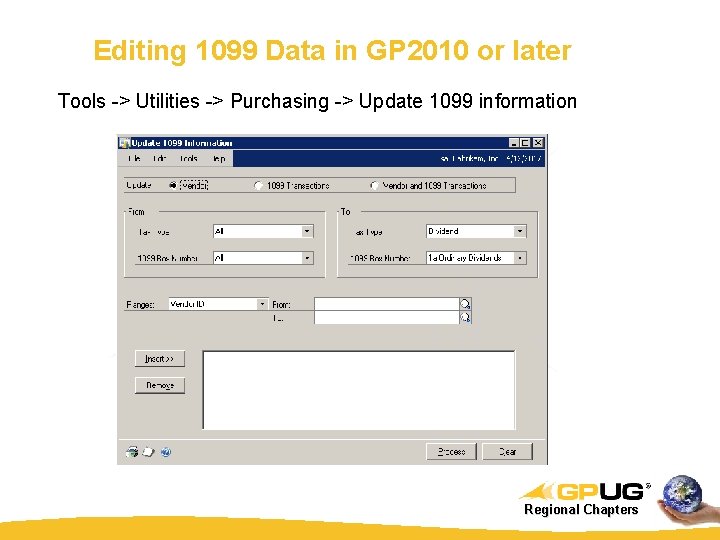
Editing 1099 Data in GP 2010 or later Tools -> Utilities -> Purchasing -> Update 1099 information Regional Chapters
Enhanced Edit 1099 functionality in GP 2013 § GP 2010 edit 1099 status was an all or nothing action. You would reclassify the vendor and their transactions for the year or date range. § Now in GP 2013 -2016 you will be able to review and edit individual transaction details, amounts, 1099 box, or 1099 type. § Changing 1099 status may have an effect on cash payments. Regional Chapters
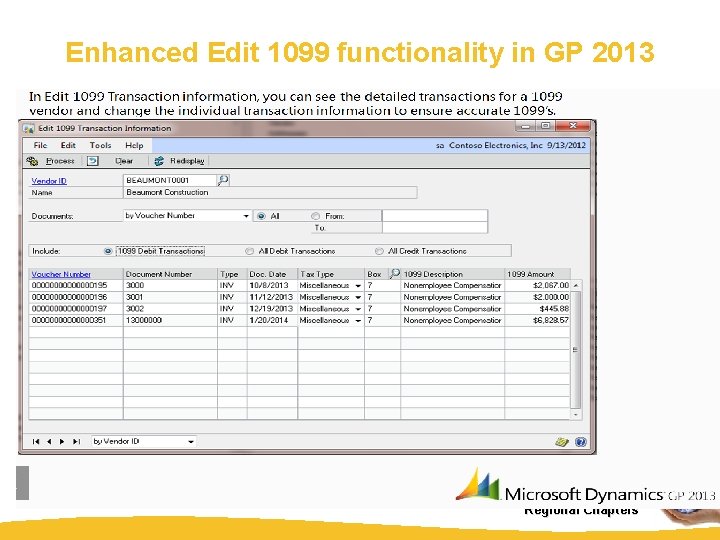
Enhanced Edit 1099 functionality in GP 2013 Regional Chapters
Best Practices: Tin Matching As Part of your Vendor Maintenance: § Perform Tin Matching as part of the New vendor creation process § “Offer” to withhold payment until correct information is submitted and validated § Near final bulk TIN match in December – Double Check record validity – Validate EIN vs. SSN number format – Review for appropriate box types (rent, medical) – Reminder: Box 14 Gross Proceeds paid to an attorney is for legal settlements only. Legal Services are recorded under Box 7 non-employee compensation Regional Chapters
Why Tin Match § Requirement for Payer To Secure a TIN Initial solicitation - for all payees, you must make the initial solicitation when the payee opens an account or when the transaction occurs using Form W-9 to request the taxpayer identification number. § The CP 2100 or CP 2100 A Notice CP 2100 and CP 2100 A notices are notices that inform a payer that he or she may be responsible for backup withholding. This may be due to missing or potentially incorrect taxpayer identification numbers identified during the processing of Form 1099 information returns. It is accompanied by a listing of missing, incorrect, and/or not currently issued payee TIN. Large volume filers (250 or more erroneous documents) receive the CP 2100 notice, while all other filers receive the CP 2100 A notice. § Payers face potential fines of $100 per each 1099 filing with a missing or invalid TIN § "B" Notice If the IRS sends you a "B" notice indicating an incorrect payee TIN, you are required to backup withhold 28% from a payee no later than 30 days after receipt. Backup withholding until the payee furnishes a TIN and certifies that it is correct. Regional Chapters
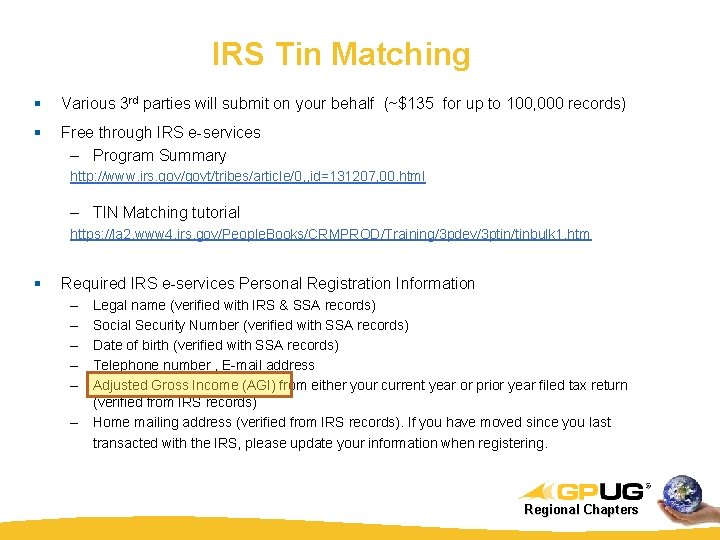
IRS Tin Matching § Various 3 rd parties will submit on your behalf (~$135 for up to 100, 000 records) § Free through IRS e-services – Program Summary http: //www. irs. gov/govt/tribes/article/0, , id=131207, 00. html – TIN Matching tutorial https: //la 2. www 4. irs. gov/People. Books/CRMPROD/Training/3 pdev/3 ptin/tinbulk 1. htm § Required IRS e-services Personal Registration Information – – – Legal name (verified with IRS & SSA records) Social Security Number (verified with SSA records) Date of birth (verified with SSA records) Telephone number , E-mail address Adjusted Gross Income (AGI) from either your current year or prior year filed tax return (verified from IRS records) Home mailing address (verified from IRS records). If you have moved since you last transacted with the IRS, please update your information when registering. Regional Chapters

TIN Matching The TIN Matching e-services allow “authorized payers” the opportunity to match 1099 payee information against IRS records prior to filing information returns. An authorized payer is one who has filed information returns with the IRS in at least one of the two past tax years. § Interactive TIN Matching will accept up to 25 payee TIN/Name combinations onscreen § Bulk TIN Matching will allow up to 100, 000 payee TIN/Name combinations to be matched via a text file submission. Both programs will: § Match the payee with W-9 name and TIN with IRS records; § Decrease backup withholding and penalty notices; § Reduce the error rate in TIN validation. The TIN Matching system is accessible 24 hours a day, 7 days a week. Regional Chapters
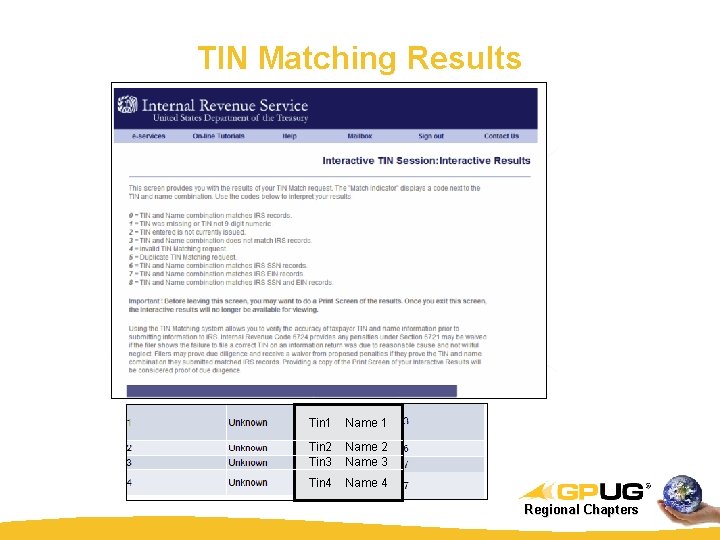
TIN Matching Results Tin 1 Name 1 Tin 2 Name 2 Tin 3 Name 3 Tin 4 Name 4 Regional Chapters
3 Methods for 1099 Reporting 1. Native Dynamics GP Printing & manual filing 2. Greenshades –GP integrated software with service bureau offering 3. 1099 Pro – stand-alone software with service bureau offering Regional Chapters
Native Dynamics GP 1099 Process § Allows you to print 1099 s for recipients § Does not generate the Federal summary report, it has to be manually created, it isn’t created in GP…. § Must manage filing or efiling process on your own Regional Chapters
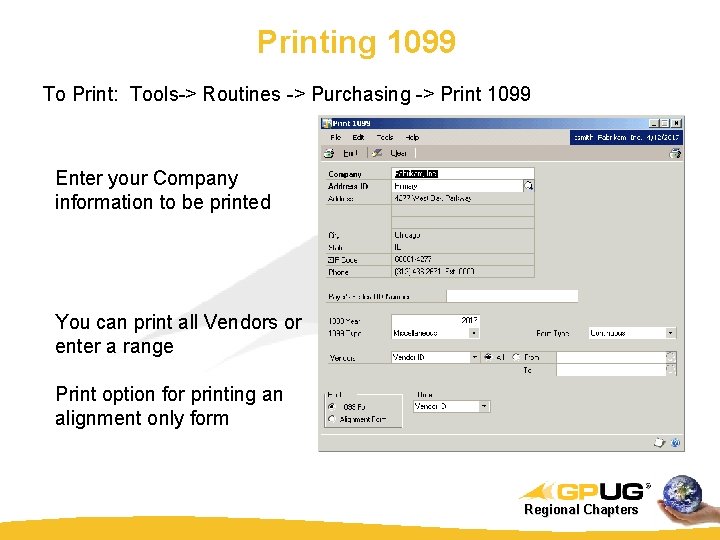
Printing 1099 To Print: Tools-> Routines -> Purchasing -> Print 1099 Enter your Company information to be printed You can print all Vendors or enter a range Print option for printing an alignment only form Regional Chapters
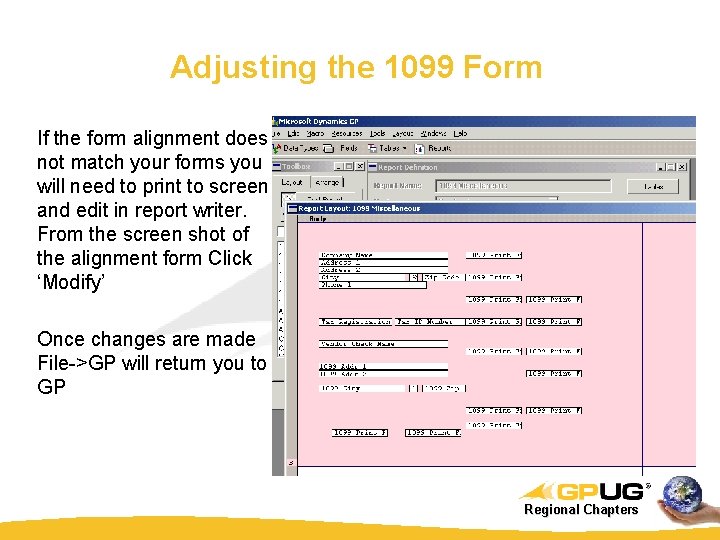
Adjusting the 1099 Form If the form alignment does not match your forms you will need to print to screen and edit in report writer. From the screen shot of the alignment form Click ‘Modify’ Once changes are made File->GP will return you to GP Regional Chapters
Look for changes in forms with GP software updates Microsoft releases updates as form changes are needed. Such changes are typical each year, so be sure to refer to Year End updates to ensure your program is up to date: Sample Links: GP 2013 Year End Update Put path here GP 2015 Year End Update Put path here GP 2016 Year End Update Put path here Regional Chapters
Year End Forms Printing § Prints recipient copies of Federal W-2 and Federal 1099 s directly to Blank Paper § Perforated Paper and Envelopes available § Print all forms, single form, or range of forms – www. downloadmyform. com § Search information on forms to print § Secure administrator controls over all functionality § Single source management of forms distribution, corrections and changes § Full reporting functionality including: – Employee requested changes – Print history – Electronic filing confirmations – Totals by company, state, dept or many more Regional Chapters
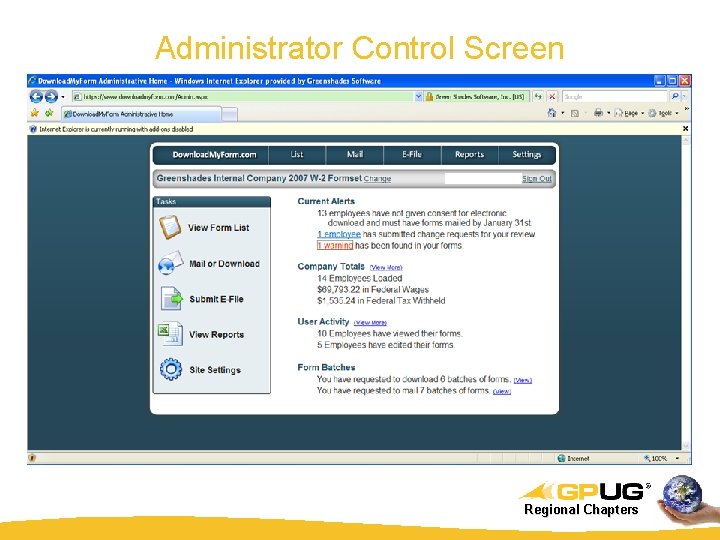
Administrator Control Screen Regional Chapters
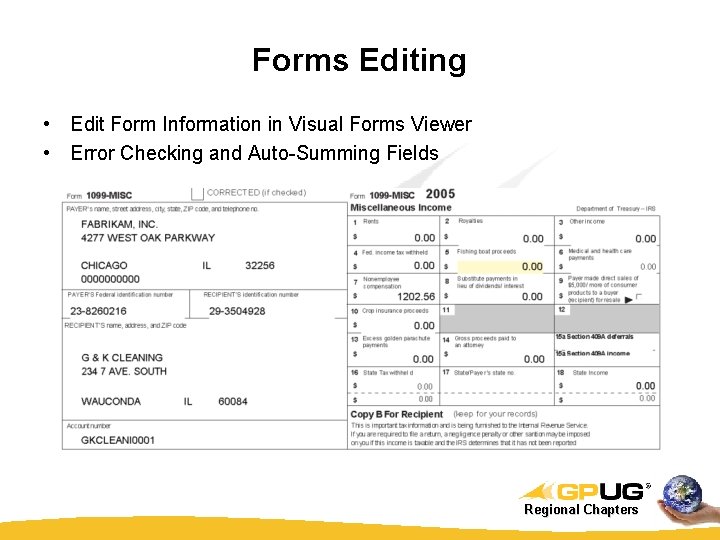
Forms Editing • Edit Form Information in Visual Forms Viewer • Error Checking and Auto-Summing Fields Regional Chapters
Recipient Distribution § Offer electronic reprints available directly from a recipients home/office computer § Print, Edit, and Re-issue easily § Perforated Paper and Envelopes available § Mail Service – Printing, stuffing, and mailing – Includes postage for as low as $1. 05 per form Regional Chapters
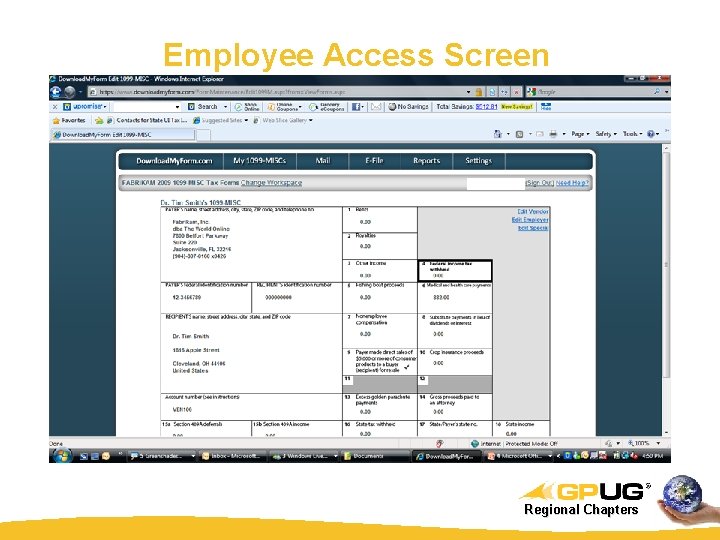
Employee Access Screen Regional Chapters
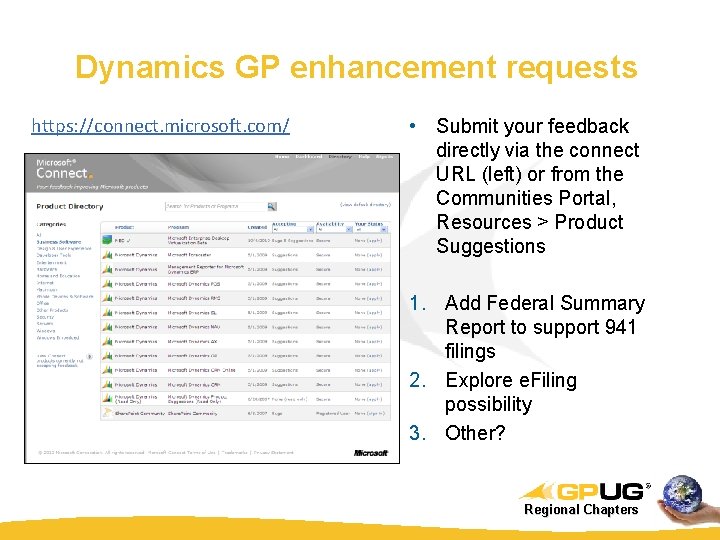
Dynamics GP enhancement requests https: //connect. microsoft. com/ • Submit your feedback directly via the connect URL (left) or from the Communities Portal, Resources > Product Suggestions 1. Add Federal Summary Report to support 941 filings 2. Explore e. Filing possibility 3. Other? Regional Chapters

QUESTIONS ? Regional Chapters
- Slides: 30