
1 Web Technologies and Programming Lecture 24 2

1
Web Technologies and Programming Lecture 24 2
Passing Data Between Pages 3
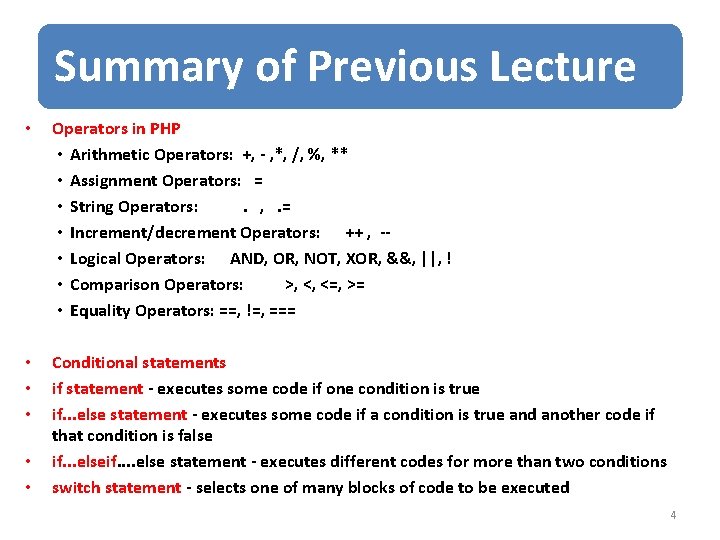
Summary of Previous Lecture • Operators in PHP • Arithmetic Operators: +, - , *, /, %, ** • Assignment Operators: = • String Operators: . , . = • Increment/decrement Operators: ++ , - • Logical Operators: AND, OR, NOT, XOR, &&, ||, ! • Comparison Operators: >, <, <=, >= • Equality Operators: ==, !=, === • • • Conditional statements if statement - executes some code if one condition is true if. . . else statement - executes some code if a condition is true and another code if that condition is false if. . . elseif. . else statement - executes different codes for more than two conditions switch statement - selects one of many blocks of code to be executed • • 4
Summary of Previous Lecture • Looping statements • • For Loop While Loop Do-While Loop For. Each Loop • Arrays in PHP • Associative arrays • Sorting arrays 5
Today’s Lecture Outline • Super Global variables • Passing form data • Passing data with sessions 6
1. Passing Form Data • Forms provide a mean of submitting information from the client to the server. • We can create HTML forms using <form> tag • Method and action are the most common attributes of <form> 7
1. Passing Form Data… • action – gives the URL of the application that is to receive and process the forms data • method – sets the HTTP method that the browser uses to send the form's data to the server for processing • most common methods are POST or GET 8
1. Passing Form Data… • When to Use GET? • You can use GET (the default method): • If the form submission is passive (like a search engine query), and without sensitive information. 9
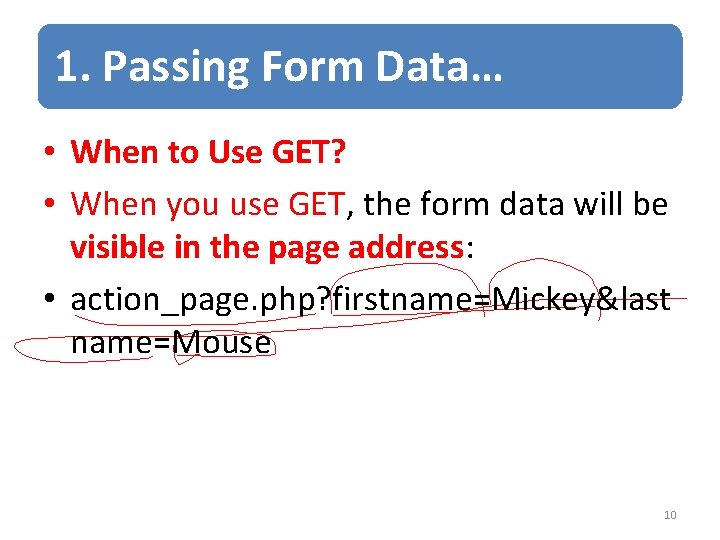
1. Passing Form Data… • When to Use GET? • When you use GET, the form data will be visible in the page address: • action_page. php? firstname=Mickey&last name=Mouse 10
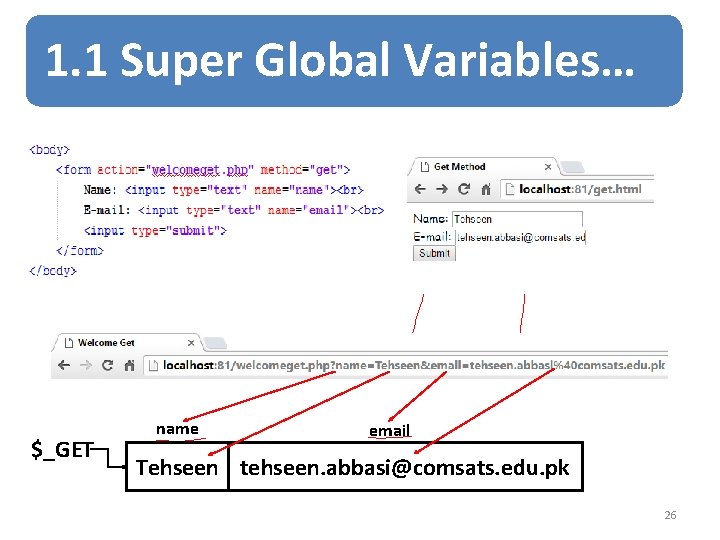
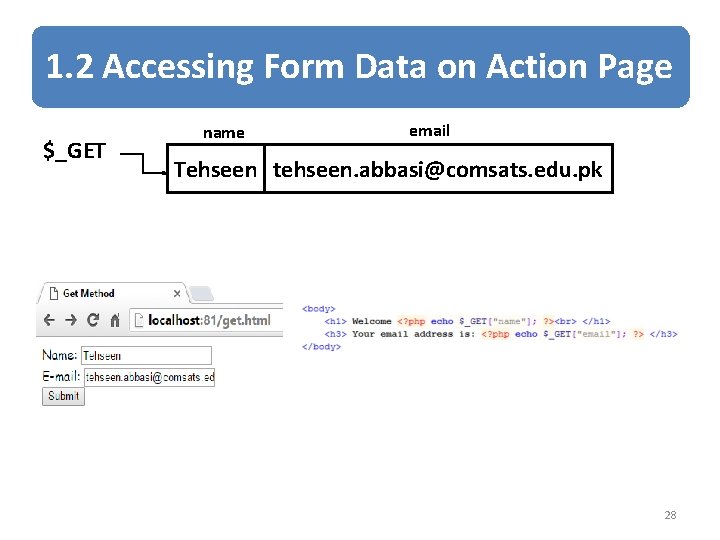
1. Passing Form Data… • Get Method: – all Form Data is encoded into the URL, appended the action URL as query string parameters – Information is visible to everyone – It has the amount limit – Get method should only be used when the data is not sensitive – Get should not be used when sending passwords or sensitive data 11
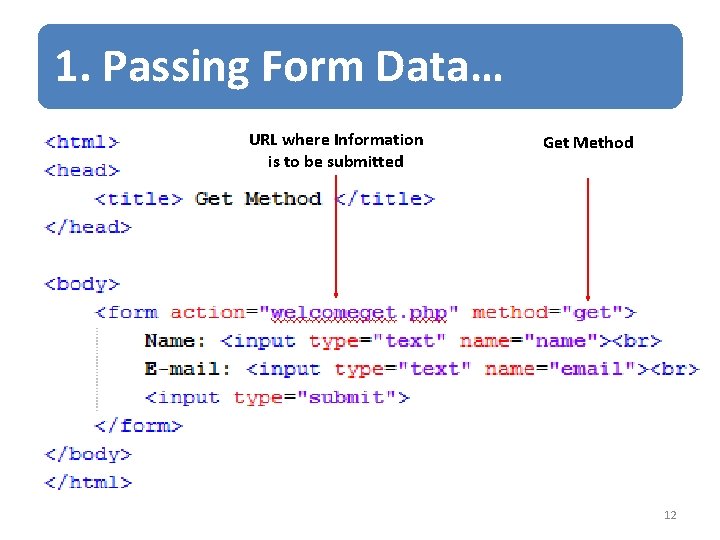
1. Passing Form Data… URL where Information is to be submitted Get Method 12
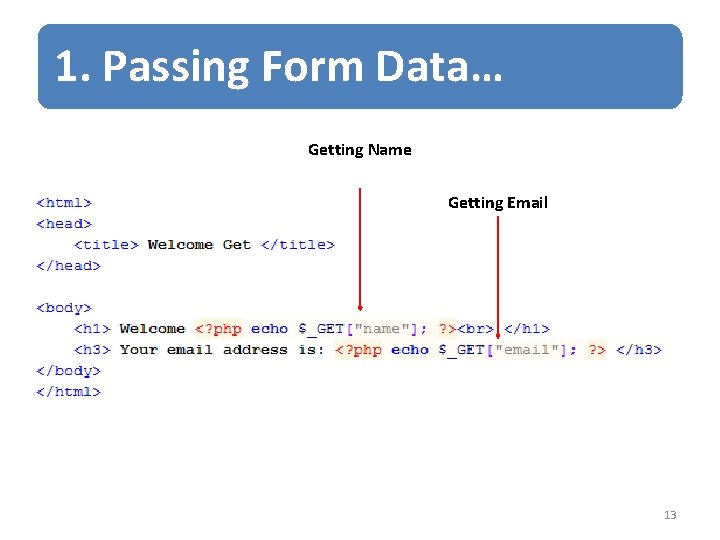
1. Passing Form Data… Getting Name Getting Email 13
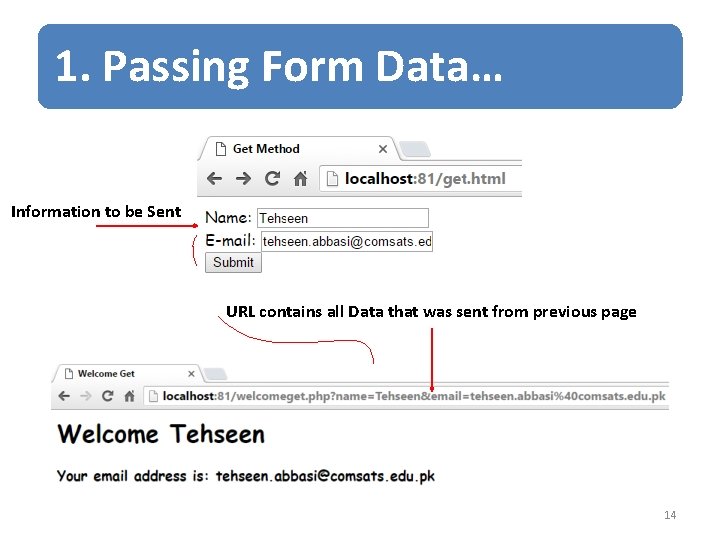
1. Passing Form Data… Information to be Sent URL contains all Data that was sent from previous page 14
1. Passing Form Data… • When to Use POST? • You should use POST: • If the form is updating data, or includes sensitive information (password). • POST offers better security because the submitted data is not visible in the page address. 15
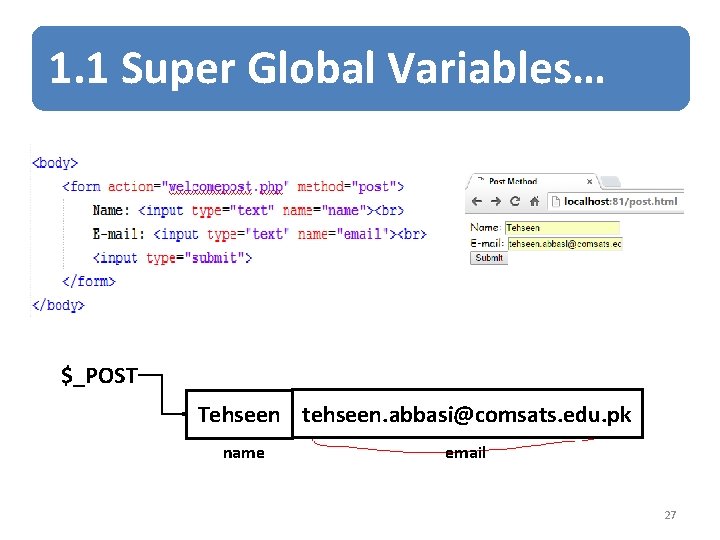
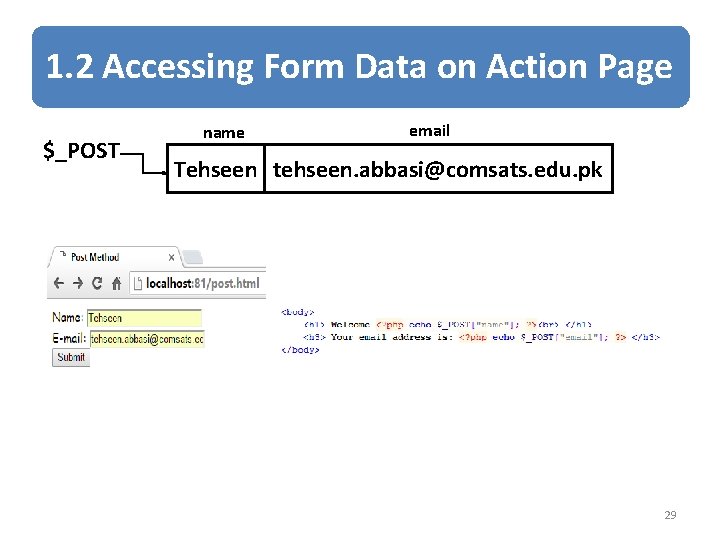
1. Passing form data… • Post method: – Form Data appears within the message body of the HTTP request – Information sent will be invisible to others – No limit on data amount – When using sensitive data such as passwords, use Post Method. 16
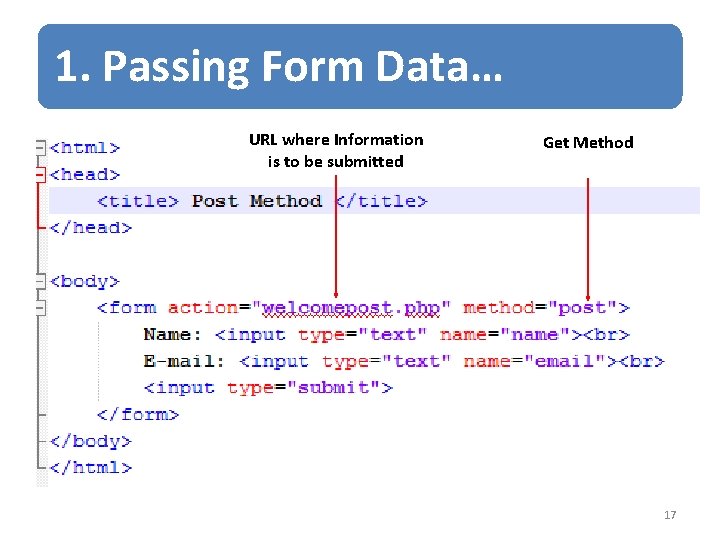
1. Passing Form Data… URL where Information is to be submitted Get Method 17
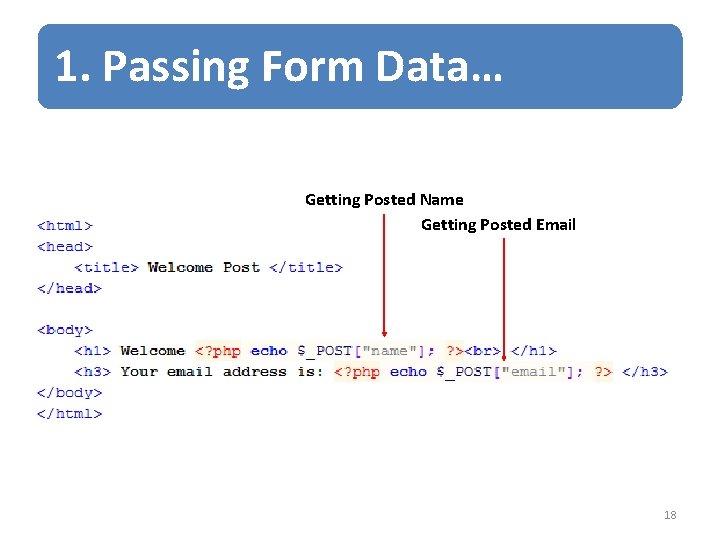
1. Passing Form Data… Getting Posted Name Getting Posted Email 18
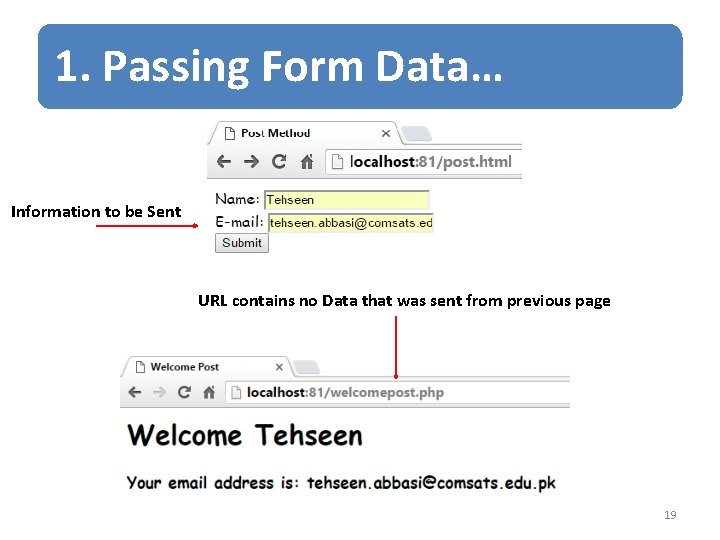
1. Passing Form Data… Information to be Sent URL contains no Data that was sent from previous page 19
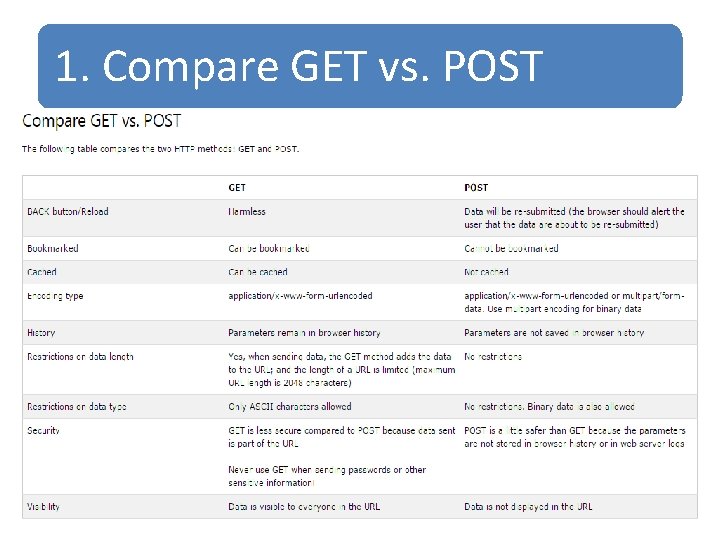
1. Compare GET vs. POST 20
1. 1 Super Global Variables • Several predefined variables in PHP are "superglobals", which means that they are always accessible, regardless of scope - and you can access them from any function, class or file without having to do anything special. 21
1. 1 Super Global Variables • PHP automatically makes few variables available in your program • These array variables and can be accessed by name • These variables are called super-global variables because they can be accessed without regard to scope 22
1. 1 Super Global Variables… • $_GET: – contains all the query string variables that were attached to the URL • $_POST: – contains all the submitted form variables and their data 23
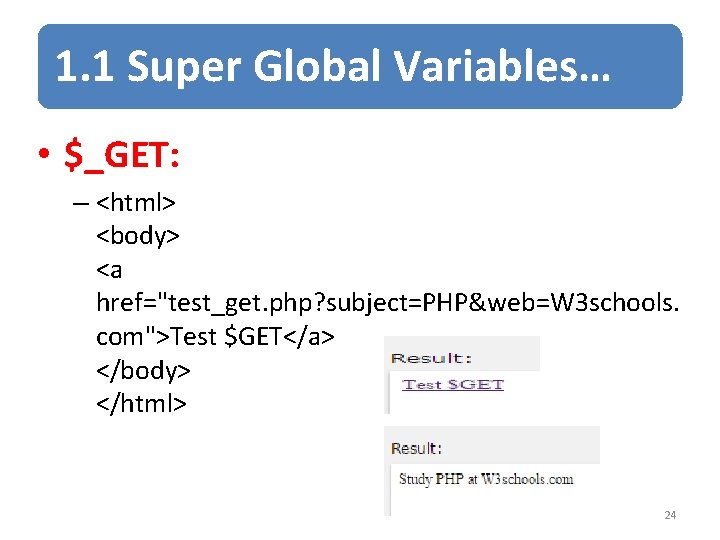
1. 1 Super Global Variables… • $_GET: – <html> <body> <a href="test_get. php? subject=PHP&web=W 3 schools. com">Test $GET</a> </body> </html> 24
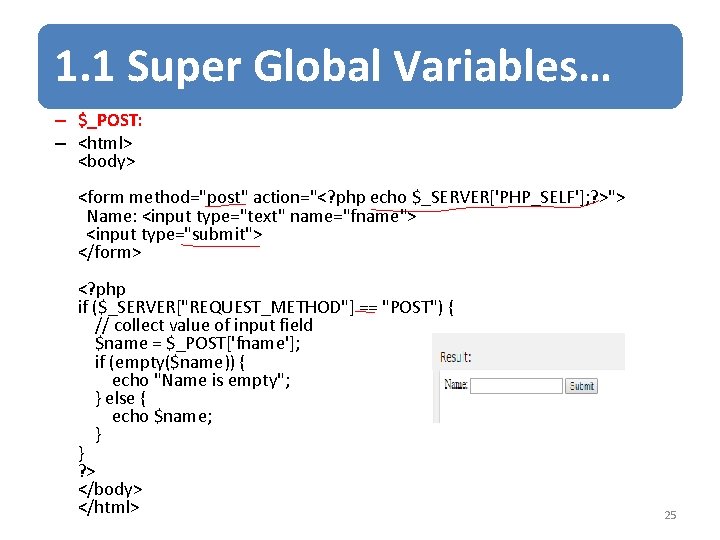
1. 1 Super Global Variables… – $_POST: – <html> <body> <form method="post" action="<? php echo $_SERVER['PHP_SELF']; ? >"> Name: <input type="text" name="fname"> <input type="submit"> </form> <? php if ($_SERVER["REQUEST_METHOD"] == "POST") { // collect value of input field $name = $_POST['fname']; if (empty($name)) { echo "Name is empty"; } else { echo $name; } } ? > </body> </html> 25
1. 1 Super Global Variables… $_GET name email Tehseen tehseen. abbasi@comsats. edu. pk 26
1. 1 Super Global Variables… $_POST Tehseen tehseen. abbasi@comsats. edu. pk name email 27
1. 2 Accessing Form Data on Action Page $_GET name email Tehseen tehseen. abbasi@comsats. edu. pk 28
1. 2 Accessing Form Data on Action Page $_POST name email Tehseen tehseen. abbasi@comsats. edu. pk 29
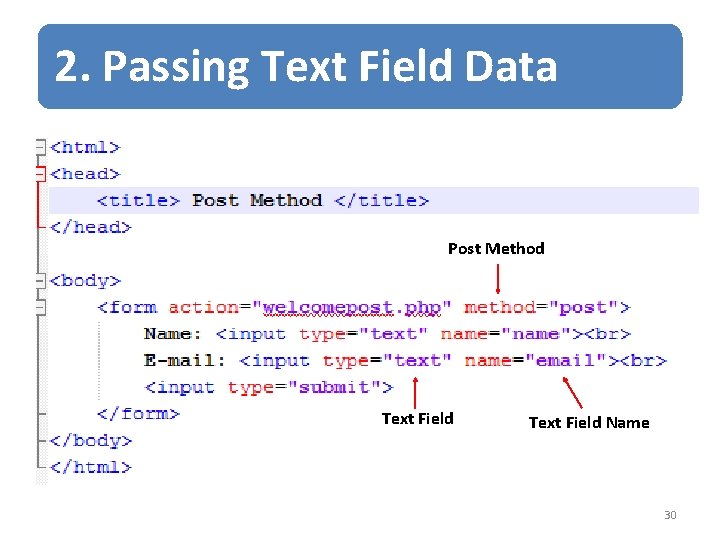
2. Passing Text Field Data Post Method Text Field Name 30
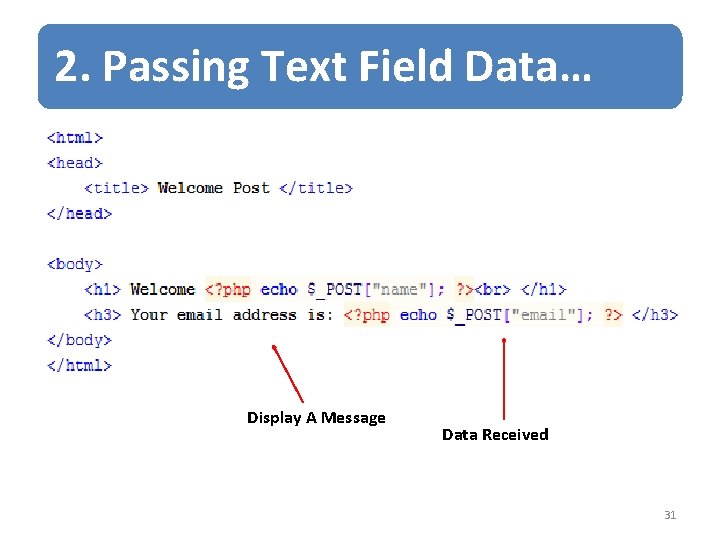
2. Passing Text Field Data… Display A Message Data Received 31
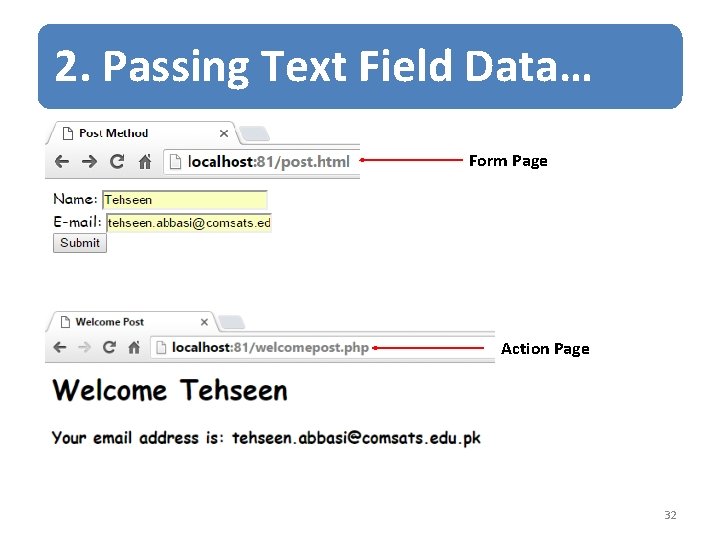
2. Passing Text Field Data… Form Page Action Page 32
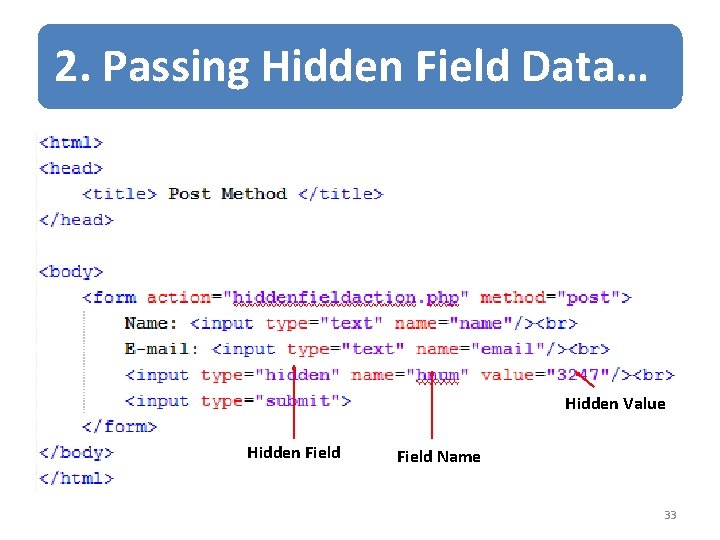
2. Passing Hidden Field Data… Hidden Value Hidden Field Name 33
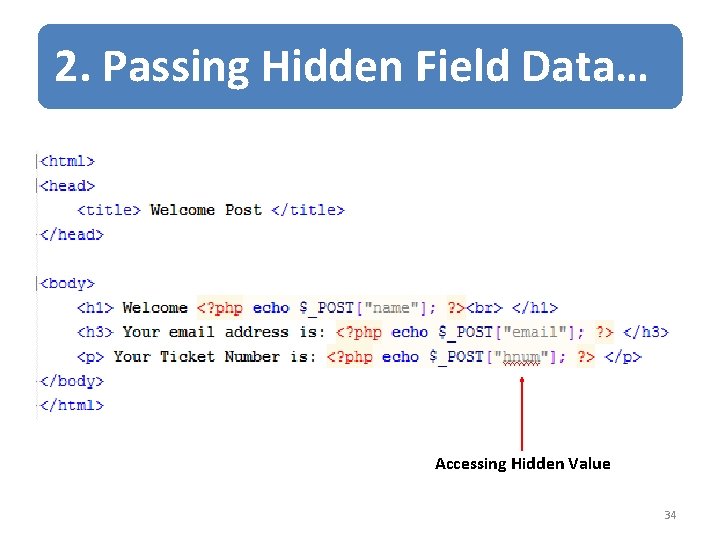
2. Passing Hidden Field Data… Accessing Hidden Value 34
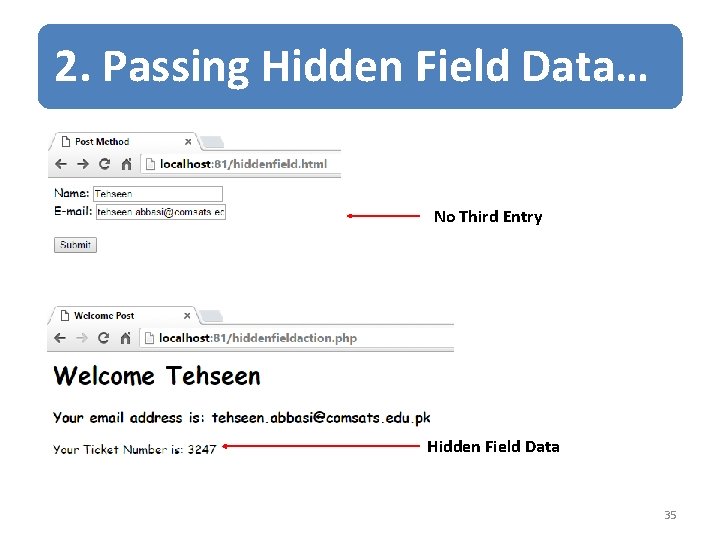
2. Passing Hidden Field Data… No Third Entry Hidden Field Data 35
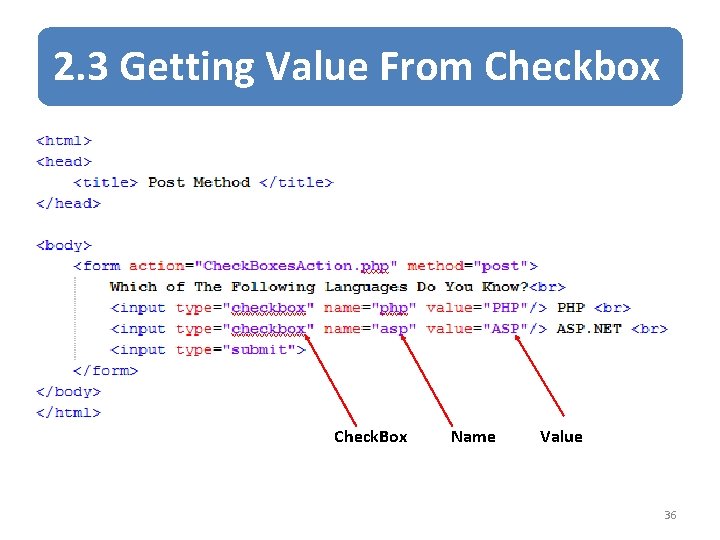
2. 3 Getting Value From Checkbox Check. Box Name Value 36
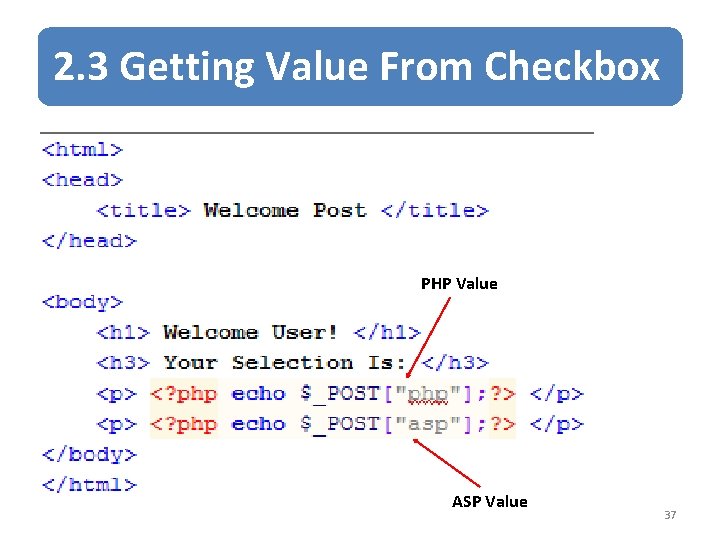
2. 3 Getting Value From Checkbox PHP Value ASP Value 37
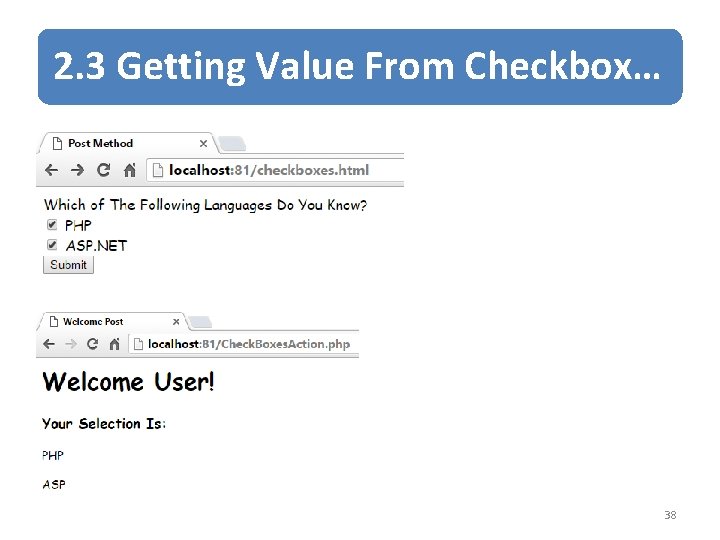
2. 3 Getting Value From Checkbox… 38
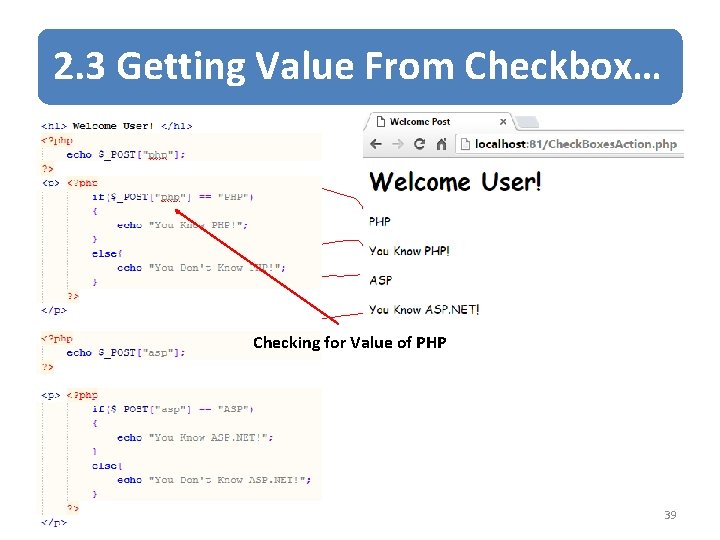
2. 3 Getting Value From Checkbox… Checking for Value of PHP 39
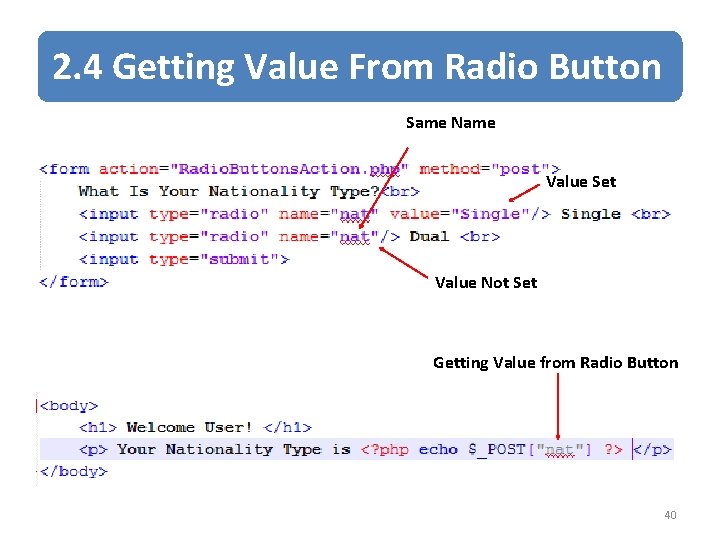
2. 4 Getting Value From Radio Button Same Name Value Set Value Not Set Getting Value from Radio Button 40
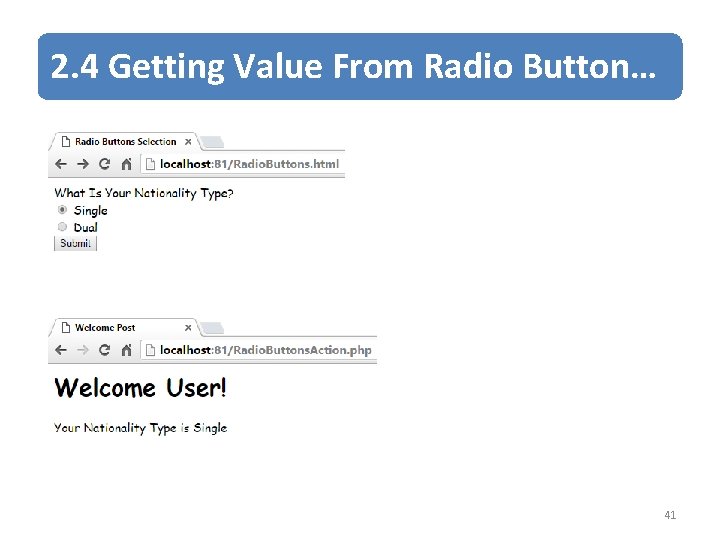
2. 4 Getting Value From Radio Button… 41
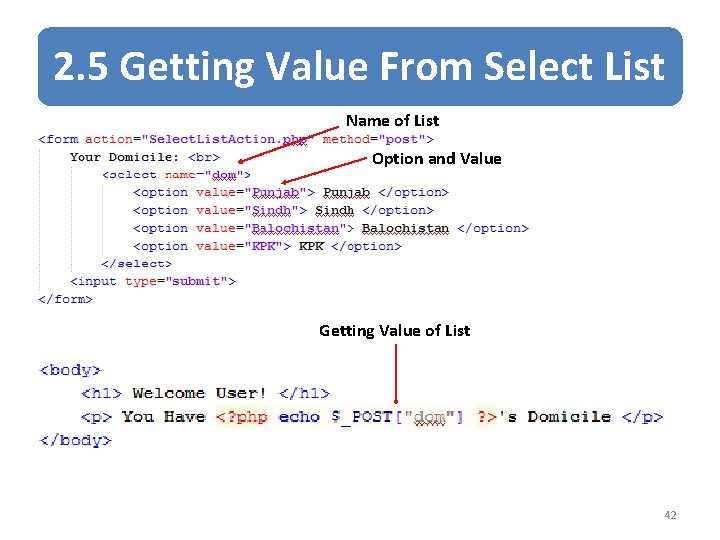
2. 5 Getting Value From Select List Name of List Option and Value Getting Value of List 42
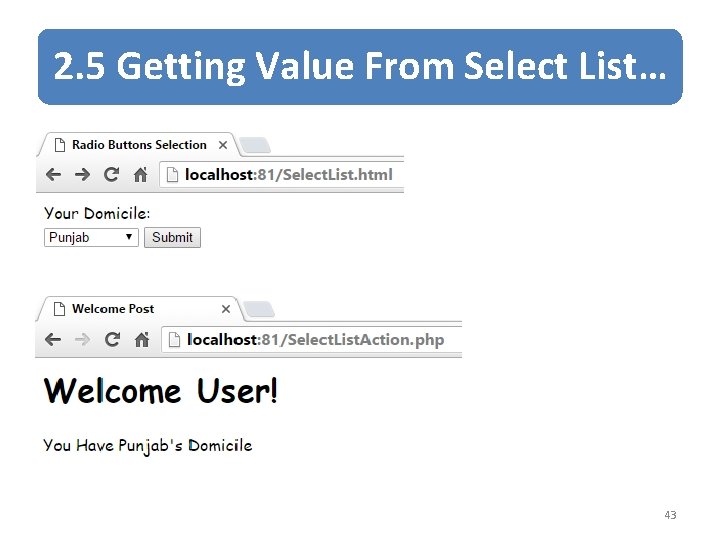
2. 5 Getting Value From Select List… 43
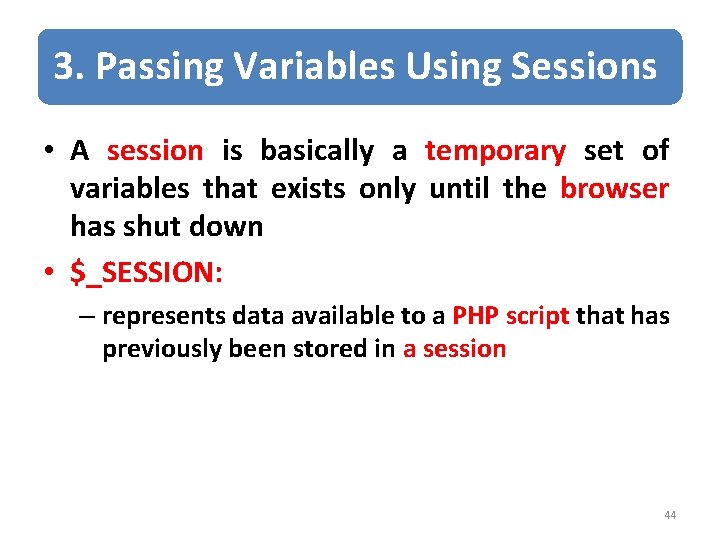
3. Passing Variables Using Sessions • A session is basically a temporary set of variables that exists only until the browser has shut down • $_SESSION: – represents data available to a PHP script that has previously been stored in a session 44
![3. Passing Variables Using Sessions… $_SESSION First Page <? php $_SESSION[‘name ‘] =‘Tehseen’; ?](http://slidetodoc.com/presentation_image/0f6b1fc25e4638026e36d0492a49147e/image-45.jpg "3. Passing Variables Using Sessions… $_SESSION First Page <? php $_SESSION[‘name ‘] =‘Tehseen’; ?")
3. Passing Variables Using Sessions… $_SESSION First Page <? php $_SESSION[‘name ‘] =‘Tehseen’; ? > name email Tehseen. abbasi@comsats. edu. pk nth page 2 nd Page <? php echo $_SESSION[‘name ‘]; $_SESSION[‘email ‘] = ‘tehseen. abbasi@comsats. edu. pk’; ? > ……. . <? php echo $_SESSION[‘name ‘]; echo $_SESSION[‘email ‘]; ? > 45
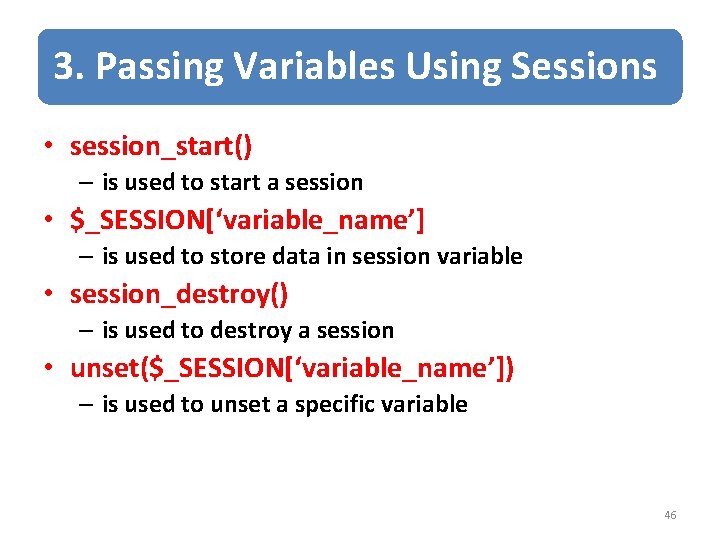
3. Passing Variables Using Sessions • session_start() – is used to start a session • $_SESSION[‘variable_name’] – is used to store data in session variable • session_destroy() – is used to destroy a session • unset($_SESSION[‘variable_name’]) – is used to unset a specific variable 46
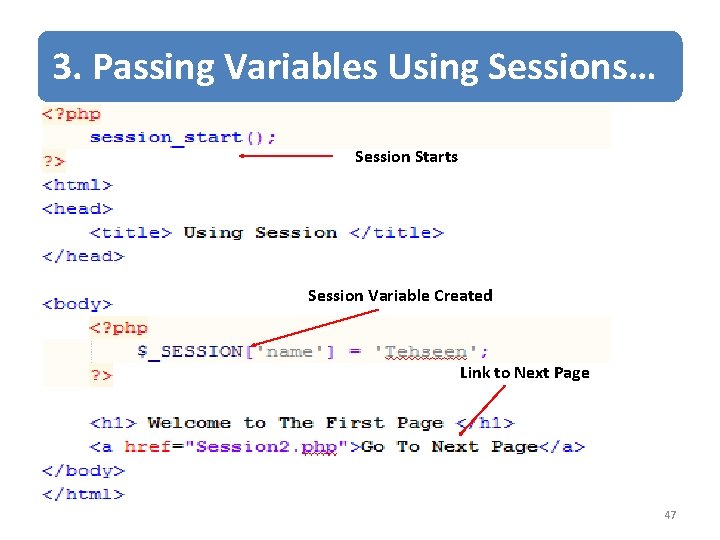
3. Passing Variables Using Sessions… Session Starts Session Variable Created Link to Next Page 47
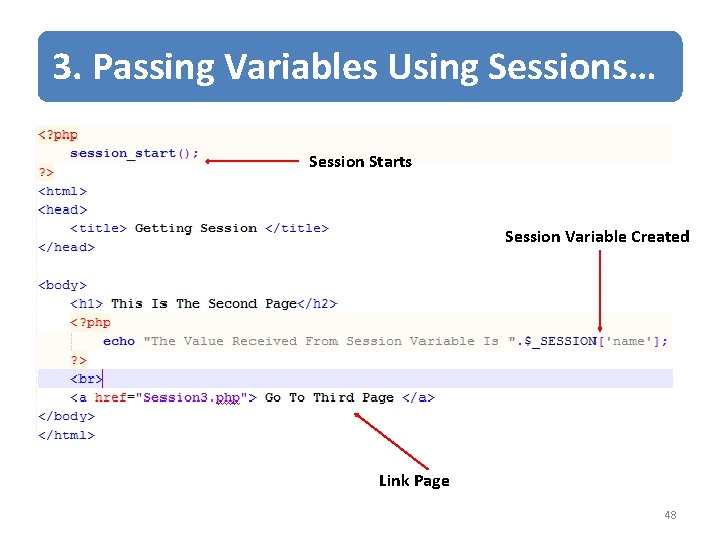
3. Passing Variables Using Sessions… Session Starts Session Variable Created Link Page 48
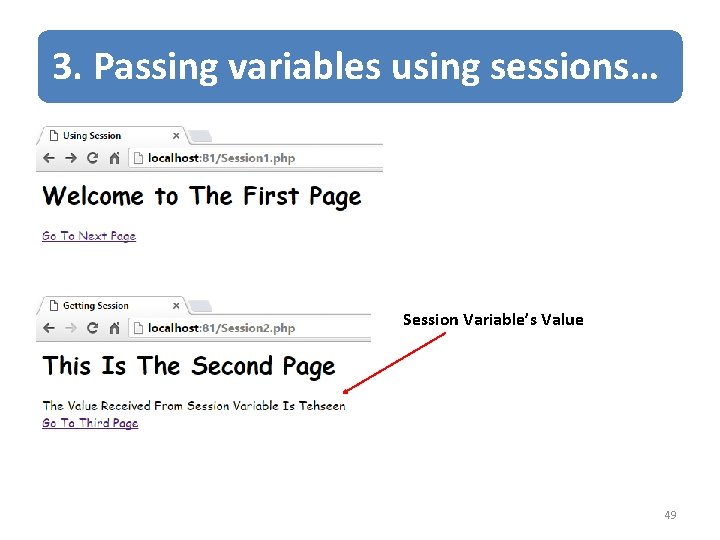
3. Passing variables using sessions… Session Variable’s Value 49
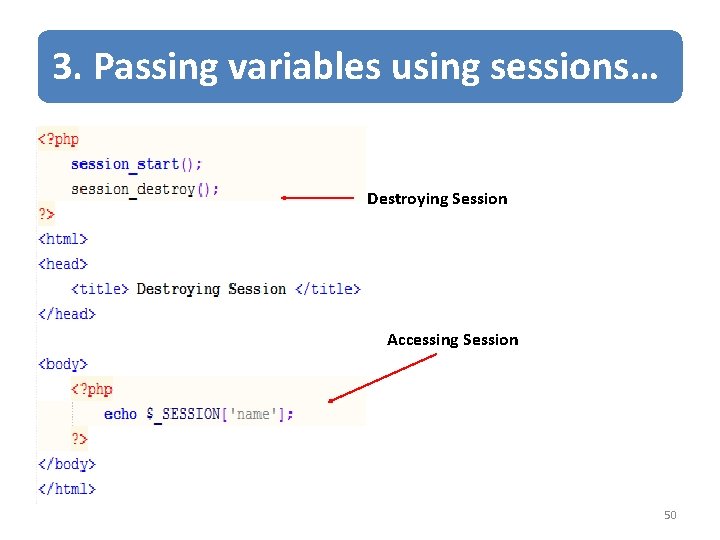
3. Passing variables using sessions… Destroying Session Accessing Session 50
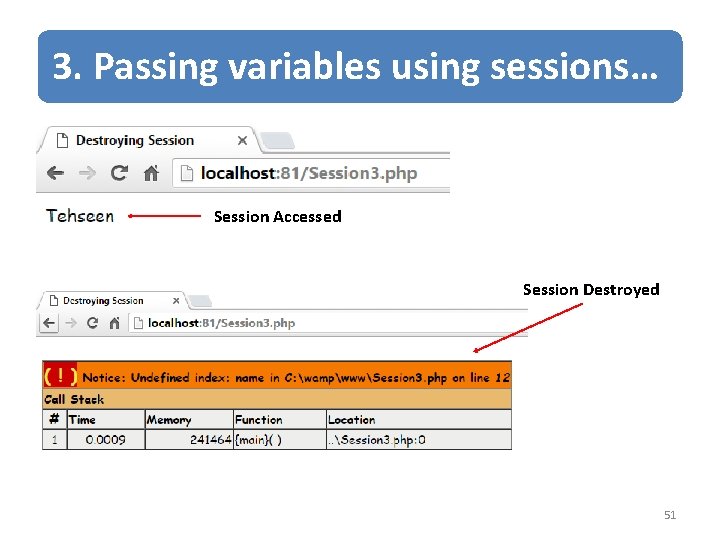
3. Passing variables using sessions… Session Accessed Session Destroyed 51
Summary of Today’s Lecture • Passing Form Data – action – method (POST or GET) • When to Use GET? • When to Use POST? • Compare GET vs. POST • Super Global Variables 52
Summary of Today’s Lecture • Passing data with forms – Passing Text Field Data – Passing Hidden Field Data – Getting Value From Checkbox – Getting Value From Radio Button – Getting Value From Select List • Using session Variables 53
THANK YOU 54
- Slides: 54