
1 n cisco com CCP Express https software


- Slides: 19
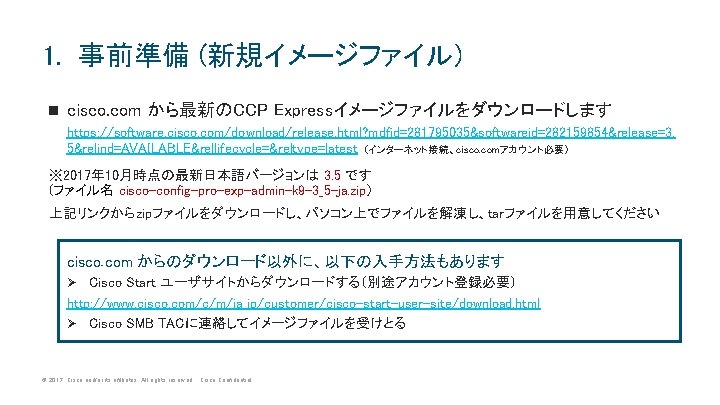
1. 事前準備 (新規イメージファイル) n cisco. com から最新のCCP Expressイメージファイルをダウンロードします https: //software. cisco. com/download/release. html? mdfid=281795035&softwareid=282159854&release=3. 5&relind=AVAILABLE&rellifecycle=&reltype=latest (インターネット接続、cisco. comアカウント必要) ※ 2017年 10月時点の最新日本語バージョンは 3. 5 です (ファイル名 cisco-config-pro-exp-admin-k 9 -3_5 -ja. zip) 上記リンクからzipファイルをダウンロードし、パソコン上でファイルを解凍し、tarファイルを用意してください cisco. com からのダウンロード以外に、以下の入手方法もあります Cisco Start ユーザサイトからダウンロードする(別途アカウント登録必要) http: //www. cisco. com/c/m/ja_jp/customer/cisco-start-user-site/download. html Ø Cisco SMB TACに連絡してイメージファイルを受けとる Ø © 2017 Cisco and/or its affiliates. All rights reserved. Cisco Confidential
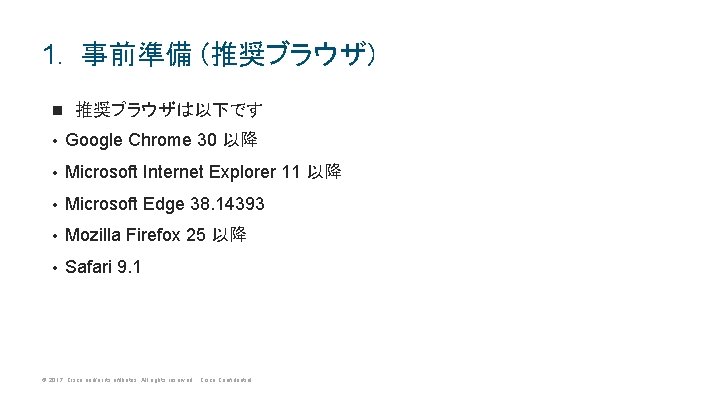
1. 事前準備 (推奨ブラウザ) n 推奨ブラウザは以下です • Google Chrome 30 以降 • Microsoft Internet Explorer 11 以降 • Microsoft Edge 38. 14393 • Mozilla Firefox 25 以降 • Safari 9. 1 © 2017 Cisco and/or its affiliates. All rights reserved. Cisco Confidential
参考 : CLIによるアップグレード方法 © 2017 Cisco and/or its affiliates. All rights reserved. Cisco Confidential
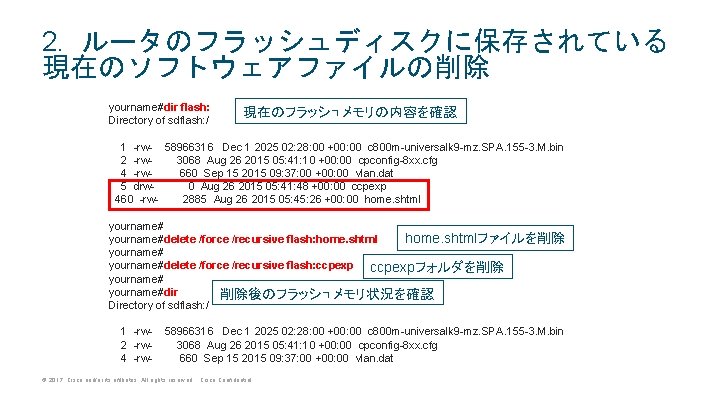
2. ルータのフラッシュディスクに保存されている 現在のソフトウェアファイルの削除 yourname#dir flash: Directory of sdflash: / 現在のフラッシュメモリの内容を確認 1 -rw- 58966316 Dec 1 2025 02: 28: 00 +00: 00 c 800 m-universalk 9 -mz. SPA. 155 -3. M. bin 2 -rw 3068 Aug 26 2015 05: 41: 10 +00: 00 cpconfig-8 xx. cfg 4 -rw 660 Sep 15 2015 09: 37: 00 +00: 00 vlan. dat 5 drw 0 Aug 26 2015 05: 41: 48 +00: 00 ccpexp 460 -rw 2885 Aug 26 2015 05: 45: 26 +00: 00 home. shtml yourname#delete /force /recursive flash: home. shtmlファイルを削除 yourname#delete /force /recursive flash: ccpexpフォルダを削除 yourname#dir 削除後のフラッシュメモリ状況を確認 Directory of sdflash: / 1 -rw 2 -rw 4 -rw- 58966316 Dec 1 2025 02: 28: 00 +00: 00 c 800 m-universalk 9 -mz. SPA. 155 -3. M. bin 3068 Aug 26 2015 05: 41: 10 +00: 00 cpconfig-8 xx. cfg 660 Sep 15 2015 09: 37: 00 +00: 00 vlan. dat © 2017 Cisco and/or its affiliates. All rights reserved. Cisco Confidential
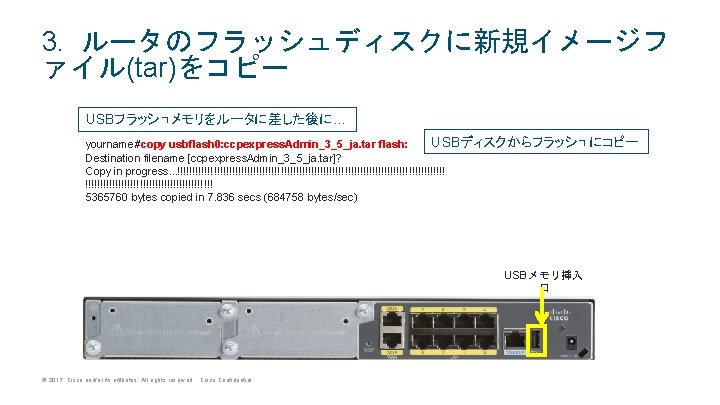
3. ルータのフラッシュディスクに新規イメージフ ァイル(tar)をコピー USBフラッシュメモリをルータに差した後に… USBディスクからフラッシュにコピー yourname#copy usbflash 0: ccpexpress. Admin_3_5_ja. tar flash: Destination filename [ccpexpress. Admin_3_5_ja. tar]? Copy in progress. . . !!!!!!!!!!!!!!!!!!!!!!!!!!!!!!!!!!!!!!!!!!!! 5365760 bytes copied in 7. 836 secs (684758 bytes/sec) USBメモリ挿入 口 © 2017 Cisco and/or its affiliates. All rights reserved. Cisco Confidential
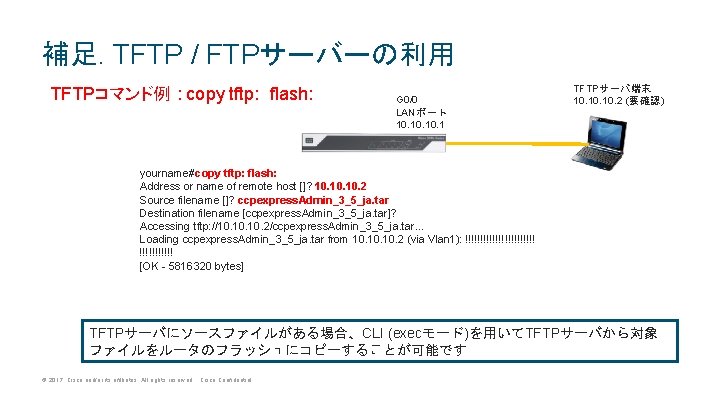
補足. TFTP / FTPサーバーの利用 TFTPコマンド例 : copy tftp: flash: G 0/0 LANポート 10. 10. 1 TFTPサーバ端末 10. 10. 2 (要確認) yourname#copy tftp: flash: Address or name of remote host []? 10. 10. 2 Source filename []? ccpexpress. Admin_3_5_ja. tar Destination filename [ccpexpress. Admin_3_5_ja. tar]? Accessing tftp: //10. 10. 2/ccpexpress. Admin_3_5_ja. tar. . . Loading ccpexpress. Admin_3_5_ja. tar from 10. 10. 2 (via Vlan 1): !!!!!!!!!!!! [OK - 5816320 bytes] TFTPサーバにソースファイルがある場合、CLI (execモード)を用いてTFTPサーバから対象 ファイルをルータのフラッシュにコピーすることが可能です © 2017 Cisco and/or its affiliates. All rights reserved. Cisco Confidential
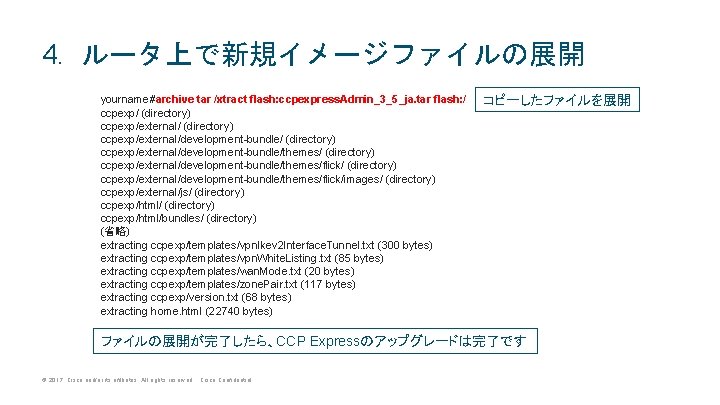
4. ルータ上で新規イメージファイルの展開 yourname#archive tar /xtract flash: ccpexpress. Admin_3_5_ja. tar flash: / ccpexp/ (directory) ccpexp/external/development-bundle/themes/flick/ (directory) ccpexp/external/development-bundle/themes/flick/images/ (directory) ccpexp/external/js/ (directory) ccpexp/html/bundles/ (directory) (省略) extracting ccpexp/templates/vpn. Ikev 2 Interface. Tunnel. txt (300 bytes) extracting ccpexp/templates/vpn. White. Listing. txt (85 bytes) extracting ccpexp/templates/wan. Mode. txt (20 bytes) extracting ccpexp/templates/zone. Pair. txt (117 bytes) extracting ccpexp/version. txt (68 bytes) extracting home. html (22740 bytes) コピーしたファイルを展開 ファイルの展開が完了したら、CCP Expressのアップグレードは完了です © 2017 Cisco and/or its affiliates. All rights reserved. Cisco Confidential