
1 MONGODB CH 9 15 REPLICATION AND SHARDING

1 MONGODB: CH 9 -15 REPLICATION AND SHARDING CSSE 533 Week 3, Spring, 2015 Side order of Hadoop
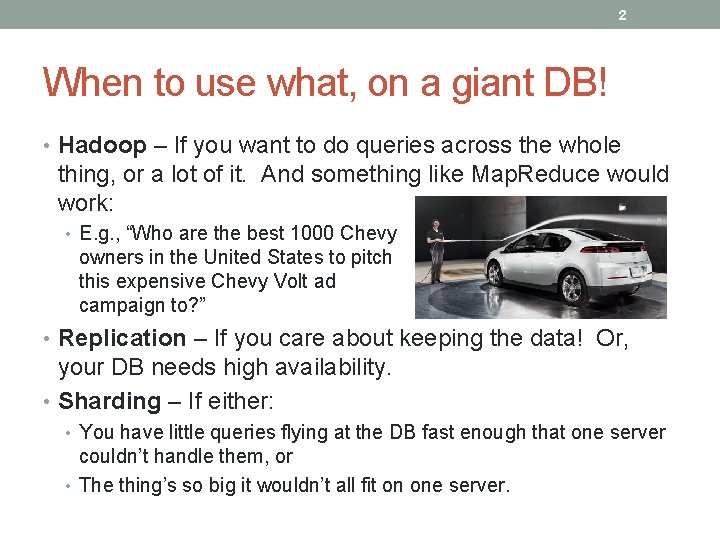
2 When to use what, on a giant DB! • Hadoop – If you want to do queries across the whole thing, or a lot of it. And something like Map. Reduce would work: • E. g. , “Who are the best 1000 Chevy owners in the United States to pitch this expensive Chevy Volt ad campaign to? ” • Replication – If you care about keeping the data! Or, your DB needs high availability. • Sharding – If either: • You have little queries flying at the DB fast enough that one server couldn’t handle them, or • The thing’s so big it wouldn’t all fit on one server.
3 Hadoop • See the Data Science Book chapter, on Moodle. • Typical Hadoop problem: • Find the most frequent words in a (giant) list. • Suppose you had 109 words… or more. • What’s the limit on how big is doable? • Computer memory? • Channel speed? • The need to consolidate results on one computer? • When we get to ~1000 machines, some will fail. • Need to start making copies, embed checksums, have a controller machine. • Need a platform that abstracts away fault tolerance.
4 Write two functions • Mapper – produces a (key, value) ordered pair. Sorts these outputs via a “shuffle, ” finding keys that match and piling them up. These piles go to the reducer. • Reducer – Processes the piles, outputting a (key, new value) pair. New value is some aggregate of the old values. • Reducer has 3 primary phases: shuffle, sort and reduce. • Both functions typically include programmatic intervention – e. g. , Java. • Hadoop runs these functions on many machines that are local to the stored data you’re using. • All the fault tolerance is automatic. • E. g. , In the word counting problem: • Each occurrence of “red” (“red”, 1). • Mapper gives stacks of (“red”, 1)’s. • Reducer adds these up, giving values like (“red”, 2).
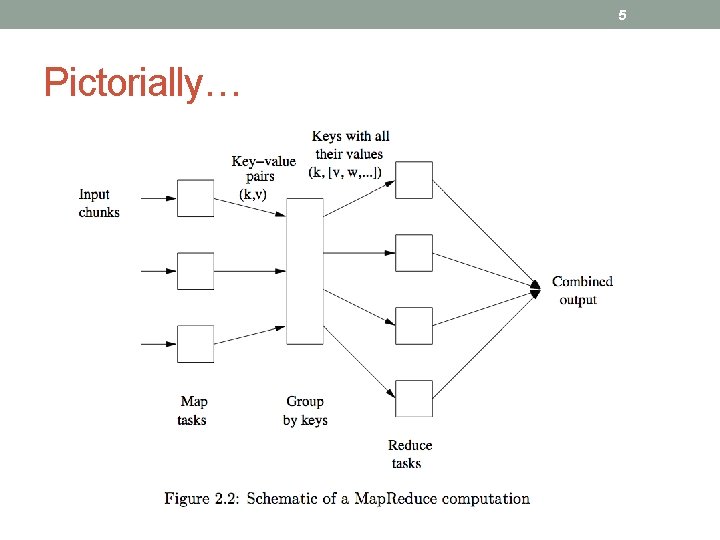
5 Pictorially…
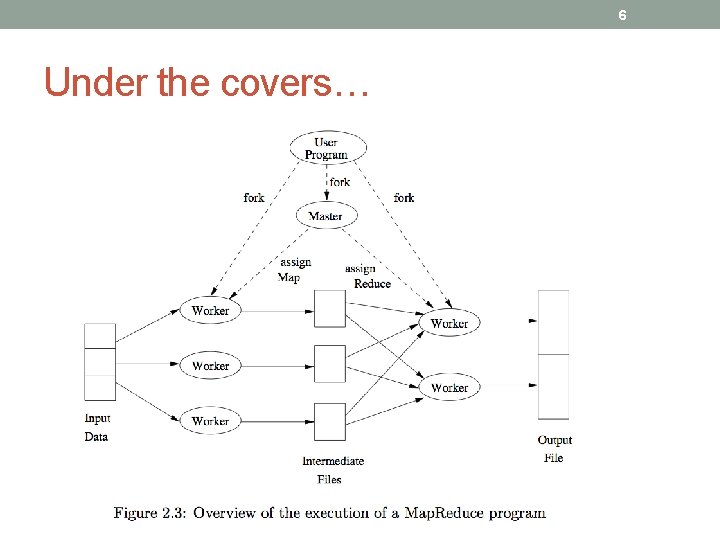
6 Under the covers…
7 Tricky parts • Converting an algorithm into a series of Map. Reduce steps can be unintuitive. • Distribution across servers needs to be uniform. • Use hashbucket heaps in the mappers. • Tends to go wrong in the reduce step due to lots of values on one key. • Data preparation and output writing take a long time. • Need a distributed file system. • And Map. Reduce just to get the data to this file system. • Use of Map. Reduce is that: • The data can be distributed among many computers and • The algorithm can treat each of those computers separately. (Without interactions between them. )
8 Another example • Lots of timestamped event data and logs of users’ actions on a website. • For each user, data like: • {user_id, IP_address, zip_code, ad_they_saw, did_they_click}. • Want to count howmany unique users saw ads from each zip code, and how many clicked at least once. • Use {zip_code, user} as the key, and {clicks, impressions} as the value. • Mapper output of these reducer that emits a table that, per user, per zip code, gives counts of clicks and impressions. New records in that look like: • {user, zip_code, number_clicks, number_impressions}. Then…
9 Another example, cntd • To get the number of unique users from each zip code, and how may clicked at least once, • Do a second Map. Reduce job with zip_code as the key, and, for each user emits {1, ifelse(clicks>0)}. • So, two different Map. Reduce runs, one for each goal.
10 Hadoop – More info? • See http: //hadoop. apache. org/docs/current/hadoop- mapreduce-client/hadoop-mapreduce-clientcore/Map. Reduce. Tutorial. html.
11 Back to Mongo. DB • Today – Ch 9 – 15 • Replication and Sharding • Ch 9 – Replication • Ch 10 – Components of a Replica Set • Ch 11 – Connecting to a Replica Set from Your Application • Ch 12 – Administration • Ch 13 – Introduction to Sharding • Ch 14 – Configuring Sharding • Ch 15 – Choosing a Shard Key
12 This leaves, for next week… • The rest of the Mongo. DB reading • All about administration • And, talking about what you’ll do with Mongo. DB in your project • So, this part will be your discussion! • Then on to Postgre. SQL
13 Ch 9 – Replication • Intro • Why would anyone not have a DB backup running? • Replication keeps identical copies running. • A one-minute test setup • Can we try this? P 170 • Configuring a replica set – p 174 • How to setup for real, across multiple machines. • Replica set gets a name, then you describe what’s in it. • The replicas start out empty – they’ll all clone the first member. • Configuring / changing requires some downtime. • There are “rs Helper Functions” – simplified Mongo. DB commands. • Must know the underlying networking to set this up. • Changing your replica set configuration • Member configuration options • Like “arbiters” – p 182 • Options like not building indexes on secondaries – p 185
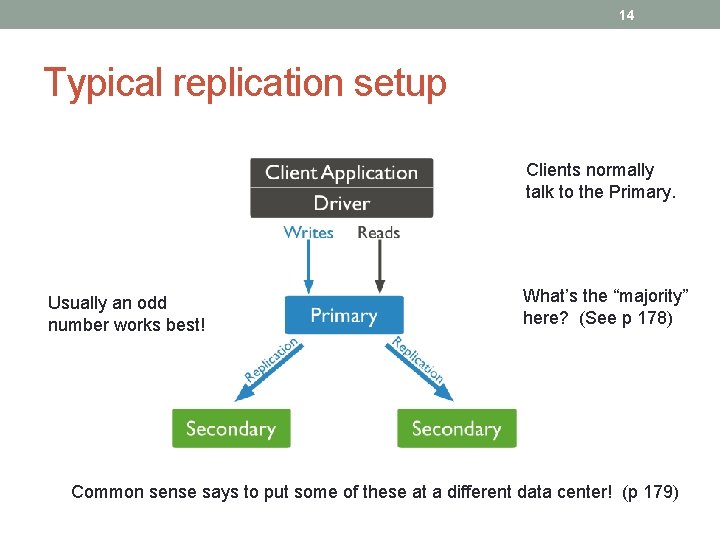
14 Typical replication setup Clients normally talk to the Primary. Usually an odd number works best! What’s the “majority” here? (See p 178) Common sense says to put some of these at a different data center! (p 179)
15 Ch 10 – Components of a Replica Set • Synching – p 187 • How they all work together. • Main idea – copies of the data on multiple servers. • Mongo. DB keeps an oplog containing every primary write. • A capped collection on the primary, • Secondaries query this collection to replicate. • Each of them has its own oplog. So they can be used as a synch source.
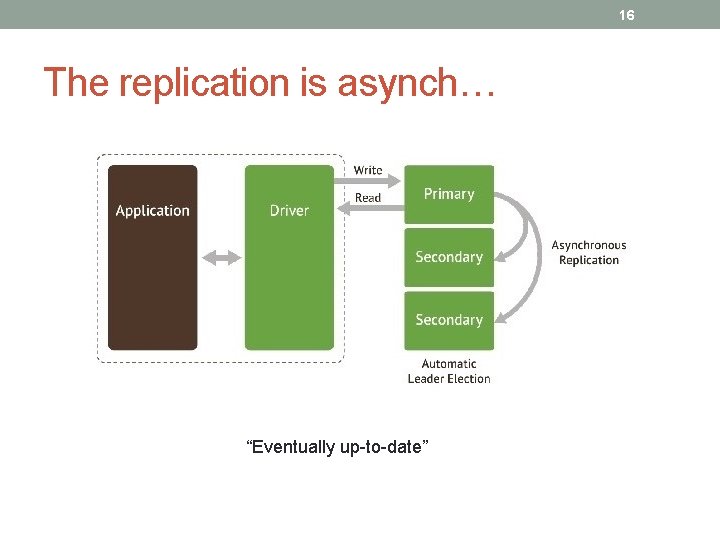
16 The replication is asynch… “Eventually up-to-date”
17 Little twists • If a secondary goes down… (p 188) • When it restarts, it will start synching from where it left off in its own oplog. May replay operations already applied – ok. • If it’s been down to long for this to work, it is “stale” and will attempt to make a full copy of the data from another member – initial synching. • Can also restore from backup, manually. (p 190) • Recoveries can slow down operations. • E, g, “working set” in memory gets kicked out. • Need to rebuild indexes.
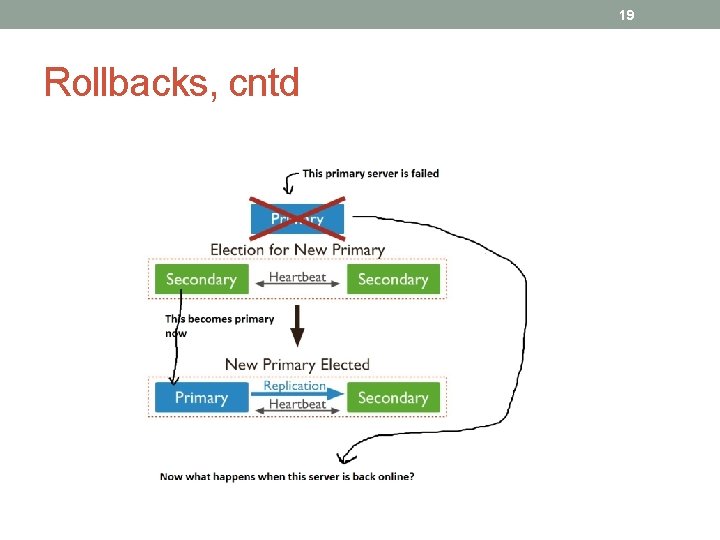
18 Ch 10, cntd • Heartbeats – p 191 • Every two seconds, from every member to every other member. • Lets primary know if it can reach a majority of the set. • If not, it demotes itself! • Members communicate their state. (pp 191 -2) • Elections – p 192 • If a member can’t reach a primary, and is eligible to become a primary, it asks to become primary. • Other members go through logic to decide if this is suitable. • Rollbacks – p 193 • Typically needed because of network partitions. • Primary gets disconnected after a write, before replication. • Can result in conflicting oplogs. Call the administrator!
19 Rollbacks, cntd
20 Ch 11 – Connecting to a Replica Set from Your Application • Client-to-replica-set connection behavior – p 199 • Client libraries connect to primary, route all traffic there. • Looks like you’re talking to a standalone server. • The hot standbys are programmatically invisible. • When your driver connects, it discovers “seeds” to the secondaries. • When the primary goes down, driver finds the new primary. • May be a detectable lull when you can’t write. • Driver won’t do any reads or writes then. • You can optionally find secondaries to do reads. • You may not know if read succeeded on primary before it went down.
21 Ch 11, cntd. • Waiting for replication on writes – p 200 • This helps ensure that a write was successful, but takes time. • Use get. Last. Error to check this. • What can go wrong? – p 201 • You check that the write was successful on the primary, but it crashes before secondaries replicate the write. • Your app thinks it can access the write – but not! • Custom replication guarantees – p 202 • You can do things like “wait for one server per data center to write. ” • Sending reads to secondaries – p 205 • Generally a bad idea! • You can get inconsistent reads. • But it does let you distribute the load and have low-latency reads.
22 Ch 12 – Administration (for replication) • The rest of “Administration” is next week! • Starting members in standalone mode – p 209 • Restarting - Lets you do many maintenance tasks. • Replica set configuration – p 210 • Kept in local. system. replset collection. • Be careful how you change this set! • Can create a replica set using rs. initiate. • Can change set members. • Can make “larger sets” than usually allowed. Why? (p 211) • Monitoring replication – p 214 • Look at the logs. • Visualize the replication graph. • Track lag. • Master-slave – p 225 • The predecessor to Mongo. DB’s replication system.
23 Ch 13 – Introduction to Sharding • Intro – p 231 • Splits data across multiple machines – partitioning. • Can store more data / handle more load. • Automatic alternative to having to program this! • Mongo. DB’s built-in system abstracts the architecture and simplifies the admin. • But, it’s still messy! • Understanding the components of a cluster – p 232 • Don’t confuse with replication! • A one-minute test setup – p 232 • We should try this!
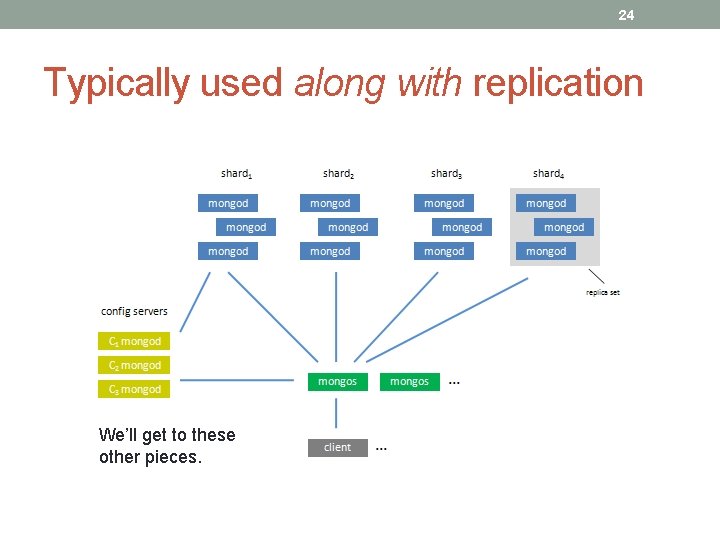
24 Typically used along with replication We’ll get to these other pieces.
25 What’s a “primary shard”? • It’s the entire replica set composing a shard. • Vs a single server that can take writes. Right – Modern “Shard” – a 1009 ft skyscraper in London!
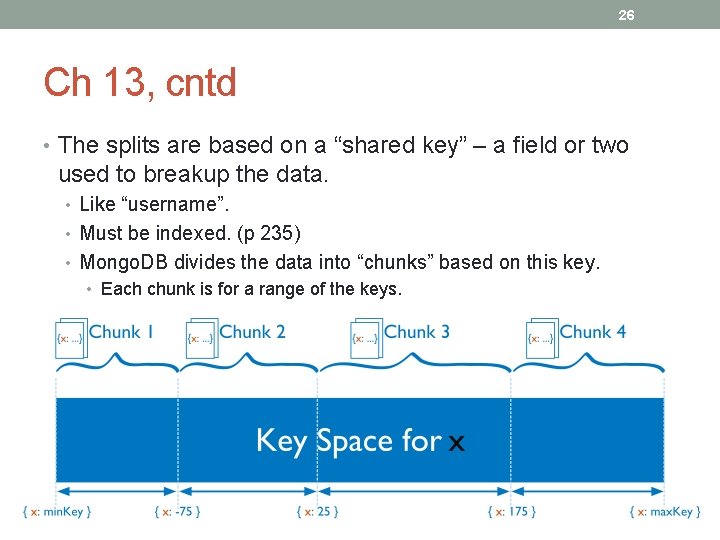
26 Ch 13, cntd • The splits are based on a “shared key” – a field or two used to breakup the data. • Like “username”. • Must be indexed. (p 235) • Mongo. DB divides the data into “chunks” based on this key. • Each chunk is for a range of the keys.
27 Ch 13, cntd • The chunks are then evenly distributed across “shards. ” (The separate servers being used. ) • Client-side queries work normally. Routing done by “mongos”. • Can use “explain” to see what really happens. (p 237) • You can still do big operations on sharded datasets. E. g. , mongos does sorting with a merge-sort across the shards.
28 Ch 14 – Configuring Sharding • When to shard – p 241. • Increase available RAM. • Increase available disk space. • Reduce load on a server. • Read or write data with greater throughput than a single mongod can handle. • Monitor to decide when sharding becomes necessary. • Starting the servers – p 242 • Need to start up all the processes required. • Need to set up the mongos and the shards. • Need to set up “config servers. ” Usually 3! (See p 243. ) • These are “the brains of your cluster. ” Used by mongos. “Table of contents. ” • Set up first. Started first. • Each on a separate machine, geographically distributed.
29 Ch 14, cntd • The mongos process • Application uses it to connect to. • Needs to know where the config servers are. Precisely! (p 244) • Typically one mongos process per application server. • Can add shards after mongos is running. • Existing shard replica set vs starting from scratch. (p 244) • Clients make requests from mongos, vs contacting the replica sets directly. • Can add more shards as needed. • Mongo. DB needs to be told how to distribute the data. • Need to tell both the database and the collection to do this – p 245.
30 Ch 14, cntd • How Mongo. DB tracks cluster data – p 246 • Documents grouped into chunks. Always on 1 shard. • Mongo. DB keeps a table of chunks mapped to shards. “config. chunks”. (see p 247) • As writes occur, some chunks grow in size, etc. • At a certain size, Mongo. DB splits a chunk. • Chunks on a server are not really physically grouped on disk. • A “split storm” occurs when mongos repeatedly attempts to split a chunk and can’t (often because a config server is down). (p 250) • The balancer – p 253 • Migrates data. • Checks for imbalances between shards. • Each mongos plays the part of “the balancer” occasionally.
31 Ch 15 – Choosing a Shard Key • Taking stock of your usage – p 257 • Once you have more than a few shards, almost impossible to change the shard key! • Need to understand workload, and how your application’s requests will be split-up. • Work-out examples, like shown in the chapter. • Basic considerations – p 258 • A 3 -shard cluster has lots more flexibility than a 1000 -shard cluster. • If many shards, you can’t fire-off queries that can hit all shards. • Thus, almost all queries must include the shard key. • Why are you sharding? To decrease read or write latency? • To decrease write latency, you may need geographically closer or more powerful machines. • To increase read or write throughput? (Capacity. ) Need requests evenly distributed for that. (Parallelism. ) • To increase system resources? (Like more RAM per GB of data. ) If so, keep working set as small as possible.
32 Ch 15, cntd • Picturing distributions – p 258 • Three basic distributions for splitting data. • Ascending shard keys – something like “date” that increases steadily over time. • All the growth will always be at the end, on the max chunk. • Randomly distributed shard keys – like usernames, email addresses, hashes. • Inserts will hit every chunk (and shard) fairly evenly. • But, Mongo. DB isn’t efficient at randomly accessing data on disk. • Location-based shard keys – like user’s IP, address, or some pseudo-location like “office. ” • Mongo. DB can shard to put data close to users and keep related data together. • Hard to predict what growth patterns will occur!
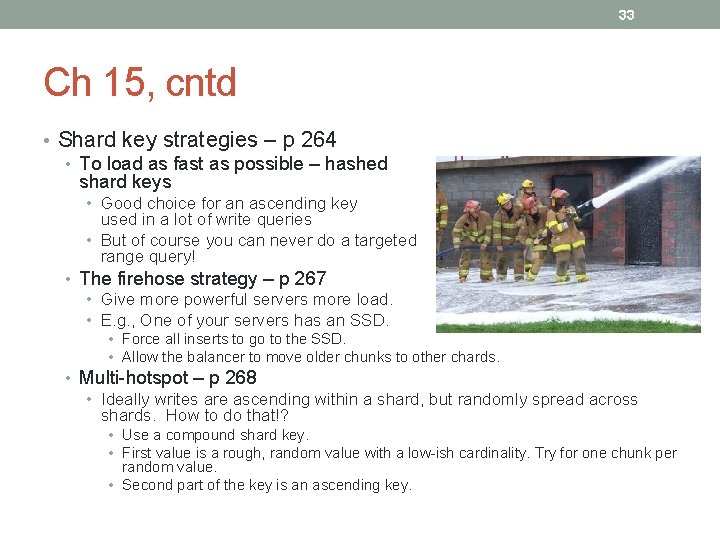
33 Ch 15, cntd • Shard key strategies – p 264 • To load as fast as possible – hashed shard keys • Good choice for an ascending key used in a lot of write queries • But of course you can never do a targeted range query! • The firehose strategy – p 267 • Give more powerful servers more load. • E. g. , One of your servers has an SSD. • Force all inserts to go to the SSD. • Allow the balancer to move older chunks to other chards. • Multi-hotspot – p 268 • Ideally writes are ascending within a shard, but randomly spread across shards. How to do that!? • Use a compound shard key. • First value is a rough, random value with a low-ish cardinality. Try for one chunk per random value. • Second part of the key is an ascending key.
34 Ch 15, cntd • Shard key rules and guidelines – p 271 • Pick shard keys like indexes – the concepts are similar. • Shard keys can’t be arrays! • Once inserted, a document’s shard key can’t be modified. • Special types of index can’t be used for shard keys. • Better choose a shard key that will vary! • It performs better on high-cardinality fields. • Controlling data distribution – p 271 • There are options beyond automatic distribution! • Like how to keep some low-value data off your best server.
35 Conclusions? • Still want to use Mongo. DB for the recruiting-related documents?
- Slides: 35