
1 HTML Basics Dr Awad Khalil Computer Science

1 HTML Basics Dr. Awad Khalil Computer Science Department AUC
Markup Languages • SGML, the Standard Generalized Markup Language (1980), is a more powerful ancestor of XML. SGML is a text-based metalanguage used to describe application languages. SGML is a textbased language that can be used to markup data – that is, add metadata – in a way which is self describing. Although SGML has many useful features, the complexity of SGML makes it extremely hard to use and learn. • HTML, the Hyper. Text Markup Language (1989), is one of the best known applications of SGML. HTML was defined to be a universal markup language for the display of information, and the linking of different pieces of information. The idea was that any HTML document (or web page) would be presentable in any application that was capable of understanding HTML (termed a web browser). 2
HTML • HTML is the document formatting language used to design most Web pages. • It is a simple, yet powerful, platform-independent document language. • Originally developed by Tim Berners-Lee while at CERN but was standardized in November 1995. • In early 2000, W 3 C produced XHTML 1. 0 as a reformulation of HTML 4 in XML. 3

DHTML • Consists of number of technologies freely available for download • Used for developing high-performance, Web-based applications Ø Much of application’s work performed directly on client rather then on server or Internet • Two versions Ø Microsoft Ø Netscape 4

5 HTML • HTML Tags: HTML tags cover formatting, structural, and semantic markup of an HTML document. <HTML> <HEAD> <TITLE> <BODY> <A> <IMG> <B> <I> <HR> • Good morning <B> Egypt </B> • <HR WIDTH="200"> • In 1989, <B><I>Tim Brayners</I></B> developed the first version of HTML • <HTML> <HEAD> <TITLE>Page 1</TITLE> </HEAD> <BODY> Good Morning, <B><I>Egypt</I></B> </BODY> </HTML>

6 HTML Document Structure
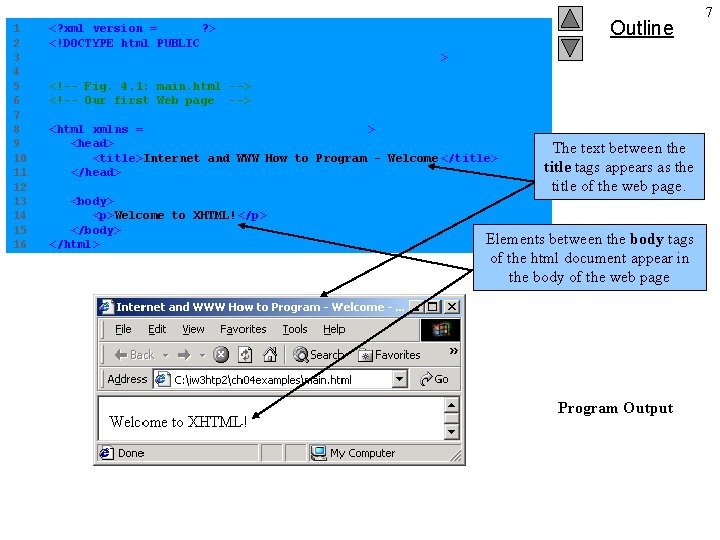
1 2 3 4 5 6 7 8 9 10 11 12 13 14 15 16 Outline <? xml version = "1. 0"? > <!DOCTYPE html PUBLIC "-//W 3 C//DTD XHTML 1. 0 Strict//EN" "http: //www. w 3. org/TR/xhtml 1/DTD/xhtml 1 -strict. dtd" > <!-- Fig. 4. 1: main. html --> <!-- Our first Web page --> <html xmlns = "http: //www. w 3. org/1999/xhtml" > <head> <title>Internet and WWW How to Program - Welcome </title> </head> <body> <p>Welcome to XHTML!</p> </body> </html> The text between the Main. html title tags appears as the title of the web page. Elements between the body tags of the html document appear in the body of the web page Program Output 7

8 HTML <HTML> <HEAD> <TITLE>The Year 2000</TITLE> </HEAD> <BODY BGCOLOR=”YELLOW” TEXT=”BLUE” LINK=”MAROON” ALINK=”GREEN” VLINK=”BROWN”> <!-- The Body tag attributes specify the color scheme, such as the background color of yellow. --> <H 1> The Millenium Approaches</H 1> <FONT SIZE=”+5”> <I>And You’re Invited!</I> </FONT> <P> <FONT COLOR=”PURPLE”>Please come to my <B>Celebration of the New Millenium BBQ & Poetry Reading</B> to be held on December 31 st at 7: 00 p. m. Anyone reading this page is invited; send me mail using the link below for more details. </FONT> <HR> <A HREF=”Mailto: akhalil@emf. net”>Awad KHALIL</A><BR> © 1999, Awad KHALIL </BODY> </HTML>
W 3 C • The World Wide Web Consortium (W 3 C) was started in 1994, according to their web site (http: //www. w 3. org), “to lead the World Wide Web to its full potential by developing common protocols that promote its evolution and ensure its interoperability”. • W 3 C produces recommendations which describe the basic building blocks of the web. • HTML recommendation is the most famous contribution of W 3 C to the web. • In 1998, W 3 C released recommendations for XML 1. 0, XSLT, and XPath. 9
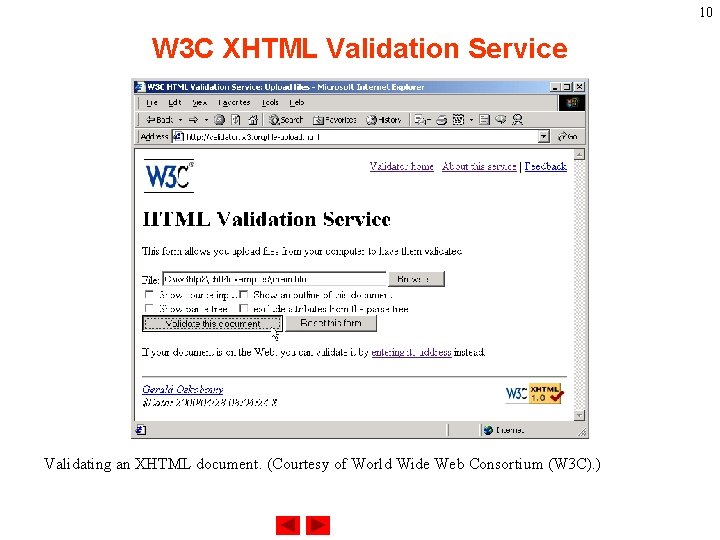
10 W 3 C XHTML Validation Service Validating an XHTML document. (Courtesy of World Wide Web Consortium (W 3 C). )
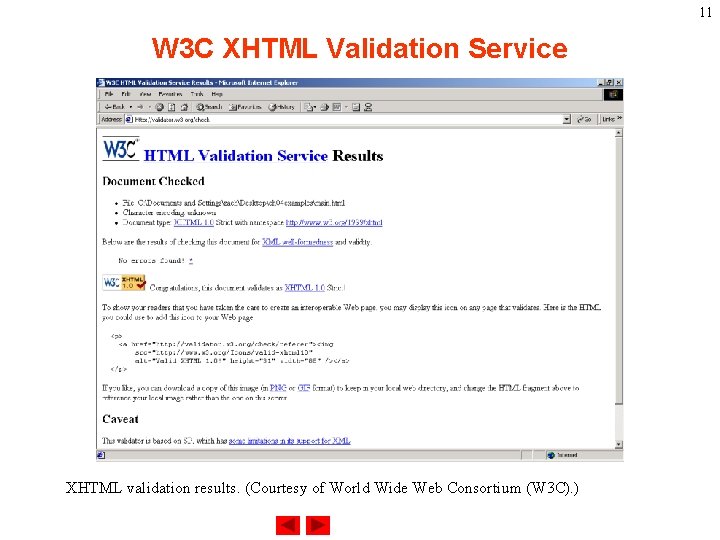
11 W 3 C XHTML Validation Service XHTML validation results. (Courtesy of World Wide Web Consortium (W 3 C). )
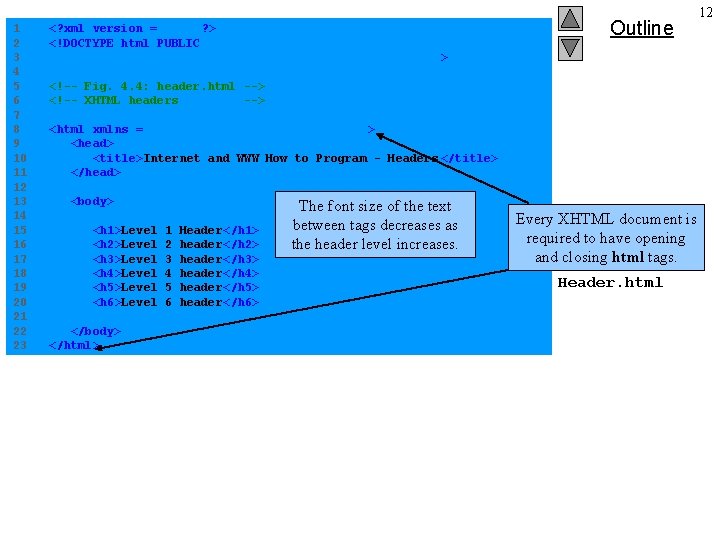
1 2 3 4 5 6 7 8 9 10 11 12 13 14 15 16 17 18 19 20 21 22 23 <? xml version = "1. 0"? > <!DOCTYPE html PUBLIC "-//W 3 C//DTD XHTML 1. 0 Strict//EN" "http: //www. w 3. org/TR/xhtml 1/DTD/xhtml 1 -strict. dtd" > Outline <!-- Fig. 4. 4: header. html --> <!-- XHTML headers --> <html xmlns = "http: //www. w 3. org/1999/xhtml" > <head> <title>Internet and WWW How to Program - Headers </title> </head> <body> <h 1>Level <h 2>Level <h 3>Level <h 4>Level <h 5>Level <h 6>Level </body> </html> 1 2 3 4 5 6 Header</h 1> header</h 2> header</h 3> header</h 4> header</h 5> header</h 6> The font size of the text between tags decreases as the header level increases. Every XHTML document is required to have opening and closing html tags. Header. html 12
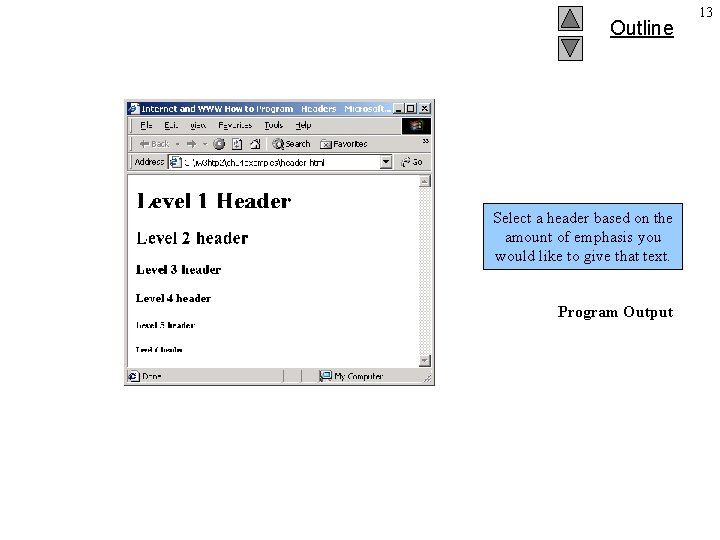
Outline Select a header based on the amount of emphasis you would like to give that text. Program Output 13
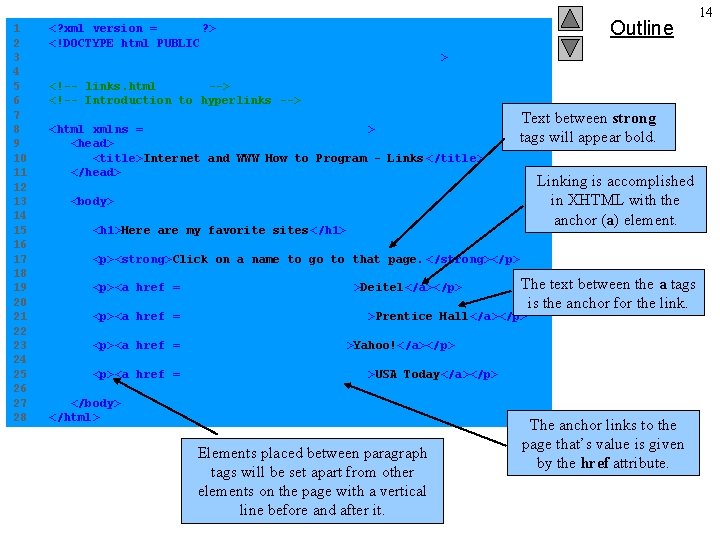
1 2 3 4 5 6 7 8 9 10 11 12 13 14 15 16 17 18 19 20 21 22 23 24 25 26 27 28 Outline <? xml version = "1. 0"? > <!DOCTYPE html PUBLIC "-//W 3 C//DTD XHTML 1. 0 Strict//EN" "http: //www. w 3. org/TR/xhtml 1/DTD/xhtml 1 -strict. dtd" > <!-- links. html --> <!-- Introduction to hyperlinks --> <html xmlns = "http: //www. w 3. org/1999/xhtml" > <head> <title>Internet and WWW How to Program - Links </title> </head> Text between strong tags will appear bold. Linking is accomplished in XHTML with the anchor (a) element. <body> <h 1>Here are my favorite sites </h 1> <p><strong>Click on a name to go to that page. </strong></p> <p><a href = "http: //www. deitel. com">Deitel</a></p> Links. html The text between the a tags is the anchor for the link. <p><a href = "http: //www. prenhall. com">Prentice Hall</a></p> <p><a href = "http: //www. yahoo. com">Yahoo!</a></p> <p><a href = "http: //www. usatoday. com">USA Today</a></p> </body> </html> Elements placed between paragraph tags will be set apart from other elements on the page with a vertical line before and after it. The anchor links to the page that’s value is given by the href attribute. 14
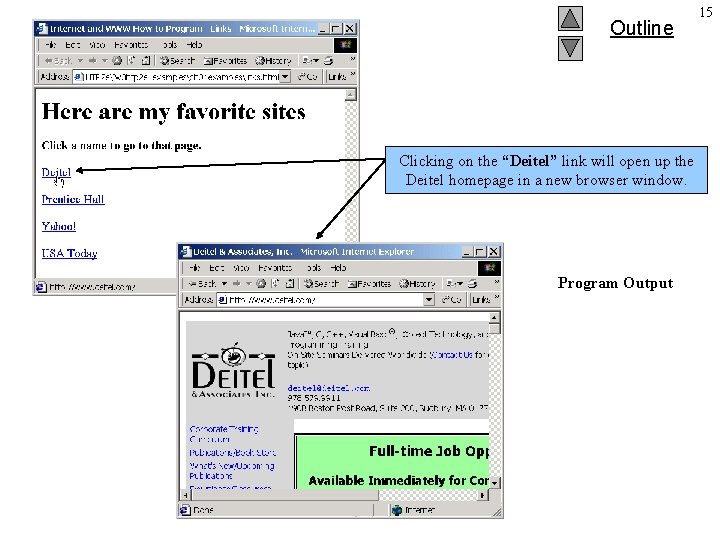
Outline Clicking on the “Deitel” link will open up the Deitel homepage in a new browser window. Program Output 15
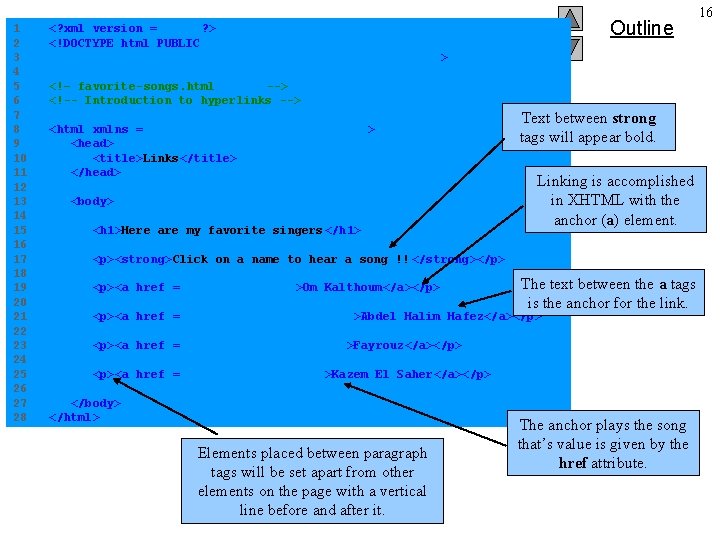
1 2 3 4 5 6 7 8 9 10 11 12 13 14 15 16 17 18 19 20 21 22 23 24 25 26 27 28 Outline <? xml version = "1. 0"? > <!DOCTYPE html PUBLIC "-//W 3 C//DTD XHTML 1. 0 Strict//EN" "http: //www. w 3. org/TR/xhtml 1/DTD/xhtml 1 -strict. dtd" > <!– favorite-songs. html --> <!-- Introduction to hyperlinks --> <html xmlns = "http: //www. w 3. org/1999/xhtml" > <head> <title>Links</title> </head> <body> <h 1>Here are my favorite singers </h 1> Text between strong tags will appear bold. Linking is accomplished in XHTML with the anchor (a) element. <p><strong>Click on a name to hear a song !! </strong></p> <p><a href = “enta-omry. mp 3">Om Kalthoum</a></p> The textsongs. html between the a tags is the anchor for the link. <p><a href = "asmar-ya-asmarani. mp 3">Abdel Halim Hafez</a></p> <p><a href = "dakhelik-ya-emmi. mp 3">Fayrouz</a></p> <p><a href = “zedini-eshkan. mp 3">Kazem El Saher</a></p> </body> </html> Elements placed between paragraph tags will be set apart from other elements on the page with a vertical line before and after it. The anchor plays the song that’s value is given by the href attribute. 16
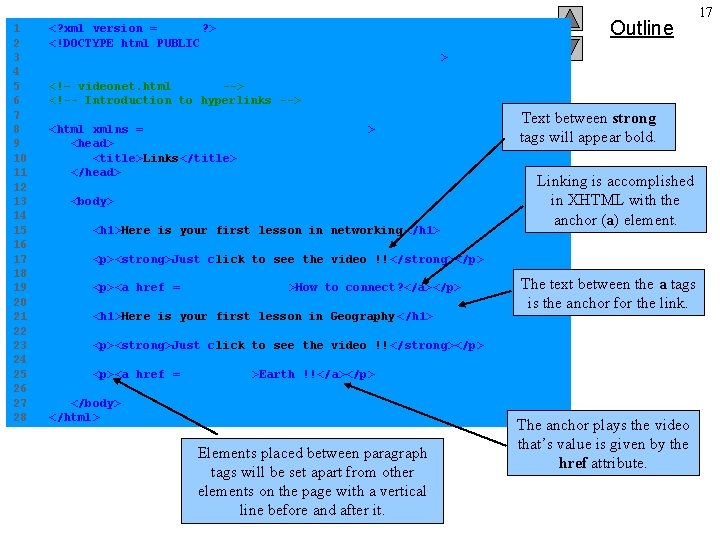
1 2 3 4 5 6 7 8 9 10 11 12 13 14 15 16 17 18 19 20 21 22 23 24 25 26 27 28 <? xml version = "1. 0"? > <!DOCTYPE html PUBLIC "-//W 3 C//DTD XHTML 1. 0 Strict//EN" "http: //www. w 3. org/TR/xhtml 1/DTD/xhtml 1 -strict. dtd" > Outline <!– videonet. html --> <!-- Introduction to hyperlinks --> <html xmlns = "http: //www. w 3. org/1999/xhtml" > <head> <title>Links</title> </head> <body> <h 1>Here is your first lesson in networking </h 1> Text between strong tags will appear bold. Linking is accomplished in XHTML with the anchor (a) element. <p><strong>Just click to see the video !! </strong></p> <p><a href = “ 03 SCRN 02. avi">How to connect? </a></p> <h 1>Here is your first lesson in Geography </h 1> The textvidoenet. html between the a tags is the anchor for the link. <p><strong>Just click to see the video !! </strong></p> <p><a href = “fox. avi">Earth !!</a></p> </body> </html> Elements placed between paragraph tags will be set apart from other elements on the page with a vertical line before and after it. The anchor plays the video that’s value is given by the href attribute. 17
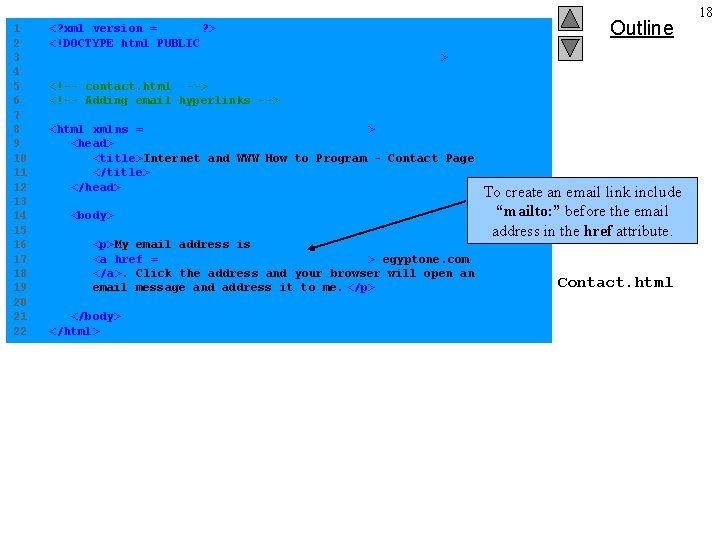
1 2 3 4 5 6 7 8 9 10 11 12 13 14 15 16 17 18 19 20 21 22 <? xml version = "1. 0"? > <!DOCTYPE html PUBLIC "-//W 3 C//DTD XHTML 1. 0 Strict//EN" "http: //www. w 3. org/TR/xhtml 1/DTD/xhtml 1 -strict. dtd" > Outline <!-- contact. html --> <!-- Adding email hyperlinks --> <html xmlns = "http: //www. w 3. org/1999/xhtml" > <head> <title>Internet and WWW How to Program - Contact Page </title> </head> <body> <p>My email address is <a href = "mailto: egyptone@arabia. com "> egyptone. com </a>. Click the address and your browser will open an email message and address it to me. </p> </body> </html> To create an email link include “mailto: ” before the email address in the href attribute. Contact. html 18
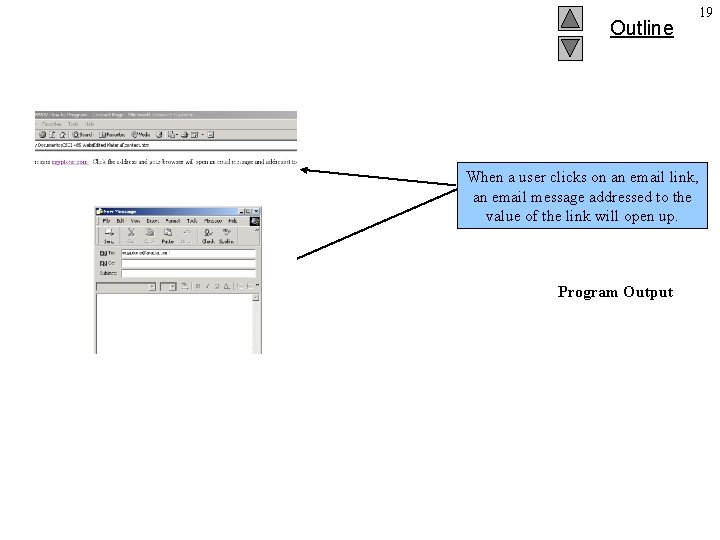
Outline When a user clicks on an email link, an email message addressed to the value of the link will open up. Program Output 19
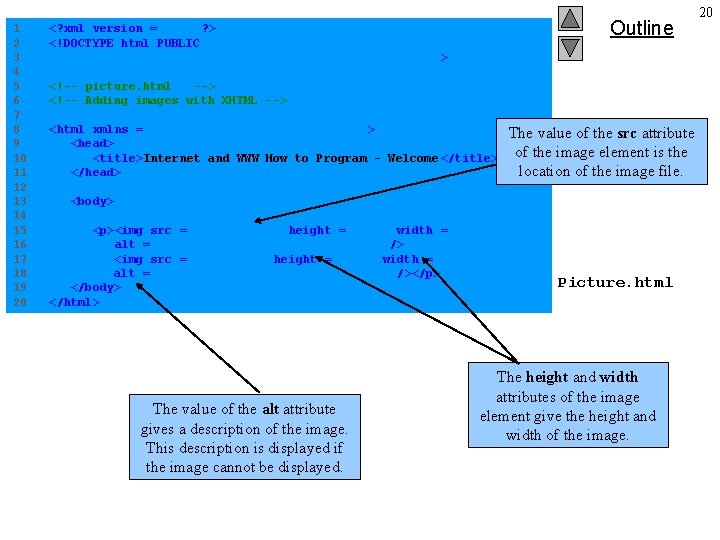
1 2 3 4 5 6 7 8 9 10 11 12 13 14 15 16 17 18 19 20 Outline <? xml version = "1. 0"? > <!DOCTYPE html PUBLIC "-//W 3 C//DTD XHTML 1. 0 Strict//EN" "http: //www. w 3. org/TR/xhtml 1/DTD/xhtml 1 -strict. dtd" > <!-- picture. html --> <!-- Adding images with XHTML --> <html xmlns = "http: //www. w 3. org/1999/xhtml" > <head> <title>Internet and WWW How to Program - Welcome </title> </head> The value of the src attribute of the image element is the location of the image file. <body> <p><img src = "xmlhtp. jpg" height = "238" width = "183" alt = "XML How to Program book cover" /> <img src = "jhtp. jpg" height = "238" width = "183" alt = "Java How to Program book cover" /></p> </body> </html> The value of the alt attribute gives a description of the image. This description is displayed if the image cannot be displayed. Picture. html The height and width attributes of the image element give the height and width of the image. 20
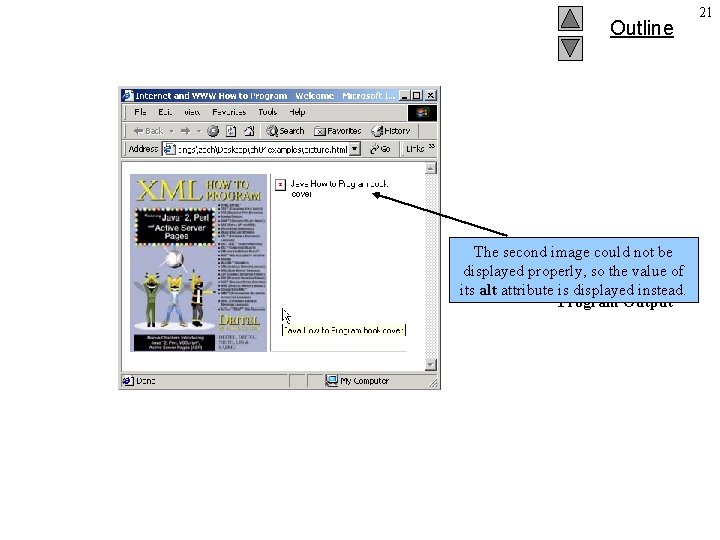
Outline The second image could not be displayed properly, so the value of its alt attribute is displayed instead. Program Output 21
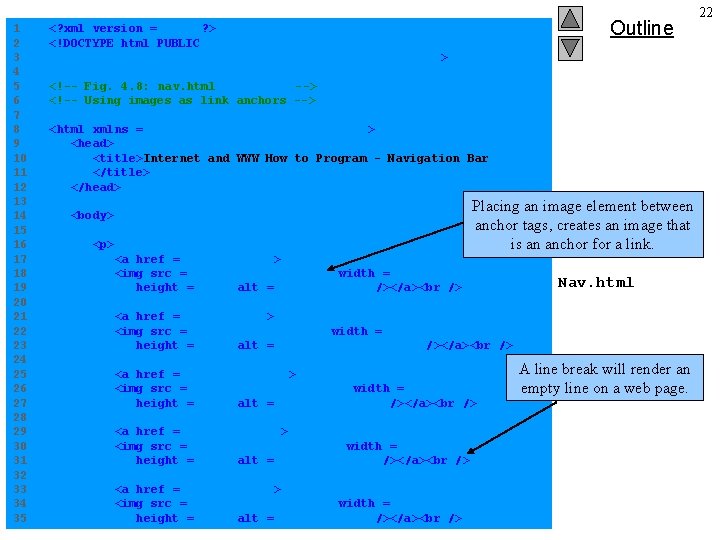
1 2 3 4 5 6 7 8 9 10 11 12 13 14 15 16 17 18 19 20 21 22 23 24 25 26 27 28 29 30 31 32 33 34 35 Outline <? xml version = "1. 0"? > <!DOCTYPE html PUBLIC "-//W 3 C//DTD XHTML 1. 0 Strict//EN" "http: //www. w 3. org/TR/xhtml 1/DTD/xhtml 1 -strict. dtd" > <!-- Fig. 4. 8: nav. html --> <!-- Using images as link anchors --> <html xmlns = "http: //www. w 3. org/1999/xhtml" > <head> <title>Internet and WWW How to Program - Navigation Bar </title> </head> <body> <p> <a href = "links. html"> <img src = "buttons/links. jpg" width = "65" height = "50" alt = "Links Page" /></a> Placing an image element between anchor tags, creates an image that is an anchor for a link. Nav. html <a href = "list. html"> <img src = "buttons/list. jpg" width = "65" height = "50" alt = "List Example Page" /></a> <a href = "contact. html"> <img src = "buttons/contact. jpg" width = "65" height = "50" alt = "Contact Page" /></a> <a href = "header. html"> <img src = "buttons/header. jpg" width = "65" height = "50" alt = "Header Page" /></a> <a href = "table. html"> <img src = "buttons/table. jpg" width = "65" height = "50" alt = "Table Page" /></a> A line break will render an empty line on a web page. 22
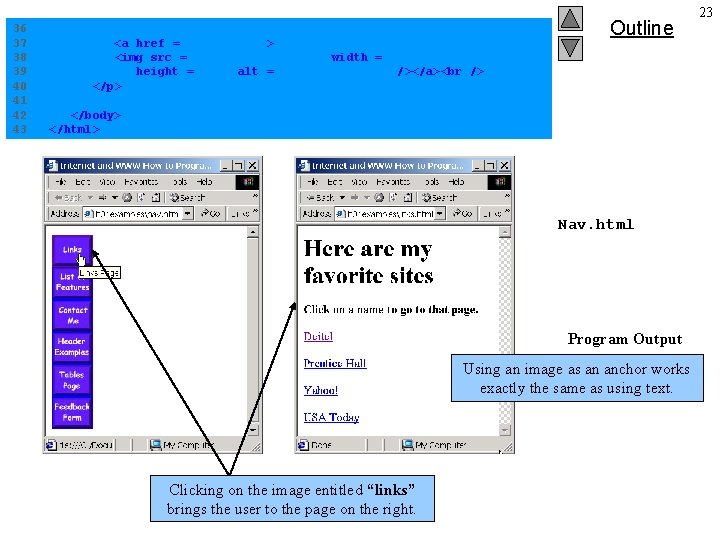
36 37 38 39 40 41 42 43 <a href = "form. html"> <img src = "buttons/form. jpg" width = "65" height = "50" alt = "Feedback Form" /></a> </p> Outline </body> </html> Nav. html Program Output Using an image as an anchor works exactly the same as using text. Clicking on the image entitled “links” brings the user to the page on the right. 23
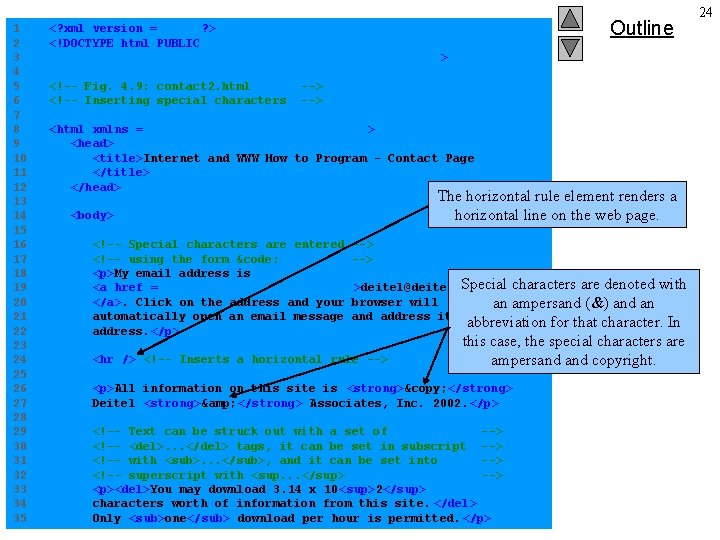
1 2 3 4 5 6 7 8 9 10 11 12 13 14 15 16 17 18 19 20 21 22 23 24 25 26 27 28 29 30 31 32 33 34 35 Outline <? xml version = "1. 0"? > <!DOCTYPE html PUBLIC "-//W 3 C//DTD XHTML 1. 0 Strict//EN" "http: //www. w 3. org/TR/xhtml 1/DTD/xhtml 1 -strict. dtd" > <!-- Fig. 4. 9: contact 2. html <!-- Inserting special characters --> <html xmlns = "http: //www. w 3. org/1999/xhtml" > <head> <title>Internet and WWW How to Program - Contact Page </title> </head> <body> The horizontal rule element renders a horizontal line on the web page. <!-- Special characters are entered --> <!-- using the form &code; --> <p>My email address is Contact 2. html Special characters are denoted with <a href = "mailto: deitel@deitel. com ">deitel@deitel. com </a>. Click on the address and your browser will an ampersand (&) and an automatically open an email message and address it to my abbreviation for that character. In address. </p> <hr /> <!-- Inserts a horizontal rule --> this case, the special characters are ampersand copyright. <p>All information on this site is <strong>© </strong> Deitel <strong>& </strong> Associates, Inc. 2002. </p> <!-- Text can be struck out with a set of --> <!-- <del>. . . </del> tags, it can be set in subscript --> <!-- with <sub>. . . </sub>, and it can be set into --> <!-- superscript with <sup. . . </sup> --> <p><del>You may download 3. 14 x 10 <sup>2</sup> characters worth of information from this site. </del> Only <sub>one</sub> download per hour is permitted. </p> 24
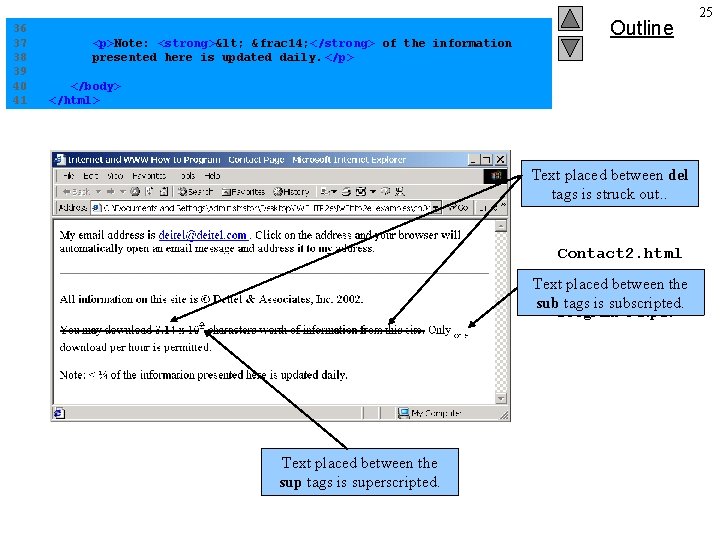
36 37 38 39 40 41 <p>Note: <strong>< &frac 14; </strong> of the information presented here is updated daily. </p> Outline </body> </html> Text placed between del tags is struck out. . Contact 2. html Text placed between the sub tags is subscripted. Program Output Text placed between the sup tags is superscripted. 25
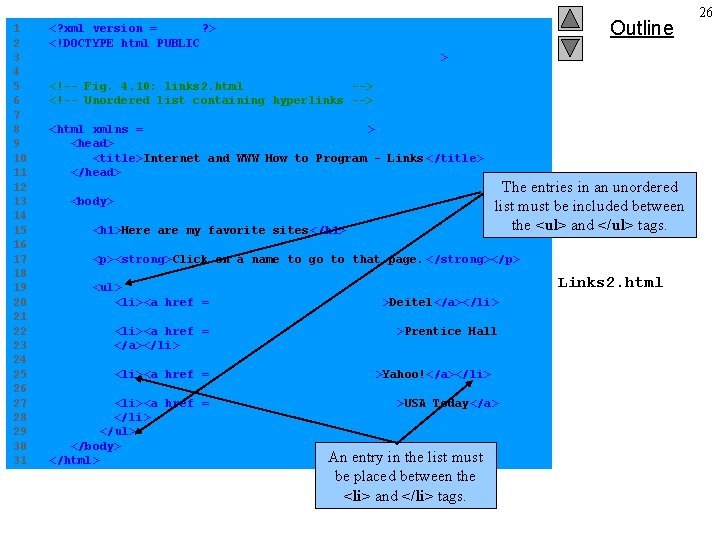
1 2 3 4 5 6 7 8 9 10 11 12 13 14 15 16 17 18 19 20 21 22 23 24 25 26 27 28 29 30 31 Outline <? xml version = "1. 0"? > <!DOCTYPE html PUBLIC "-//W 3 C//DTD XHTML 1. 0 Strict//EN" "http: //www. w 3. org/TR/xhtml 1/DTD/xhtml 1 -strict. dtd" > <!-- Fig. 4. 10: links 2. html --> <!-- Unordered list containing hyperlinks --> <html xmlns = "http: //www. w 3. org/1999/xhtml" > <head> <title>Internet and WWW How to Program - Links </title> </head> <body> <h 1>Here are my favorite sites </h 1> The entries in an unordered list must be included between the <ul> and </ul> tags. <p><strong>Click on a name to go to that page. </strong></p> <ul> <li><a href = "http: //www. deitel. com">Deitel</a></li> <li><a href = "http: //www. prenhall. com">Prentice Hall </a></li> <li><a href = "http: //www. yahoo. com">Yahoo!</a></li> <li><a href = "http: //www. usatoday. com">USA Today</a> </li> </ul> </body> An entry in the list must </html> be placed between the <li> and </li> tags. Links 2. html 26
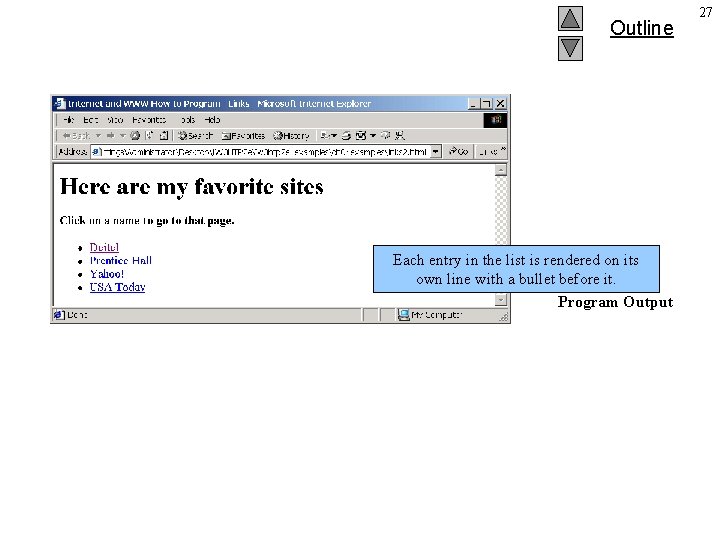
Outline Each entry in the list is rendered on its own line with a bullet before it. Program Output 27
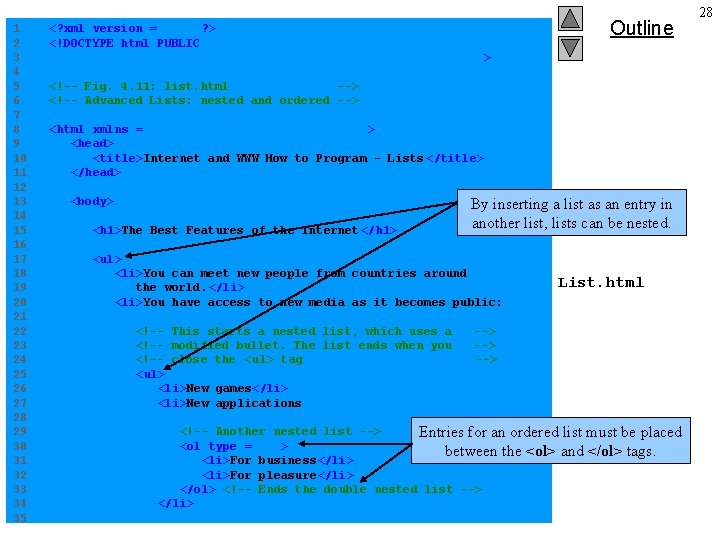
1 2 3 4 5 6 7 8 9 10 11 12 13 14 15 16 17 18 19 20 21 22 23 24 25 26 27 28 29 30 31 32 33 34 35 <? xml version = "1. 0"? > <!DOCTYPE html PUBLIC "-//W 3 C//DTD XHTML 1. 0 Transitional//EN" "http: //www. w 3. org/TR/xhtml 1/DTD/xhtml 1 -transitional. dtd" > Outline <!-- Fig. 4. 11: list. html --> <!-- Advanced Lists: nested and ordered --> <html xmlns = "http: //www. w 3. org/1999/xhtml" > <head> <title>Internet and WWW How to Program - Lists </title> </head> <body> <h 1>The Best Features of the Internet </h 1> By inserting a list as an entry in another list, lists can be nested. <ul> <li>You can meet new people from countries around the world. </li> <li>You have access to new media as it becomes public: <!-- This starts a nested list, which uses a <!-- modified bullet. The list ends when you <!-- close the < ul> tag <ul> <li>New games</li> <li>New applications List. html --> --> <!-- Another nested list --> Entries for an ordered list must be placed <ol type = "I"> between the <ol> and </ol> tags. <li>For business</li> <li>For pleasure</li> </ol> <!-- Ends the double nested list --> </li> 28

36 37 38 39 40 41 42 43 44 45 46 47 48 49 50 51 52 53 54 55 56 57 58 59 60 61 62 63 64 65 66 67 68 Outline <li>Around the clock news</li> <li>Search engines</li> <li>Shopping</li> <li>Programming <ol type = "a"> <li>XML</li> <li>Java</li> <li>XHTML</li> <li>Scripts</li> <li>New languages</li> </ol> The type attribute of the ordered list element allows you to select a sequence type to order the list. </li> </ul> <!-- Ends the first level nested list --> </li> <li>Links</li> <li>Keeping in touch with old friends </li> <li>It is the technology of the future! </li> </ul> List. html Text placed between the em tags will be italicized. <!-- Ends the primary unordered list --> <h 1>My 3 Favorite <em>CEOs</em></h 1> <!-- ol elements without a type attribute --> <!-- have a numeric sequence type (i. e. , 1, 2, . . . ) --> <ol> <li>Harvey Deitel</li> <li>Bill Gates</li> <li>Michael Dell</li> </ol> 29
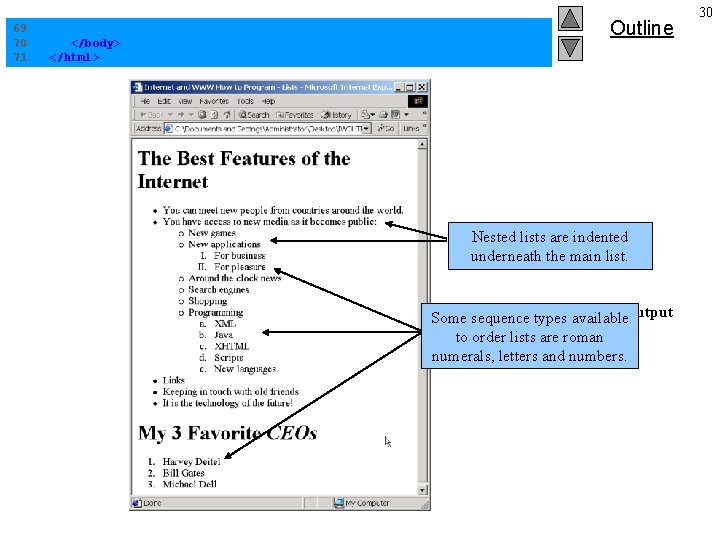
69 70 71 </body> </html> Outline Nested lists are indented underneath the. List. html main list. Program Some sequence types available. Output to order lists are roman numerals, letters and numbers. 30
- Slides: 30