
1 Electronic Filing System EFS EFS Overview 2
- Slides: 14
1 Electronic Filing System (EFS) EFS Overview
2 EFS Overview EFS General Overview EFS Software Components
3 EFS Concepts EFS facilitates electronic authoring and secure submission of patent application documents to the USPTO via the Internet.
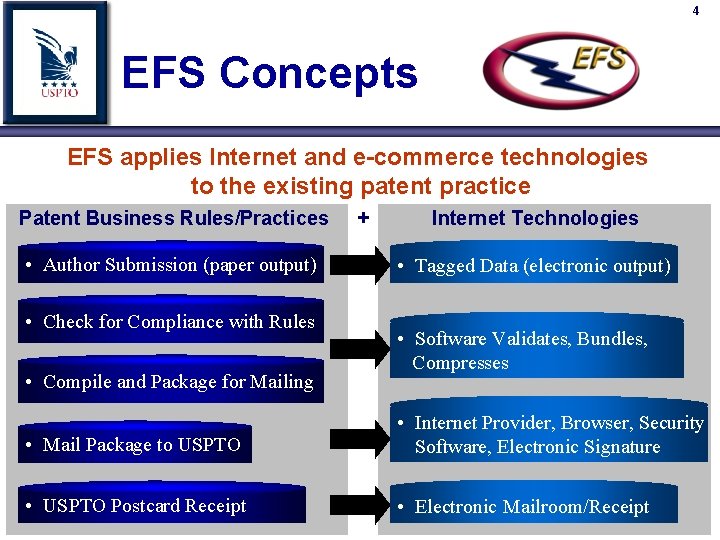
4 EFS Concepts EFS applies Internet and e-commerce technologies to the existing patent practice Patent Business Rules/Practices + Internet Technologies • Author Submission (paper output) • Check for Compliance with Rules • Compile and Package for Mailing • Tagged Data (electronic output) • Software Validates, Bundles, Compresses • Mail Package to USPTO • Internet Provider, Browser, Security Software, Electronic Signature • USPTO Postcard Receipt • Electronic Mailroom/Receipt
5 EFS – Customer Benefits · Reduces mailing fees and inconvenience. · Flexibility and convenience when filing: ü 24 hours a day, 7 days a week ü From almost anywhere, over the Internet · Facilitate e-filing and accuracy for Pre-Grant Publication. · Automatic validation of EFS submissions for completeness and USPTO business rules. · Immediate Electronic Acknowledgement Receipt: ü No delay while waiting for Postcard. ü Use Application Number for same day paper filings. · Rapid assignment recordation and notification. · Automatic paragraph and claim numbering facilitates future amendments.
6 EFS – Software Release Several EFS releases phase-in electronic filing of various types of patent application submissions. EFS phases allow USPTO to gather feedback, test, and improve each successive release. October 2000 EFS release, which incorporated EFS Pilot release feedback, was the first EFS production release of software that supports: n New Utility n Pre-Grant Publication n CRF Biosequence Submissions
7 EFS – Software Release December 2001 added the following: Ability to file Provisionals. Ability to file Multiple Assignments. - With New Utility, Provisional, or as a separate filing). Improved network compatibility. Ability to attach Appendix Data (e. g. computer program listings, large tables) as described in the Specification. Spring 2002 Ability to file electronic Information Disclosure Statements (e. IDS). October 2002 Lengthen the fee code field – transparent to users.
8 EFS – Software Release April 2003 Complete Redesign of e. PAVE to do the following: Comply with the international e-filing standards outlined in the Annex F of the Patent Cooperation Treaty (PCT). For additional information regarding these international e-filing standards, please refer to World Intellectual Property Organization (WIPO) Legal framework and technical standard – DTD online documentation (December 20, 2001) website: http: //pcteasy. wipo. int/efiling_standards/schema. DOCS/schema. Docs. htm XPORT XML Specification Translation Tool. Look & feel of GUI now more user-friendly. Low-Level PKI Certificate can now be used to submit New Utility & Provisional applications. Only the e-mail address is required.
9 EFS – Software & Manuals EFS Software & Technical Documentation Download Off of EFS Website (www. uspto. gov, Click on File Patents) If Download not possible, contact EBC for CD. Note: Check EFS website for periodic software and documentation updates.
10 EFS – 4 Steps 1. Preparation É Gather the application documents. 2. Authoring É Create electronic application components for submission to the USPTO. 3. Viewing É Display the application in standard Web browser for attorney or applicant review 4. Submission É Package and encrypt the application components for transmission to the USPTO over the Internet
11 EFS – Preparation Step Convert Image Files To TIFF Format Drawings, inline graphics, documents 300 dpi Black & white (no color or grayscale) Group 4 compression Maximum Page Size of 8. 5” x 11” Note: Image File include drawings, tables, complex work units (mathematical/chemical), official signed documents.
12 EFS – Authoring Step Customers use USPTO-provided software to: n Create structured, e. Xtensible Mark-up Language (XML) tagged documents using USPTO-customized tool for use with the MS Word commercial product. n Create transmittal, fee, and application data sheet information as structured, XML tagged documents using USPTO-provided Requires software. no user knowledge of submission XML, as software formats
13 EFS – Viewing Step Electronic files are viewed in standard Web browser. USPTO standard stylesheet controls display format. É Attorney or applicant certifies that this is the version which was reviewed and submitted É User display and printout are identical to USPTO display and printout with same stylesheet. É Electronic format, as displayed and printed at USPTO, becomes legal record of filing.
14 EFS – Submission Step electronic Packaging And Validation Engine (e. PAVE): É User-friendly Graphic User Interface (GUI). É Collects transmittal, fee, bibliographic, and publication information. É Allows easy attachment of previously created electronic documents such as XML and TIFF files. É Automatically bundles, compresses, digitally signs, and securely transmits the submission to the USPTO via the Internet (using PKI technology). É Immediate return of electronic Acknowledgement Receipt with Application Number and Confirmation Number (New Utility & Provisional Applications).