
1 CS 103 Guest Lecture Number Systems Conversion
1 CS 103 Guest Lecture Number Systems & Conversion Bitwise Logic Operations
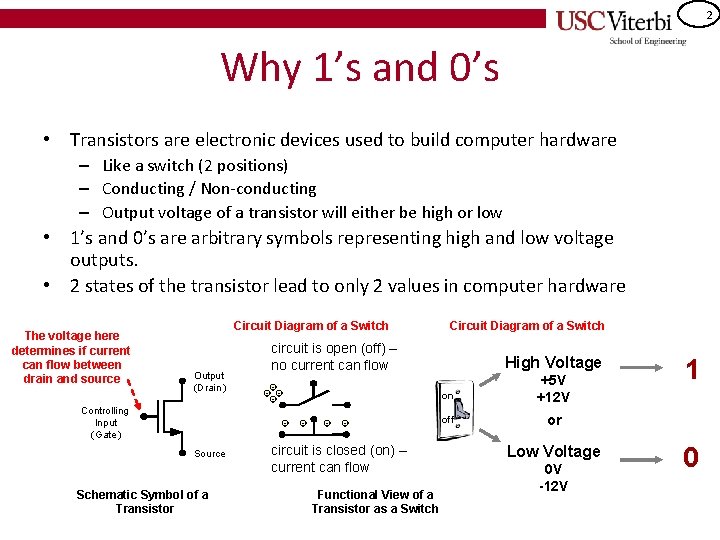
2 Why 1’s and 0’s • Transistors are electronic devices used to build computer hardware – Like a switch (2 positions) – Conducting / Non-conducting – Output voltage of a transistor will either be high or low • 1’s and 0’s are arbitrary symbols representing high and low voltage outputs. • 2 states of the transistor lead to only 2 values in computer hardware The voltage here determines if current can flow between drain and source Circuit Diagram of a Switch Output (Drain ) Controlling Input (Gate ) circuit is open (off) – no current can flow - - Source Schematic Symbol of a Transistor Circuit Diagram of a Switch - - - circuit is closed (on) – current can flow Functional View of a Transistor as a Switch High Voltage on +5 V +12 V off or Low Voltage 0 V -12 V 1 0
3 POSITIONAL NUMBER SYSTEMS
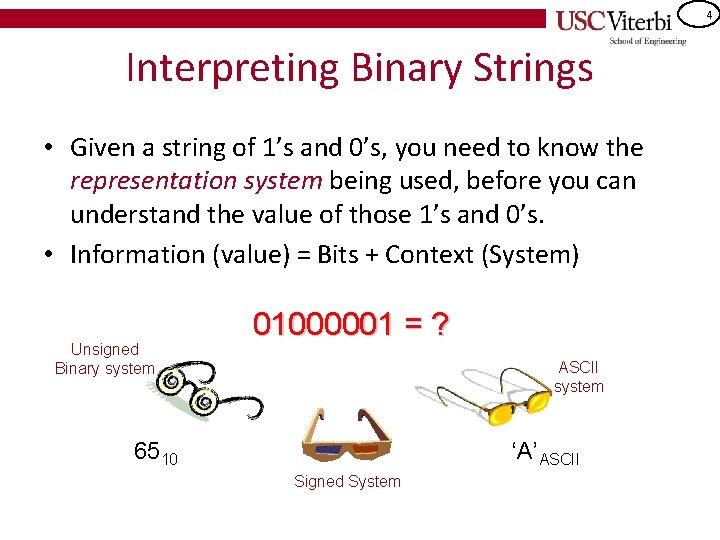
4 Interpreting Binary Strings • Given a string of 1’s and 0’s, you need to know the representation system being used, before you can understand the value of those 1’s and 0’s. • Information (value) = Bits + Context (System) Unsigned Binary system 01000001 = ? ASCII system 6510 ‘A’ASCII Signed System
5 Binary Number System • Humans use the decimal number system – Based on number 10 – 10 digits: [0 -9] • Because computer hardware uses digital signals with 2 states, computers use the binary number system – Based on number 2 – 2 binary digits (a. k. a bits): [0, 1]
6 Number Systems • Number systems consist of 1. A base (radix) r 2. r coefficients [0 to r-1] • Human System: Decimal (Base 10): 0, 1, 2, 3, 4, 5, 6, 7, 8, 9 • Computer System: Binary (Base 2): 0, 1 • Human systems for working with computer systems (shorthand for human to read/write binary) – Octal (Base 8): 0, 1, 2, 3, 4, 5, 6, 7 – Hexadecimal (Base 16): 0 -9, A, B, C, D, E, F (A thru F = 10 thru 15)
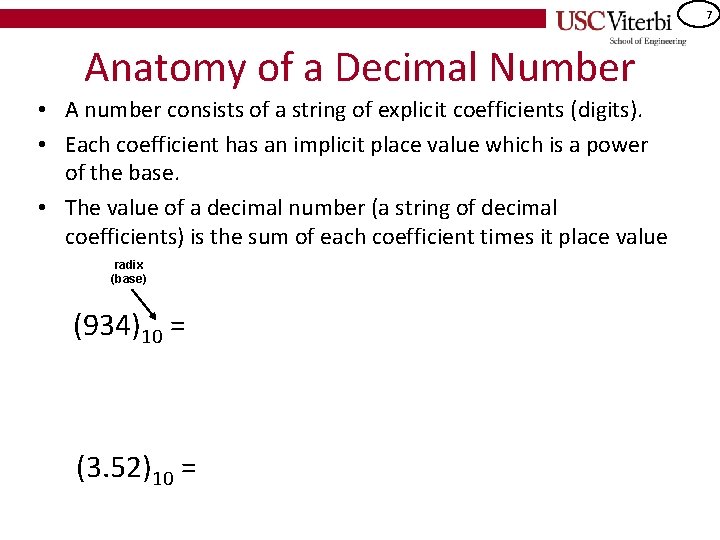
7 Anatomy of a Decimal Number • A number consists of a string of explicit coefficients (digits). • Each coefficient has an implicit place value which is a power of the base. • The value of a decimal number (a string of decimal coefficients) is the sum of each coefficient times it place value radix (base) (934)10 = (3. 52)10 =
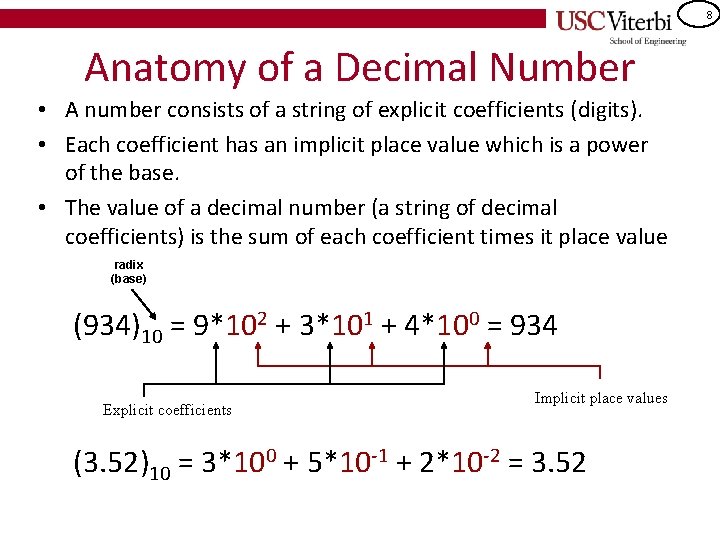
8 Anatomy of a Decimal Number • A number consists of a string of explicit coefficients (digits). • Each coefficient has an implicit place value which is a power of the base. • The value of a decimal number (a string of decimal coefficients) is the sum of each coefficient times it place value radix (base) (934)10 = 9*102 + 3*101 + 4*100 = 934 Explicit coefficients Implicit place values (3. 52)10 = 3*100 + 5*10 -1 + 2*10 -2 = 3. 52
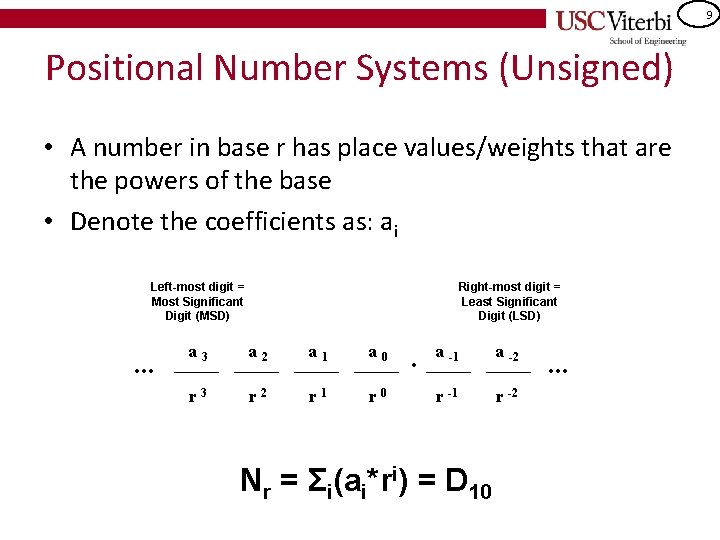
9 Positional Number Systems (Unsigned) • A number in base r has place values/weights that are the powers of the base • Denote the coefficients as: ai Left-most digit = Most Significant Digit (MSD) . . . Right-most digit = Least Significant Digit (LSD) a 3 a 2 a 1 a 0 r 3 r 2 r 1 r 0 . a -1 a -2 r -1 r -2 Nr = Σi(ai*ri) = D 10 . . .
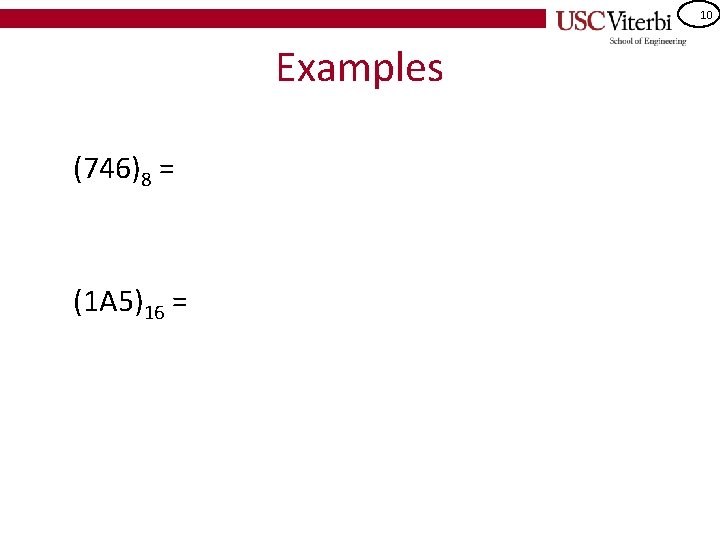
10 Examples (746)8 = (1 A 5)16 =
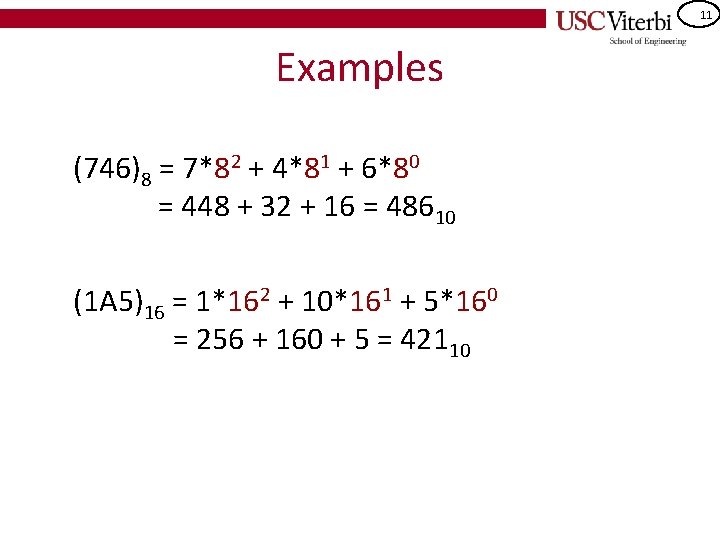
11 Examples (746)8 = 7*82 + 4*81 + 6*80 = 448 + 32 + 16 = 48610 (1 A 5)16 = 1*162 + 10*161 + 5*160 = 256 + 160 + 5 = 42110
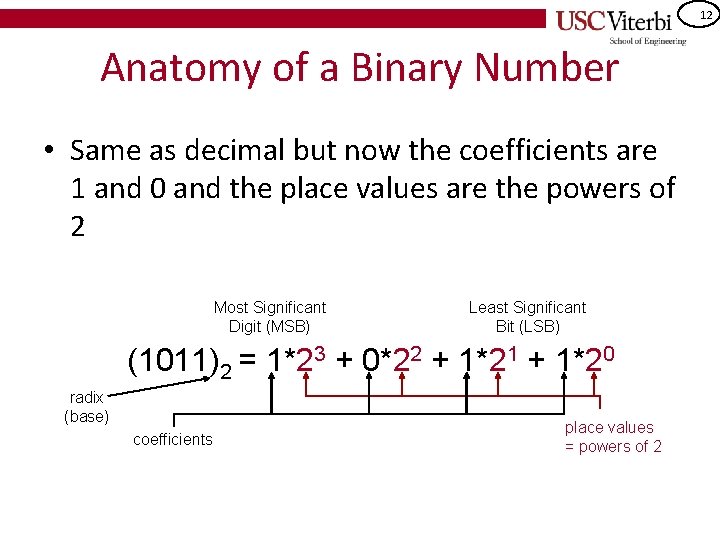
12 Anatomy of a Binary Number • Same as decimal but now the coefficients are 1 and 0 and the place values are the powers of 2 Most Significant Digit (MSB) Least Significant Bit (LSB) (1011)2 = 1*23 + 0*22 + 1*21 + 1*20 radix (base) coefficients place values = powers of 2

13 Binary Examples (1001. 1)2 = (10110001)2 =
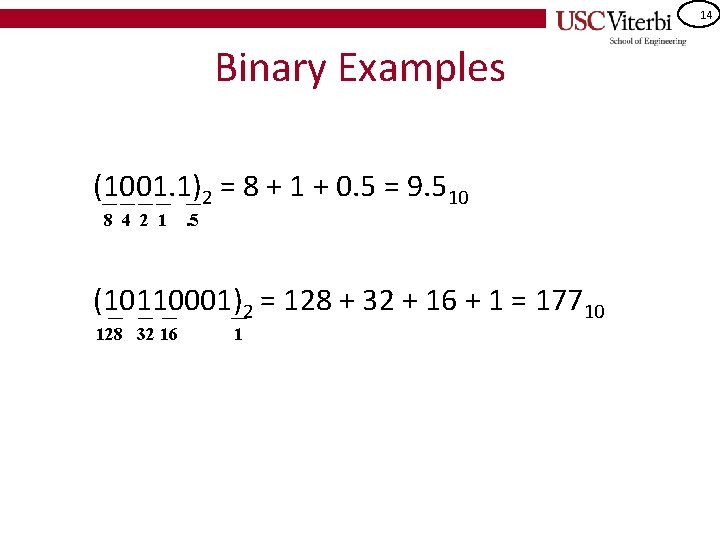
14 Binary Examples (1001. 1)2 = 8 + 1 + 0. 5 = 9. 510 8 4 2 1 . 5 (10110001)2 = 128 + 32 + 16 + 1 = 17710 128 32 16 1
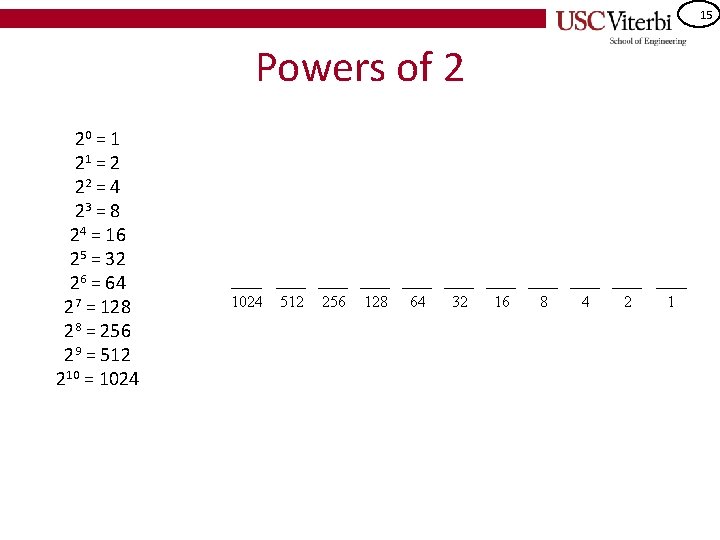
15 Powers of 2 20 = 1 21 = 2 22 = 4 23 = 8 24 = 16 25 = 32 26 = 64 27 = 128 28 = 256 29 = 512 210 = 1024 512 256 128 64 32 16 8 4 2 1
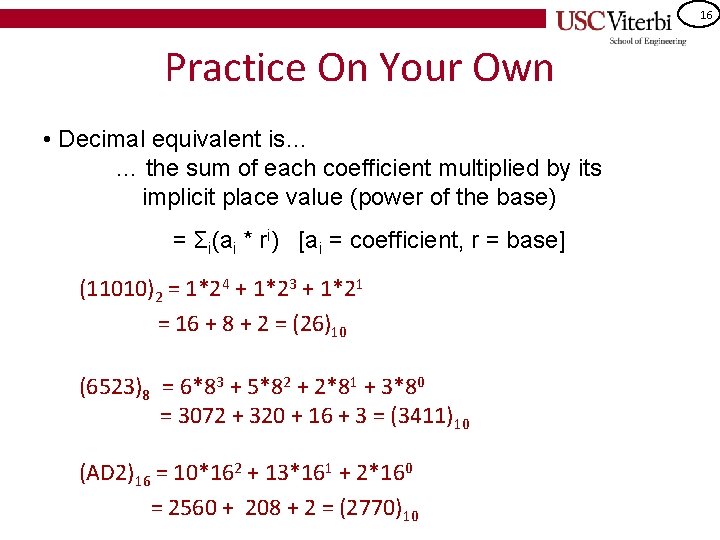
16 Practice On Your Own • Decimal equivalent is… … the sum of each coefficient multiplied by its implicit place value (power of the base) = Σi(ai * ri) [ai = coefficient, r = base] (11010)2 = 1*24 + 1*23 + 1*21 = 16 + 8 + 2 = (26)10 (6523)8 = 6*83 + 5*82 + 2*81 + 3*80 = 3072 + 320 + 16 + 3 = (3411)10 (AD 2)16 = 10*162 + 13*161 + 2*160 = 2560 + 208 + 2 = (2770)10
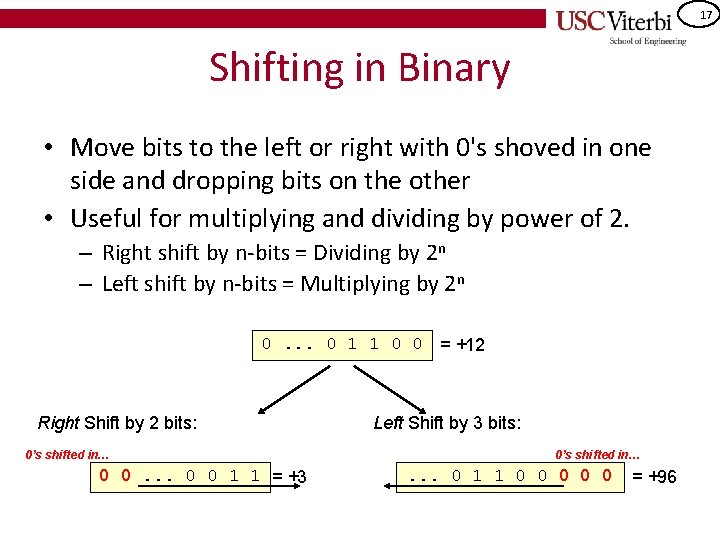
17 Shifting in Binary • Move bits to the left or right with 0's shoved in one side and dropping bits on the other • Useful for multiplying and dividing by power of 2. – Right shift by n-bits = Dividing by 2 n – Left shift by n-bits = Multiplying by 2 n 0. . . 0 1 1 0 0 = +12 Right Shift by 2 bits: 0’s shifted in… 0 0. . . 0 0 1 1 = +3 Left Shift by 3 bits: 0’s shifted in… . . . 0 1 1 0 0 0 = +96
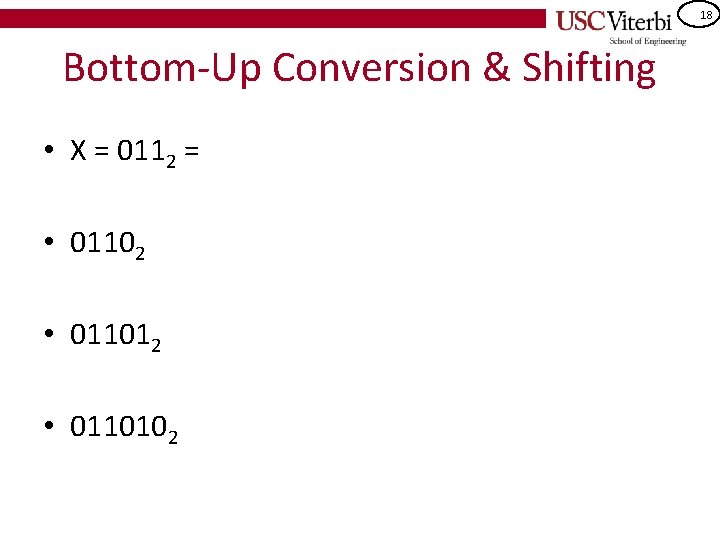
18 Bottom-Up Conversion & Shifting • X = 0112 = • 01102 • 0110102
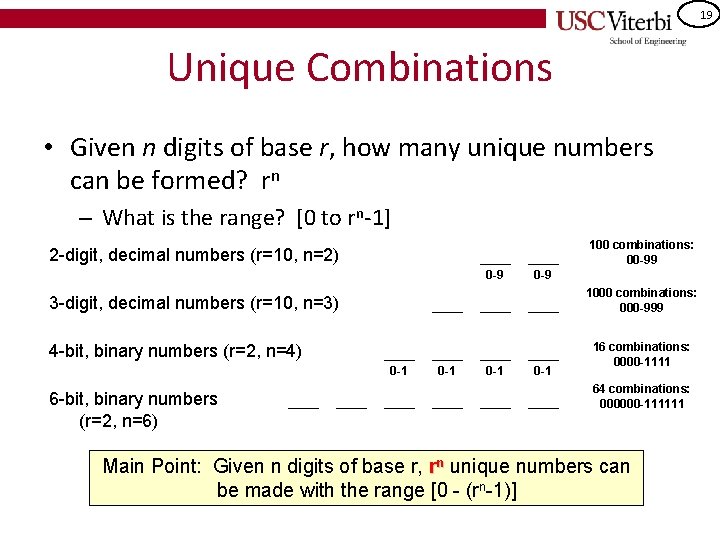
19 Unique Combinations • Given n digits of base r, how many unique numbers can be formed? rn – What is the range? [0 to rn-1] 100 combinations: 00 -99 2 -digit, decimal numbers (r=10, n=2) 0 -9 1000 combinations: 000 -999 3 -digit, decimal numbers (r=10, n=3) 4 -bit, binary numbers (r=2, n=4) 0 -1 6 -bit, binary numbers (r=2, n=6) 0 -1 0 -1 16 combinations: 0000 -1111 64 combinations: 000000 -111111 Main Point: Given n digits of base r, rn unique numbers can be made with the range [0 - (rn-1)]
20 CONVERSION FROM DECIMAL TO OTHER BASE
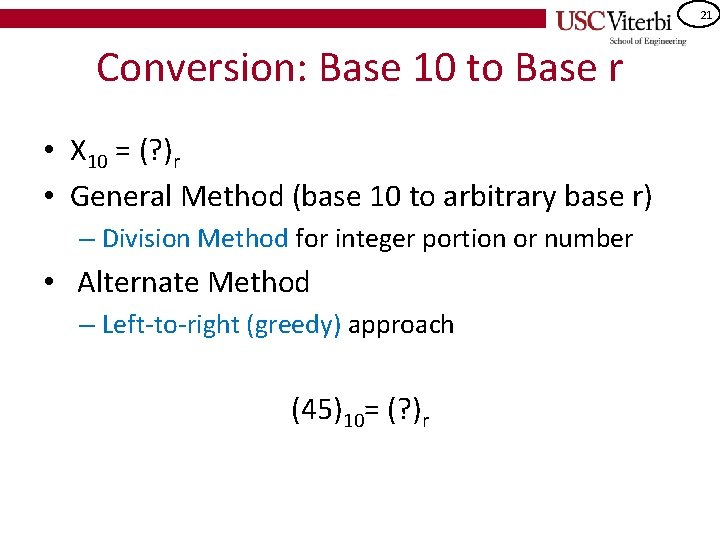
21 Conversion: Base 10 to Base r • X 10 = (? )r • General Method (base 10 to arbitrary base r) – Division Method for integer portion or number • Alternate Method – Left-to-right (greedy) approach (45)10= (? )r
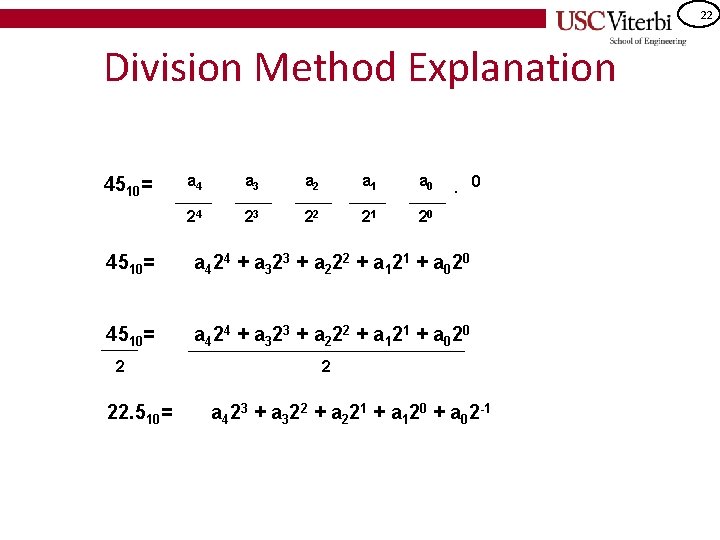
22 Division Method Explanation 4510= a 4 a 3 a 2 a 1 a 0 24 23 22 21 20 . 4510= a 4 24 + a 3 23 + a 2 22 + a 1 21 + a 0 20 2 22. 510= 0 2 a 423 + a 322 + a 221 + a 120 + a 02 -1
23 Binary Division Method Example 4510 = (? ? )2
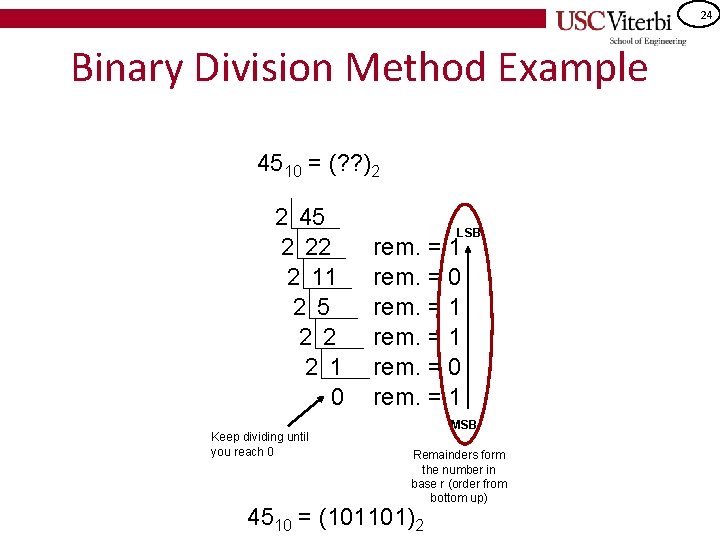
24 Binary Division Method Example 4510 = (? ? )2 2 45 2 22 2 11 2 5 2 2 2 1 0 Keep dividing until you reach 0 LSB rem. = 1 rem. = 0 rem. = 1 MSB Remainders form the number in base r (order from bottom up) 4510 = (101101)2
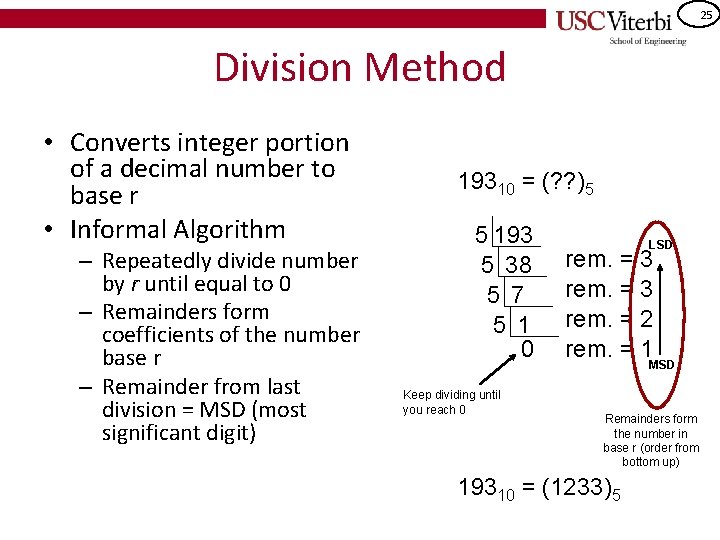
25 Division Method • Converts integer portion of a decimal number to base r • Informal Algorithm – Repeatedly divide number by r until equal to 0 – Remainders form coefficients of the number base r – Remainder from last division = MSD (most significant digit) 19310 = (? ? )5 5 193 5 38 5 7 5 1 0 Keep dividing until you reach 0 LSD rem. = 3 rem. = 2 rem. = 1 MSD Remainders form the number in base r (order from bottom up) 19310 = (1233)5
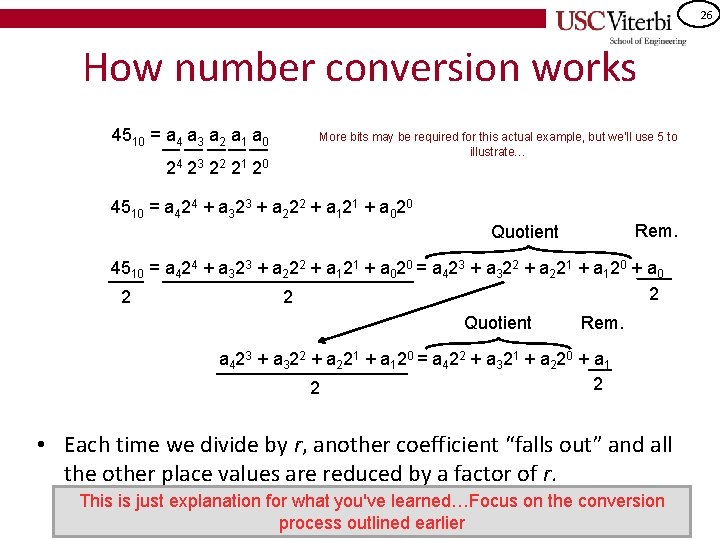
26 How number conversion works 4510 = a 4 a 3 a 2 a 1 a 0 24 2 3 2 2 2 1 2 0 More bits may be required for this actual example, but we'll use 5 to illustrate… 4510 = a 424 + a 323 + a 222 + a 121 + a 020 Rem. Quotient 4510 = a 424 + a 323 + a 222 + a 121 + a 020 = a 423 + a 322 + a 221 + a 120 + a 0 2 2 2 Quotient Rem. a 4 23 + a 3 22 + a 2 21 + a 1 20 = a 4 22 + a 3 21 + a 2 20 + a 1 2 2 • Each time we divide by r, another coefficient “falls out” and all the other place values are reduced by a factor of r. This is just explanation for what you've learned…Focus on the conversion process outlined earlier
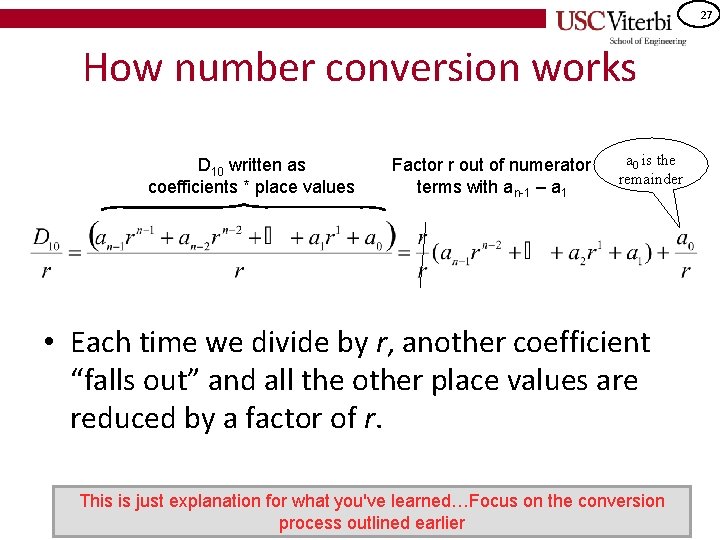
27 How number conversion works D 10 written as coefficients * place values Factor r out of numerator terms with an-1 – a 1 a 0 is the remainder • Each time we divide by r, another coefficient “falls out” and all the other place values are reduced by a factor of r. This is just explanation for what you've learned…Focus on the conversion process outlined earlier
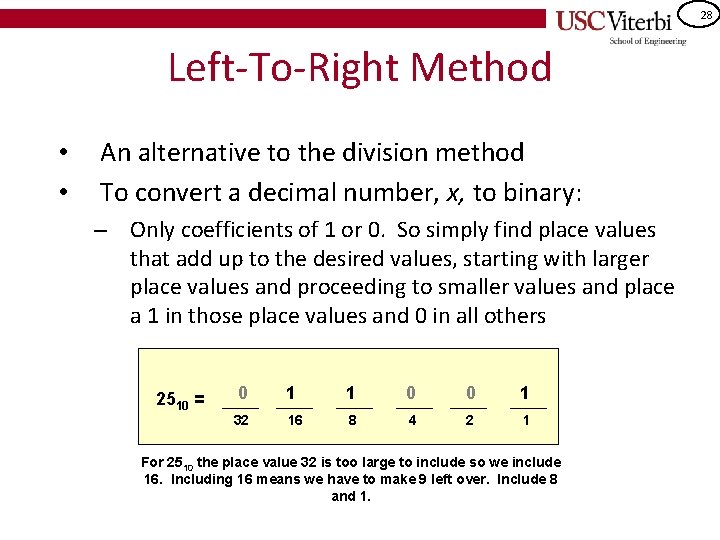
28 Left-To-Right Method • • An alternative to the division method To convert a decimal number, x, to binary: – Only coefficients of 1 or 0. So simply find place values that add up to the desired values, starting with larger place values and proceeding to smaller values and place a 1 in those place values and 0 in all others 2510 = 0 32 1 1 0 0 1 16 8 4 2 1 For 2510 the place value 32 is too large to include so we include 16. Including 16 means we have to make 9 left over. Include 8 and 1.
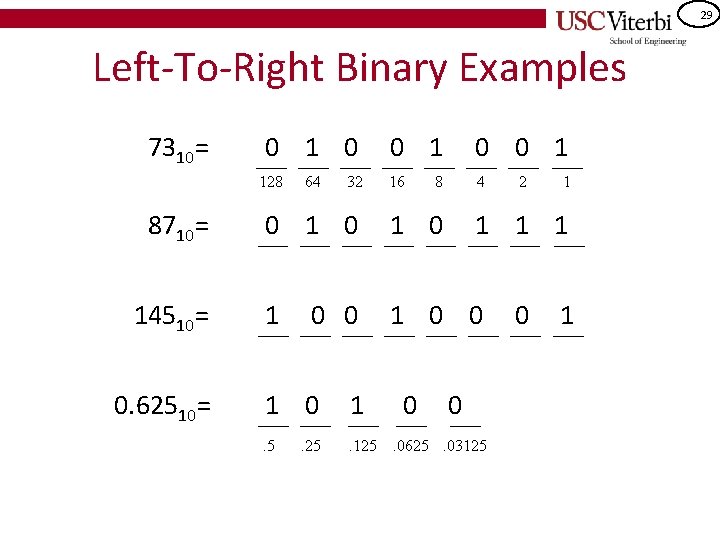
29 Left-To-Right Binary Examples 7310= 0 128 8710= 14510= 0. 62510= 64 32 0 1 0 0 1 16 4 8 0 1 0 1 1 0 0 1 0 1 . 5 . 125 . 25 0 2 1 1 0 . 0625. 03125 0 1
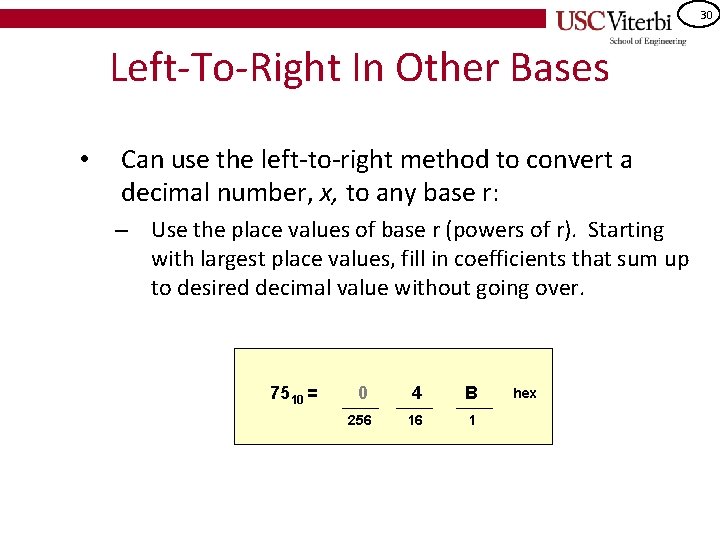
30 Left-To-Right In Other Bases • Can use the left-to-right method to convert a decimal number, x, to any base r: – Use the place values of base r (powers of r). Starting with largest place values, fill in coefficients that sum up to desired decimal value without going over. 7510 = 0 4 B 256 16 1 hex
31 Hexadecimal and Octal SHORTHAND FOR BINARY
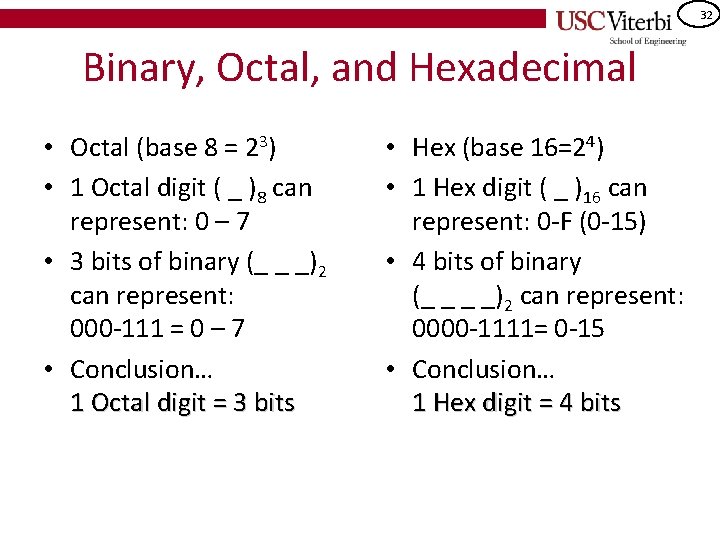
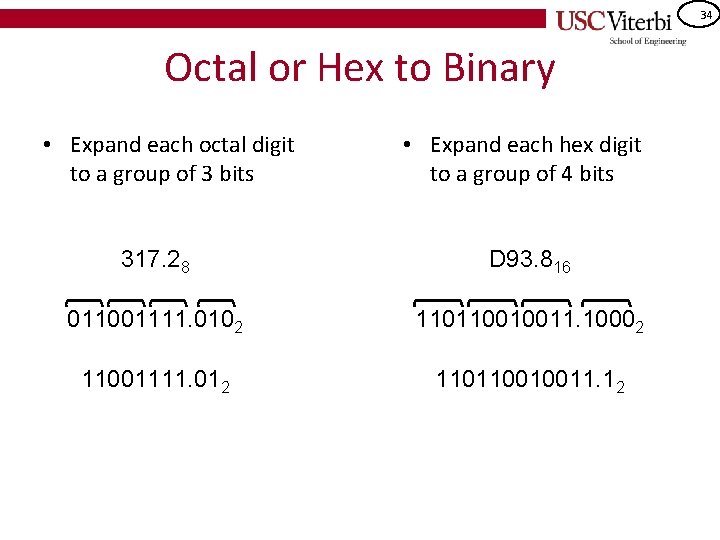
32 Binary, Octal, and Hexadecimal • Octal (base 8 = 23) • 1 Octal digit ( _ )8 can represent: 0 – 7 • 3 bits of binary (_ _ _)2 can represent: 000 -111 = 0 – 7 • Conclusion… 1 Octal digit = 3 bits • Hex (base 16=24) • 1 Hex digit ( _ )16 can represent: 0 -F (0 -15) • 4 bits of binary (_ _ _ _)2 can represent: 0000 -1111= 0 -15 • Conclusion… 1 Hex digit = 4 bits
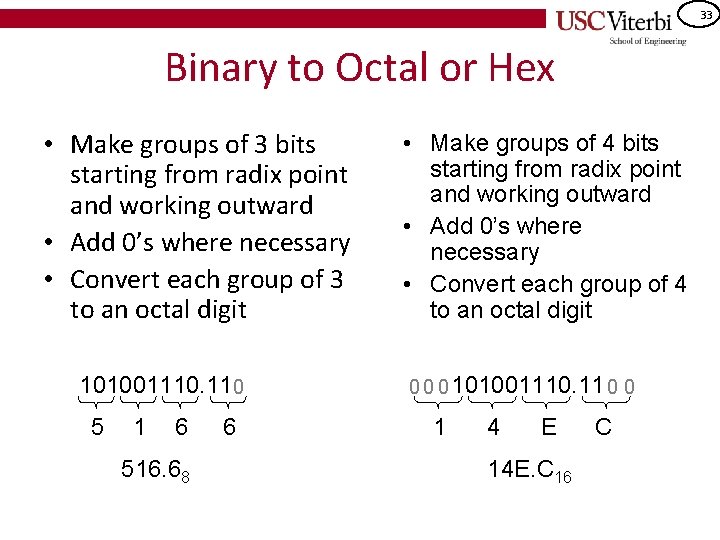
33 Binary to Octal or Hex • Make groups of 3 bits starting from radix point and working outward • Add 0’s where necessary • Convert each group of 3 to an octal digit 101001110. 110 5 1 6 516. 68 6 • Make groups of 4 bits starting from radix point and working outward • Add 0’s where necessary • Convert each group of 4 to an octal digit 0 0 0 101001110. 11 0 0 1 4 E 14 E. C 16 C
34 Octal or Hex to Binary • Expand each octal digit to a group of 3 bits • Expand each hex digit to a group of 4 bits 317. 28 D 93. 816 011001111. 0102 110110010011. 10002 11001111. 012 110110010011. 12
35 LOGIC OPERATIONS
36 Bitwise Logical Operations X F 1 0 0 1 F = X or ~X B 1 B 2 F 0 0 1 1 1 0&x=0 1&x=x x&x=x Pass Force '0' B 2 B 1 B 2 F 0 0 1 1 1 0|x=x 1|x=1 x|x=x XOR B 2 Y B 1 B 2 F 0 0 1 1 1 0 0^x=x 1^x=~x x^x=0 FZ Invert Pass AND B 2 OR Force Pass '1' B 1 X B 1
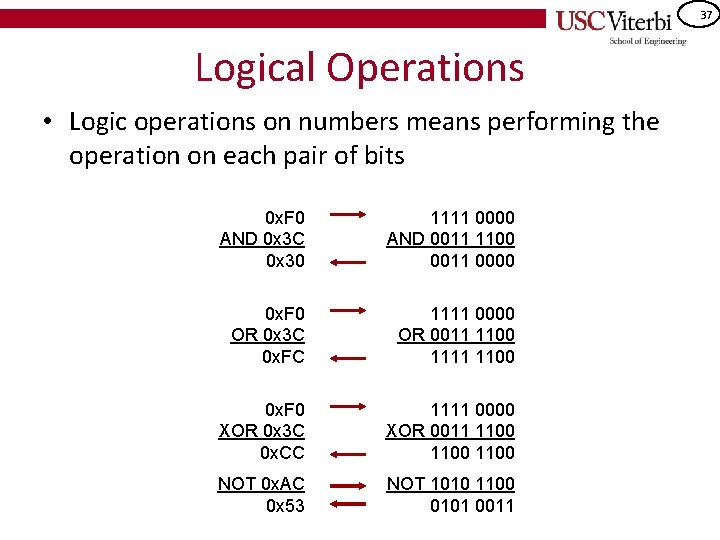
37 Logical Operations • Logic operations on numbers means performing the operation on each pair of bits 0 x. F 0 AND 0 x 3 C 0 x 30 1111 0000 AND 0011 1100 0011 0000 0 x. F 0 OR 0 x 3 C 0 x. FC 1111 0000 OR 0011 1100 1111 1100 0 x. F 0 XOR 0 x 3 C 0 x. CC 1111 0000 XOR 0011 1100 NOT 0 x. AC 0 x 53 NOT 1010 1100 0101 0011
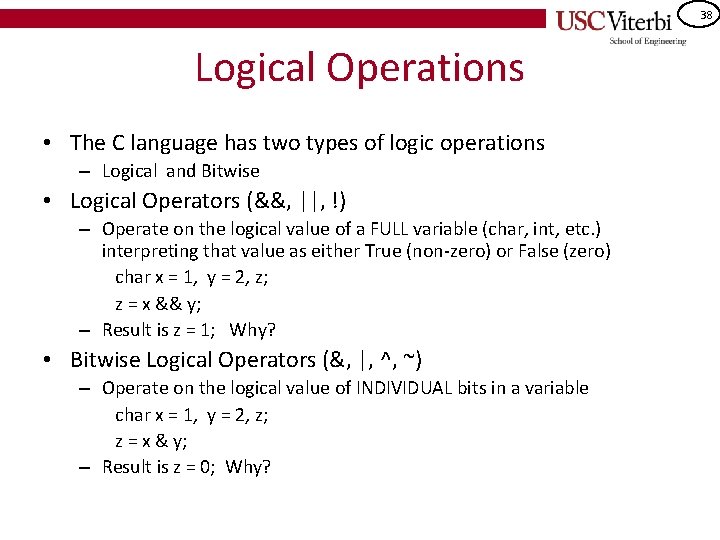
38 Logical Operations • The C language has two types of logic operations – Logical and Bitwise • Logical Operators (&&, ||, !) – Operate on the logical value of a FULL variable (char, int, etc. ) interpreting that value as either True (non-zero) or False (zero) char x = 1, y = 2, z; z = x && y; – Result is z = 1; Why? • Bitwise Logical Operators (&, |, ^, ~) – Operate on the logical value of INDIVIDUAL bits in a variable char x = 1, y = 2, z; z = x & y; – Result is z = 0; Why?
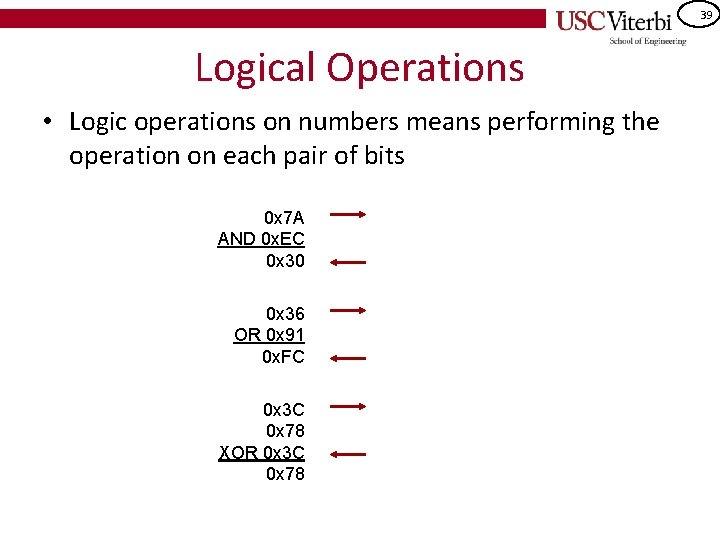
39 Logical Operations • Logic operations on numbers means performing the operation on each pair of bits 0 x 7 A AND 0 x. EC 0 x 30 0 x 36 OR 0 x 91 0 x. FC 0 x 3 C 0 x 78 XOR 0 x 3 C 0 x 78
40 Look Toward LFSR PA • One of your next PA's will utilize the bitwise XOR operator and leverage the fact that: –a^b^a = b • Proof:
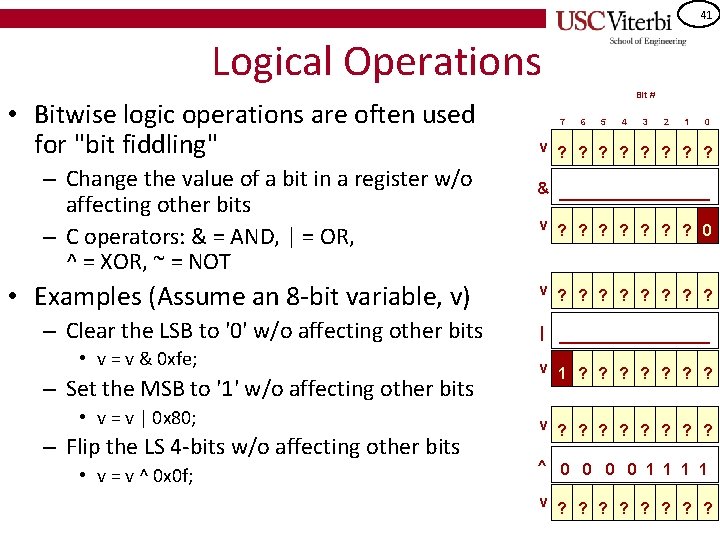
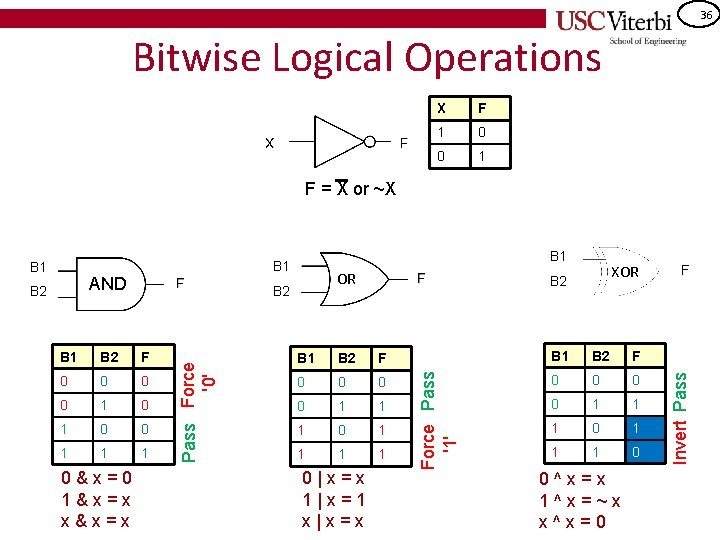
41 Logical Operations • Bitwise logic operations are often used for "bit fiddling" – Change the value of a bit in a register w/o affecting other bits – C operators: & = AND, | = OR, ^ = XOR, ~ = NOT • Examples (Assume an 8 -bit variable, v) – Clear the LSB to '0' w/o affecting other bits • v = v & 0 xfe; – Set the MSB to '1' w/o affecting other bits • v = v | 0 x 80; – Flip the LS 4 -bits w/o affecting other bits • v = v ^ 0 x 0 f; Bit # 7 6 5 4 3 2 1 0 v ? ? ? ? & _________ v ? ? ? ? 0 v ? ? ? ? | _________ v 1 ? ? ? ? v ? ? ? ? ^ 0 0 1 1 v ? ? ? ?

42 Exercises for Practice • Q 1 -Q 15 on the posted worksheet – http: //bits. usc. edu/files/cs 103/coursework/Numb er. Sys. pdf
- Slides: 42