
1 Chapter 1 Introduction to Databases 2 Chapter
1 Chapter 1 Introduction to Databases
2 Chapter 1 - Objectives • • • Some common uses of database systems. Characteristics of file-based systems. Problems with file-based approach. Meaning of the term database. Meaning of the term Database Management System (DBMS). Typical functions of a DBMS. Major components of the DBMS environment. Personnel involved in the DBMS environment. History of the development of DBMSs. Advantages and disadvantages of DBMSs.
3 Examples of Database Applications • • Purchases from the supermarket Purchases using your credit card Booking a holiday at the travel agents Using the local library Taking out insurance Renting a video Using the Internet Studying at university
4 File-Based Systems • Collection of application programs that perform services for the end users (e. g. reports). • Each program defines and manages its own data.

5 File-Based Processing

6 Limitations of File-Based Approach • Separation and isolation of data ▫ Each program maintains its own set of data. ▫ Users of one program may be unaware of potentially useful data held by other programs. • Duplication of data ▫ Same data is held by different programs. ▫ Wasted space and potentially different values and/or different formats for the same item.
7 Limitations of File-Based Approach • Data dependence ▫ File structure is defined in the program code. • Incompatible file formats ▫ Programs are written in different languages, and so cannot easily access each other’s files. • Fixed Queries/Proliferation of application programs ▫ Programs are written to satisfy particular functions. ▫ Any new requirement needs a new program.
8 Database Approach • Arose because: ▫ Definition of data was embedded in application programs, rather than being stored separately and independently. ▫ No control over access and manipulation of data beyond that imposed by application programs. • Result: ▫ the database and Database Management System (DBMS).
9 Database • Shared collection of logically related data (and a description of this data), designed to meet the information needs of an organization. • System catalog (metadata) provides description of data to enable program–data independence. • Logically related data comprises entities, attributes, and relationships of an organization’s information.
10 Database Management System (DBMS) • A software system that enables users to define, create, maintain, and control access to the database. • (Database) application program: a computer program that interacts with database by issuing an appropriate request (SQL statement) to the DBMS.
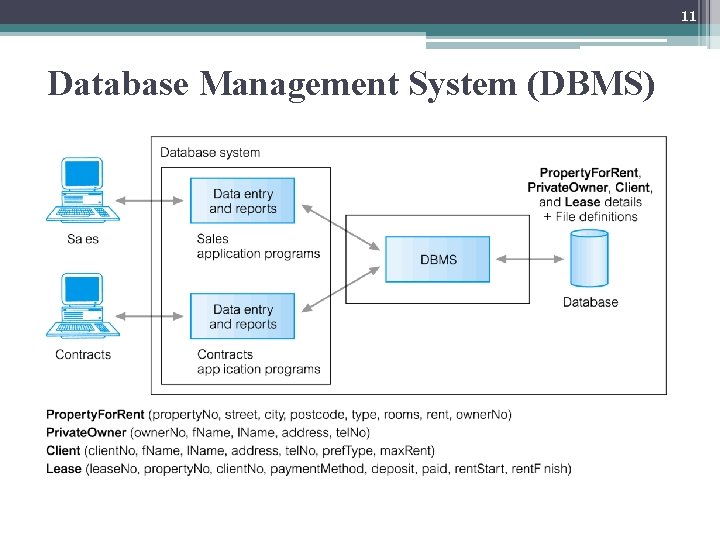
11 Database Management System (DBMS)
12 Database Approach • Data definition language (DDL). ▫ Permits specification of data types, structures and any data constraints. ▫ All specifications are stored in the database. • Data manipulation language (DML). ▫ General enquiry facility (query language) of the data.
13 Database Approach • Controlled access to database may include: ▫ ▫ ▫ a security system an integrity system a concurrency control system a recovery control system a user-accessible catalog.
14 Views • Allows each user to have his or her own view of the database. • A view is essentially some subset of the database.
15 Views - Benefits • Reduce complexity • Provide a level of security • Provide a mechanism to customize the appearance of the database • Present a consistent, unchanging picture of the structure of the database, even if the underlying database is changed
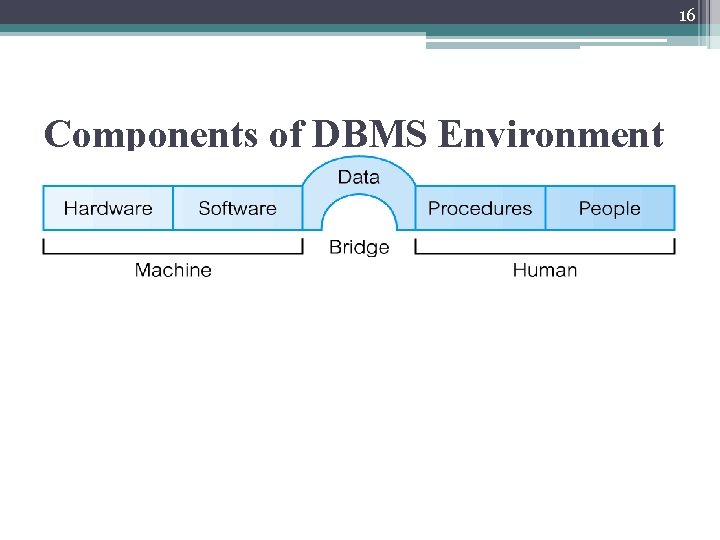
16 Components of DBMS Environment
17 Components of DBMS Environment • Hardware ▫ Can range from a PC to a network of computers. • Software ▫ DBMS, operating system, network software (if necessary) and also the application programs. • Data ▫ Used by the organization and a description of this data called the schema.
18 Components of DBMS Environment • Procedures ▫ Instructions and rules that should be applied to the design and use of the database and DBMS. • People ▫ People involved with the system
19 Roles in the Database Environment • Data Administrator (DA) and Database Administrator (DBA) • Database Designers ▫ Logical-concerned with identifying the data ▫ Physical-decides how the logical database design is to be physically realized. • Application Programmers/developers • End Users ▫ naive users-typically unaware of the DBMS. They do not need to know anything about the database or DBMS ▫ Sophisticated-familiar with the structure of the database and the facilities offered by the DBMS
20 History of Database Systems • First-generation ▫ Hierarchical and Network • Second generation ▫ Relational • Third generation ▫ Object-Relational ▫ Object-Oriented
21 Advantages of DBMSs • Control of data redundancy • Data consistency • More information from the same amount of data • Sharing of data • Improved data integrity • Improved security • Enforcement of standards • Economy of scale
22 Advantages of DBMSs • • Balance conflicting requirements Improved data accessibility and responsiveness Increased productivity Improved maintenance through data independence • Increased concurrency • Improved backup and recovery services
23 Disadvantages of DBMSs • • Complexity Size Cost of DBMS Additional hardware costs Cost of conversion Performance Higher impact of a failure
24 Review questions • List two other examples of database systems other than those listed. • Discuss each of the following terms: ▫ Database management system • Describe the approach taken to the handling of data in early file systems. Discuss the disadvantages of this approach. • Describe the main characteristics of the database approach and contrast it with the file-based approach. • Discuss the five components of the DBMS and discuss how they relate to each other • Discuss the three generations of DBMS.
- Slides: 24