
1 Case Study Elevator System Simulation Program Goal
![24 move toward floor button [floor door closed] press floor button [floor door open]](https://slidetodoc.com/presentation_image_h2/513efda4edd75c681760a4e33e3c5a5d/image-24.jpg "24 move toward floor button [floor door closed] press floor button [floor door open]")
![30 [floor button pressed] [elevator button pressed] set summoned to false close elevator door](https://slidetodoc.com/presentation_image_h2/513efda4edd75c681760a4e33e3c5a5d/image-30.jpg "30 [floor button pressed] [elevator button pressed] set summoned to false close elevator door")
- Slides: 84
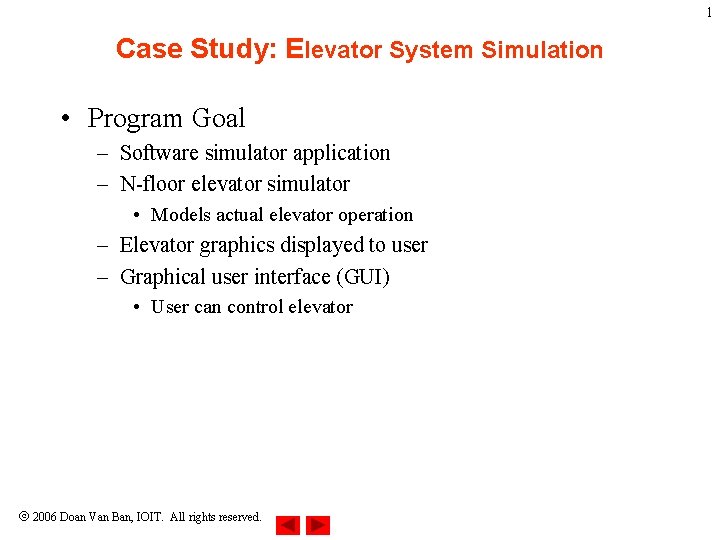
1 Case Study: Elevator System Simulation • Program Goal – Software simulator application – N-floor elevator simulator • Models actual elevator operation – Elevator graphics displayed to user – Graphical user interface (GUI) • User can control elevator 2006 Doan Van Ban, IOIT. All rights reserved.
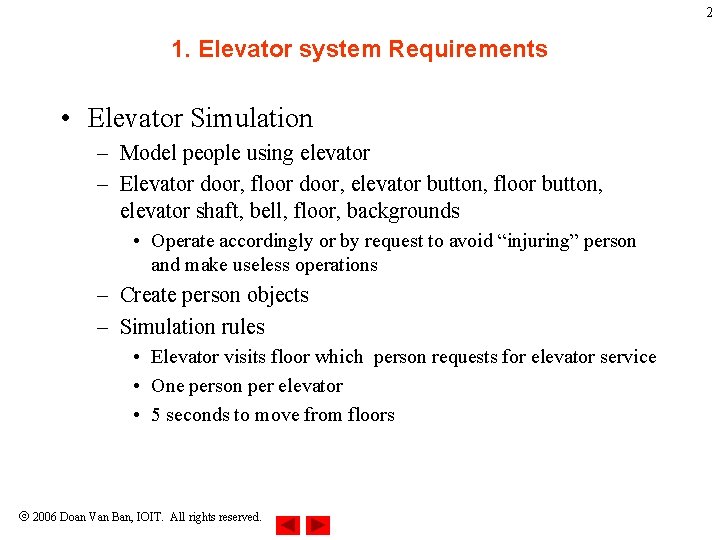
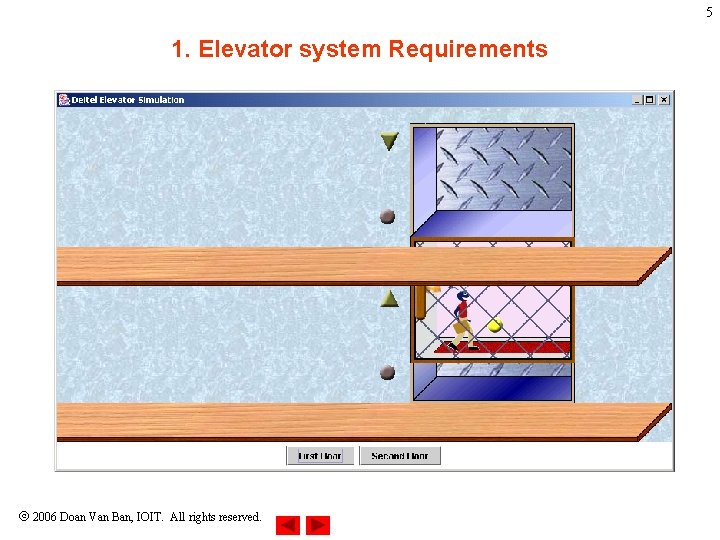
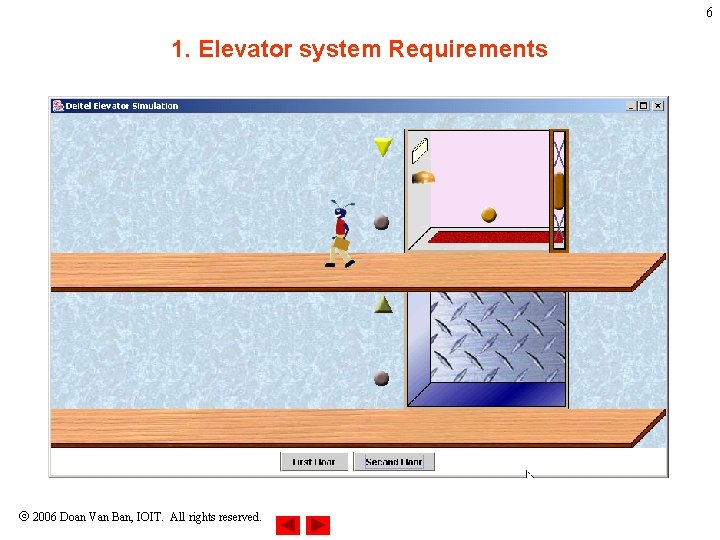
2 1. Elevator system Requirements • Elevator Simulation – Model people using elevator – Elevator door, floor door, elevator button, floor button, elevator shaft, bell, floor, backgrounds • Operate accordingly or by request to avoid “injuring” person and make useless operations – Create person objects – Simulation rules • Elevator visits floor which person requests for elevator service • One person per elevator • 5 seconds to move from floors 2006 Doan Van Ban, IOIT. All rights reserved.
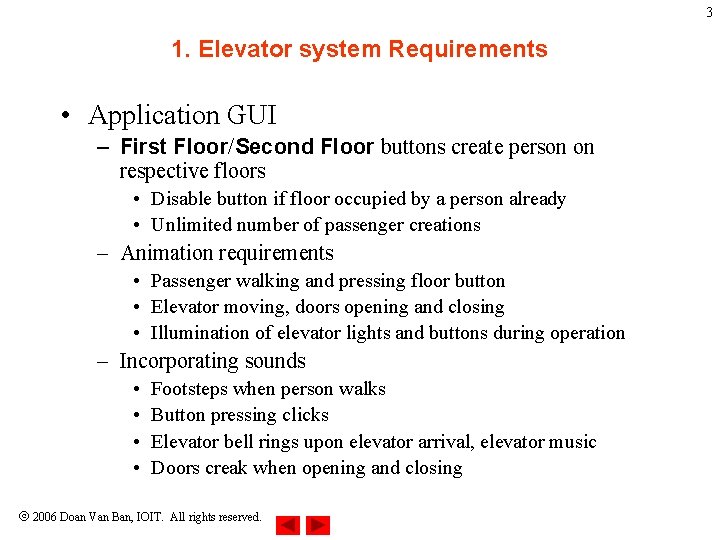
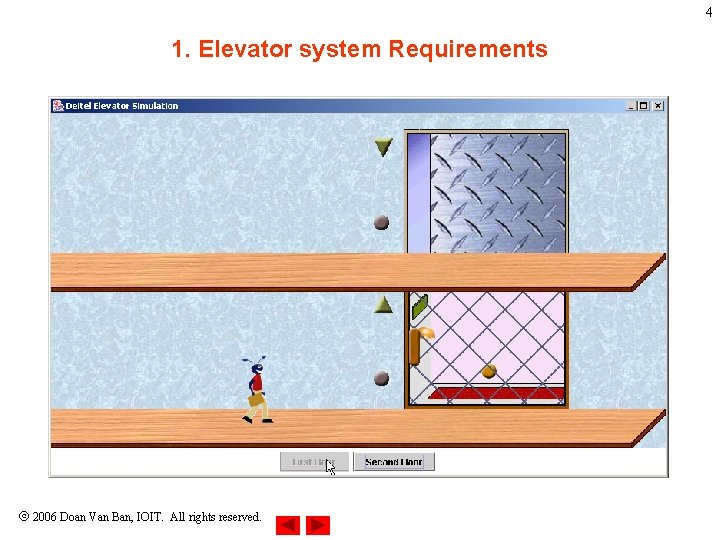
3 1. Elevator system Requirements • Application GUI – First Floor/Second Floor buttons create person on respective floors • Disable button if floor occupied by a person already • Unlimited number of passenger creations – Animation requirements • Passenger walking and pressing floor button • Elevator moving, doors opening and closing • Illumination of elevator lights and buttons during operation – Incorporating sounds • • Footsteps when person walks Button pressing clicks Elevator bell rings upon elevator arrival, elevator music Doors creak when opening and closing 2006 Doan Van Ban, IOIT. All rights reserved.
4 1. Elevator system Requirements 2006 Doan Van Ban, IOIT. All rights reserved.
5 1. Elevator system Requirements 2006 Doan Van Ban, IOIT. All rights reserved.
6 1. Elevator system Requirements 2006 Doan Van Ban, IOIT. All rights reserved.
7 2. Designing elevator system • Designing elevator system – Specified in requirements document through OOD analysis • UML • Design used to implement Java code – How system should be constructed to complete tasks • System Structure – System is a set of interactive components to solve problems • Simplified by subsystems – Simulator – Describes system’s objects and inter-relationships – System behavior describes how system changes through object interaction 2006 Doan Van Ban, IOIT. All rights reserved.
8 2. Designing elevator system • UML diagram types – System structure • Class diagram – Models classes, or “building blocks” of a system – Person, elevator, floor, etc. • Object diagrams – Snapshot (model) of system’s objects and relationships at specific point in time • Component diagrams – Model components such as graphics resources and class packages that make up the system • Deployment diagrams (not discussed) – Model hardware, memory and runtime resources 2006 Doan Van Ban, IOIT. All rights reserved.
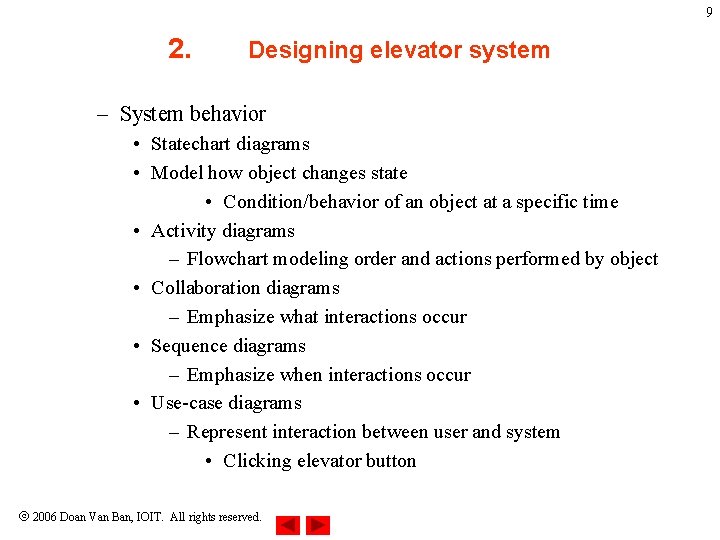
9 2. Designing elevator system – System behavior • Statechart diagrams • Model how object changes state • Condition/behavior of an object at a specific time • Activity diagrams – Flowchart modeling order and actions performed by object • Collaboration diagrams – Emphasize what interactions occur • Sequence diagrams – Emphasize when interactions occur • Use-case diagrams – Represent interaction between user and system • Clicking elevator button 2006 Doan Van Ban, IOIT. All rights reserved.
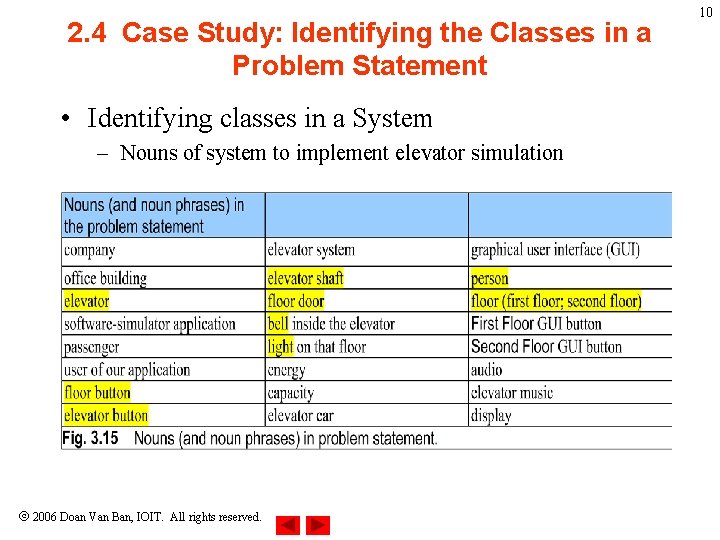
2. 4 Case Study: Identifying the Classes in a Problem Statement • Identifying classes in a System – Nouns of system to implement elevator simulation 2006 Doan Van Ban, IOIT. All rights reserved. 10
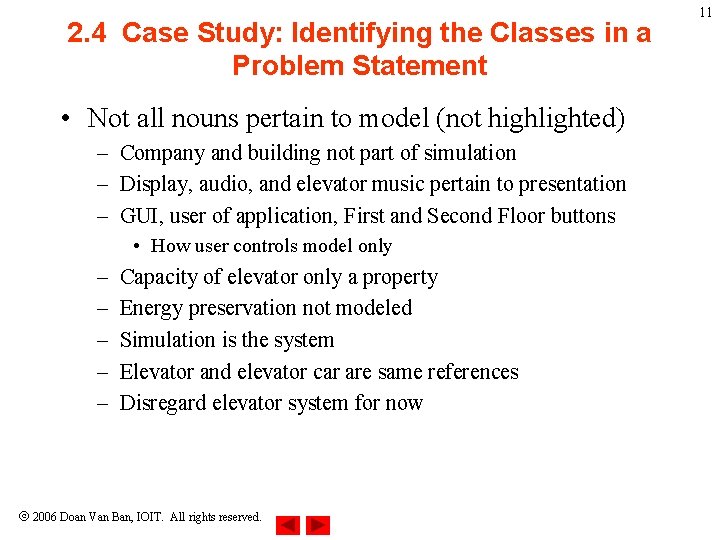
2. 4 Case Study: Identifying the Classes in a Problem Statement • Not all nouns pertain to model (not highlighted) – Company and building not part of simulation – Display, audio, and elevator music pertain to presentation – GUI, user of application, First and Second Floor buttons • How user controls model only – – – Capacity of elevator only a property Energy preservation not modeled Simulation is the system Elevator and elevator car are same references Disregard elevator system for now 2006 Doan Van Ban, IOIT. All rights reserved. 11
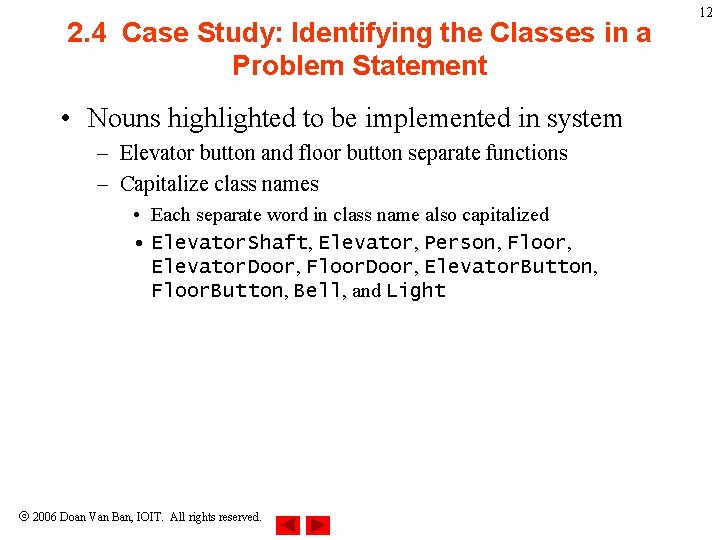
2. 4 Case Study: Identifying the Classes in a Problem Statement • Nouns highlighted to be implemented in system – Elevator button and floor button separate functions – Capitalize class names • Each separate word in class name also capitalized • Elevator. Shaft, Elevator, Person, Floor, Elevator. Door, Floor. Door, Elevator. Button, Floor. Button, Bell, and Light 2006 Doan Van Ban, IOIT. All rights reserved. 12
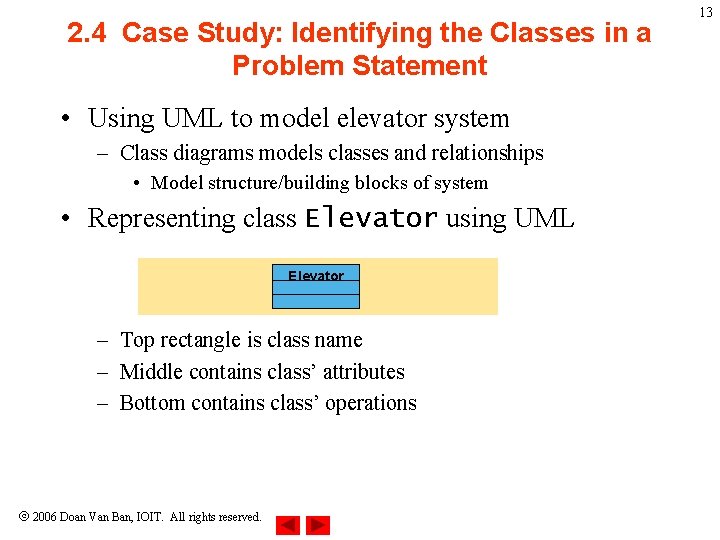
2. 4 Case Study: Identifying the Classes in a Problem Statement • Using UML to model elevator system – Class diagrams models classes and relationships • Model structure/building blocks of system • Representing class Elevator using UML Elevator – Top rectangle is class name – Middle contains class’ attributes – Bottom contains class’ operations 2006 Doan Van Ban, IOIT. All rights reserved. 13
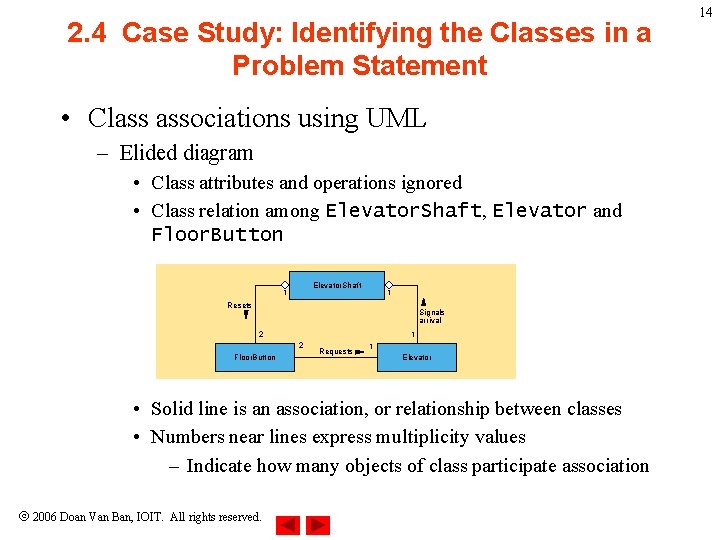
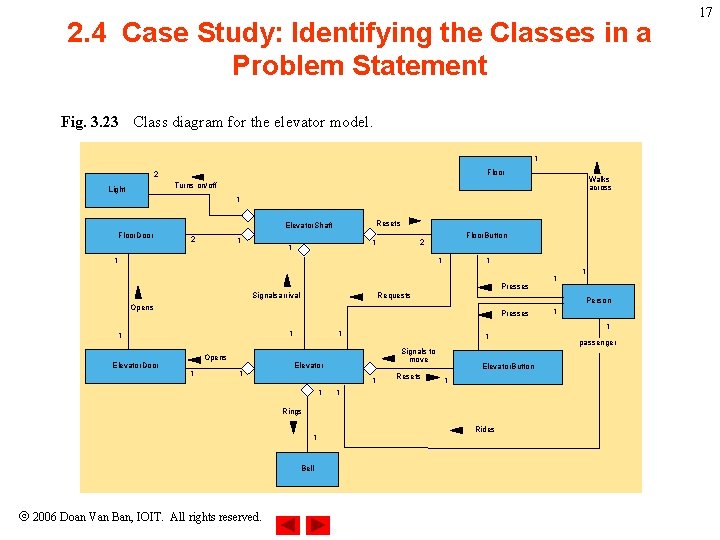
2. 4 Case Study: Identifying the Classes in a Problem Statement • Class associations using UML – Elided diagram • Class attributes and operations ignored • Class relation among Elevator. Shaft, Elevator and Floor. Button Elevator. Shaft 1 1 Resets Signals arrival 2 1 2 Floor. Button Requests 1 Elevator • Solid line is an association, or relationship between classes • Numbers near lines express multiplicity values – Indicate how many objects of class participate association 2006 Doan Van Ban, IOIT. All rights reserved. 14
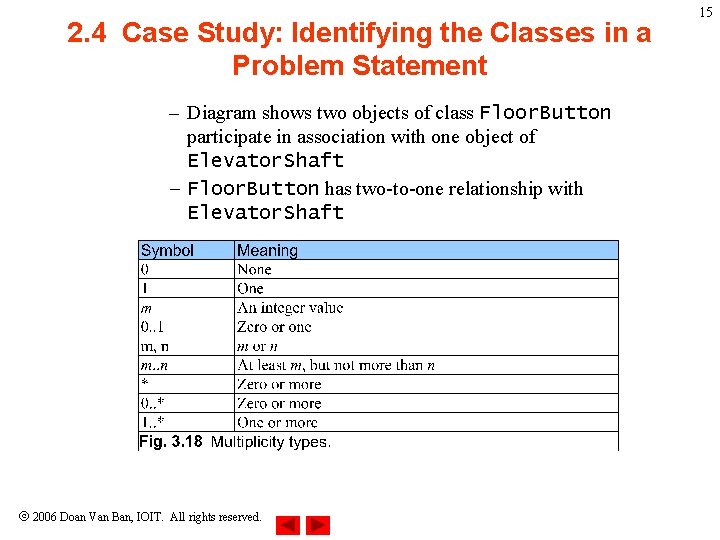
2. 4 Case Study: Identifying the Classes in a Problem Statement – Diagram shows two objects of class Floor. Button participate in association with one object of Elevator. Shaft – Floor. Button has two-to-one relationship with Elevator. Shaft 2006 Doan Van Ban, IOIT. All rights reserved. 15
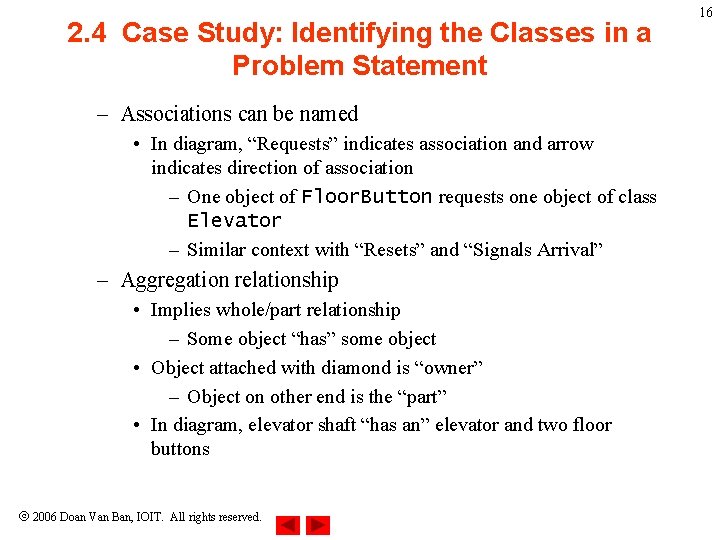
2. 4 Case Study: Identifying the Classes in a Problem Statement – Associations can be named • In diagram, “Requests” indicates association and arrow indicates direction of association – One object of Floor. Button requests one object of class Elevator – Similar context with “Resets” and “Signals Arrival” – Aggregation relationship • Implies whole/part relationship – Some object “has” some object • Object attached with diamond is “owner” – Object on other end is the “part” • In diagram, elevator shaft “has an” elevator and two floor buttons 2006 Doan Van Ban, IOIT. All rights reserved. 16
2. 4 Case Study: Identifying the Classes in a Problem Statement Fig. 3. 23 Class diagram for the elevator model. 1 Floor 2 Walks across Turns on/off Light 1 Resets Elevator. Shaft Floor. Door 2 1 1 1 Floor. Button 2 1 1 1 Presses Signalsarrival Requests Presses 1 Elevator. Door Opens 1 1 1 Signals to move Elevator 1 Resets Elevator. Button 1 1 Rings 1 Bell 2006 Doan Van Ban, IOIT. All rights reserved. 1 1 1 Person Opens 1 1 Rides passenger 17
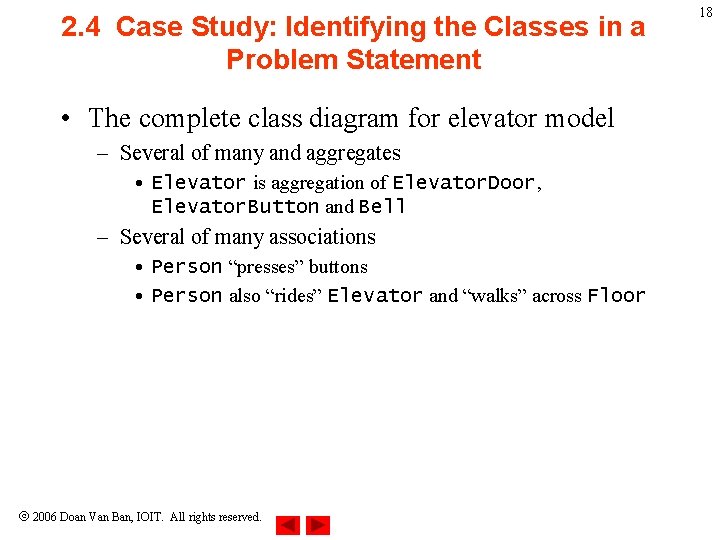
2. 4 Case Study: Identifying the Classes in a Problem Statement • The complete class diagram for elevator model – Several of many and aggregates • Elevator is aggregation of Elevator. Door, Elevator. Button and Bell – Several of many associations • Person “presses” buttons • Person also “rides” Elevator and “walks” across Floor 2006 Doan Van Ban, IOIT. All rights reserved. 18
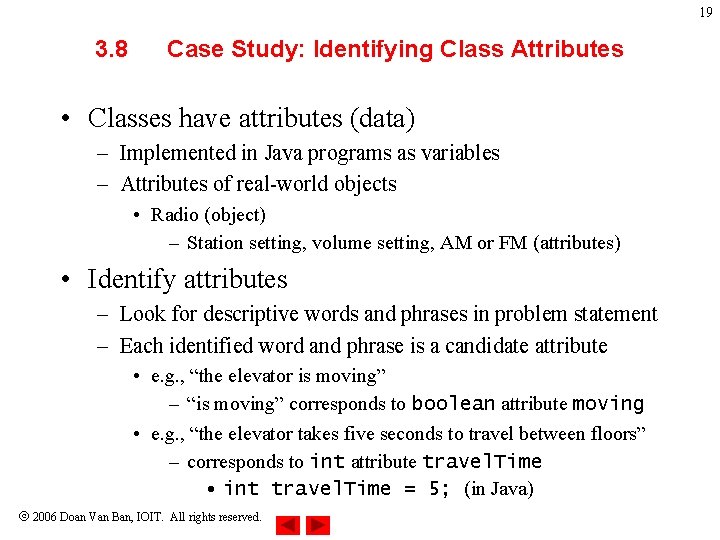
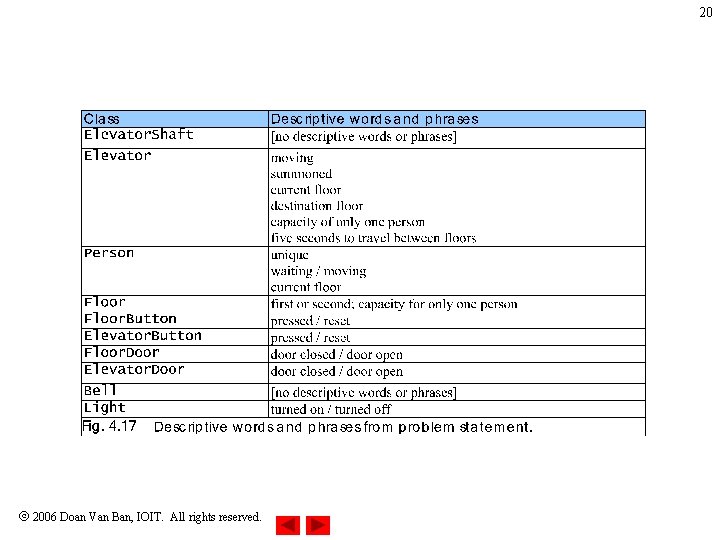
19 3. 8 Case Study: Identifying Class Attributes • Classes have attributes (data) – Implemented in Java programs as variables – Attributes of real-world objects • Radio (object) – Station setting, volume setting, AM or FM (attributes) • Identify attributes – Look for descriptive words and phrases in problem statement – Each identified word and phrase is a candidate attribute • e. g. , “the elevator is moving” – “is moving” corresponds to boolean attribute moving • e. g. , “the elevator takes five seconds to travel between floors” – corresponds to int attribute travel. Time • int travel. Time = 5; (in Java) 2006 Doan Van Ban, IOIT. All rights reserved.
20 2006 Doan Van Ban, IOIT. All rights reserved.
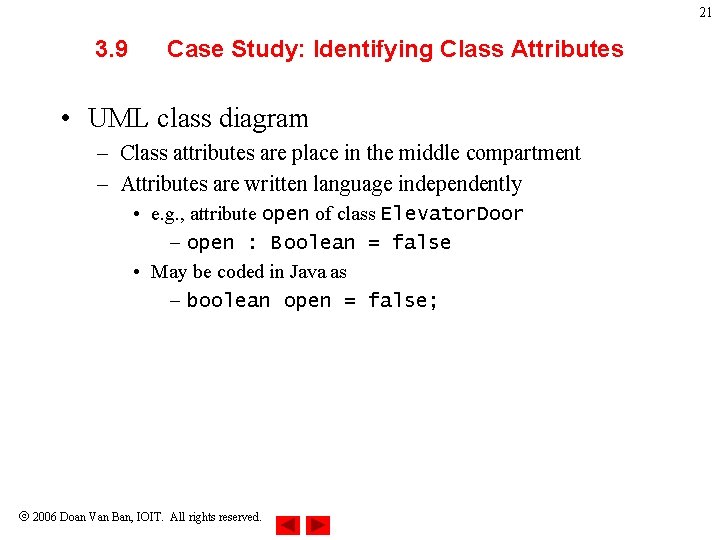
21 3. 9 Case Study: Identifying Class Attributes • UML class diagram – Class attributes are place in the middle compartment – Attributes are written language independently • e. g. , attribute open of class Elevator. Door – open : Boolean = false • May be coded in Java as – boolean open = false; 2006 Doan Van Ban, IOIT. All rights reserved.
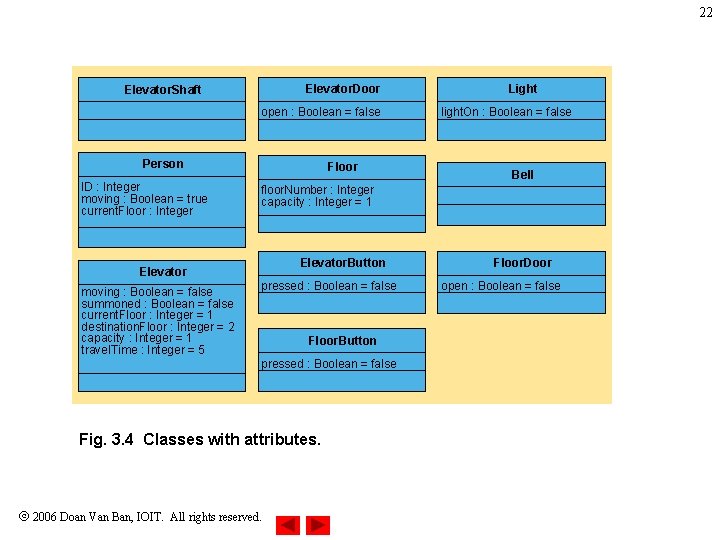
22 Elevator. Door Elevator. Shaft open : Boolean = false Person ID : Integer moving : Boolean = true current. Floor : Integer Floor light. On : Boolean = false Bell floor. Number : Integer capacity : Integer = 1 Elevator. Button Elevator moving : Boolean = false summoned : Boolean = false current. Floor : Integer = 1 destination. Floor : Integer = 2 capacity : Integer = 1 travel. Time : Integer = 5 Light pressed : Boolean = false Floor. Button pressed : Boolean = false Fig. 3. 4 Classes with attributes. 2006 Doan Van Ban, IOIT. All rights reserved. Floor. Door open : Boolean = false
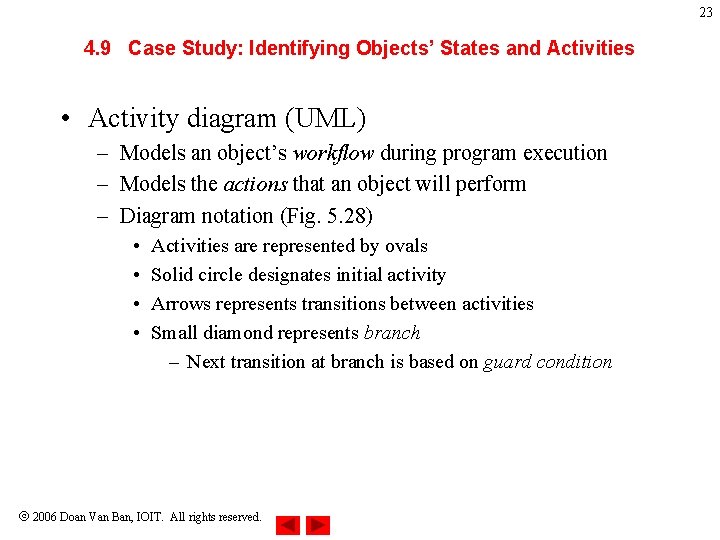
23 4. 9 Case Study: Identifying Objects’ States and Activities • Activity diagram (UML) – Models an object’s workflow during program execution – Models the actions that an object will perform – Diagram notation (Fig. 5. 28) • • Activities are represented by ovals Solid circle designates initial activity Arrows represents transitions between activities Small diamond represents branch – Next transition at branch is based on guard condition 2006 Doan Van Ban, IOIT. All rights reserved.
24 move toward floor button [floor door closed] press floor button [floor door open] wait for door to open [no passenger on elevator] [passenger on elevator] wait for passenger to exit elevator enter elevator press elevator button wait for door to open exit elevator Fig. 4. 28 Activity diagram for a Person object. 2006 Doan Van Ban, IOIT. All rights reserved.
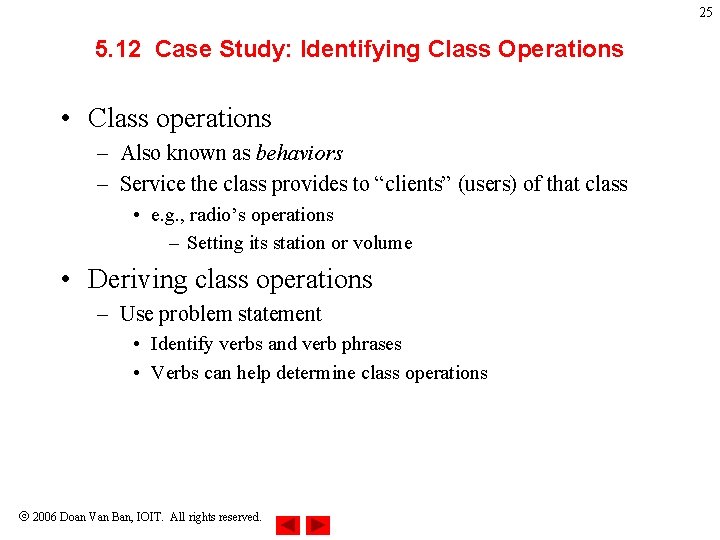
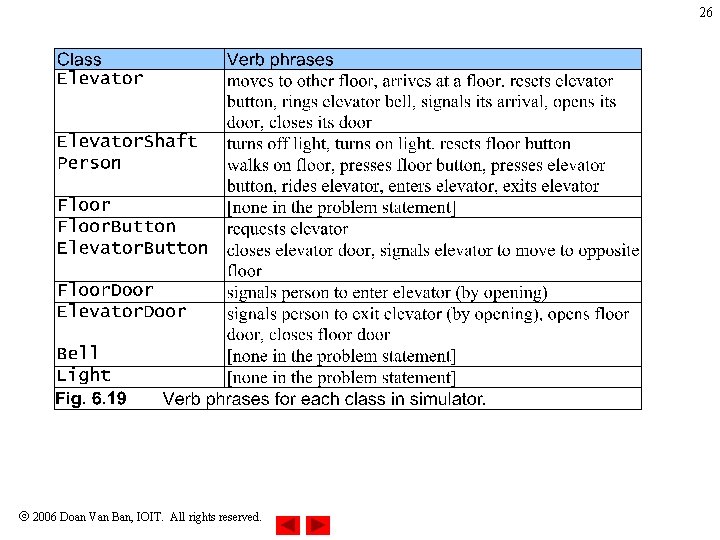
25 5. 12 Case Study: Identifying Class Operations • Class operations – Also known as behaviors – Service the class provides to “clients” (users) of that class • e. g. , radio’s operations – Setting its station or volume • Deriving class operations – Use problem statement • Identify verbs and verb phrases • Verbs can help determine class operations 2006 Doan Van Ban, IOIT. All rights reserved.
26 2006 Doan Van Ban, IOIT. All rights reserved.
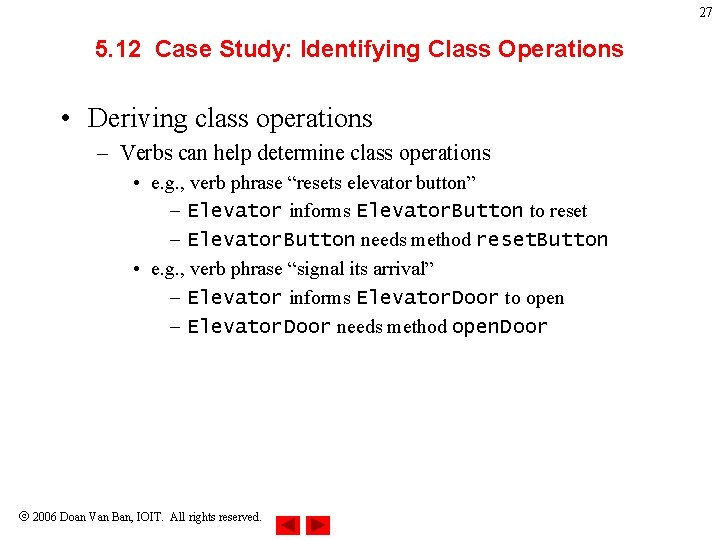
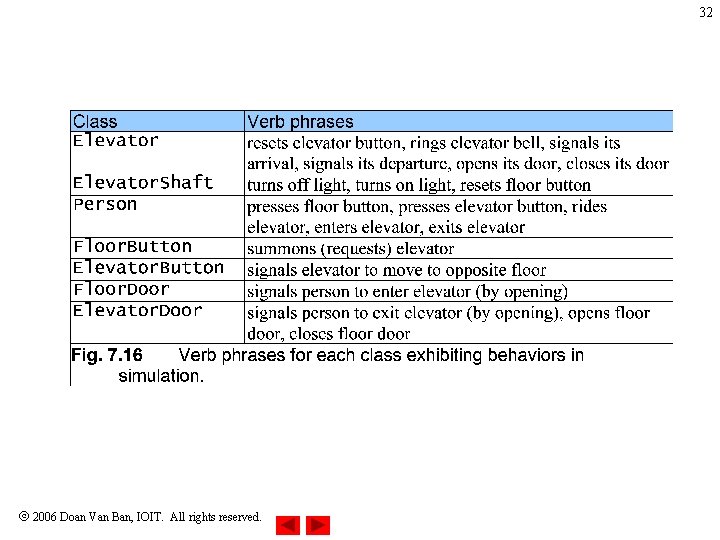
27 5. 12 Case Study: Identifying Class Operations • Deriving class operations – Verbs can help determine class operations • e. g. , verb phrase “resets elevator button” – Elevator informs Elevator. Button to reset – Elevator. Button needs method reset. Button • e. g. , verb phrase “signal its arrival” – Elevator informs Elevator. Door to open – Elevator. Door needs method open. Door 2006 Doan Van Ban, IOIT. All rights reserved.
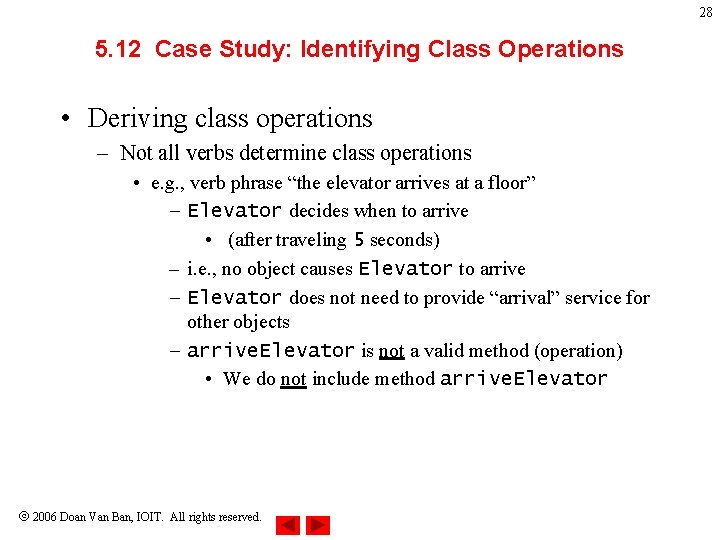
28 5. 12 Case Study: Identifying Class Operations • Deriving class operations – Not all verbs determine class operations • e. g. , verb phrase “the elevator arrives at a floor” – Elevator decides when to arrive • (after traveling 5 seconds) – i. e. , no object causes Elevator to arrive – Elevator does not need to provide “arrival” service for other objects – arrive. Elevator is not a valid method (operation) • We do not include method arrive. Elevator 2006 Doan Van Ban, IOIT. All rights reserved.
29 5. 12 Case Study: Identifying Class Operations • Store methods (operations) in UML class diagram – Place class methods in bottom compartment of that class 2006 Doan Van Ban, IOIT. All rights reserved.
30 [floor button pressed] [elevator button pressed] set summoned to false close elevator door [button on destination[elevator idle] floor pressed] [elevator moving] [button on destination floor pressed] move to destination floor reset elevator button [button on current floor pressed] ring bell [button on current floor pressed] set summoned to true open elevator door [summoned] [not summoned] Fig. 4. 29 Activity diagram for the Elevator object. 2006 Doan Van Ban, IOIT. All rights reserved.
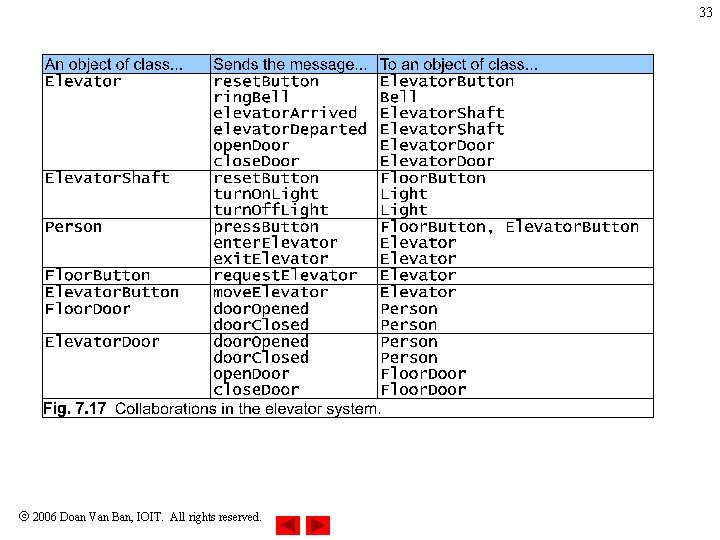
31 6. 9 Case Study: Collaboration Among Objects • Collaborations – When objects communicate to accomplish task • Accomplished by invoking operations (methods) – One object sends a message to another object – In 6. 15, we extracted verb phrases from problem statement • Verb phrases exhibit behaviors of classes • “The elevator resets its button” – Elevator object sends reset. Button message to Elevator. Button object – Elevator collaborates with Elevator. Button 2006 Doan Van Ban, IOIT. All rights reserved.
32 2006 Doan Van Ban, IOIT. All rights reserved.
33 2006 Doan Van Ban, IOIT. All rights reserved.
34 6. 9 Case Study: Collaboration Among Objects • Collaboration diagram (UML) – Type of interaction diagram • The other is sequence diagram, discussed in Chapter 16 – Models collaborations in system 2006 Doan Van Ban, IOIT. All rights reserved.
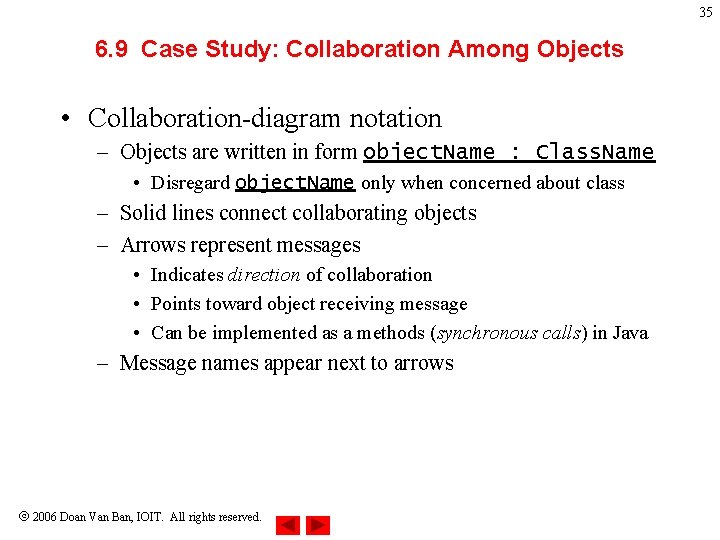
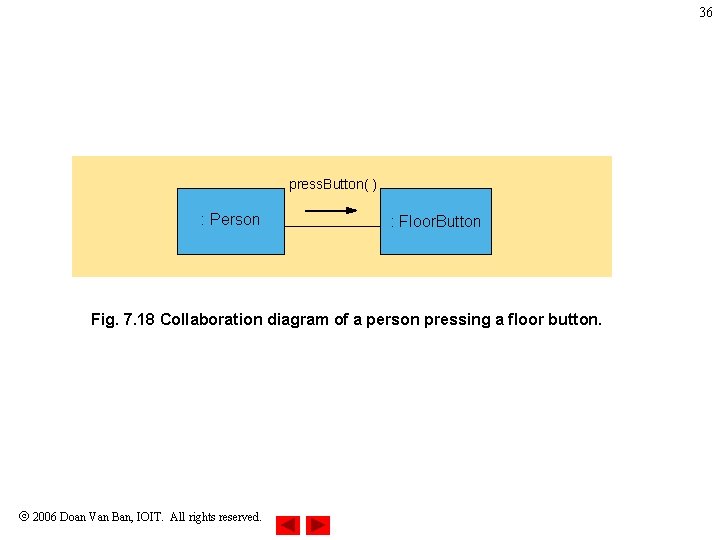
35 6. 9 Case Study: Collaboration Among Objects • Collaboration-diagram notation – Objects are written in form object. Name : Class. Name • Disregard object. Name only when concerned about class – Solid lines connect collaborating objects – Arrows represent messages • Indicates direction of collaboration • Points toward object receiving message • Can be implemented as a methods (synchronous calls) in Java – Message names appear next to arrows 2006 Doan Van Ban, IOIT. All rights reserved.
36 press. Button( ) : Person : Floor. Button Fig. 7. 18 Collaboration diagram of a person pressing a floor button. 2006 Doan Van Ban, IOIT. All rights reserved.
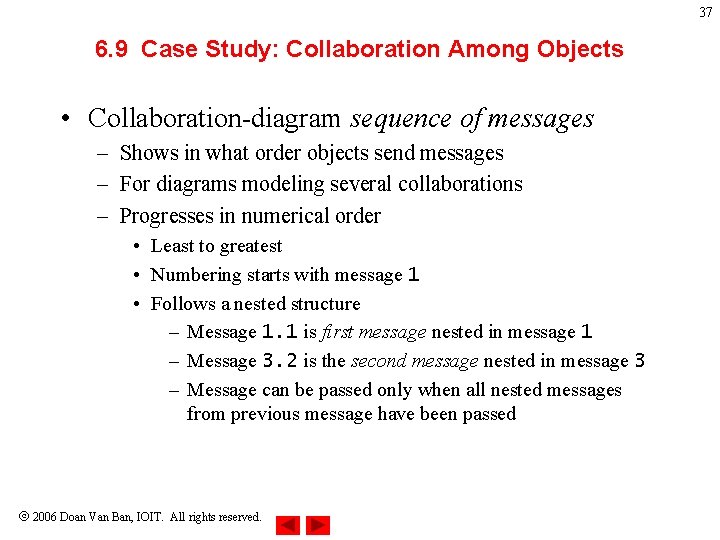
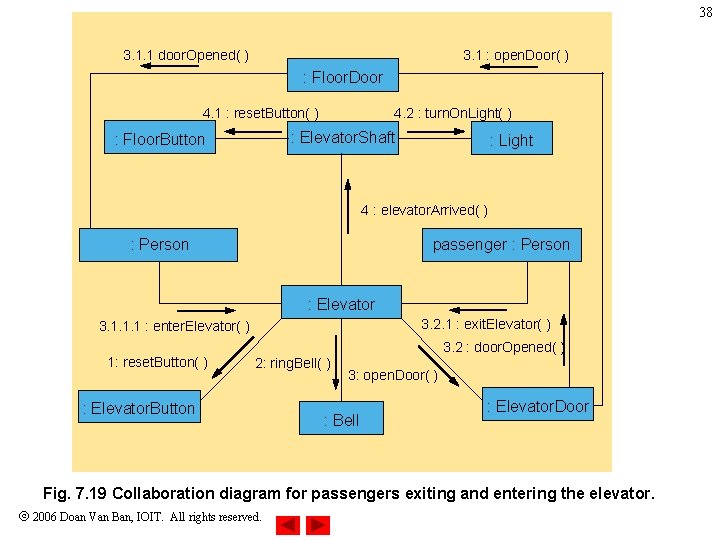
37 6. 9 Case Study: Collaboration Among Objects • Collaboration-diagram sequence of messages – Shows in what order objects send messages – For diagrams modeling several collaborations – Progresses in numerical order • Least to greatest • Numbering starts with message 1 • Follows a nested structure – Message 1. 1 is first message nested in message 1 – Message 3. 2 is the second message nested in message 3 – Message can be passed only when all nested messages from previous message have been passed 2006 Doan Van Ban, IOIT. All rights reserved.
38 3. 1 : open. Door( ) 3. 1. 1 door. Opened( ) : Floor. Door 4. 1 : reset. Button( ) 4. 2 : turn. On. Light( ) : Elevator. Shaft : Floor. Button : Light 4 : elevator. Arrived( ) : Person passenger : Person : Elevator 3. 2. 1 : exit. Elevator( ) 3. 1. 1. 1 : enter. Elevator( ) 1: reset. Button( ) 3. 2 : door. Opened( ) 2: ring. Bell( ) : Elevator. Button 3: open. Door( ) : Bell : Elevator. Door Fig. 7. 19 Collaboration diagram for passengers exiting and entering the elevator. 2006 Doan Van Ban, IOIT. All rights reserved.
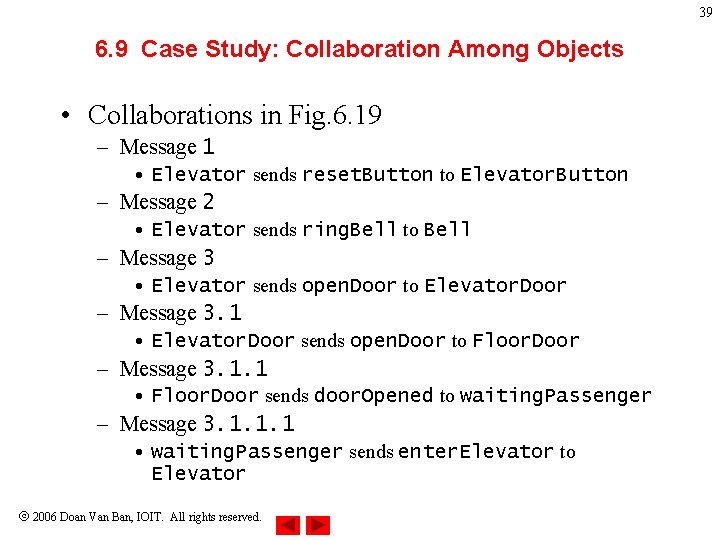
39 6. 9 Case Study: Collaboration Among Objects • Collaborations in Fig. 6. 19 – Message 1 • Elevator sends reset. Button to Elevator. Button – Message 2 • Elevator sends ring. Bell to Bell – Message 3 • Elevator sends open. Door to Elevator. Door – Message 3. 1 • Elevator. Door sends open. Door to Floor. Door – Message 3. 1. 1 • Floor. Door sends door. Opened to waiting. Passenger – Message 3. 1. 1. 1 • waiting. Passenger sends enter. Elevator to Elevator 2006 Doan Van Ban, IOIT. All rights reserved.
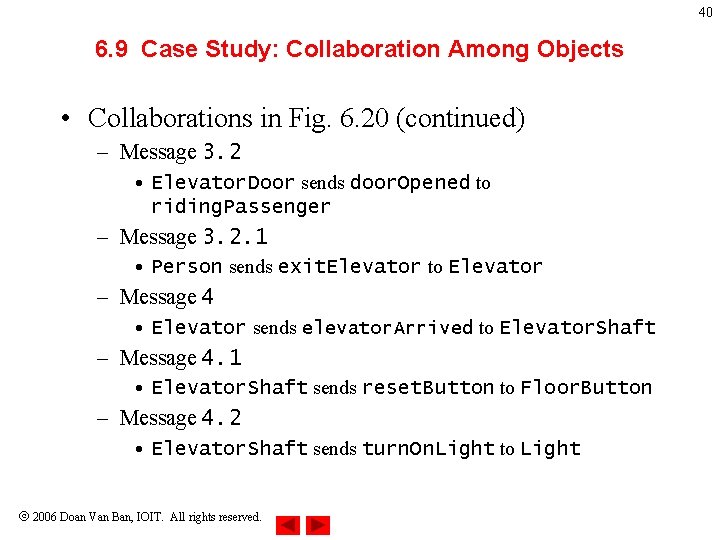
40 6. 9 Case Study: Collaboration Among Objects • Collaborations in Fig. 6. 20 (continued) – Message 3. 2 • Elevator. Door sends door. Opened to riding. Passenger – Message 3. 2. 1 • Person sends exit. Elevator to Elevator – Message 4 • Elevator sends elevator. Arrived to Elevator. Shaft – Message 4. 1 • Elevator. Shaft sends reset. Button to Floor. Button – Message 4. 2 • Elevator. Shaft sends turn. On. Light to Light 2006 Doan Van Ban, IOIT. All rights reserved.
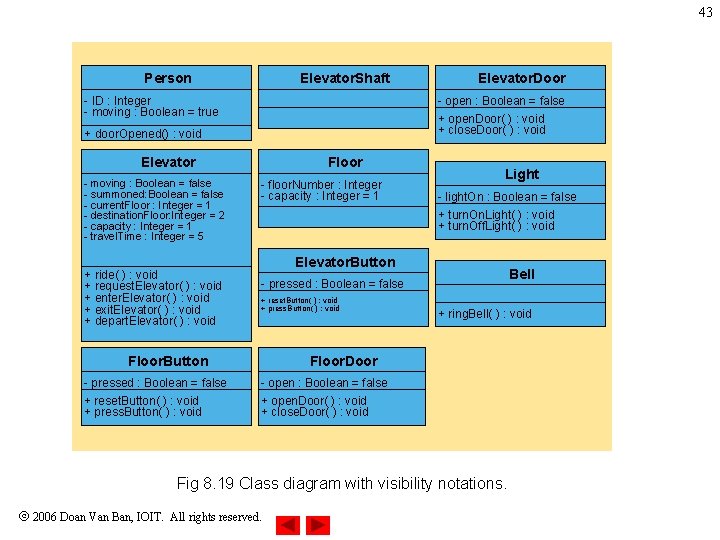
7. 15 Case Study: Starting to Program the Classes for the Elevator Simulation • Visibility – Apply member-access modifiers to class members – public methods • to provide services to clients – private variables • To promote encapsulation 2006 Doan Van Ban, IOIT. All rights reserved. 41
7. 15 Case Study: Starting to Program the Classes for the Elevator Simulation • Class diagram (UML) – Member-access modifiers • public – Denoted by plus sign (+) • private – Denoted by minus sign (-) 2006 Doan Van Ban, IOIT. All rights reserved. 42
43 Person Elevator. Shaft - ID : Integer - moving : Boolean = true - open : Boolean = false + open. Door( ) : void + close. Door( ) : void + door. Opened() : void Elevator - moving : Boolean = false - summoned: Boolean = false - current. Floor : Integer = 1 - destination. Floor: Integer = 2 - capacity : Integer = 1 - travel. Time : Integer = 5 + ride( ) : void + request. Elevator( ) : void + enter. Elevator( ) : void + exit. Elevator( ) : void + depart. Elevator( ) : void Floor - floor. Number : Integer - capacity : Integer = 1 Light - light. On : Boolean = false + turn. On. Light( ) : void + turn. Off. Light( ) : void Elevator. Button Bell - pressed : Boolean = false + reset. Button( ) : void + press. Button( ) : void Floor. Button - pressed : Boolean = false + reset. Button( ) : void + press. Button( ) : void Elevator. Door + ring. Bell( ) : void Floor. Door - open : Boolean = false + open. Door( ) : void + close. Door( ) : void Fig 8. 19 Class diagram with visibility notations. 2006 Doan Van Ban, IOIT. All rights reserved.
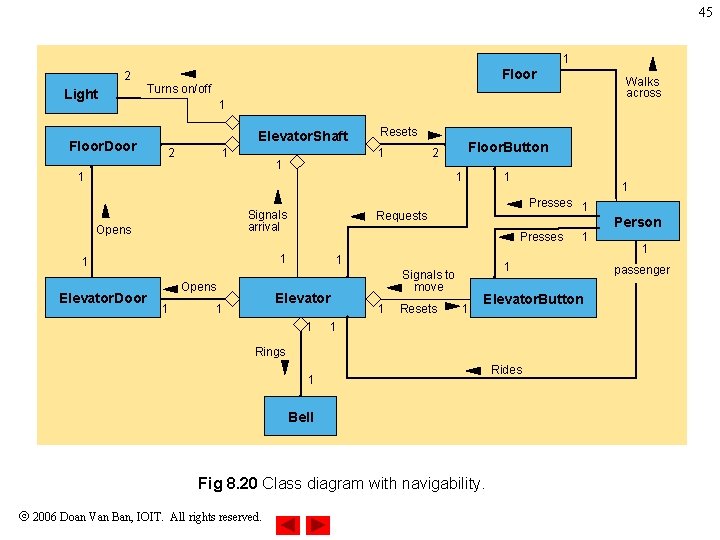
7. 15 Case Study: Starting to Program the Classes for the Elevator Simulation • Navigability – Indicate in which direction an association can be navigated – Help programmers determine which objects need references to other objects 2006 Doan Van Ban, IOIT. All rights reserved. 44
45 1 2 Light Floor. Door Floor 1 Elevator. Shaft 2 1 Opens 1 1 Presses 1 Person Presses 1 Elevator 1 1 Requests 1 1 Floor. Button 2 1 Signals arrival Opens Resets 1 1 1 Elevator. Door Walks across Turns on/off 1 1 Signals to move 1 Resets 1 Elevator. Button 1 Rings 1 Bell Fig 8. 20 Class diagram with navigability. 2006 Doan Van Ban, IOIT. All rights reserved. 1 Rides 1 passenger
7. 15 Case Study: Starting to Program the Classes for the Elevator Simulation • Implementation – Forward engineering • Transform design (i. e. , class diagram) to code 2006 Doan Van Ban, IOIT. All rights reserved. 46
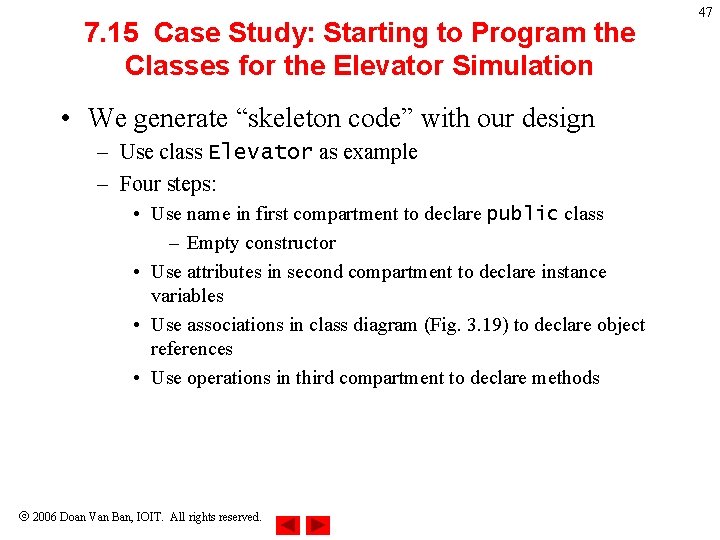
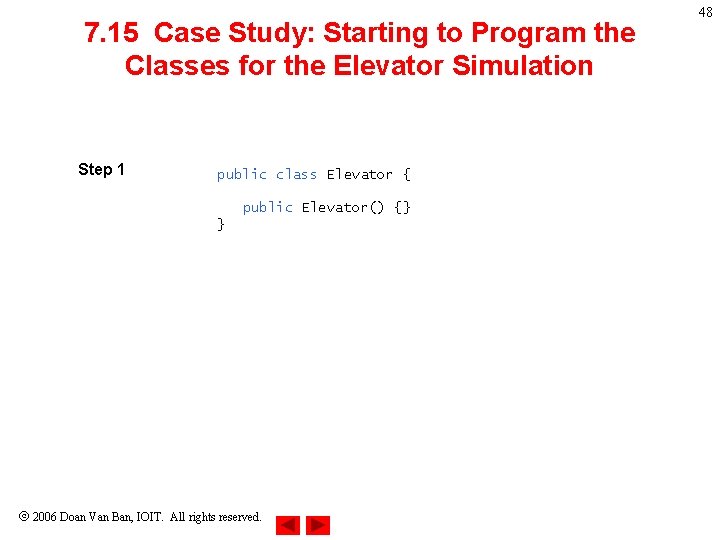
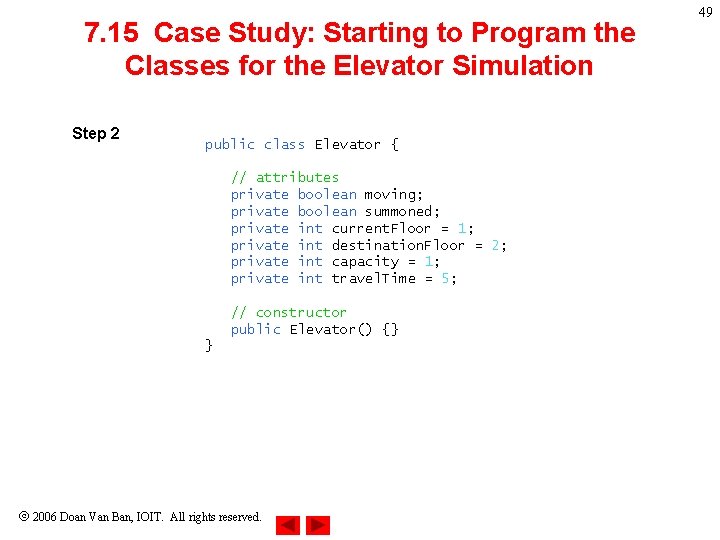
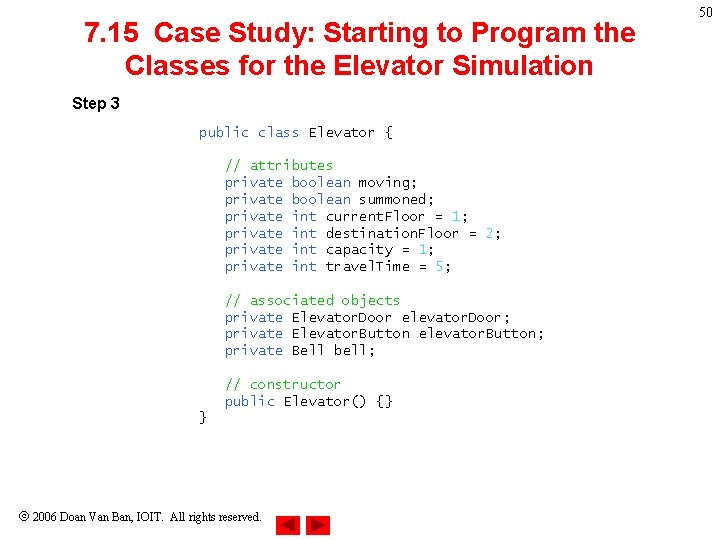
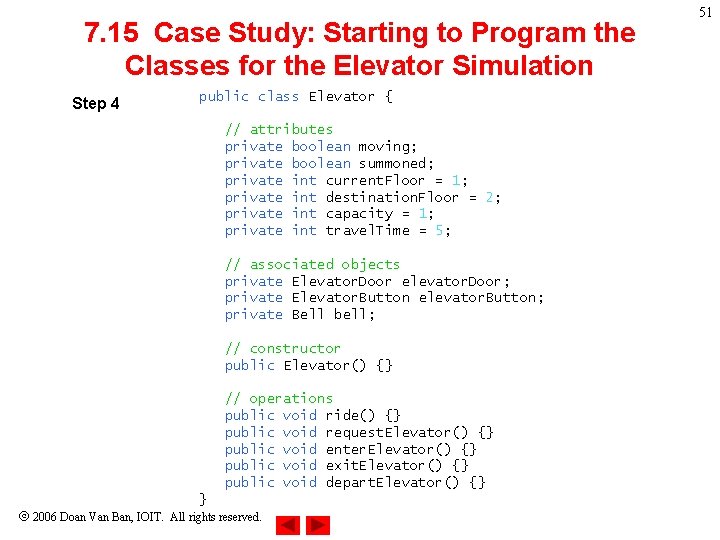
7. 15 Case Study: Starting to Program the Classes for the Elevator Simulation • We generate “skeleton code” with our design – Use class Elevator as example – Four steps: • Use name in first compartment to declare public class – Empty constructor • Use attributes in second compartment to declare instance variables • Use associations in class diagram (Fig. 3. 19) to declare object references • Use operations in third compartment to declare methods 2006 Doan Van Ban, IOIT. All rights reserved. 47
7. 15 Case Study: Starting to Program the Classes for the Elevator Simulation Step 1 public class Elevator { public Elevator() {} } 2006 Doan Van Ban, IOIT. All rights reserved. 48
7. 15 Case Study: Starting to Program the Classes for the Elevator Simulation Step 2 public class Elevator { // attributes private boolean moving; private boolean summoned; private int current. Floor = 1; private int destination. Floor = 2; private int capacity = 1; private int travel. Time = 5; // constructor public Elevator() {} } 2006 Doan Van Ban, IOIT. All rights reserved. 49
7. 15 Case Study: Starting to Program the Classes for the Elevator Simulation Step 3 public class Elevator { // attributes private boolean moving; private boolean summoned; private int current. Floor = 1; private int destination. Floor = 2; private int capacity = 1; private int travel. Time = 5; // associated objects private Elevator. Door elevator. Door; private Elevator. Button elevator. Button; private Bell bell; // constructor public Elevator() {} } 2006 Doan Van Ban, IOIT. All rights reserved. 50
7. 15 Case Study: Starting to Program the Classes for the Elevator Simulation Step 4 public class Elevator { // attributes private boolean moving; private boolean summoned; private int current. Floor = 1; private int destination. Floor = 2; private int capacity = 1; private int travel. Time = 5; // associated objects private Elevator. Door elevator. Door; private Elevator. Button elevator. Button; private Bell bell; // constructor public Elevator() {} // operations public void ride() {} public void request. Elevator() {} public void enter. Elevator() {} public void exit. Elevator() {} public void depart. Elevator() {} } 2006 Doan Van Ban, IOIT. All rights reserved. 51
9. 11 Case Study: Incorporating Inheritance into the Elevator Simulation • Our design can benefit from inheritance – Examine sets of classes – Look for commonality between/among sets • Extract commonality into superclass – Subclasses inherits this commonality 2006 Doan Van Ban, IOIT. All rights reserved. 52
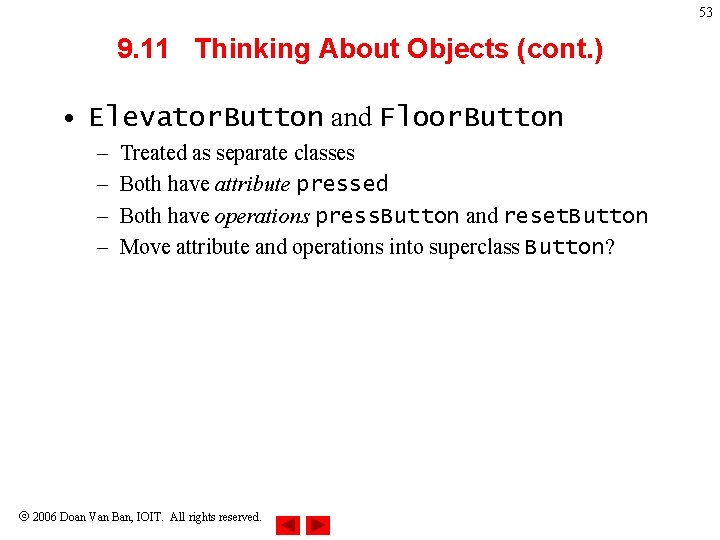
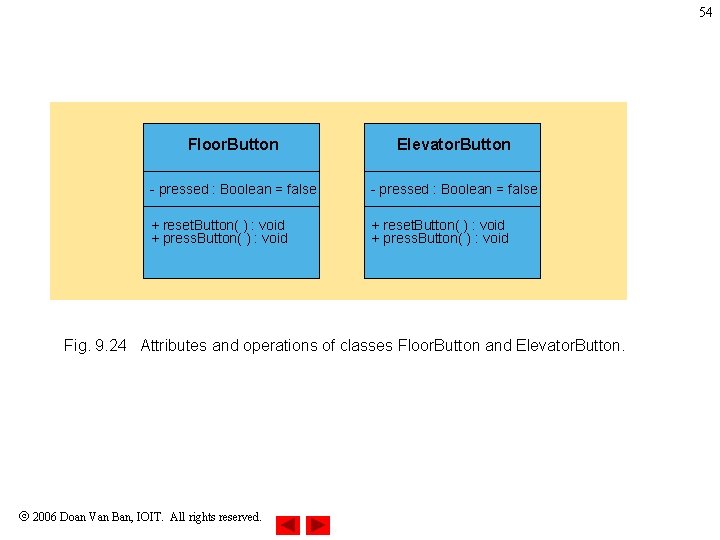
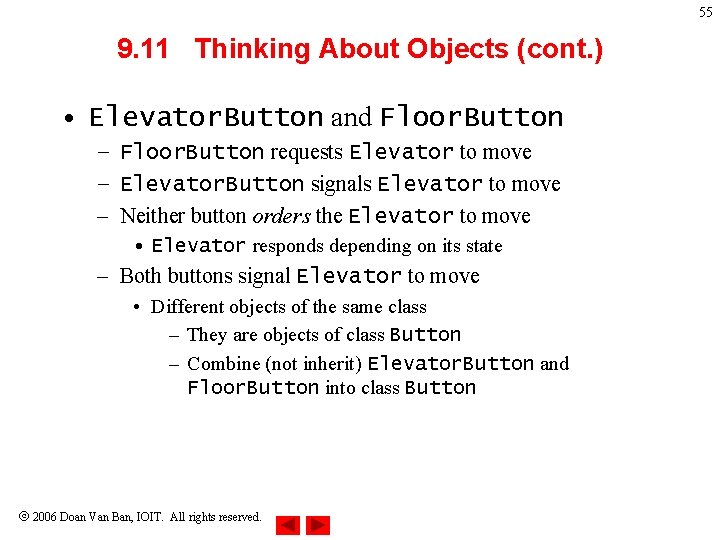
53 9. 11 Thinking About Objects (cont. ) • Elevator. Button and Floor. Button – – Treated as separate classes Both have attribute pressed Both have operations press. Button and reset. Button Move attribute and operations into superclass Button? 2006 Doan Van Ban, IOIT. All rights reserved.
54 Floor. Button Elevator. Button - pressed : Boolean = false + reset. Button( ) : void + press. Button( ) : void Fig. 9. 24 Attributes and operations of classes Floor. Button and Elevator. Button. 2006 Doan Van Ban, IOIT. All rights reserved.
55 9. 11 Thinking About Objects (cont. ) • Elevator. Button and Floor. Button – Floor. Button requests Elevator to move – Elevator. Button signals Elevator to move – Neither button orders the Elevator to move • Elevator responds depending on its state – Both buttons signal Elevator to move • Different objects of the same class – They are objects of class Button – Combine (not inherit) Elevator. Button and Floor. Button into class Button 2006 Doan Van Ban, IOIT. All rights reserved.
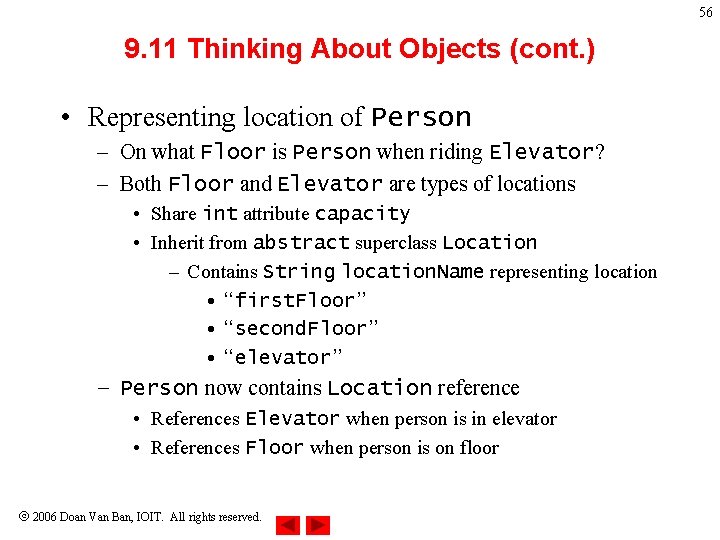
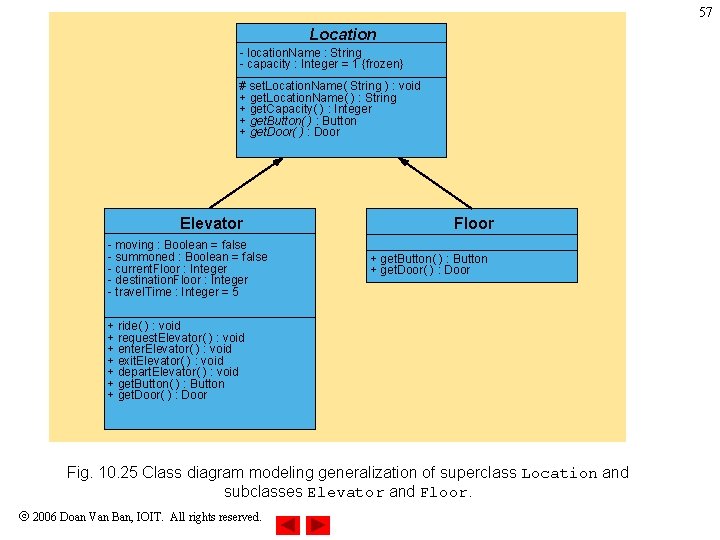
56 9. 11 Thinking About Objects (cont. ) • Representing location of Person – On what Floor is Person when riding Elevator? – Both Floor and Elevator are types of locations • Share int attribute capacity • Inherit from abstract superclass Location – Contains String location. Name representing location • “first. Floor” • “second. Floor” • “elevator” – Person now contains Location reference • References Elevator when person is in elevator • References Floor when person is on floor 2006 Doan Van Ban, IOIT. All rights reserved.
57 Location - location. Name : String - capacity : Integer = 1 {frozen} # set. Location. Name( String ) : void + get. Location. Name( ) : String + get. Capacity( ) : Integer + get. Button( ) : Button + get. Door( ) : Door Elevator - moving : Boolean = false - summoned : Boolean = false - current. Floor : Integer - destination. Floor : Integer - travel. Time : Integer = 5 Floor + get. Button( ) : Button + get. Door( ) : Door + ride( ) : void + request. Elevator( ) : void + enter. Elevator( ) : void + exit. Elevator( ) : void + depart. Elevator( ) : void + get. Button( ) : Button + get. Door( ) : Door Fig. 10. 25 Class diagram modeling generalization of superclass Location and subclasses Elevator and Floor. 2006 Doan Van Ban, IOIT. All rights reserved.
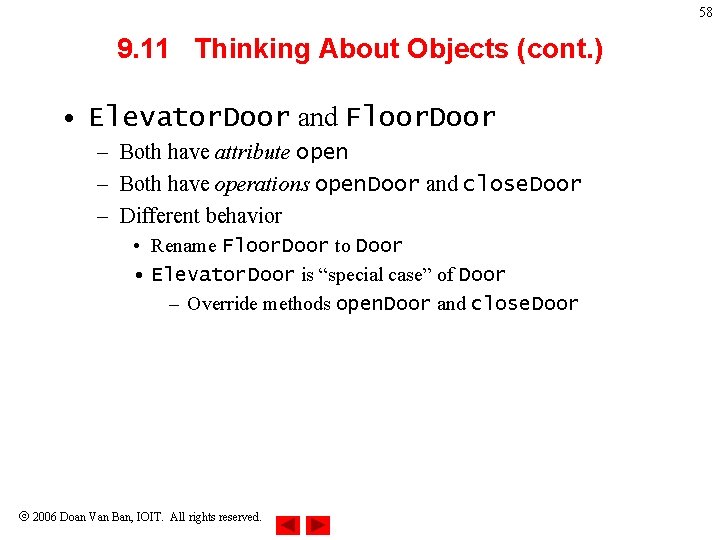
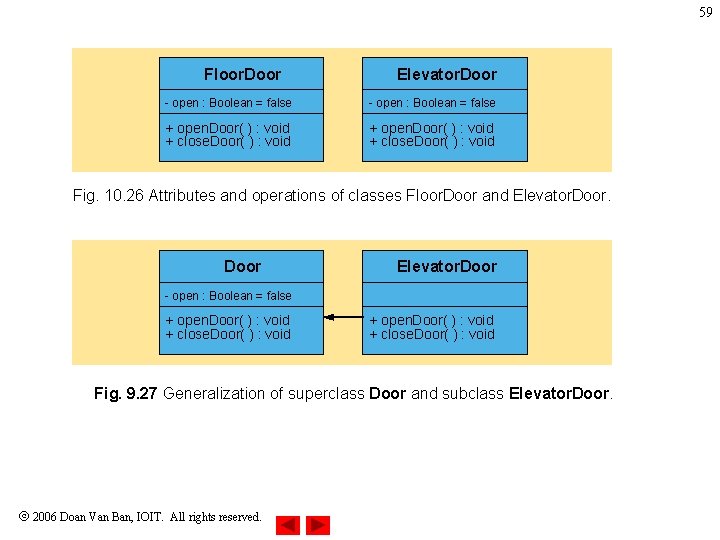
58 9. 11 Thinking About Objects (cont. ) • Elevator. Door and Floor. Door – Both have attribute open – Both have operations open. Door and close. Door – Different behavior • Rename Floor. Door to Door • Elevator. Door is “special case” of Door – Override methods open. Door and close. Door 2006 Doan Van Ban, IOIT. All rights reserved.
59 Floor. Door Elevator. Door - open : Boolean = false + open. Door( ) : void + close. Door( ) : void Fig. 10. 26 Attributes and operations of classes Floor. Door and Elevator. Door - open : Boolean = false + open. Door( ) : void + close. Door( ) : void Fig. 9. 27 Generalization of superclass Door and subclass Elevator. Door. 2006 Doan Van Ban, IOIT. All rights reserved.
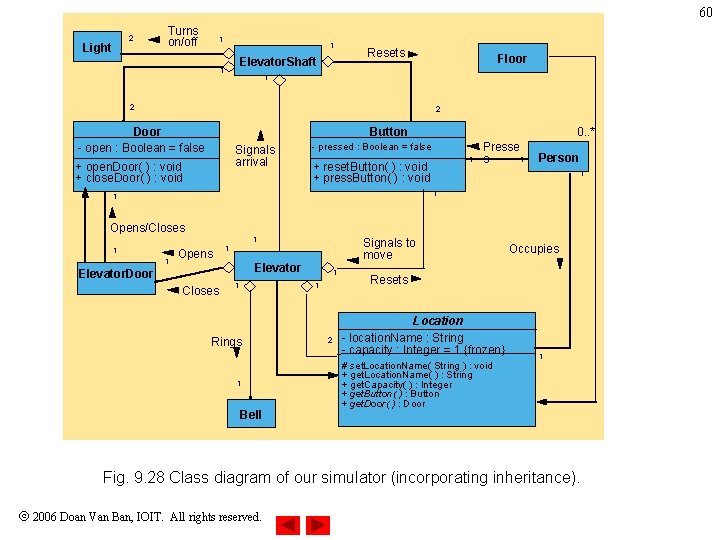
60 2 Light Turns on/off 1 1 Elevator. Shaft 1 Resets Floor 1 2 2 Door - open : Boolean = false Button Signals arrival + open. Door( ) : void + close. Door( ) : void 0. . * - pressed : Boolean = false 1 + reset. Button( ) : void + press. Button( ) : void Presse 1 s Person 1 1 1 Opens/Closes 1 1 1 Opens Signals to move 1 Elevator. Door Closes 1 1 1 Rings 1 Bell 2 Occupies Resets Location - location. Name : String - capacity : Integer = 1 {frozen} # set. Location. Name( String ) : void + get. Location. Name( ) : String + get. Capacity( ) : Integer + get. Button( ) : Button + get. Door( ) : Door 1 Fig. 9. 28 Class diagram of our simulator (incorporating inheritance). 2006 Doan Van Ban, IOIT. All rights reserved.
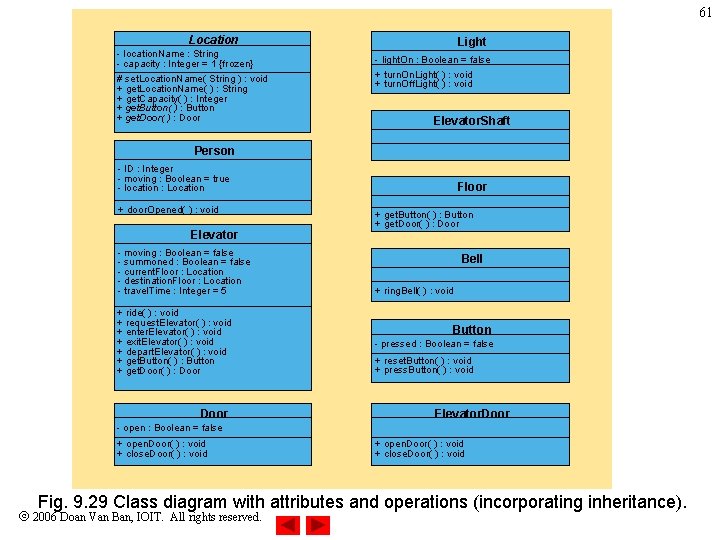
61 Location - location. Name : String - capacity : Integer = 1 {frozen} # set. Location. Name( String ) : void + get. Location. Name( ) : String + get. Capacity( ) : Integer + get. Button( ) : Button + get. Door( ) : Door Light - light. On : Boolean = false + turn. On. Light( ) : void + turn. Off. Light( ) : void Elevator. Shaft Person - ID : Integer - moving : Boolean = true - location : Location + door. Opened( ) : void Elevator - moving : Boolean = false - summoned : Boolean = false - current. Floor : Location - destination. Floor : Location - travel. Time : Integer = 5 + ride( ) : void + request. Elevator( ) : void + enter. Elevator( ) : void + exit. Elevator( ) : void + depart. Elevator( ) : void + get. Button( ) : Button + get. Door( ) : Door Floor + get. Button( ) : Button + get. Door( ) : Door Bell + ring. Bell( ) : void Button - pressed : Boolean = false + reset. Button( ) : void + press. Button( ) : void Elevator. Door - open : Boolean = false + open. Door( ) : void + close. Door( ) : void Fig. 9. 29 Class diagram with attributes and operations (incorporating inheritance). 2006 Doan Van Ban, IOIT. All rights reserved.
62 9. 11 Thinking About Objects (cont. ) • Implementation: Forward Engineering (Incorporating Inheritance) – Transform design (i. e. , class diagram) to code – Generate “skeleton code” with our design • Use class Elevator as example • Two steps (incorporating inheritance) 2006 Doan Van Ban, IOIT. All rights reserved.
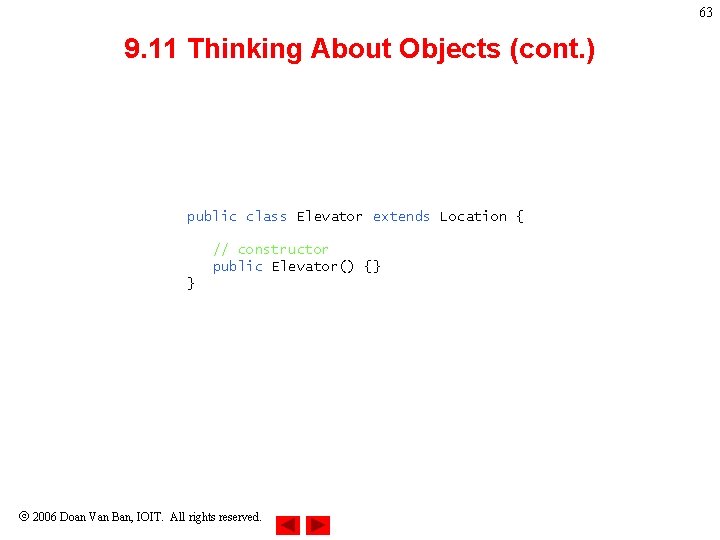
63 9. 11 Thinking About Objects (cont. ) public class Elevator extends Location { // constructor public Elevator() {} } 2006 Doan Van Ban, IOIT. All rights reserved.
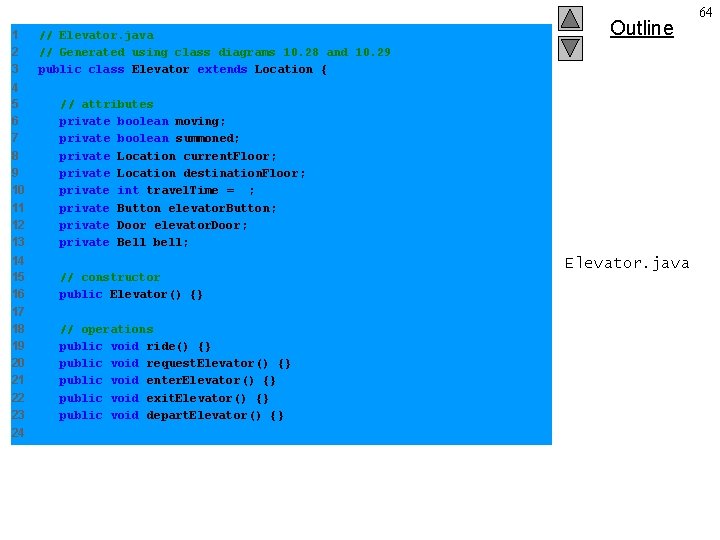
1 2 3 // Elevator. java // Generated using class diagrams 10. 28 and 10. 29 public class Elevator extends Location { 4 5 6 7 8 9 10 11 12 13 // attributes private boolean moving; private boolean summoned; private Location current. Floor; private Location destination. Floor; private int travel. Time = 5; private Button elevator. Button; private Door elevator. Door; private Bell bell; 14 15 16 // constructor public Elevator() {} 17 18 19 20 21 22 23 // operations public void ride() {} public void request. Elevator() {} public void enter. Elevator() {} public void exit. Elevator() {} public void depart. Elevator() {} 24 Outline Elevator. java 64
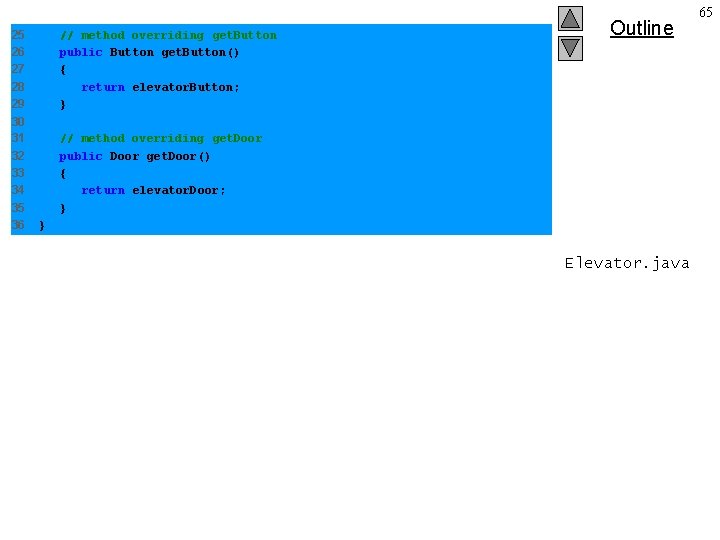
25 26 27 28 29 // method overriding get. Button public Button get. Button() { return elevator. Button; } 30 31 32 33 34 35 36 // method overriding get. Door public Door get. Door() { return elevator. Door; } Outline } Elevator. java 65
10. 5 Case Study: Thinking About Objects Event Handling • How objects interact – Sending object sends message to receiving object – We discuss how elevator-system objects interact • Model system behavior 2006 Doan Van Ban, IOIT. All rights reserved. 66
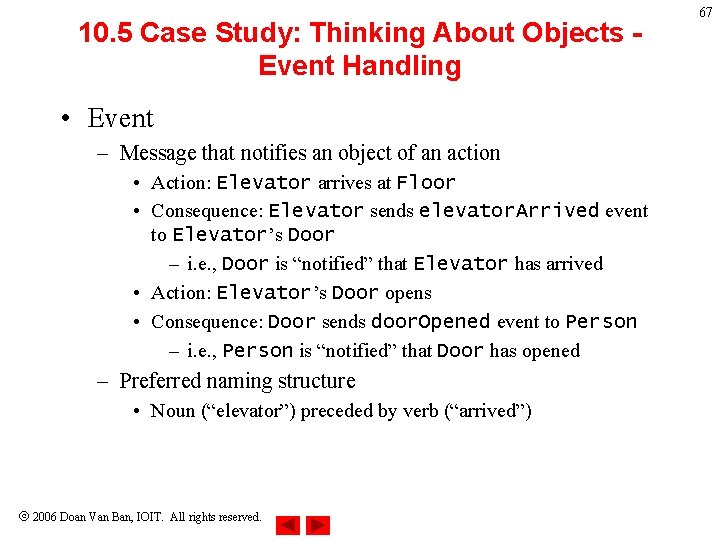
10. 5 Case Study: Thinking About Objects Event Handling • Event – Message that notifies an object of an action • Action: Elevator arrives at Floor • Consequence: Elevator sends elevator. Arrived event to Elevator’s Door – i. e. , Door is “notified” that Elevator has arrived • Action: Elevator’s Door opens • Consequence: Door sends door. Opened event to Person – i. e. , Person is “notified” that Door has opened – Preferred naming structure • Noun (“elevator”) preceded by verb (“arrived”) 2006 Doan Van Ban, IOIT. All rights reserved. 67
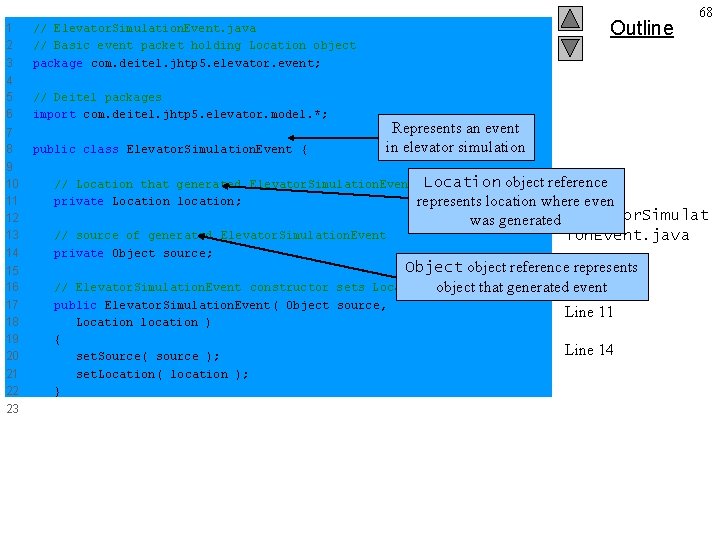
1 2 3 // Elevator. Simulation. Event. java // Basic event packet holding Location object package com. deitel. jhtp 5. elevator. event; 4 5 6 // Deitel packages import com. deitel. jhtp 5. elevator. model. *; 7 8 public class Elevator. Simulation. Event { 9 10 11 12 13 14 15 16 17 18 19 20 21 22 23 Outline 68 Represents an event in elevator simulation // Location that generated Elevator. Simulation. Event Location object reference private Location location; represents location where even // source of generated Elevator. Simulation. Event private Object source; was generated Elevator. Simulat ion. Event. java Object object reference. Line represents 8 Location object that generated event // Elevator. Simulation. Event constructor sets public Elevator. Simulation. Event( Object source, Location location ) { set. Source( source ); set. Location( location ); } Line 11 Line 14
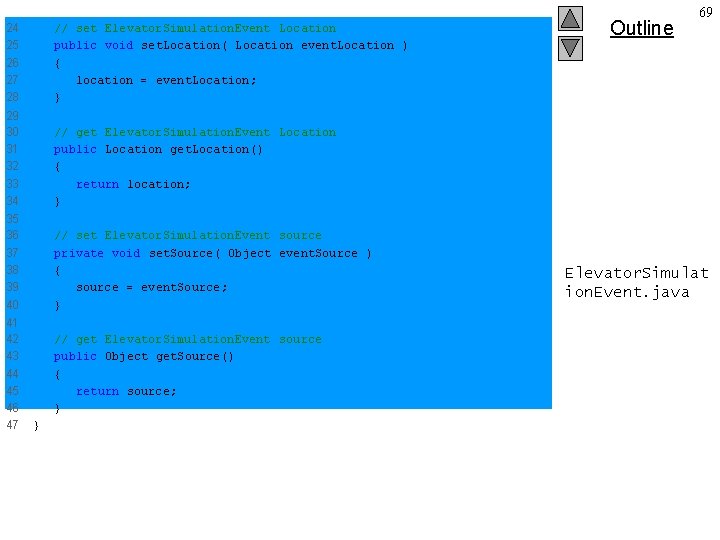
24 25 26 27 28 // set Elevator. Simulation. Event Location public void set. Location( Location event. Location ) { location = event. Location; } 29 30 31 32 33 34 // get Elevator. Simulation. Event Location public Location get. Location() { return location; } 35 36 37 38 39 40 // set Elevator. Simulation. Event source private void set. Source( Object event. Source ) { source = event. Source; } 41 42 43 44 45 46 47 // get Elevator. Simulation. Event source public Object get. Source() { return source; } } Outline 69 Elevator. Simulat ion. Event. java
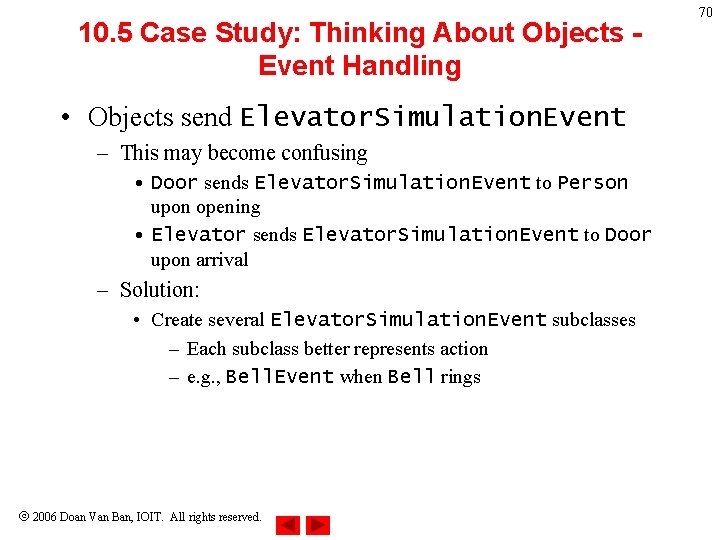
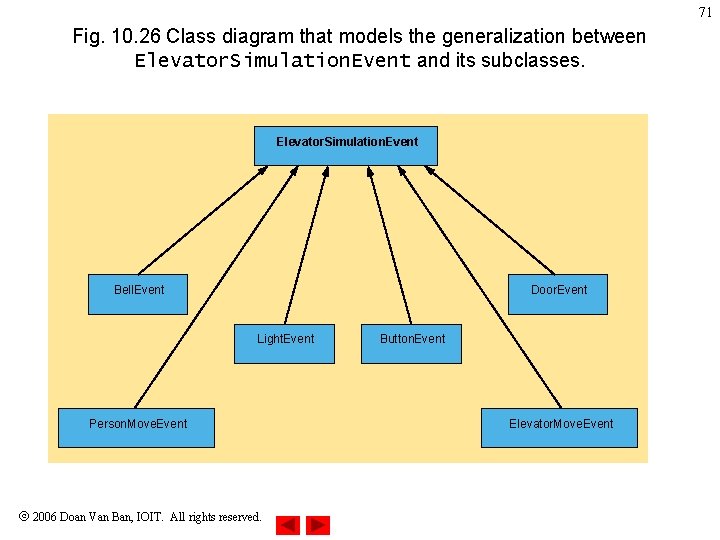
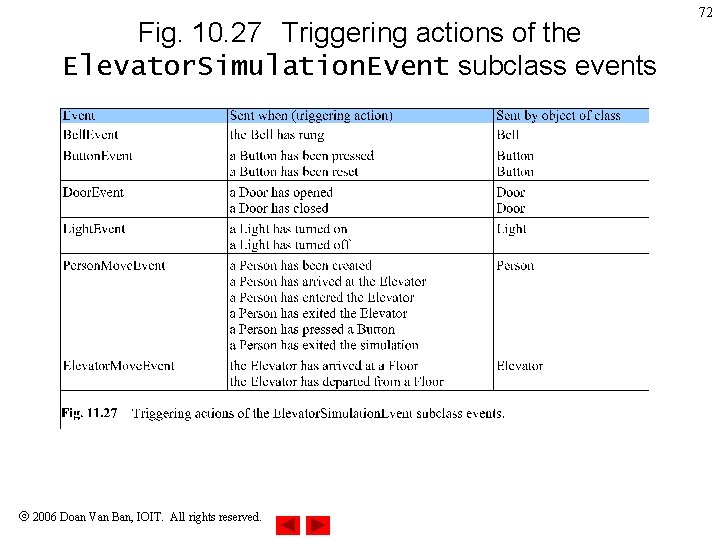
10. 5 Case Study: Thinking About Objects Event Handling • Objects send Elevator. Simulation. Event – This may become confusing • Door sends Elevator. Simulation. Event to Person upon opening • Elevator sends Elevator. Simulation. Event to Door upon arrival – Solution: • Create several Elevator. Simulation. Event subclasses – Each subclass better represents action – e. g. , Bell. Event when Bell rings 2006 Doan Van Ban, IOIT. All rights reserved. 70
71 Fig. 10. 26 Class diagram that models the generalization between Elevator. Simulation. Event and its subclasses. Elevator. Simulation. Event Bell. Event Door. Event Light. Event Person. Move. Event 2006 Doan Van Ban, IOIT. All rights reserved. Button. Event Elevator. Move. Event
Fig. 10. 27 Triggering actions of the Elevator. Simulation. Event subclass events 2006 Doan Van Ban, IOIT. All rights reserved. 72
10. 5 Case Study: Thinking About Objects Event Handling • Event handling – Similar to collaboration – Object sends message (event) to objects • However, receiving objects must be listening for event – Called event listeners – Listeners must register with sender to receive event 2006 Doan Van Ban, IOIT. All rights reserved. 73
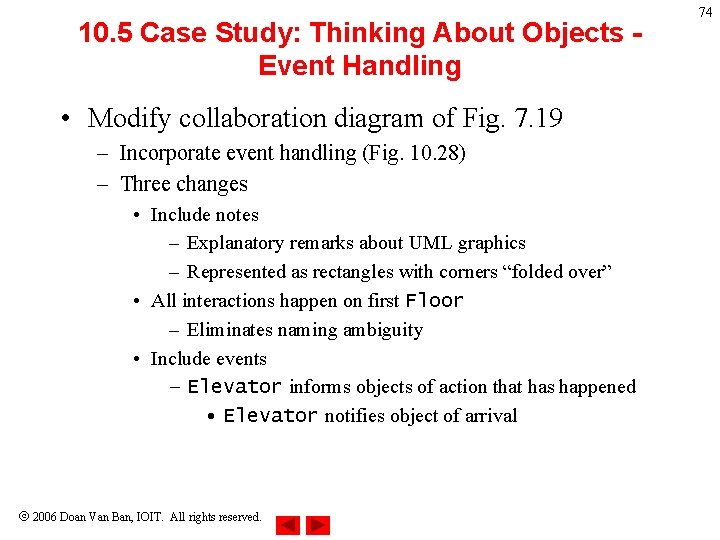
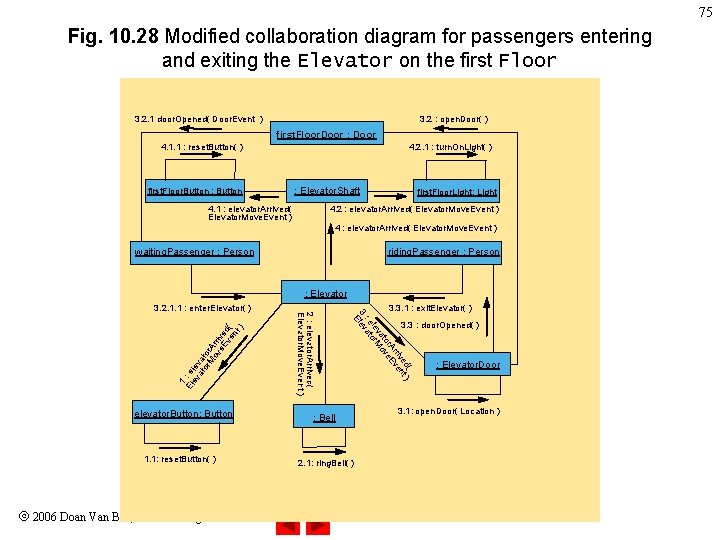
10. 5 Case Study: Thinking About Objects Event Handling • Modify collaboration diagram of Fig. 7. 19 – Incorporate event handling (Fig. 10. 28) – Three changes • Include notes – Explanatory remarks about UML graphics – Represented as rectangles with corners “folded over” • All interactions happen on first Floor – Eliminates naming ambiguity • Include events – Elevator informs objects of action that has happened • Elevator notifies object of arrival 2006 Doan Van Ban, IOIT. All rights reserved. 74
75 Fig. 10. 28 Modified collaboration diagram for passengers entering and exiting the Elevator on the first Floor 3. 2. 1 door. Opened( Door. Event ) 3. 2 : open. Door( ) first. Floor. Door : Door 4. 1. 1 : reset. Button( ) first. Floor. Button : Button 4. 2. 1 : turn. On. Light( ) : Elevator. Shaft 4. 1 : elevator. Arrived( Elevator. Move. Event ) first. Floor. Light: Light 4. 2 : elevator. Arrived( Elevator. Move. Event ) 4 : elevator. Arrived( Elevator. Move. Event ) waiting. Passenger : Person riding. Passenger : Person : Elevator 1 El : e ev lev at at or or M A ov rri e. E ve ve d( nt ) 1. 1: reset. Button( ) 2006 Doan Van Ban, IOIT. All rights reserved. 3. 3. 1 : exit. Elevator( ) d( ) ve nt rri ve r. A E to ve va o le or. M : e at 3 lev E elevator. Button: Button 2 : elevator. Arrived( Elevator. Move. Event ) 3. 2. 1. 1 : enter. Elevator( ) : Bell 2. 1: ring. Bell( ) 3. 3 : door. Opened( ) : Elevator. Door 3. 1: open. Door( Location )
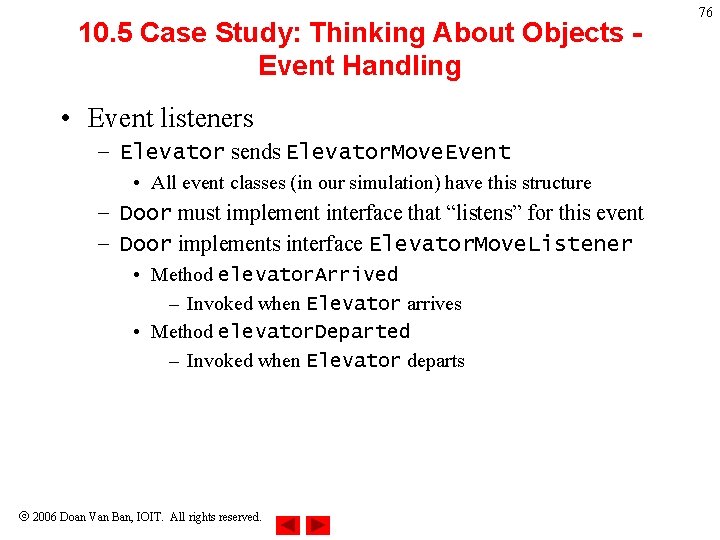
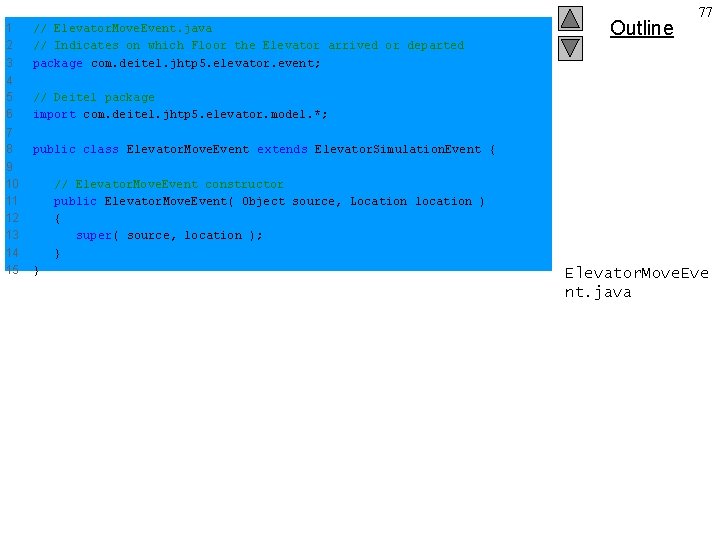
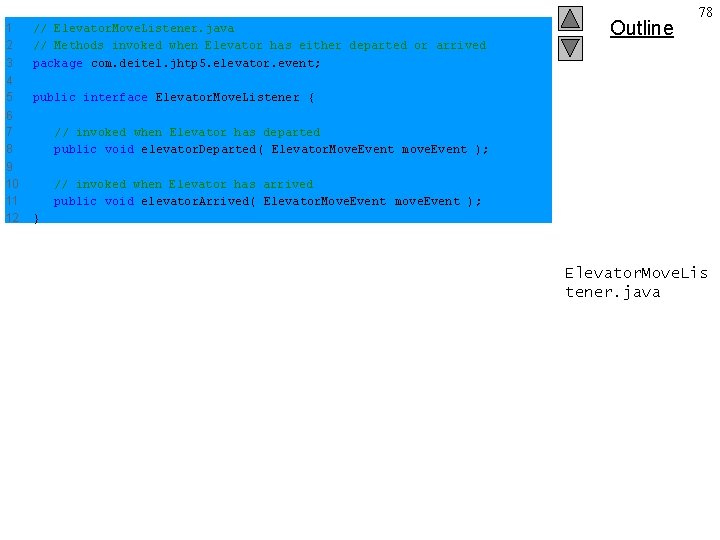
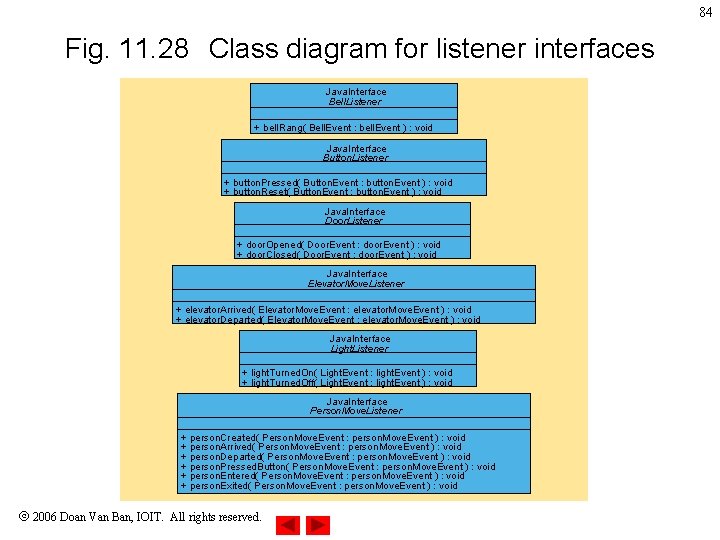
10. 5 Case Study: Thinking About Objects Event Handling • Event listeners – Elevator sends Elevator. Move. Event • All event classes (in our simulation) have this structure – Door must implement interface that “listens” for this event – Door implements interface Elevator. Move. Listener • Method elevator. Arrived – Invoked when Elevator arrives • Method elevator. Departed – Invoked when Elevator departs 2006 Doan Van Ban, IOIT. All rights reserved. 76
1 2 3 // Elevator. Move. Event. java // Indicates on which Floor the Elevator arrived or departed package com. deitel. jhtp 5. elevator. event; 4 5 6 // Deitel package import com. deitel. jhtp 5. elevator. model. *; 7 8 public class Elevator. Move. Event extends Elevator. Simulation. Event { 9 10 11 12 13 14 15 Outline 77 // Elevator. Move. Event constructor public Elevator. Move. Event( Object source, Location location ) { super( source, location ); } } Elevator. Move. Eve nt. java
1 2 3 // Elevator. Move. Listener. java // Methods invoked when Elevator has either departed or arrived package com. deitel. jhtp 5. elevator. event; 4 5 public interface Elevator. Move. Listener { 6 7 8 9 10 11 12 Outline 78 // invoked when Elevator has departed public void elevator. Departed( Elevator. Move. Event move. Event ); // invoked when Elevator has arrived public void elevator. Arrived( Elevator. Move. Event move. Event ); } Elevator. Move. Lis tener. java
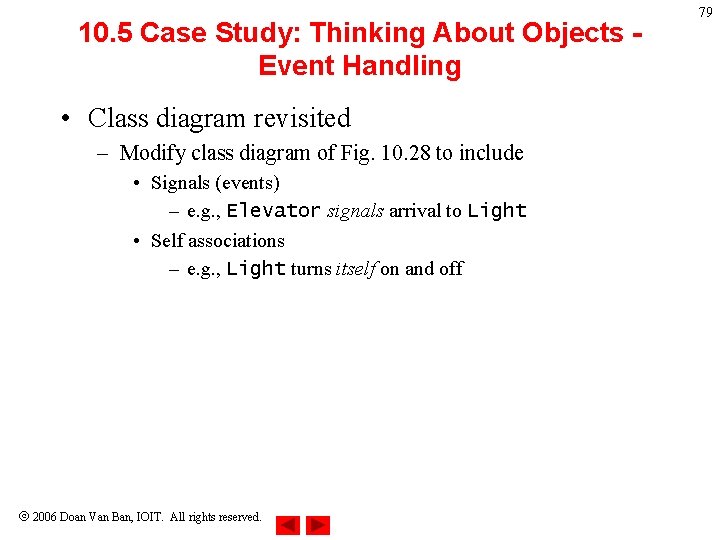
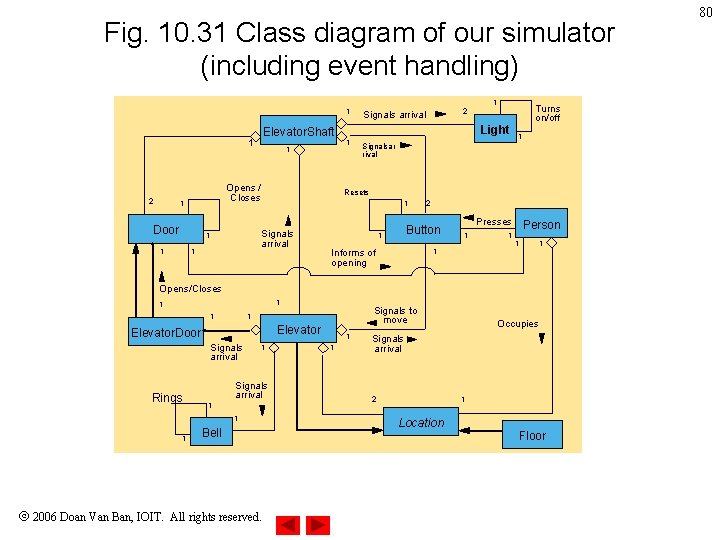
10. 5 Case Study: Thinking About Objects Event Handling • Class diagram revisited – Modify class diagram of Fig. 10. 28 to include • Signals (events) – e. g. , Elevator signals arrival to Light • Self associations – e. g. , Light turns itself on and off 2006 Doan Van Ban, IOIT. All rights reserved. 79
Fig. 10. 31 Class diagram of our simulator (including event handling) 1 1 2 Door 1 1 1 Signalsar rival Resets 1 Signals arrival 1 1 1 Opens / Closes 1 Light Elevator. Shaft 1 Turns on/off 2 Signals arrival 2 Button 1 Presses 1 1 Informs of opening 1 Person 1 1 Opens/Closes 1 1 1 Elevator. Door Signals arrival Rings 1 1 Signals arrival 1 1 Signals to move 1 Bell 2006 Doan Van Ban, IOIT. All rights reserved. 1 1 Occupies Signals arrival 2 1 Location Floor 80
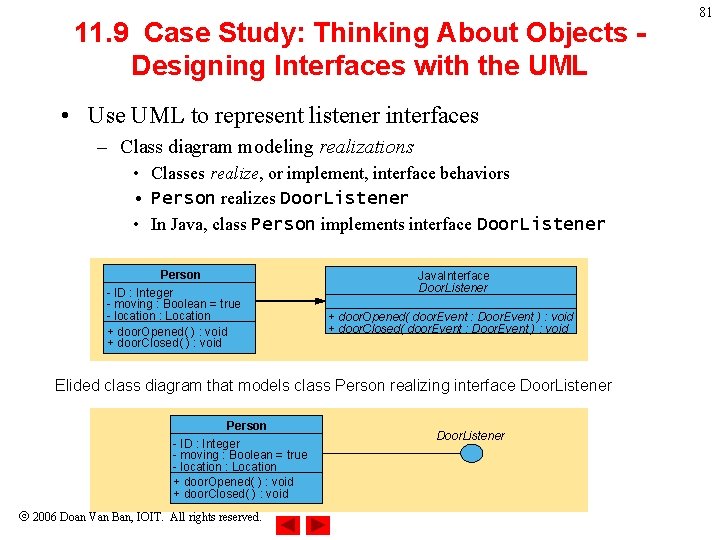
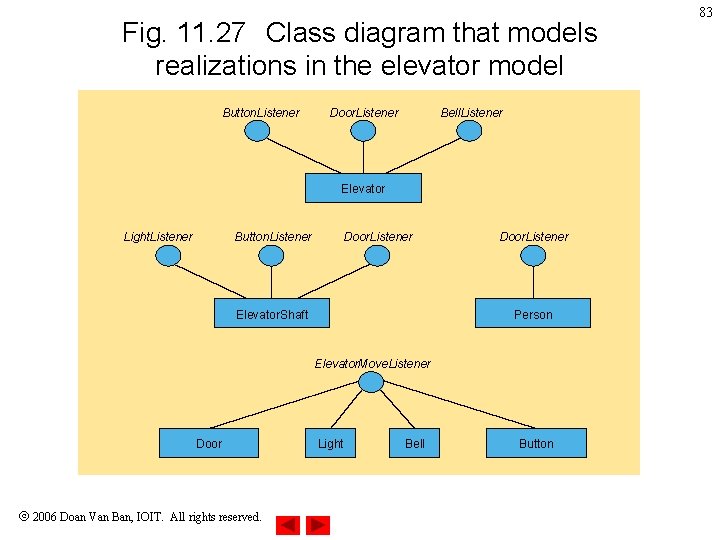
11. 9 Case Study: Thinking About Objects Designing Interfaces with the UML • Use UML to represent listener interfaces – Class diagram modeling realizations • Classes realize, or implement, interface behaviors • Person realizes Door. Listener • In Java, class Person implements interface Door. Listener Person - ID : Integer - moving : Boolean = true - location : Location + door. Opened( ) : void + door. Closed( ) : void Java. Interface Door. Listener + door. Opened( door. Event : Door. Event ) : void + door. Closed( door. Event : Door. Event ) : void Elided class diagram that models class Person realizing interface Door. Listener Person - ID : Integer - moving : Boolean = true - location : Location + door. Opened( ) : void + door. Closed( ) : void 2006 Doan Van Ban, IOIT. All rights reserved. Door. Listener 81
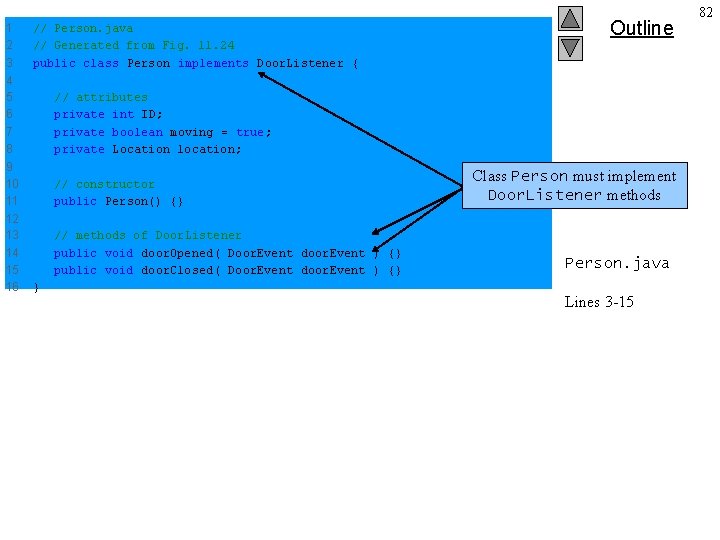
1 2 3 // Person. java // Generated from Fig. 11. 24 public class Person implements Door. Listener { 4 5 6 7 8 // attributes private int ID; private boolean moving = true; private Location location; 9 10 11 // constructor public Person() {} 12 13 14 15 16 // methods of Door. Listener public void door. Opened( Door. Event door. Event ) {} public void door. Closed( Door. Event door. Event ) {} } Outline Class Person must implement Door. Listener methods Person. java Lines 3 -15 82
Fig. 11. 27 Class diagram that models realizations in the elevator model Button. Listener Door. Listener Bell. Listener Elevator Light. Listener Button. Listener Door. Listener Person Elevator. Shaft Elevator. Move. Listener Door 2006 Doan Van Ban, IOIT. All rights reserved. Light Bell Button 83
84 Fig. 11. 28 Class diagram for listener interfaces Java. Interface Bell. Listener + bell. Rang( Bell. Event : bell. Event ) : void Java. Interface Button. Listener + button. Pressed( Button. Event : button. Event ) : void + button. Reset( Button. Event : button. Event ) : void Java. Interface Door. Listener + door. Opened( Door. Event : door. Event ) : void + door. Closed( Door. Event : door. Event ) : void Java. Interface Elevator. Move. Listener + elevator. Arrived( Elevator. Move. Event : elevator. Move. Event ) : void + elevator. Departed( Elevator. Move. Event : elevator. Move. Event ) : void Java. Interface Light. Listener + light. Turned. On( Light. Event : light. Event ) : void + light. Turned. Off( Light. Event : light. Event ) : void Java. Interface Person. Move. Listener + person. Created( Person. Move. Event : person. Move. Event ) : void + person. Arrived( Person. Move. Event : person. Move. Event ) : void + person. Departed( Person. Move. Event : person. Move. Event ) : void + person. Pressed. Button( Person. Move. Event : person. Move. Event ) : void + person. Entered( Person. Move. Event : person. Move. Event ) : void + person. Exited( Person. Move. Event : person. Move. Event ) : void 2006 Doan Van Ban, IOIT. All rights reserved.