
1 8 Java Script Control Statements II 2008






- Slides: 88
1 8 Java. Script: Control Statements II 2008 Pearson Education, Inc. All rights reserved.
2 Not everything that can be counted counts, and not every thing that counts can be counted. —Albert Einstein Who can control his fate? —William Shakespeare The used key is always bright. —Benjamin Franklin Intelligence is the faculty of making artificial objects, especially tools to make tools. —Henri Bergson Every advantage in the past is judged in the light of the final issue. —Demosthenes 2008 Pearson Education, Inc. All rights reserved.
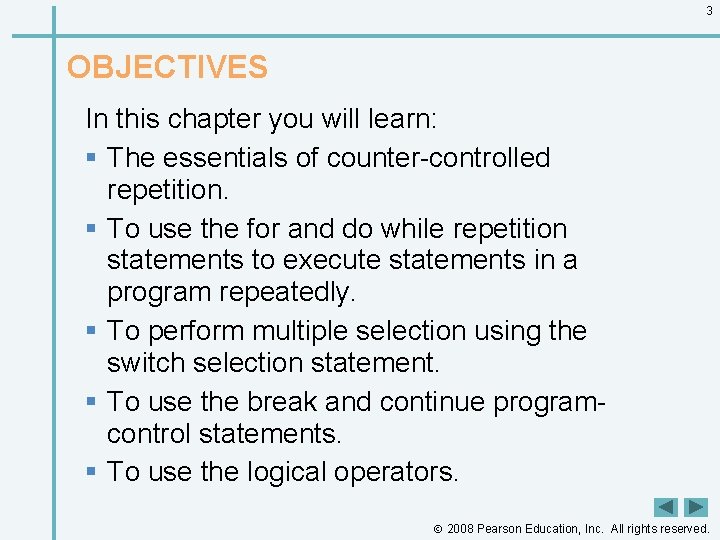
3 OBJECTIVES In this chapter you will learn: § The essentials of counter-controlled repetition. § To use the for and do while repetition statements to execute statements in a program repeatedly. § To perform multiple selection using the switch selection statement. § To use the break and continue programcontrol statements. § To use the logical operators. 2008 Pearson Education, Inc. All rights reserved.
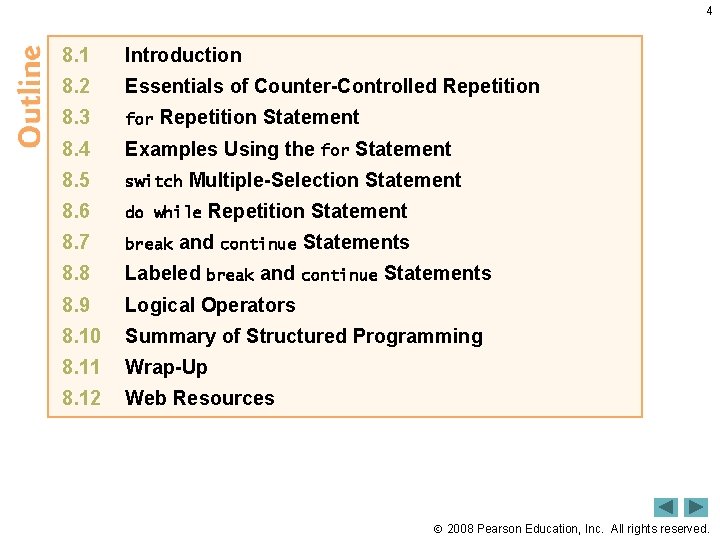
4 8. 1 Introduction 8. 2 Essentials of Counter-Controlled Repetition 8. 3 for 8. 4 Examples Using the for Statement 8. 5 switch 8. 6 do while 8. 7 break 8. 8 Labeled break and continue Statements 8. 9 Logical Operators 8. 10 Summary of Structured Programming 8. 11 Wrap-Up 8. 12 Web Resources Repetition Statement Multiple-Selection Statement Repetition Statement and continue Statements 2008 Pearson Education, Inc. All rights reserved.
5 8. 1 Introduction • The techniques you will learn here applicable to most high-level languages, including Java. Script. 2008 Pearson Education, Inc. All rights reserved.
8. 2 Essentials of Counter-Controlled Repetition 6 • Counter-controlled repetition requires – name of a control variable – initial value of the control variable – the increment (or decrement) by which the control variable is modified each time through the loop – the condition that tests for the final value of the control variable to determine whether looping should continue 2008 Pearson Education, Inc. All rights reserved.
8. 2 Essentials of Counter-Controlled Repetition (Cont. ) 7 • The double-quote character delimits the beginning and end of a string literal in Java. Script – it cannot be used in a string unless it is preceded by a to create the escape sequence ” 2008 Pearson Education, Inc. All rights reserved.
8. 2 Essentials of Counter-Controlled Repetition (Cont. ) 8 • XHTML allows either single quotes (') or double quotes (") to be placed around the value specified for an attribute • Java. Script allows single quotes to be placed in a string literal 2008 Pearson Education, Inc. All rights reserved.
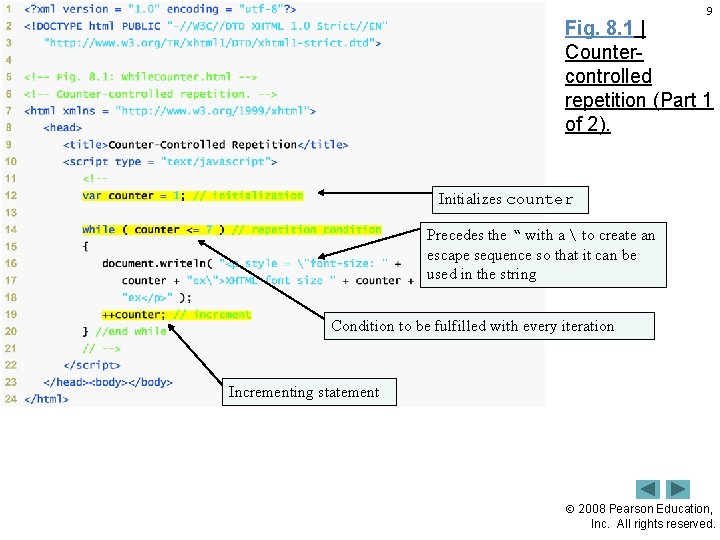
9 Fig. 8. 1 | Countercontrolled repetition (Part 1 of 2). Initializes counter Precedes the “ with a to create an escape sequence so that it can be used in the string Condition to be fulfilled with every iteration Incrementing statement 2008 Pearson Education, Inc. All rights reserved.
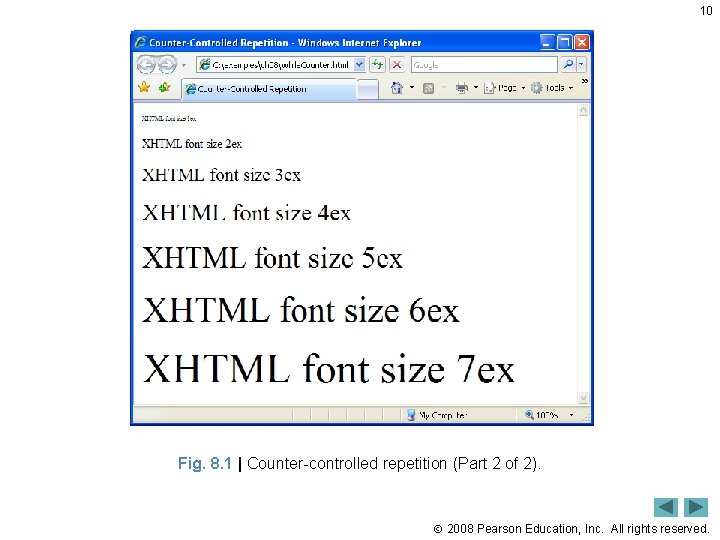
10 Fig. 8. 1 | Counter-controlled repetition (Part 2 of 2). 2008 Pearson Education, Inc. All rights reserved.
11 Common Programming Error 8. 1 Placing a double-quote (") character inside a string literal that is delimited by double quotes causes a runtime error when the script is interpreted. To be displayed as part of a string literal, a double-quote (") character must be preceded by a to form the escape sequence ". 2008 Pearson Education, Inc. All rights reserved.
12 Good Programming Practice 8. 1 Use integer values to control loop counting. 2008 Pearson Education, Inc. All rights reserved.
13 Good Programming Practice 8. 2 Indent the statements in the body of each control structure. 2008 Pearson Education, Inc. All rights reserved.
14 Good Programming Practice 8. 3 Put a blank line before and after each control structure, to make it stand out in the program. 2008 Pearson Education, Inc. All rights reserved.
15 Good Programming Practice 8. 4 Too many levels of nesting can make a program difficult to understand. As a general rule, try to avoid using more than three levels of nesting. 2008 Pearson Education, Inc. All rights reserved.
16 Good Programming Practice 8. 5 Vertical spacing above and below control structures and indentation of the bodies of control structures in the headers of the control structure give programs a two-dimensional appearance that enhances readability. 2008 Pearson Education, Inc. All rights reserved.
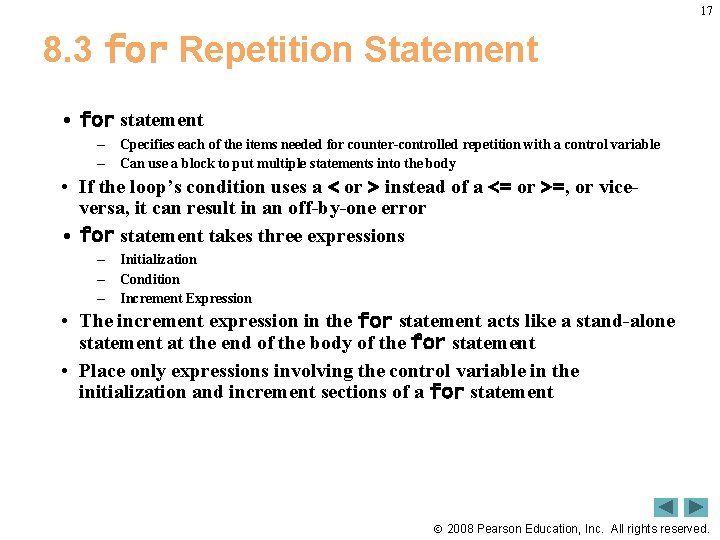
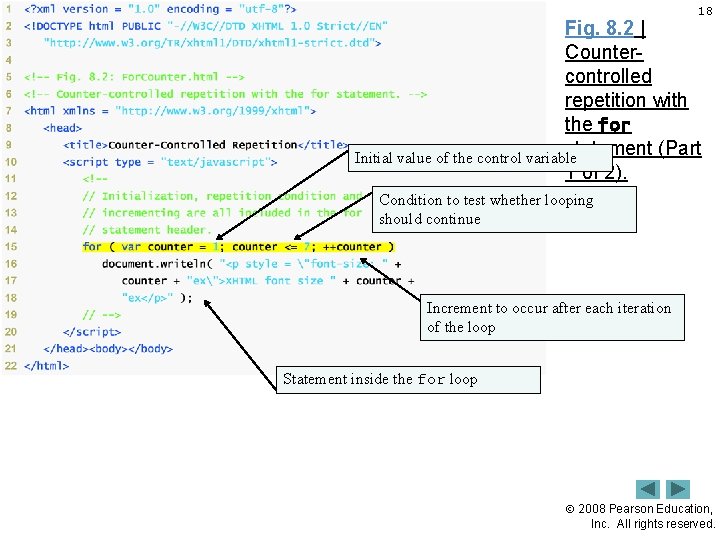
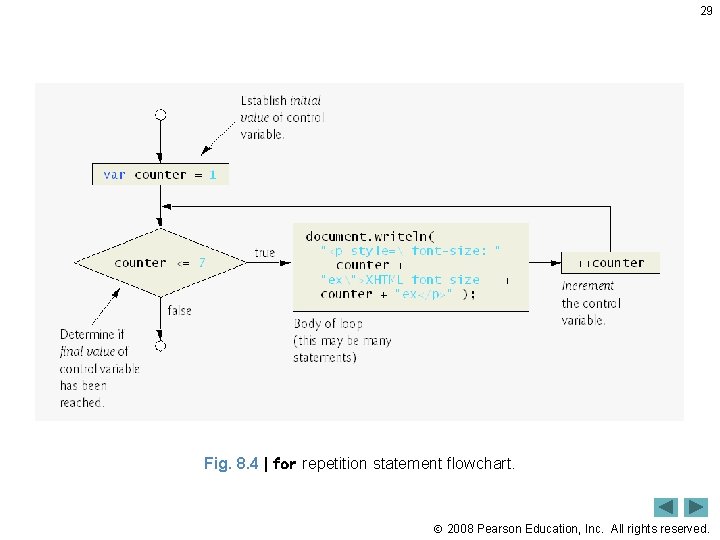
17 8. 3 for Repetition Statement • for statement – – Cpecifies each of the items needed for counter-controlled repetition with a control variable Can use a block to put multiple statements into the body • If the loop’s condition uses a < or > instead of a <= or >=, or viceversa, it can result in an off-by-one error • for statement takes three expressions – – – Initialization Condition Increment Expression • The increment expression in the for statement acts like a stand-alone statement at the end of the body of the for statement • Place only expressions involving the control variable in the initialization and increment sections of a for statement 2008 Pearson Education, Inc. All rights reserved.
18 Fig. 8. 2 | Countercontrolled repetition with the for statement (Part Initial value of the control variable 1 of 2). Condition to test whether looping should continue Increment to occur after each iteration of the loop Statement inside the for loop 2008 Pearson Education, Inc. All rights reserved.
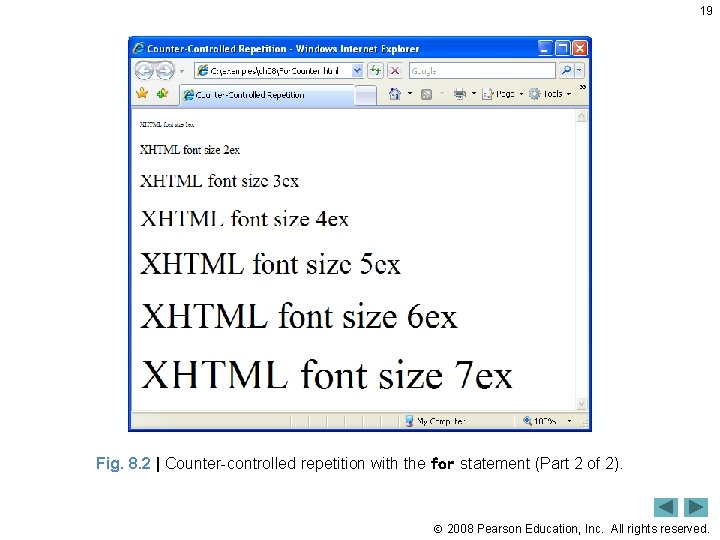
19 Fig. 8. 2 | Counter-controlled repetition with the for statement (Part 2 of 2). 2008 Pearson Education, Inc. All rights reserved.
20 8. 3 for Repetition Statement (Cont. ) • The three expressions in the for statement are optional • The two semicolons in the for statement are required • The initialization, loop-continuation condition and increment portions of a for statement can contain arithmetic expressions 2008 Pearson Education, Inc. All rights reserved.
21 8. 3 for Repetition Statement (Cont. ) • The part of a script in which a variable name can be used is known as the variable’s scope • The “increment” of a for statement may be negative, in which case it is called a decrement and the loop actually counts downward • If the loop-continuation condition initially is false, the body of the for statement is not performed – Execution proceeds with the statement following the for statement 2008 Pearson Education, Inc. All rights reserved.
22 Common Programming Error 8. 2 Using an incorrect relational operator or an incorrect final value of a loop counter in the condition of a while, for or do while statement can cause an off-by-one error or an infinite loop. 2008 Pearson Education, Inc. All rights reserved.
23 Good Programming Practice 8. 6 Using the final value in the condition of a while or for statement and using the <= relational operator will help avoid off-by-one errors. For a loop used to print the values 1 to 10, for example, the initial value of counter should be 1, and the loop-continuation condition should be counter <= 10 rather than counter < 10 (which is an off-by-one error) or counter < 11 (which is correct). Many programmers, however, prefer so-called zero-based counting, in which, to count 10 times through the loop, counter would be initialized to zero and the loop-continuation test would be counter < 10. 2008 Pearson Education, Inc. All rights reserved.
24 Fig. 8. 3 | for statement header components. 2008 Pearson Education, Inc. All rights reserved.
25 Good Programming Practice 8. 7 Place only expressions involving the control variable in the initialization and increment sections of a for statement. Manipulations of other variables should appear either before the loop (if they execute only once, like initialization statements) or in the loop body (if they execute once per iteration of the loop, like incrementing or decrementing statements). 2008 Pearson Education, Inc. All rights reserved.
26 Common Programming Error 8. 3 Using commas instead of the two required semicolons in the header of a for statement is a syntax error. 2008 Pearson Education, Inc. All rights reserved.
27 Common Programming Error 8. 4 Placing a semicolon immediately to the right of the right parenthesis of the header of a for statement makes the body of that for statement an empty statement. This code is normally a logic error. 2008 Pearson Education, Inc. All rights reserved.
28 Error-Prevention Tip 8. 1 Although the value of the control variable can be changed in the body of a for statement, avoid changing it, because doing so can lead to subtle errors. 2008 Pearson Education, Inc. All rights reserved.
29 Fig. 8. 4 | for repetition statement flowchart. 2008 Pearson Education, Inc. All rights reserved.
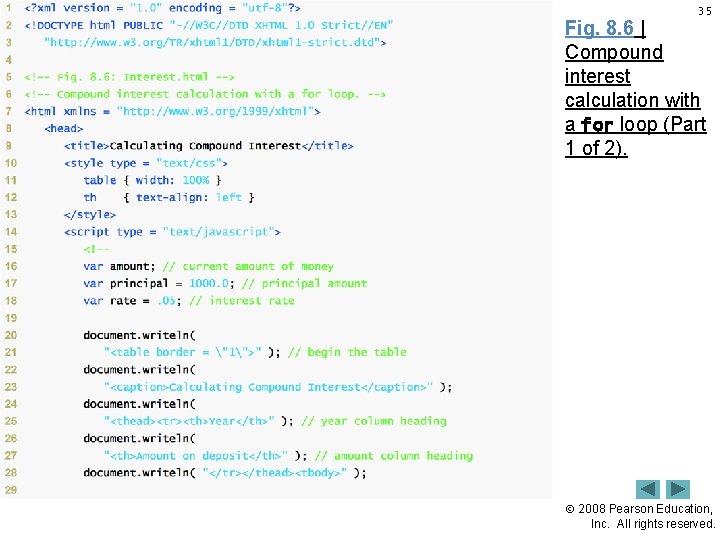
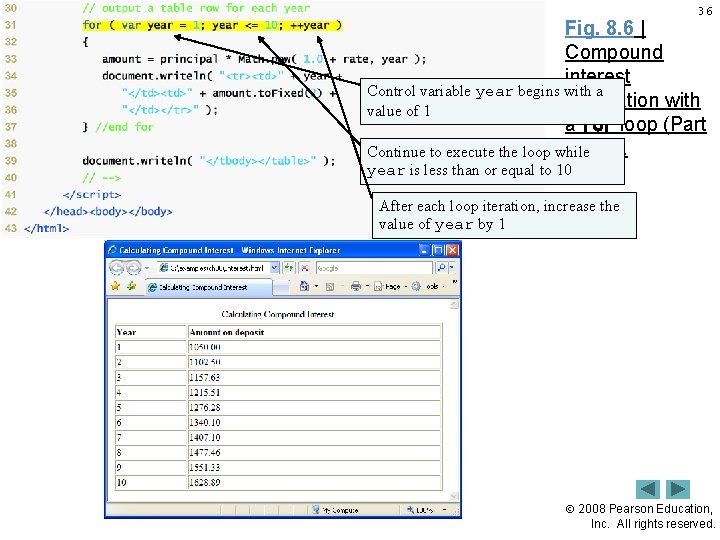
30 8. 4 Examples Using the for Statement • Java. Script does not include an exponentiation operator – Math object’s pow method for this purpose. Math. pow(x, y) calculates the value of x raised to the yth power. • Floating-point numbers can cause trouble as a result of rounding errors 2008 Pearson Education, Inc. All rights reserved.
31 Common Programming Error 8. 5 Not using the proper relational operator in the loop-continuation condition of a loop that counts downward (e. g. , using i <= 1 in a loop that counts down to 1) is usually a logic error that will yield incorrect results when the program runs. 2008 Pearson Education, Inc. All rights reserved.
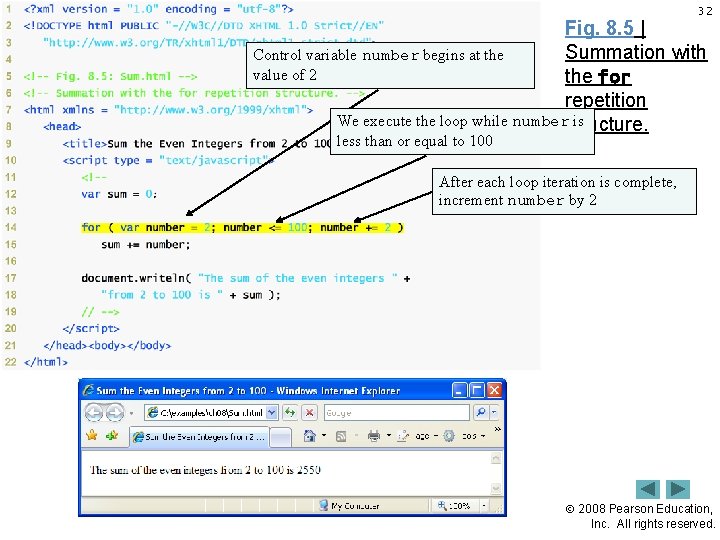
32 Fig. 8. 5 | Summation with Control variable number begins at the value of 2 the for repetition We execute the loop while numberstructure. is less than or equal to 100 After each loop iteration is complete, increment number by 2 2008 Pearson Education, Inc. All rights reserved.
33 Good Programming Practice 8. 8 Although statements preceding a for statement and in the body of a for statement can often be merged into the for header, avoid doing so, because it makes the program more difficult to read. 2008 Pearson Education, Inc. All rights reserved.
34 Good Programming Practice 8. 9 For clarity, limit the size of control-statement headers to a single line, if possible. 2008 Pearson Education, Inc. All rights reserved.
35 Fig. 8. 6 | Compound interest calculation with a for loop (Part 1 of 2). 2008 Pearson Education, Inc. All rights reserved.
36 Fig. 8. 6 | Compound interest Control variable year begins with a calculation with value of 1 a for loop (Part 2 of 2). Continue to execute the loop while year is less than or equal to 10 After each loop iteration, increase the value of year by 1 2008 Pearson Education, Inc. All rights reserved.
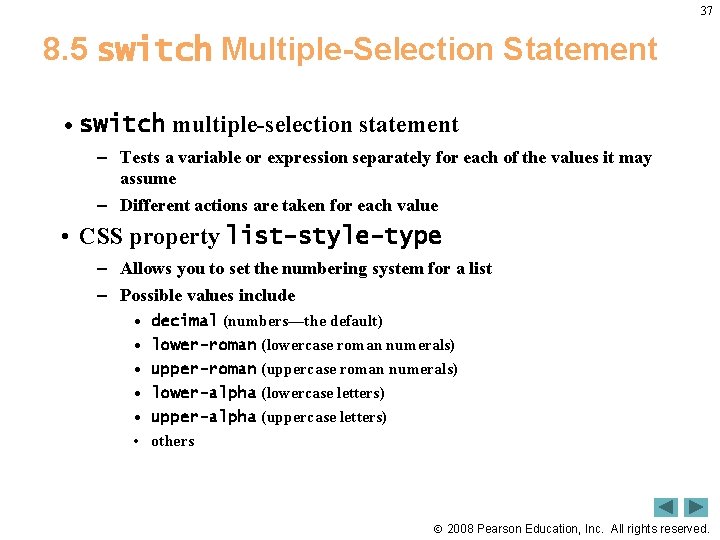
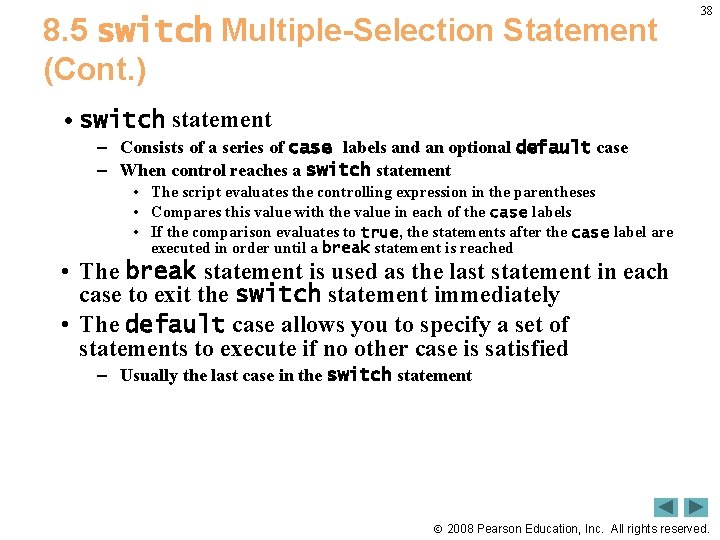
37 8. 5 switch Multiple-Selection Statement • switch multiple-selection statement – Tests a variable or expression separately for each of the values it may assume – Different actions are taken for each value • CSS property list-style-type – Allows you to set the numbering system for a list – Possible values include • • • decimal (numbers—the default) lower-roman (lowercase roman numerals) upper-roman (uppercase roman numerals) lower-alpha (lowercase letters) upper-alpha (uppercase letters) others 2008 Pearson Education, Inc. All rights reserved.
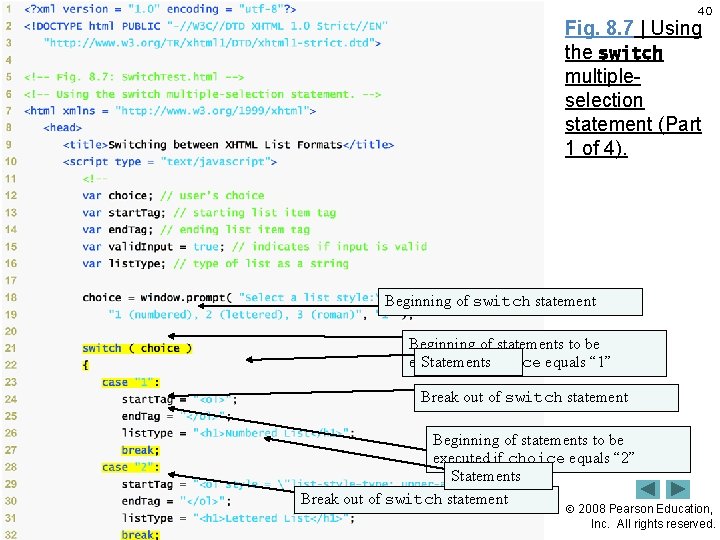
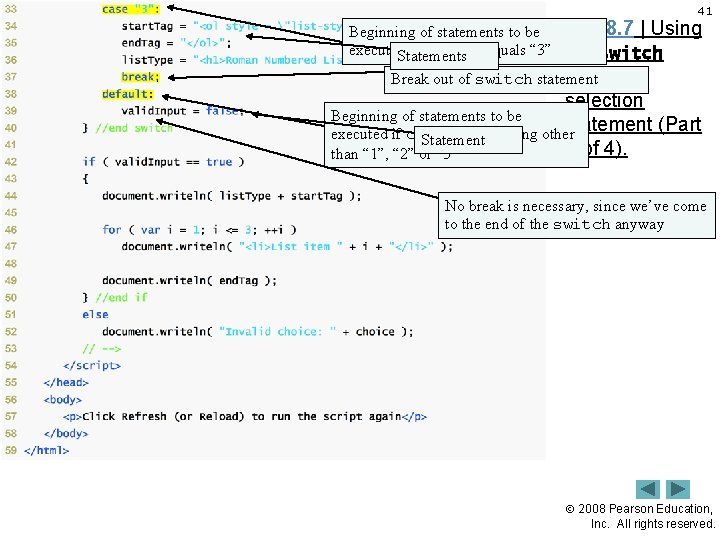
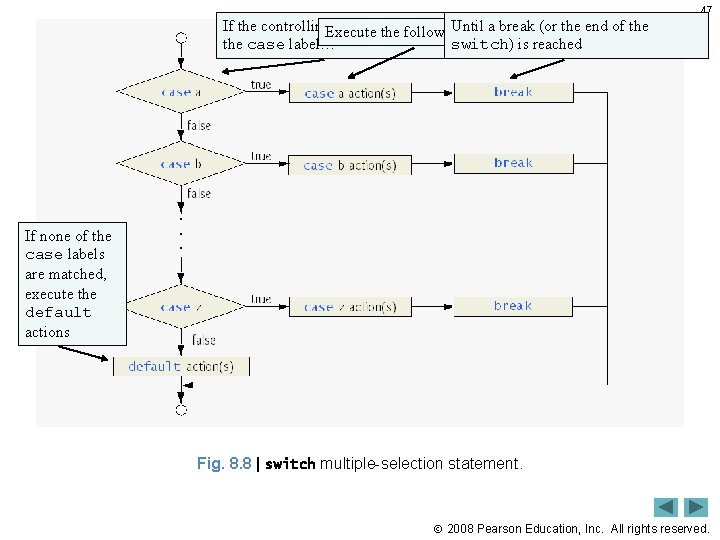
8. 5 switch Multiple-Selection Statement (Cont. ) 38 • switch statement – Consists of a series of case labels and an optional default case – When control reaches a switch statement • The script evaluates the controlling expression in the parentheses • Compares this value with the value in each of the case labels • If the comparison evaluates to true, the statements after the case label are executed in order until a break statement is reached • The break statement is used as the last statement in each case to exit the switch statement immediately • The default case allows you to specify a set of statements to execute if no other case is satisfied – Usually the last case in the switch statement 2008 Pearson Education, Inc. All rights reserved.
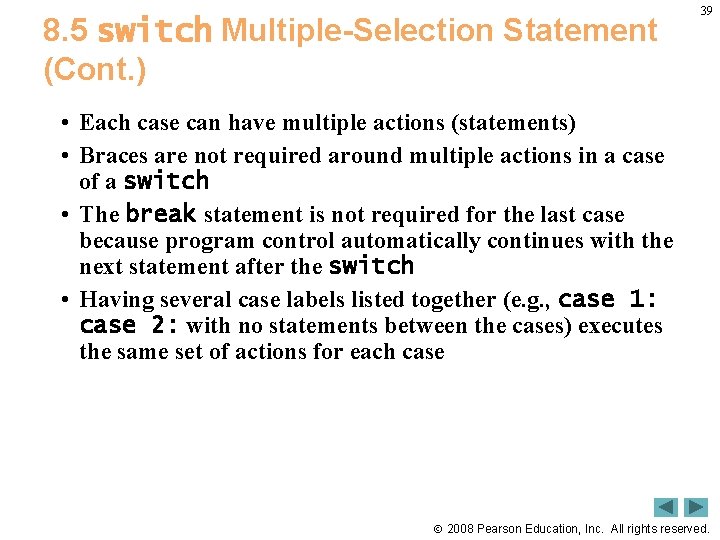
8. 5 switch Multiple-Selection Statement (Cont. ) 39 • Each case can have multiple actions (statements) • Braces are not required around multiple actions in a case of a switch • The break statement is not required for the last case because program control automatically continues with the next statement after the switch • Having several case labels listed together (e. g. , case 1: case 2: with no statements between the cases) executes the same set of actions for each case 2008 Pearson Education, Inc. All rights reserved.
40 Fig. 8. 7 | Using the switch multipleselection statement (Part 1 of 4). Beginning of switch statement Beginning of statements to be executed if choice equals “ 1” Statements Break out of switch statement Beginning of statements to be executed if choice equals “ 2” Statements Break out of switch statement 2008 Pearson Education, Inc. All rights reserved.
41 Fig. 8. 7 | Using Beginning of statements to be executed if choice equals “ 3” the switch Statements multiple. Break out of switch statement selection Beginning of statements to be statement (Part executed if choice is anything other Statement 2 of 4). than “ 1”, “ 2” or “ 3” No break is necessary, since we’ve come to the end of the switch anyway 2008 Pearson Education, Inc. All rights reserved.
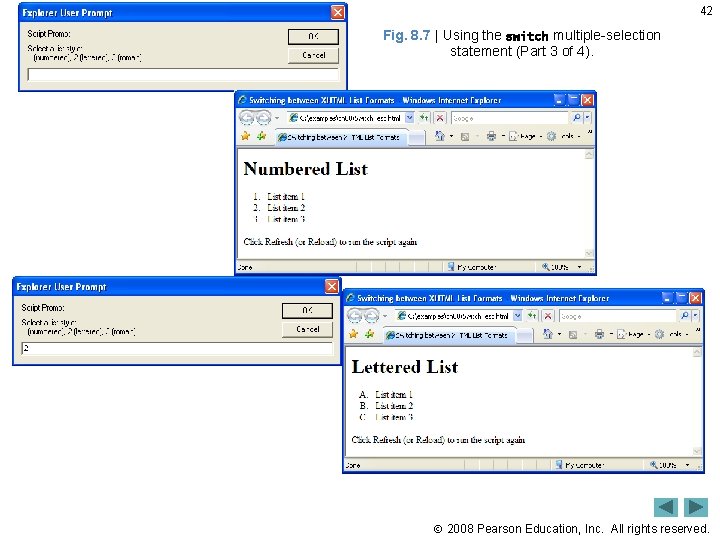
42 Fig. 8. 7 | Using the switch multiple-selection statement (Part 3 of 4). 2008 Pearson Education, Inc. All rights reserved.
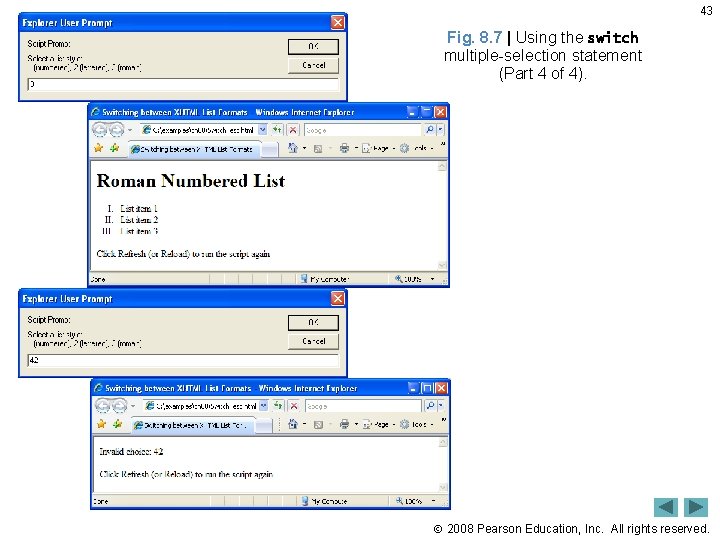
43 Fig. 8. 7 | Using the switch multiple-selection statement (Part 4 of 4). 2008 Pearson Education, Inc. All rights reserved.
44 Common Programming Error 8. 6 Forgetting a break statement when one is needed in a switch statement is a logic error. 2008 Pearson Education, Inc. All rights reserved.
45 Software Engineering Observation 8. 1 Provide a default case in switch statements. Cases not explicitly tested in a switch statement without a default case are ignored. Including a default case focuses the programmer on processing exceptional conditions. However, there are situations in which no default processing is needed. 2008 Pearson Education, Inc. All rights reserved.
46 Good Programming Practice 8. 10 Although the case clauses and the default case clause in a switch statement can occur in any order, it is clearer (and more common) to place the default clause last. 2008 Pearson Education, Inc. All rights reserved.
If the controlling. Execute expression is equal. Until tostatements… a break (or the end of the following the case label… switch) is reached 47 If none of the case labels are matched, execute the default actions Fig. 8. 8 | switch multiple-selection statement. 2008 Pearson Education, Inc. All rights reserved.
48 Good Programming Practice 8. 11 In a switch statement, when the default clause is listed last, the break for that case statement is not required. Some programmers include this break for clarity and for symmetry with other cases. 2008 Pearson Education, Inc. All rights reserved.
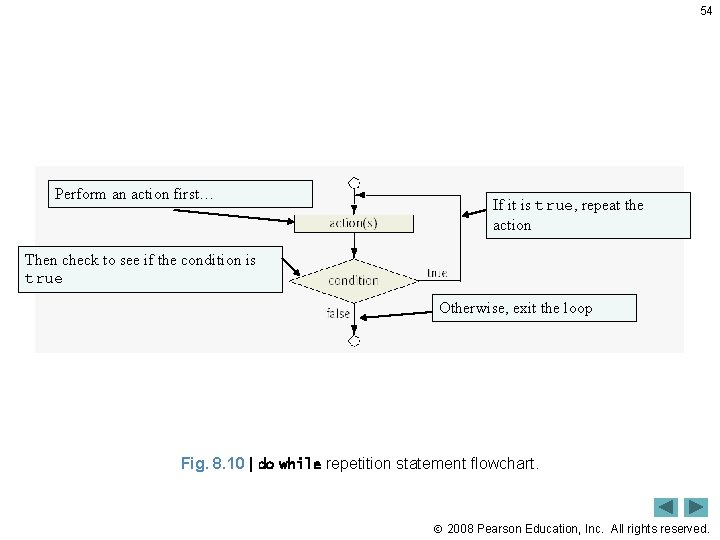
49 8. 6 do…while Repetition Statement • do…while statement – tests the loop-continuation condition after the loop body executes – The loop body always executes at least once 2008 Pearson Education, Inc. All rights reserved.
50 Good Programming Practice 8. 12 Some programmers always include braces in a do while statement even if they are not necessary. This helps eliminate ambiguity between the while statement and the do while statement containing a one-statement body. 2008 Pearson Education, Inc. All rights reserved.
51 Common Programming Error 8. 7 Infinite loops are caused when the loopcontinuation condition never becomes false in a while , for or do while statement. To prevent this, make sure that there is not a semicolon immediately after the header of a while or for statement. In a countercontrolled loop, make sure that the control variable is incremented (or decremented) in the body of the loop. In a sentinel-controlled loop, make sure that the sentinel value is eventually input. 2008 Pearson Education, Inc. All rights reserved.
52 Fig. 8. 9 | Using the do while repetition statement (Part 1 of 2). Perform the following actions… Then check to see if counter <= 6. If it is, iterate through the loop again. 2008 Pearson Education, Inc. All rights reserved.
53 Fig. 8. 9 | Using the do while repetition statement (Part 2 of 2). 2008 Pearson Education, Inc. All rights reserved.
54 Perform an action first… If it is true, repeat the action Then check to see if the condition is true Otherwise, exit the loop Fig. 8. 10 | do while repetition statement flowchart. 2008 Pearson Education, Inc. All rights reserved.
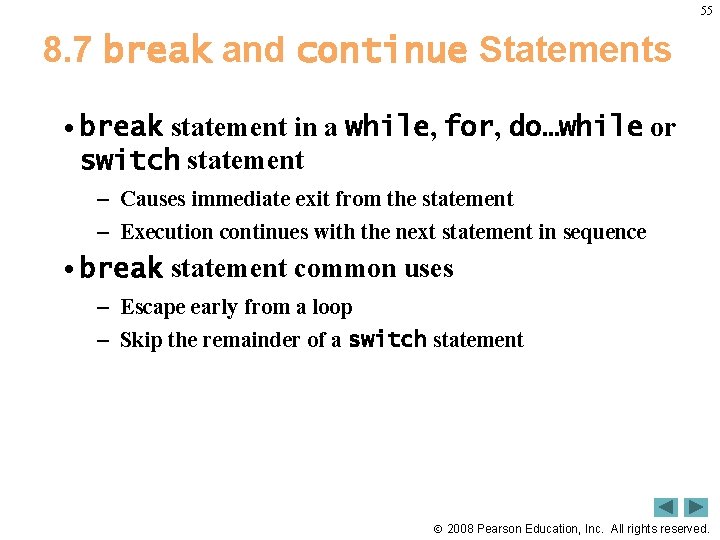
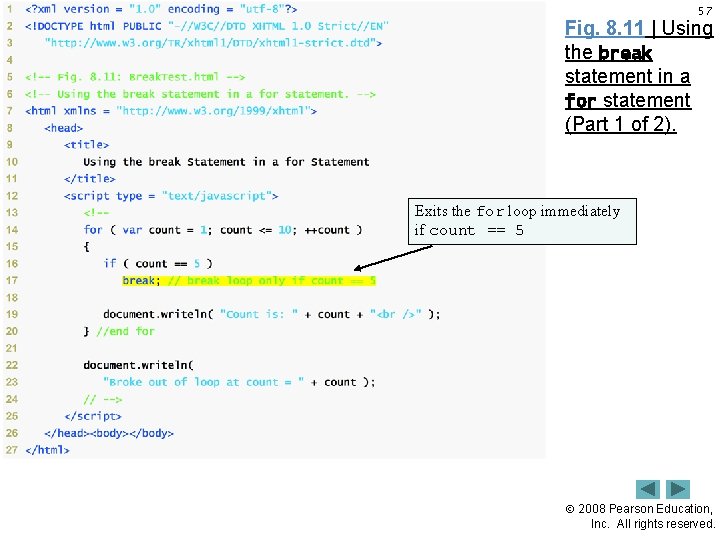
55 8. 7 break and continue Statements • break statement in a while, for, do…while or switch statement – Causes immediate exit from the statement – Execution continues with the next statement in sequence • break statement common uses – Escape early from a loop – Skip the remainder of a switch statement 2008 Pearson Education, Inc. All rights reserved.
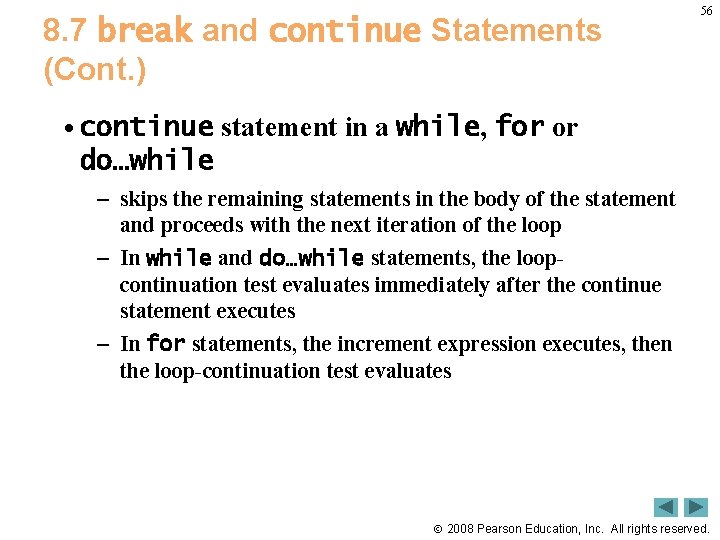
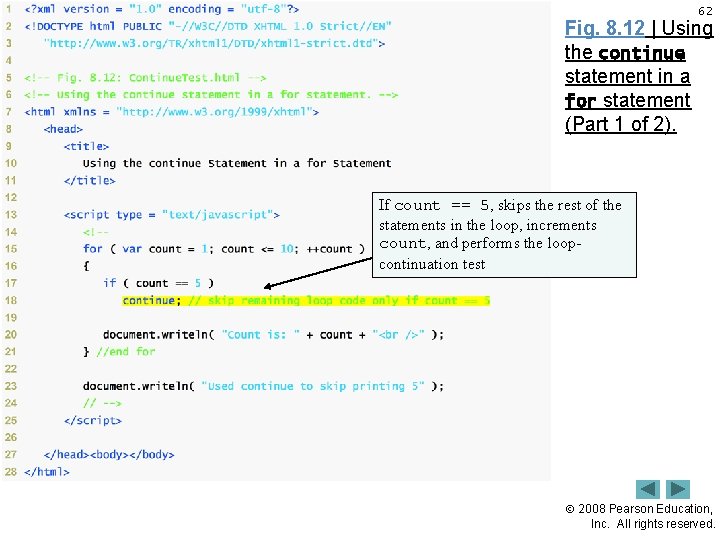
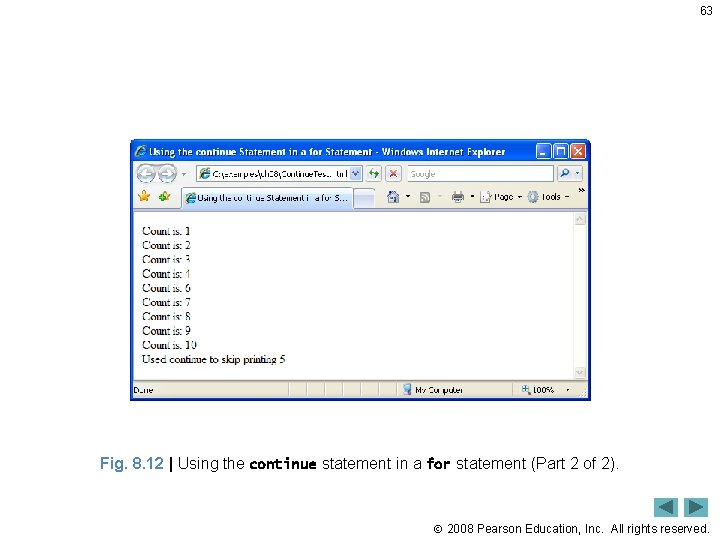
8. 7 break and continue Statements (Cont. ) 56 • continue statement in a while, for or do…while – skips the remaining statements in the body of the statement and proceeds with the next iteration of the loop – In while and do…while statements, the loopcontinuation test evaluates immediately after the continue statement executes – In for statements, the increment expression executes, then the loop-continuation test evaluates 2008 Pearson Education, Inc. All rights reserved.
57 Fig. 8. 11 | Using the break statement in a for statement (Part 1 of 2). Exits the for loop immediately if count == 5 2008 Pearson Education, Inc. All rights reserved.
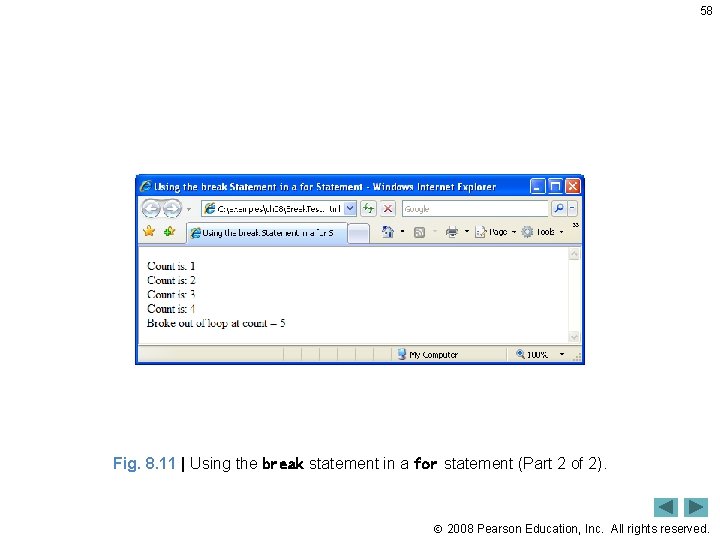
58 Fig. 8. 11 | Using the break statement in a for statement (Part 2 of 2). 2008 Pearson Education, Inc. All rights reserved.
59 Software Engineering Observation 8. 2 Some programmers feel that break and continue violate structured programming. They do not use break and continue , because the effects of these statements can be achieved by structured programming techniques. 2008 Pearson Education, Inc. All rights reserved.
60 Performance Tip 8. 1 The break and continue statements, when used properly, perform faster than the corresponding structured techniques. 2008 Pearson Education, Inc. All rights reserved.
61 Software Engineering Observation 8. 3 There is a tension between achieving quality software engineering and achieving the bestperforming software. Often, one of these goals is achieved at the expense of the other. For all but the most performance-intensive situations, the following rule of thumb should be followed: First make your code simple, readable and correct; then make it fast and small, but only if necessary. 2008 Pearson Education, Inc. All rights reserved.
62 Fig. 8. 12 | Using the continue statement in a for statement (Part 1 of 2). If count == 5, skips the rest of the statements in the loop, increments count, and performs the loopcontinuation test 2008 Pearson Education, Inc. All rights reserved.
63 Fig. 8. 12 | Using the continue statement in a for statement (Part 2 of 2). 2008 Pearson Education, Inc. All rights reserved.
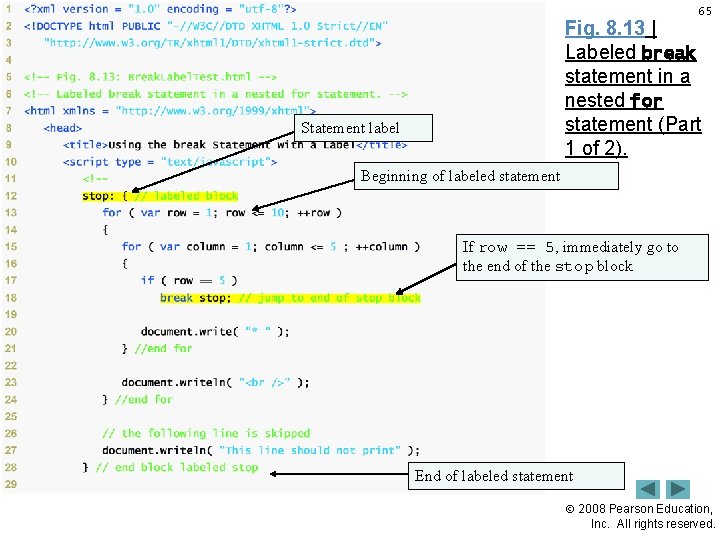
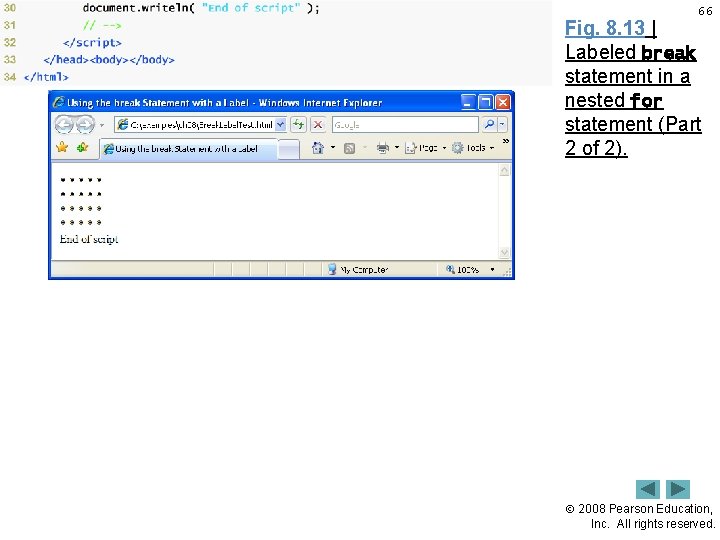
8. 8 Labeled break and continue Statements 64 • To break out of a nested control statement – Use the labeled break statement – When executed in a while, for, do…while or switch statement, causes immediate exit from that statement and any number of enclosing repetition statements – Program execution resumes with the first statement after the specified labeled statement (a statement preceded by a label) • A labeled statement can be a block (a set of statements enclosed in curly braces, {}) • Commonly are used to terminate nested looping structures containing while, for, do…while or switch statements 2008 Pearson Education, Inc. All rights reserved.
65 Fig. 8. 13 | Labeled break statement in a nested for statement (Part 1 of 2). Statement label Beginning of labeled statement If row == 5, immediately go to the end of the stop block End of labeled statement 2008 Pearson Education, Inc. All rights reserved.
66 Fig. 8. 13 | Labeled break statement in a nested for statement (Part 2 of 2). 2008 Pearson Education, Inc. All rights reserved.
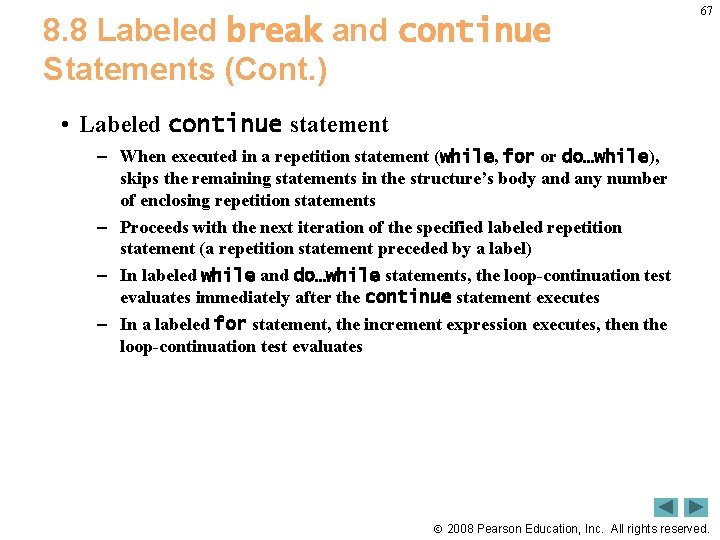
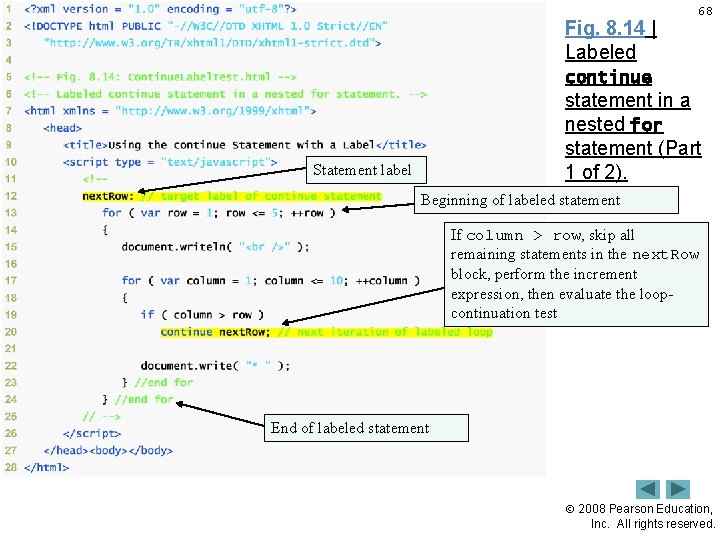
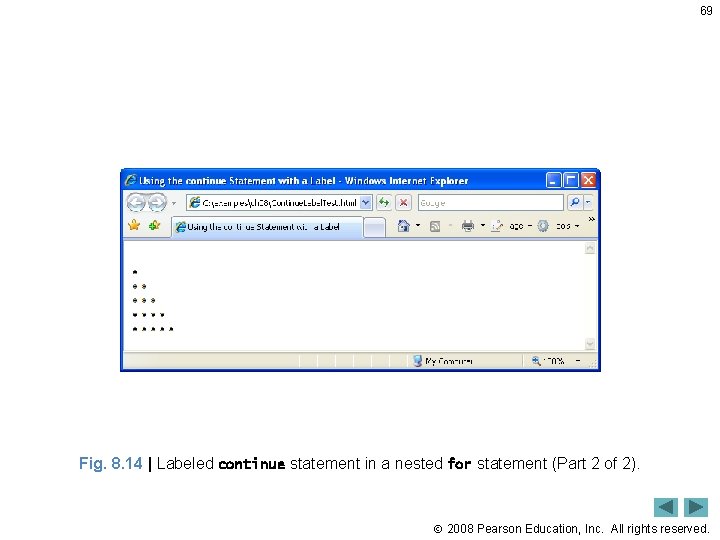
8. 8 Labeled break and continue Statements (Cont. ) 67 • Labeled continue statement – When executed in a repetition statement (while, for or do…while), skips the remaining statements in the structure’s body and any number of enclosing repetition statements – Proceeds with the next iteration of the specified labeled repetition statement (a repetition statement preceded by a label) – In labeled while and do…while statements, the loop-continuation test evaluates immediately after the continue statement executes – In a labeled for statement, the increment expression executes, then the loop-continuation test evaluates 2008 Pearson Education, Inc. All rights reserved.
Fig. 8. 14 | Labeled 68 continue statement in a nested for statement (Part 1 of 2). Statement label Beginning of labeled statement If column > row, skip all remaining statements in the next. Row block, perform the increment expression, then evaluate the loopcontinuation test End of labeled statement 2008 Pearson Education, Inc. All rights reserved.
69 Fig. 8. 14 | Labeled continue statement in a nested for statement (Part 2 of 2). 2008 Pearson Education, Inc. All rights reserved.
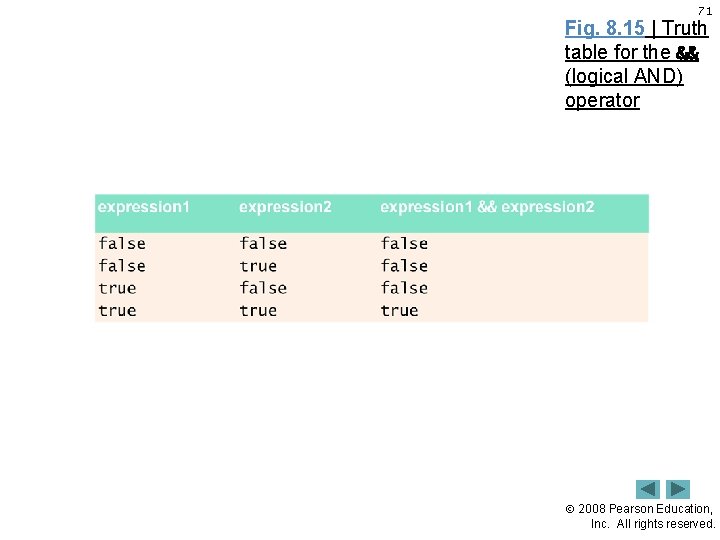
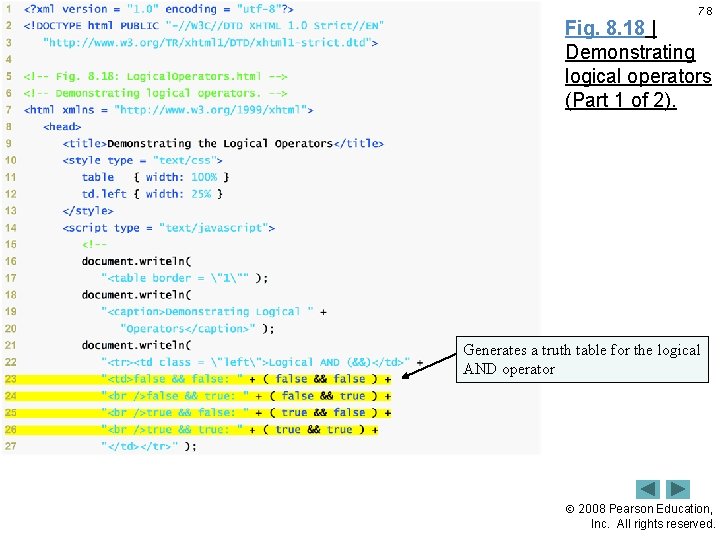
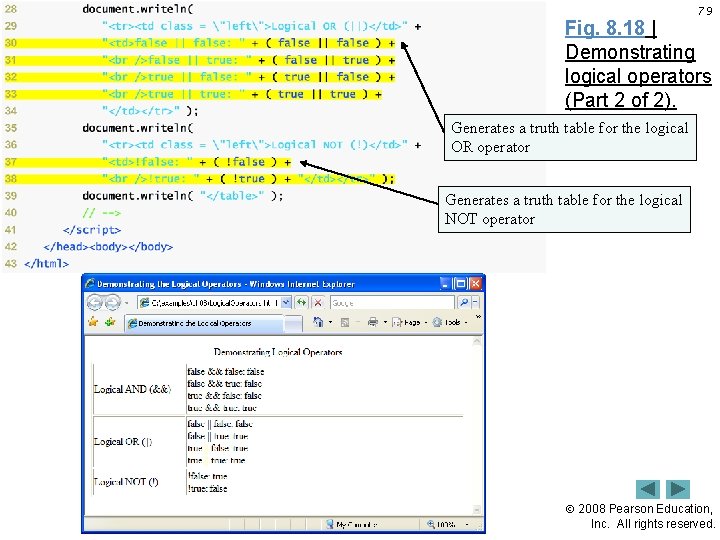
70 8. 9 Logical Operators • Logical operators can be used to form complex conditions by combining simple conditions – && (logical AND) – || (logical OR) – ! (logical NOT, also called logical negation) • The && operator is used to ensure that two conditions are both true before choosing a certain path of execution • Java. Script evaluates to false or true all expressions that include relational operators, equality operators and/or logical operators 2008 Pearson Education, Inc. All rights reserved.
71 Fig. 8. 15 | Truth table for the && (logical AND) operator 2008 Pearson Education, Inc. All rights reserved.
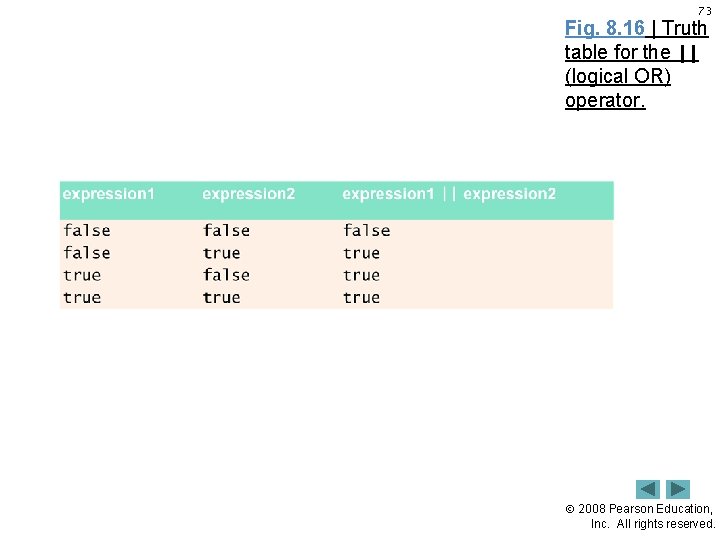
72 8. 9 Logical Operators (Cont. ) • The || (logical OR) operator is used to ensure that either or both of two conditions are true before choosing choose a certain path of execution 2008 Pearson Education, Inc. All rights reserved.
73 Fig. 8. 16 | Truth table for the || (logical OR) operator. 2008 Pearson Education, Inc. All rights reserved.
74 8. 9 Logical Operators (Cont. ) • The && operator has a higher precedence than the || operator • Both operators associate from left to right. • An expression containing && or || operators is evaluated only until truth or falsity is known – This is called short-circuit evaluation 2008 Pearson Education, Inc. All rights reserved.
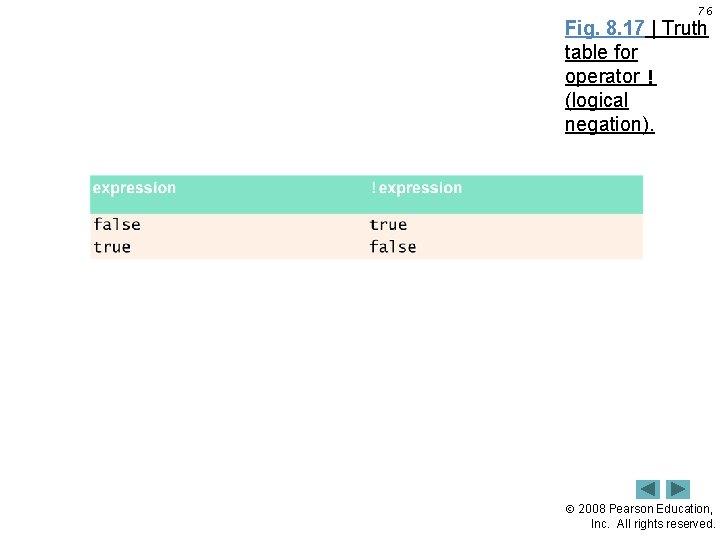
75 8. 9 Logical Operators (Cont. ) • ! (logical negation) operator – reverses the meaning of a condition (i. e. , a true value becomes false, and a false value becomes true) – Has only a single condition as an operand (i. e. , it is a unary operator) – Placed before a condition to evaluate to true if the original condition (without the logical negation operator) is false 2008 Pearson Education, Inc. All rights reserved.
76 Fig. 8. 17 | Truth table for operator ! (logical negation). 2008 Pearson Education, Inc. All rights reserved.
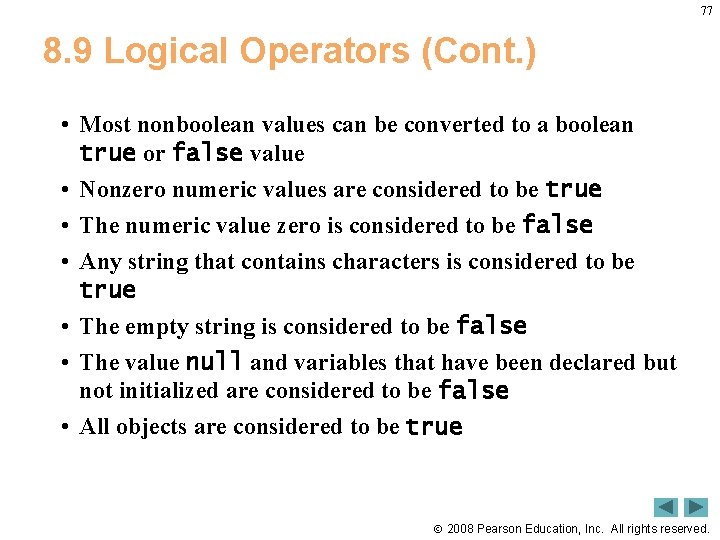
77 8. 9 Logical Operators (Cont. ) • Most nonboolean values can be converted to a boolean true or false value • Nonzero numeric values are considered to be true • The numeric value zero is considered to be false • Any string that contains characters is considered to be true • The empty string is considered to be false • The value null and variables that have been declared but not initialized are considered to be false • All objects are considered to be true 2008 Pearson Education, Inc. All rights reserved.
78 Fig. 8. 18 | Demonstrating logical operators (Part 1 of 2). Generates a truth table for the logical AND operator 2008 Pearson Education, Inc. All rights reserved.
79 Fig. 8. 18 | Demonstrating logical operators (Part 2 of 2). Generates a truth table for the logical OR operator Generates a truth table for the logical NOT operator 2008 Pearson Education, Inc. All rights reserved.
80 Fig. 8. 19 | Precedence and associativity of the operators discussed so far. 2008 Pearson Education, Inc. All rights reserved.
8. 10 Summary of Structured Programming 81 • The following charts review some of the key topics of structured programming. 2008 Pearson Education, Inc. All rights reserved.
82 Fig. 8. 20 | Single-entry/single-exit sequence, selection and repetition structures. 2008 Pearson Education, Inc. All rights reserved.
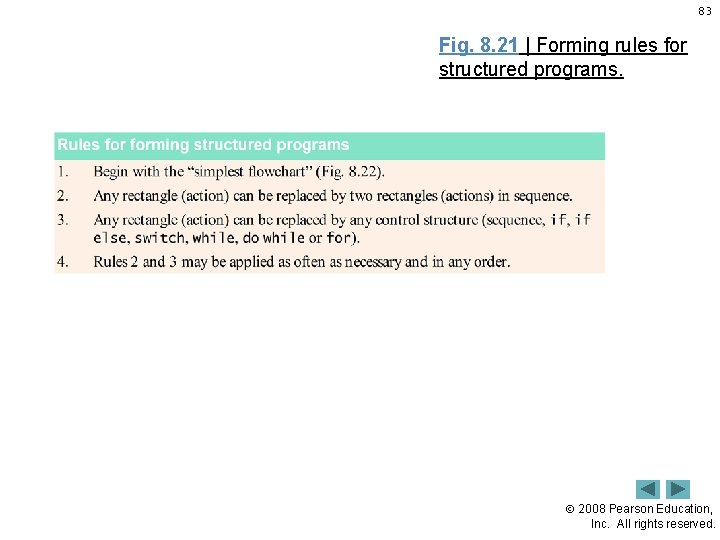
83 Fig. 8. 21 | Forming rules for structured programs. 2008 Pearson Education, Inc. All rights reserved.
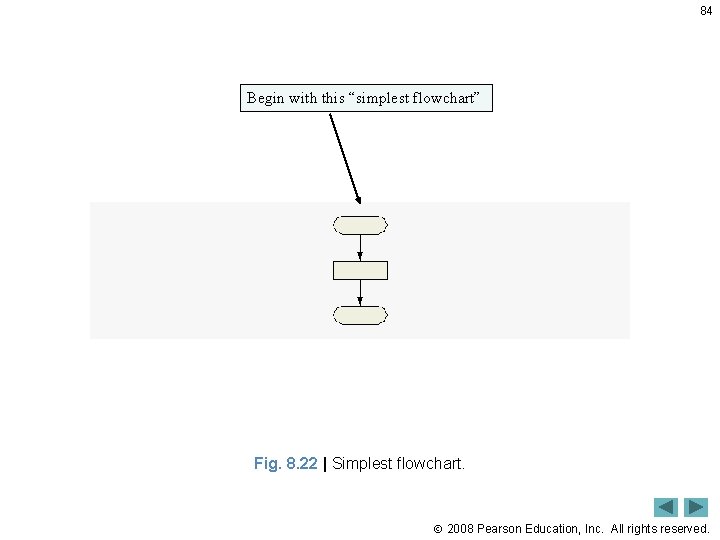
84 Begin with this “simplest flowchart” Fig. 8. 22 | Simplest flowchart. 2008 Pearson Education, Inc. All rights reserved.
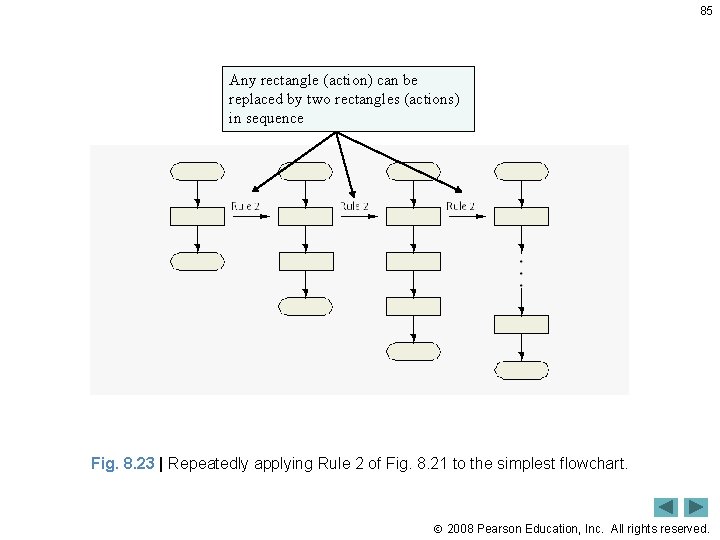
85 Any rectangle (action) can be replaced by two rectangles (actions) in sequence Fig. 8. 23 | Repeatedly applying Rule 2 of Fig. 8. 21 to the simplest flowchart. 2008 Pearson Education, Inc. All rights reserved.
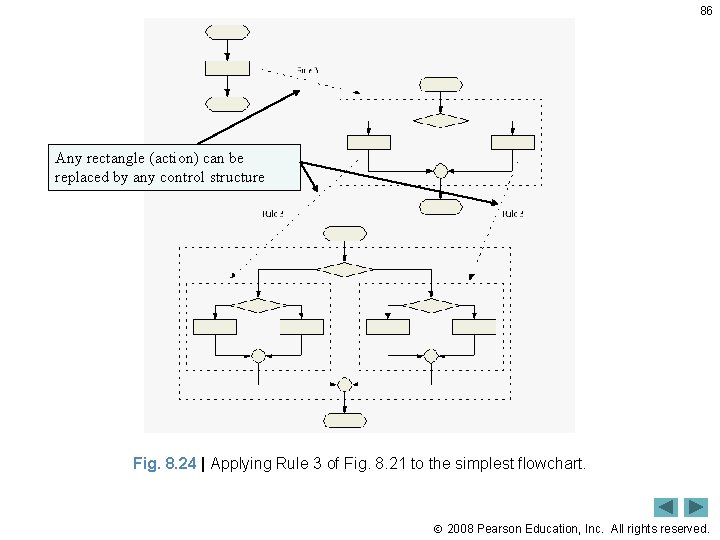
86 Any rectangle (action) can be replaced by any control structure Fig. 8. 24 | Applying Rule 3 of Fig. 8. 21 to the simplest flowchart. 2008 Pearson Education, Inc. All rights reserved.
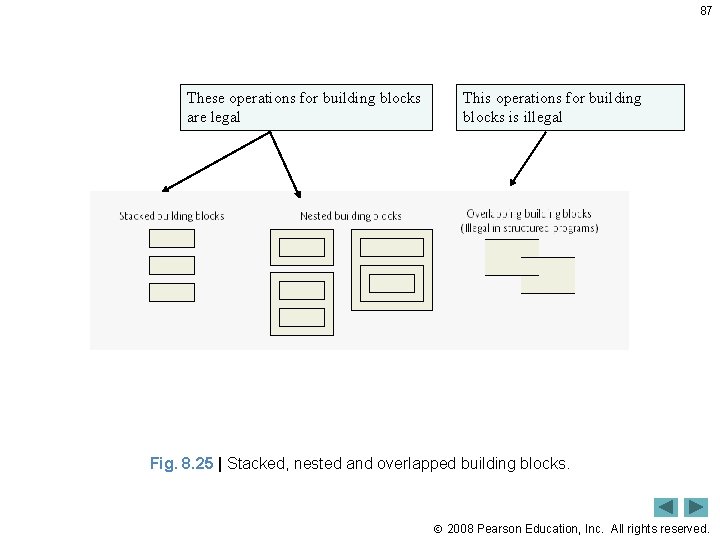
87 These operations for building blocks are legal This operations for building blocks is illegal Fig. 8. 25 | Stacked, nested and overlapped building blocks. 2008 Pearson Education, Inc. All rights reserved.
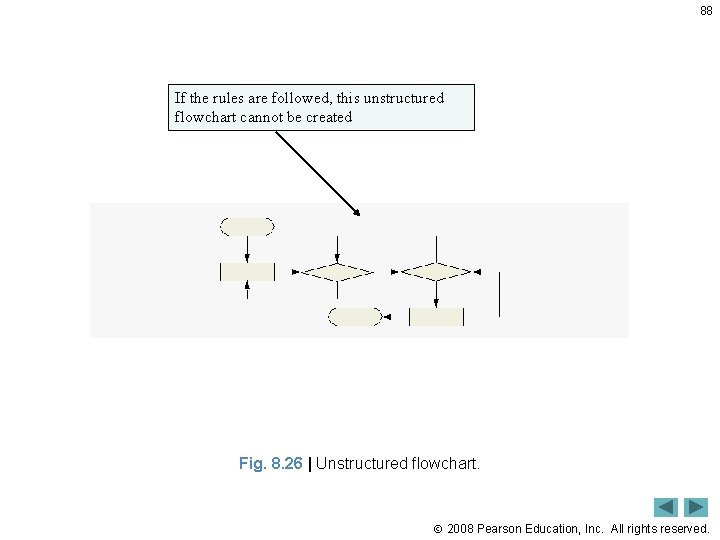
88 If the rules are followed, this unstructured flowchart cannot be created Fig. 8. 26 | Unstructured flowchart. 2008 Pearson Education, Inc. All rights reserved.