
1 15 AjaxEnabled Rich Internet Applications 2008 Pearson
1 15 Ajax-Enabled Rich Internet Applications 2008 Pearson Education, Inc. All rights reserved.
2 … the challenges are for the designers of these applications: to forget what we think we know about the limitations of the Web, and begin to imagine a wider, richer range of possibilities. It’s going to be fun. —Jesse James Garrett Dojo is the standard library Java. Script never had. —Alex Russell 2008 Pearson Education, Inc. All rights reserved.
3 To know how to suggest is the great art of teaching. To attain it we must be able to guess what will interest … —Henri-Fredreic Amiel It is characteristic of the epistemological tradition to present us with partial scenarios and then to demand whole or categorical answers as it were. —Avrum Stroll O! call back yesterday, bid time return. —William Shakespeare 2008 Pearson Education, Inc. All rights reserved.
4 OBJECTIVES In this chapter you will learn: § What Ajax is and why it is important for building Rich Internet Applications. § What asynchronous requests are and how they help give web applications the feel of desktop applications. § What the XMLHttp. Request object is and how it’s used to create and manage asynchronous requests to servers and to receive asynchronous responses from servers. 2008 Pearson Education, Inc. All rights reserved.
5 OBJECTIVES § Methods and properties of the XMLHttp. Request object. § How to use XHTML, Java. Script, CSS, XML, JSON and the DOM in Ajax applications. § How to use Ajax frameworks and toolkits, specifically Dojo, to conveniently create robust Ajax-enabled Rich Internet Applications. § About resources for studying Ajax-related issues such as security, performance, debugging, the “back-button problem” and more. 2008 Pearson Education, Inc. All rights reserved.
6 15. 1 Introduction 15. 2 Traditional Web Applications vs. Ajax Applications 15. 3 Rich Internet Applications (RIAs) with Ajax 15. 4 History of Ajax 15. 5 “Raw” Ajax Example Using the XMLHttp. Request Object 15. 6 Using XML and the DOM 15. 7 Creating a Full-Scale Ajax-Enabled Application 15. 8 Dojo Toolkit 15. 9 Wrap-Up 15. 10 Web Resources 2008 Pearson Education, Inc. All rights reserved.
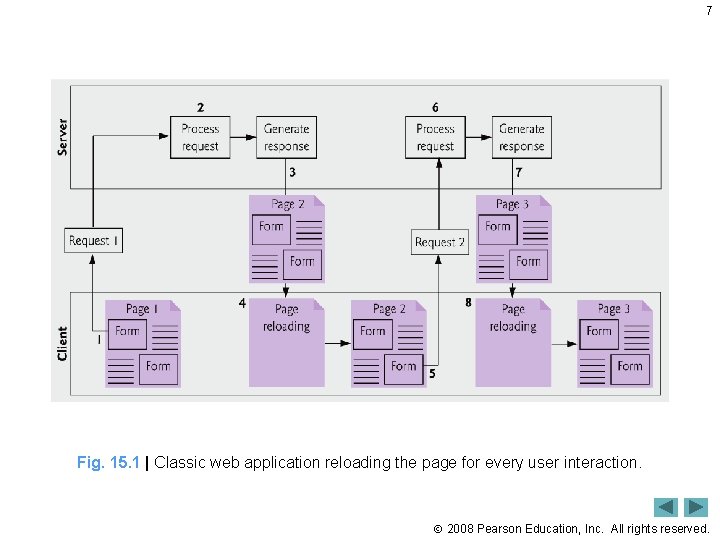
7 Fig. 15. 1 | Classic web application reloading the page for every user interaction. 2008 Pearson Education, Inc. All rights reserved.

8 Fig. 15. 2 | Ajax-enabled web application interacting with the server asynchronously. 2008 Pearson Education, Inc. All rights reserved.
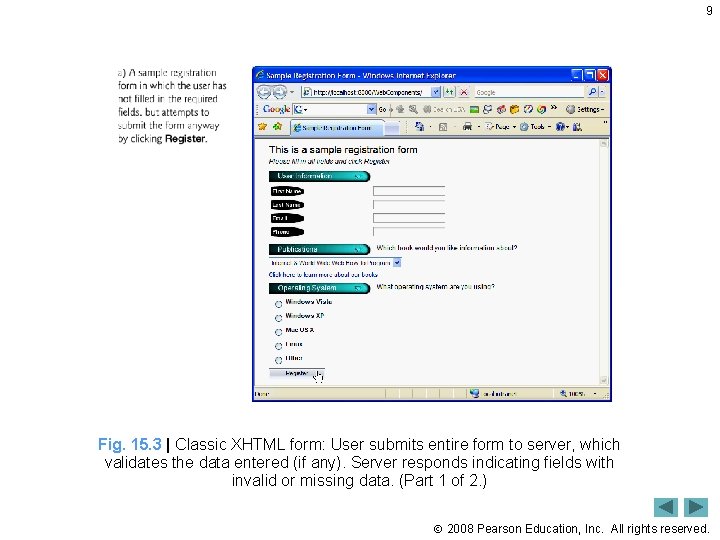
9 Fig. 15. 3 | Classic XHTML form: User submits entire form to server, which validates the data entered (if any). Server responds indicating fields with invalid or missing data. (Part 1 of 2. ) 2008 Pearson Education, Inc. All rights reserved.
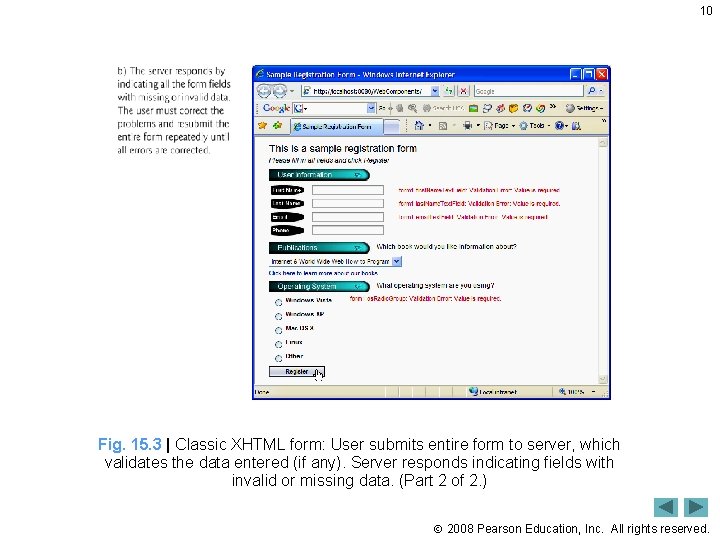
10 Fig. 15. 3 | Classic XHTML form: User submits entire form to server, which validates the data entered (if any). Server responds indicating fields with invalid or missing data. (Part 2 of 2. ) 2008 Pearson Education, Inc. All rights reserved.
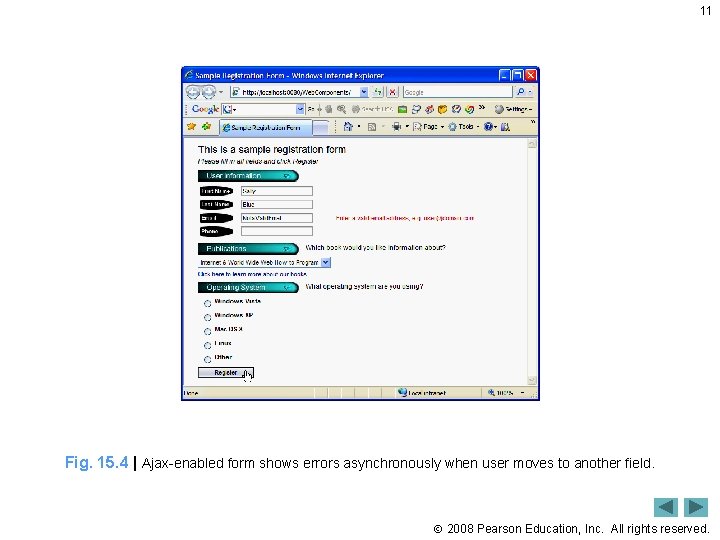
11 Fig. 15. 4 | Ajax-enabled form shows errors asynchronously when user moves to another field. 2008 Pearson Education, Inc. All rights reserved.
12 Performance Tip 15. 1 When an Ajax application requests a file from a server, such as an XHTML document or an image, the browser typically caches that file. Subsequent requests for the same file can load it from the browser’s cache rather than making the round trip to the server again. 2008 Pearson Education, Inc. All rights reserved.
13 Software Engineering Observation 15. 1 For security purposes, the XMLHttp. Request object doesn’t allow a web application to request resources from domain names other than the one that served the application. For this reason, the web application and its resources must reside on the same web server (this could be a web server on your local computer). This is commonly known as the same origin policy (SOP). SOP aims to close a vulnerability called cross-site scripting, also known as XSS, which allows an attacker to compromise a website’s security by injecting a malicious script onto the page from another domain. To learn more about XSS visit en. wikipedia. org/wiki/XSS. To get content from another domain securely, you can implement a server-side proxy—an application on the web application’s web server—that can make requests to other servers on the web application’s behalf. 2008 Pearson Education, Inc. All rights reserved.
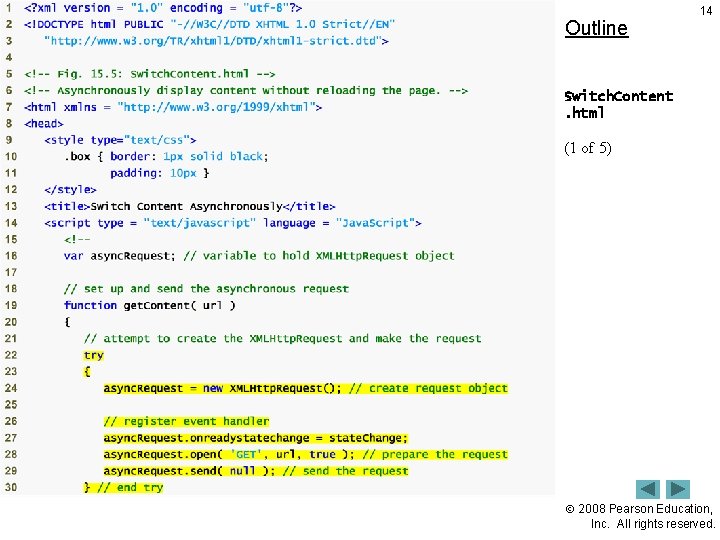
Outline 14 Switch. Content. html (1 of 5) 2008 Pearson Education, Inc. All rights reserved.
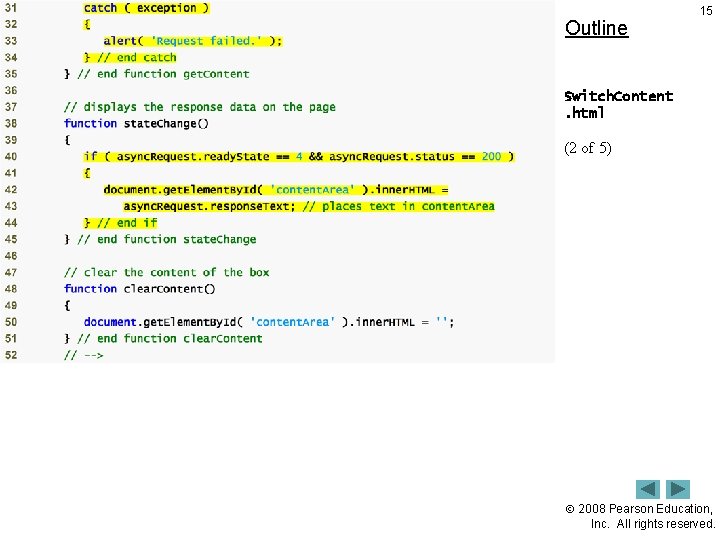
Outline 15 Switch. Content. html (2 of 5) 2008 Pearson Education, Inc. All rights reserved.
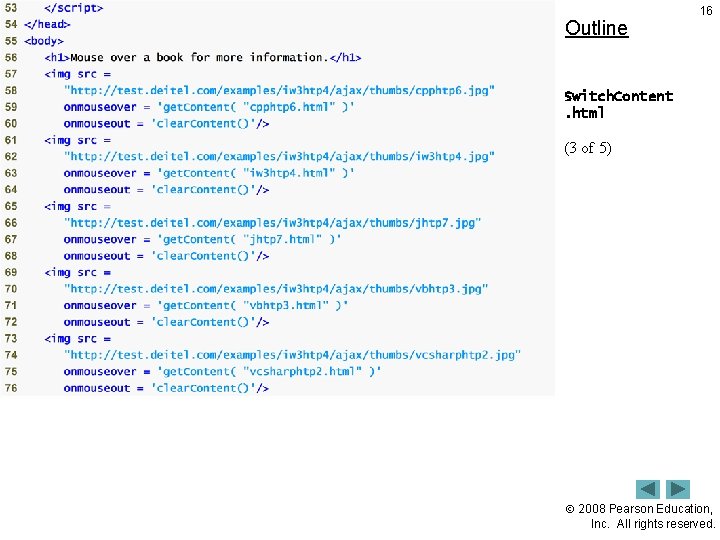
Outline 16 Switch. Content. html (3 of 5) 2008 Pearson Education, Inc. All rights reserved.
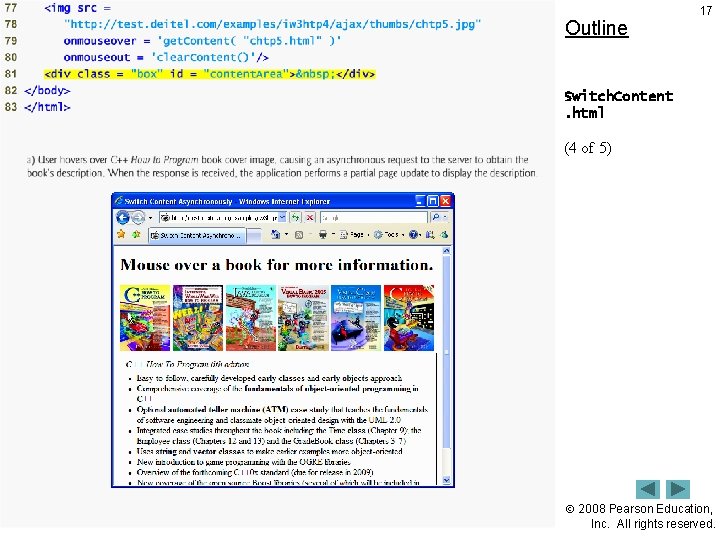
Outline 17 Switch. Content. html (4 of 5) 2008 Pearson Education, Inc. All rights reserved.
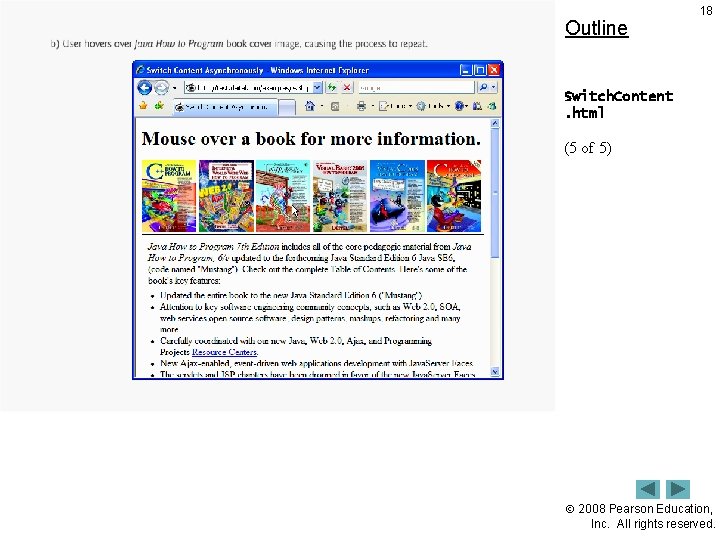
Outline 18 Switch. Content. html (5 of 5) 2008 Pearson Education, Inc. All rights reserved.
19 Fig. 15. 6 | XMLHttp. Request object properties. 2008 Pearson Education, Inc. All rights reserved.
20 Fig. 15. 7 | XMLHttp. Request object methods. (Part 1 of 2. ) 2008 Pearson Education, Inc. All rights reserved.
21 Fig. 15. 7 | XMLHttp. Request object methods. (Part 2 of 2. ) 2008 Pearson Education, Inc. All rights reserved.

Outline 22 Pull. Images. Onto Page. html (1 of 6) 2008 Pearson Education, Inc. All rights reserved.

Outline 23 Pull. Images. Onto Page. html (2 of 6) 2008 Pearson Education, Inc. All rights reserved.

Outline 24 Pull. Images. Onto Page. html (3 of 6) 2008 Pearson Education, Inc. All rights reserved.

Outline 25 Pull. Images. Onto Page. html (4 of 6) 2008 Pearson Education, Inc. All rights reserved.

Outline 26 Pull. Images. Onto Page. html (5 of 6) 2008 Pearson Education, Inc. All rights reserved.
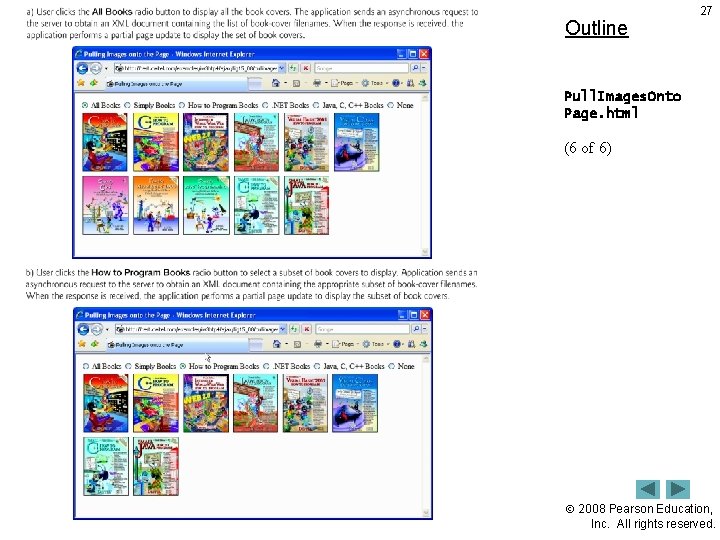
Outline 27 Pull. Images. Onto Page. html (6 of 6) 2008 Pearson Education, Inc. All rights reserved.
Outline 28 addressbook. html (1 of 18) 2008 Pearson Education, Inc. All rights reserved.
Outline 29 addressbook. html (2 of 18) 2008 Pearson Education, Inc. All rights reserved.

Outline 30 addressbook. html (3 of 18) 2008 Pearson Education, Inc. All rights reserved.

Outline 31 addressbook. html (4 of 18) 2008 Pearson Education, Inc. All rights reserved.
Outline 32 addressbook. html (5 of 18) 2008 Pearson Education, Inc. All rights reserved.

Outline 33 addressbook. html (6 of 18) 2008 Pearson Education, Inc. All rights reserved.

Outline 34 addressbook. html (7 of 18) 2008 Pearson Education, Inc. All rights reserved.
Outline 35 addressbook. html (8 of 18) 2008 Pearson Education, Inc. All rights reserved.
Outline 36 addressbook. html (9 of 18) 2008 Pearson Education, Inc. All rights reserved.

Outline 37 addressbook. html (10 of 18) 2008 Pearson Education, Inc. All rights reserved.
Outline 38 addressbook. html (11 of 18) 2008 Pearson Education, Inc. All rights reserved.

Outline 39 addressbook. html (12 of 18) 2008 Pearson Education, Inc. All rights reserved.
Outline 40 addressbook. html (13 of 18) 2008 Pearson Education, Inc. All rights reserved.
Outline 41 addressbook. html (14 of 18) 2008 Pearson Education, Inc. All rights reserved.
Outline 42 addressbook. html (15 of 18) 2008 Pearson Education, Inc. All rights reserved.
Outline 43 addressbook. html (16 of 18) 2008 Pearson Education, Inc. All rights reserved.
Outline 44 addressbook. html (17 of 18) 2008 Pearson Education, Inc. All rights reserved.
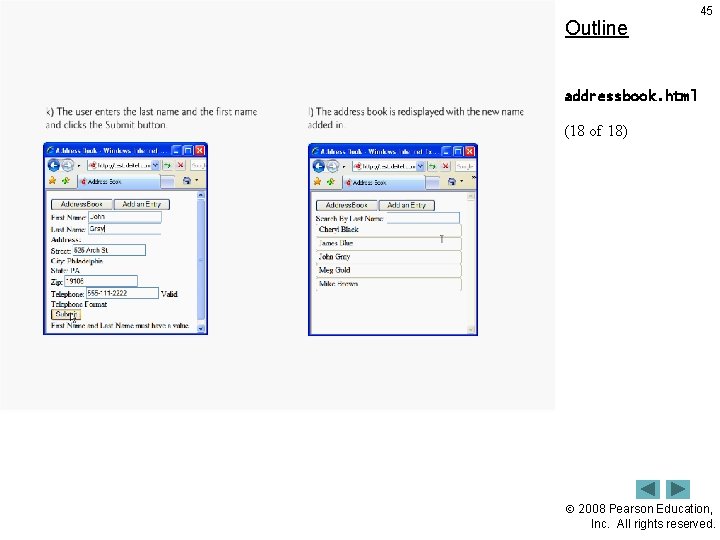
Outline 45 addressbook. html (18 of 18) 2008 Pearson Education, Inc. All rights reserved.
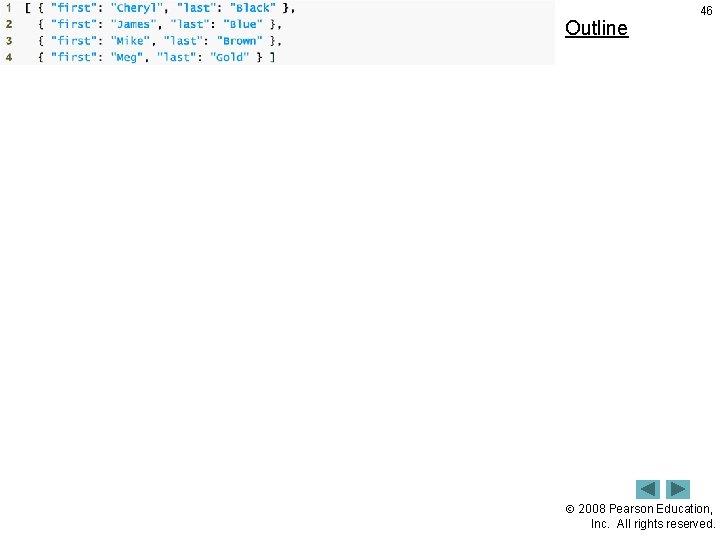
Outline 46 2008 Pearson Education, Inc. All rights reserved.
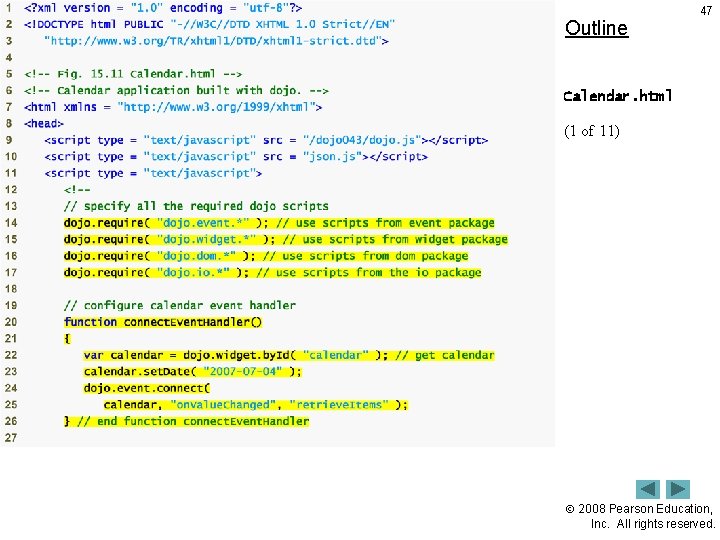
Outline 47 Calendar. html (1 of 11) 2008 Pearson Education, Inc. All rights reserved.
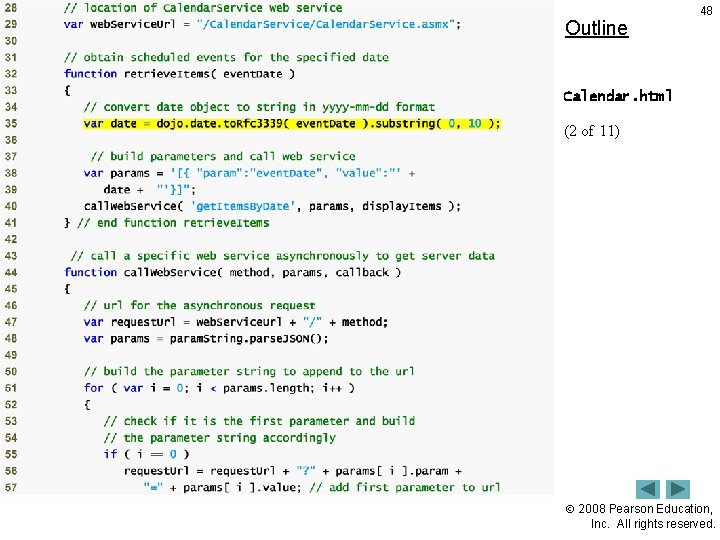
Outline 48 Calendar. html (2 of 11) 2008 Pearson Education, Inc. All rights reserved.
Outline 49 Calendar. html (3 of 11) 2008 Pearson Education, Inc. All rights reserved.
Outline 50 Calendar. html (4 of 11) 2008 Pearson Education, Inc. All rights reserved.
Outline 51 Calendar. html (5 of 11) 2008 Pearson Education, Inc. All rights reserved.
Outline 52 Calendar. html (6 of 11) 2008 Pearson Education, Inc. All rights reserved.
Outline 53 Calendar. html (7 of 11) 2008 Pearson Education, Inc. All rights reserved.
Outline 54 Calendar. html (8 of 11) 2008 Pearson Education, Inc. All rights reserved.
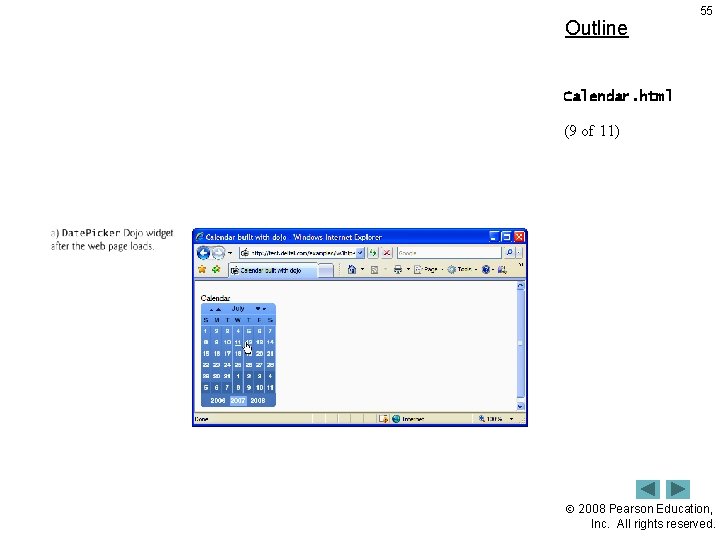
Outline 55 Calendar. html (9 of 11) 2008 Pearson Education, Inc. All rights reserved.
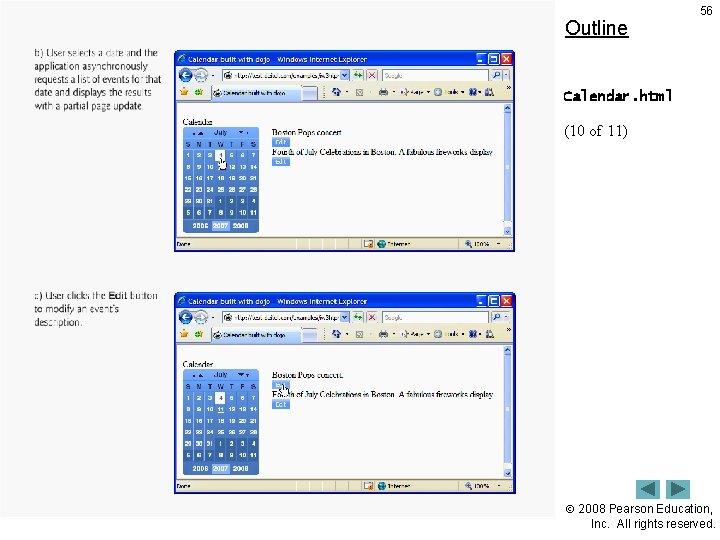
Outline 56 Calendar. html (10 of 11) 2008 Pearson Education, Inc. All rights reserved.
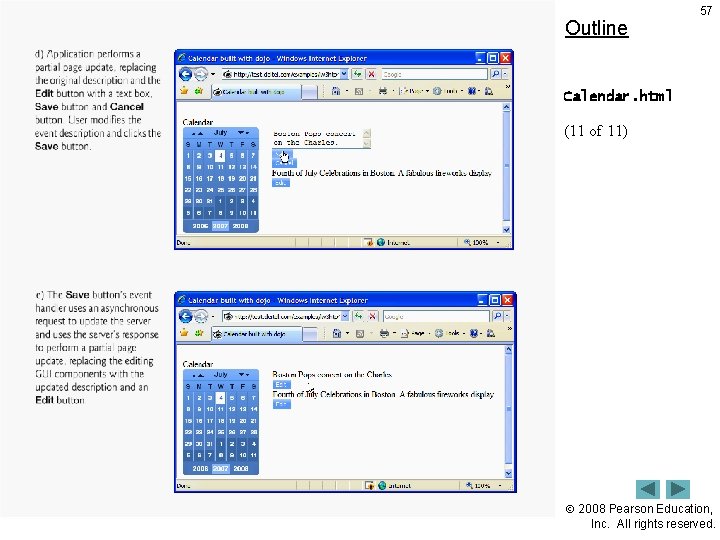
Outline 57 Calendar. html (11 of 11) 2008 Pearson Education, Inc. All rights reserved.
- Slides: 57