
1 12 Document Object Model DOM Objects and
1 12 Document Object Model (DOM): Objects and Collections 2008 Pearson Education, Inc. All rights reserved.

2 Our children may learn about heroes of the past. Our task is to make ourselves architects of the future. —Jomo Mzee Kenyatta Though leaves are many, the root is one. —William Butler Yeats The thing that impresses me most about America is the way parents obey their children. —Duke of Windsor Most of us become parents long before we have stopped being children. —Mignon Mc. Laughlin To write it, it took three months; to conceive it three minutes; to collect the data in it—all my life. —F. Scott Fitzgerald Sibling rivalry is inevitable. The only sure way to avoid it is to have one child. —Nancy Samalin 2008 Pearson Education, Inc. All rights reserved.
3 OBJECTIVES In this chapter you will learn: § How to use Java. Script and the W 3 C Document Object Model to create dynamic web pages. § The concept of DOM nodes and DOM trees. § How to traverse, edit and modify elements in an XHTML document. § How to change CSS styles dynamically. § To create Java. Script animations. 2008 Pearson Education, Inc. All rights reserved.
4 12. 1 Introduction 12. 2 Modeling a Document: DOM Nodes and Trees 12. 3 Traversing and Modifying a DOM Tree 12. 4 DOM Collections 12. 5 Dynamic Styles 12. 6 Summary of the DOM Objects and Collections 12. 7 Wrap-Up 12. 8 Web Resources 2008 Pearson Education, Inc. All rights reserved.
5 12. 1 Introduction • The Document Object Model gives you access to all the elements on a web page. Using Java. Script, you can create, modify and remove elements in the page dynamically. 2008 Pearson Education, Inc. All rights reserved.
6 Software Engineering Observation 12. 1 With the DOM, XHTML elements can be treated as objects, and many attributes of XHTML elements can be treated as properties of those objects. Then, objects can be scripted (through their id attributes) with Java. Script to achieve dynamic effects. 2008 Pearson Education, Inc. All rights reserved.
12. 2 Modeling a Document: DOM Nodes and Trees 7 • get. Element. By. Id method – – Returns objects called DOM nodes Every element in an XHTML page is modeled in the web browser by a DOM node • The nodes in a document make up the page’s DOM tree, which describes the relationships among elements • Nodes are related to each other through child-parent relationships • A node may have multiple children, but only one parent • Nodes with the same parent node are referred to as siblings • Firefox’s DOM Inspector and the IE Web Developer Toolbar allow you to see a visual representation of a document’s DOM tree and information about each node • The document node in a DOM tree is called the root node, because it has no parent 2008 Pearson Education, Inc. All rights reserved.
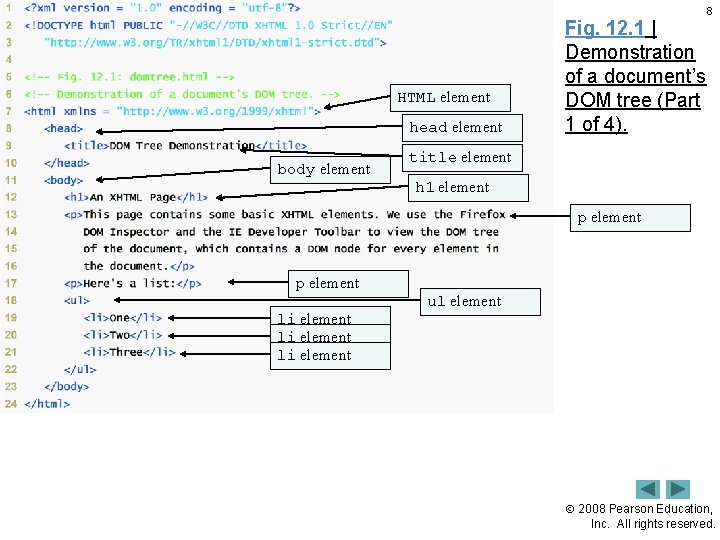
8 HTML element head element body element Fig. 12. 1 | Demonstration of a document’s DOM tree (Part 1 of 4). title element h 1 element p element li element ul element 2008 Pearson Education, Inc. All rights reserved.
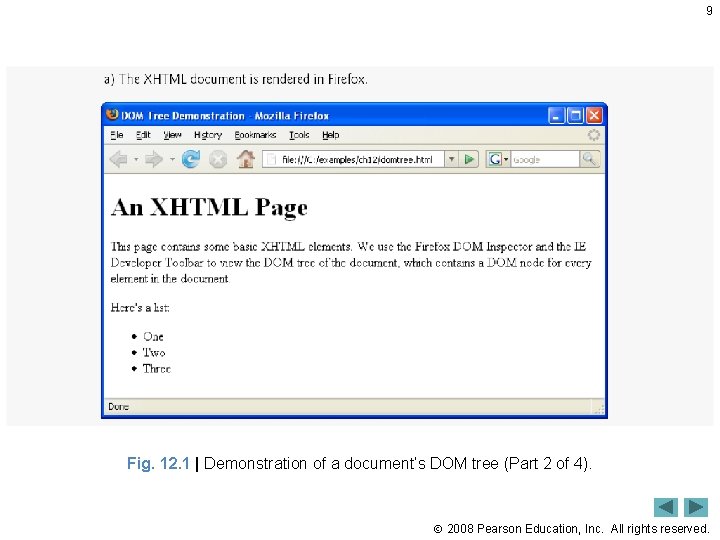
9 Fig. 12. 1 | Demonstration of a document’s DOM tree (Part 2 of 4). 2008 Pearson Education, Inc. All rights reserved.
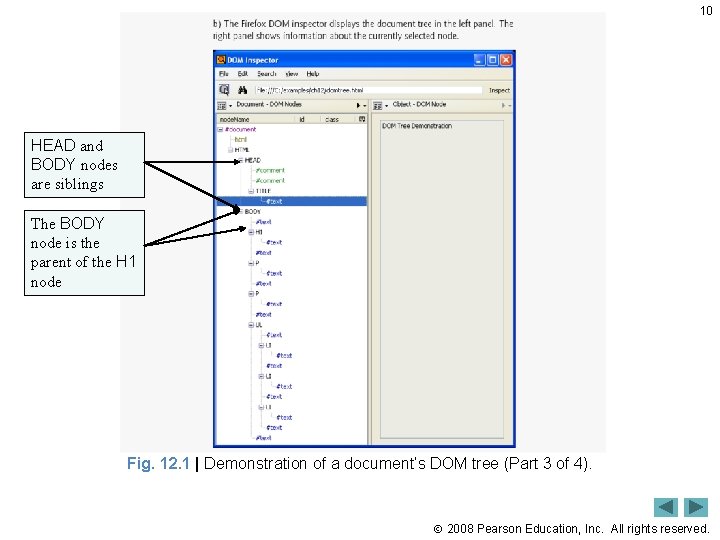
10 HEAD and BODY nodes are siblings The BODY node is the parent of the H 1 node Fig. 12. 1 | Demonstration of a document’s DOM tree (Part 3 of 4). 2008 Pearson Education, Inc. All rights reserved.
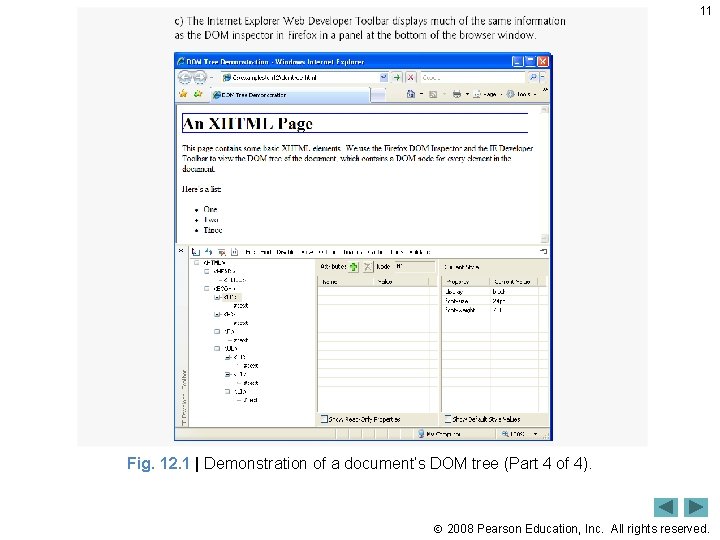
11 Fig. 12. 1 | Demonstration of a document’s DOM tree (Part 4 of 4). 2008 Pearson Education, Inc. All rights reserved.
12. 3 Traversing and Modifying a DOM Tree 12 • The class. Name property of a DOM node allows you to change an XHTML element’s class attribute • The id property of a DOM node controls an element’s id attribute 2008 Pearson Education, Inc. All rights reserved.
12. 3 Traversing and Modifying a DOM Tree (Cont. ) 13 • document object create. Element method – Creates a new DOM node, taking the tag name as an argument. Does not insert the element on the page. • document object create. Text. Node method – Creates a DOM node that can contain only text. Given a string argument, create. Text. Node inserts the string into the text node. • Method append. Child – Called on a parent node to insert a child node (passed as an argument) after any existing children • parent. Node property of any DOM node contains the node’s parent • insert. Before method – Called on a parent with a new child an existing child as arguments. The new child is inserted as a child of the parent directly before the existing child. • replace. Child method – Called on a parent, taking a new child an existing child as arguments. The method inserts the new child into its list of children in place of the existing child. • remove. Child method – Called on a parent with a child to be removed as an argument. 2008 Pearson Education, Inc. All rights reserved.
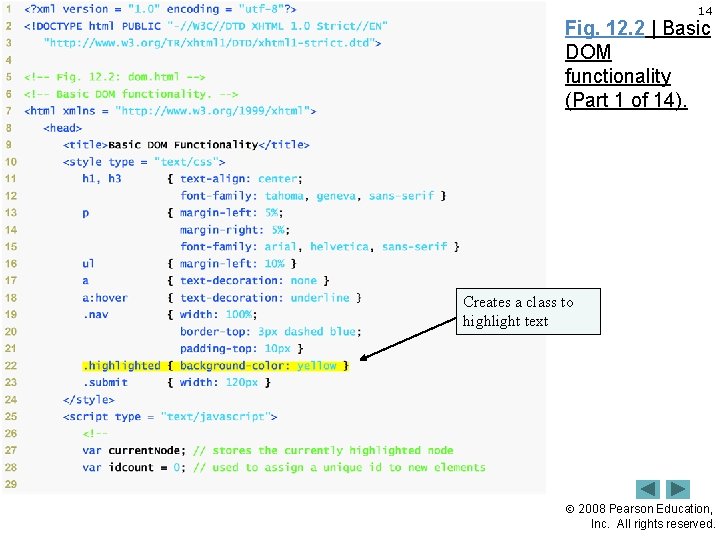
14 Fig. 12. 2 | Basic DOM functionality (Part 1 of 14). Creates a class to highlight text 2008 Pearson Education, Inc. All rights reserved.
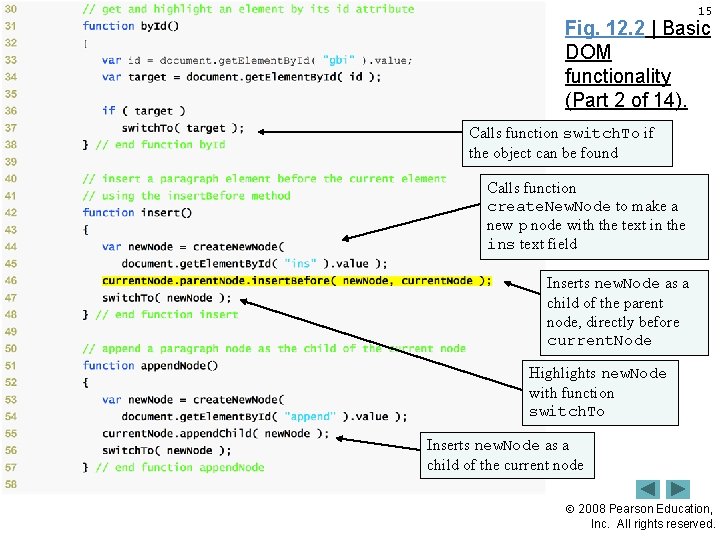
15 Fig. 12. 2 | Basic DOM functionality (Part 2 of 14). Calls function switch. To if the object can be found Calls function create. New. Node to make a new p node with the text in the ins text field Inserts new. Node as a child of the parent node, directly before current. Node Highlights new. Node with function switch. To Inserts new. Node as a child of the current node 2008 Pearson Education, Inc. All rights reserved.
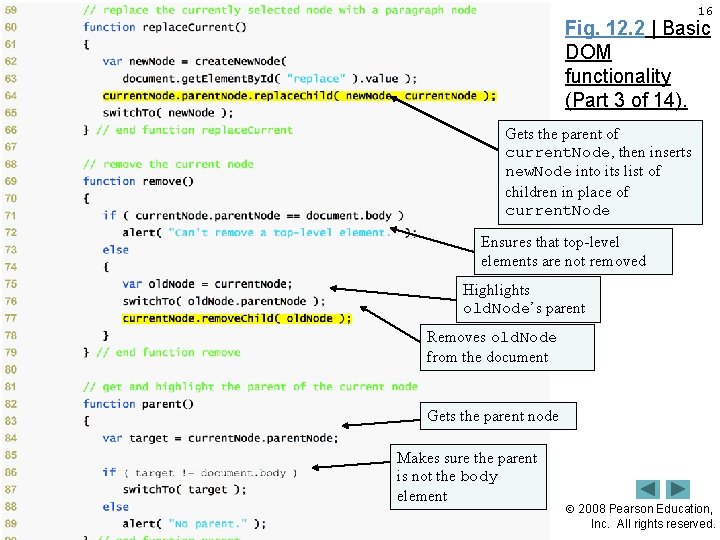
16 Fig. 12. 2 | Basic DOM functionality (Part 3 of 14). Gets the parent of current. Node, then inserts new. Node into its list of children in place of current. Node Ensures that top-level elements are not removed Highlights old. Node’s parent Removes old. Node from the document Gets the parent node Makes sure the parent is not the body element 2008 Pearson Education, Inc. All rights reserved.
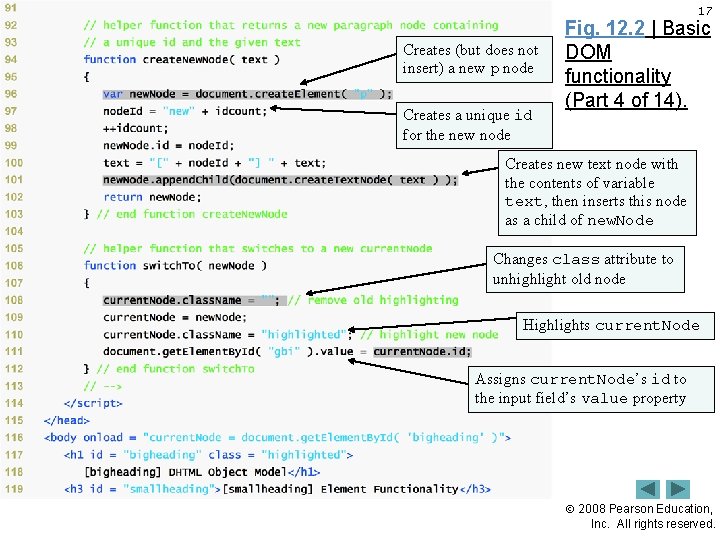
17 Creates (but does not insert) a new p node Creates a unique id for the new node Fig. 12. 2 | Basic DOM functionality (Part 4 of 14). Creates new text node with the contents of variable text, then inserts this node as a child of new. Node Changes class attribute to unhighlight old node Highlights current. Node Assigns current. Node’s id to the input field’s value property 2008 Pearson Education, Inc. All rights reserved.
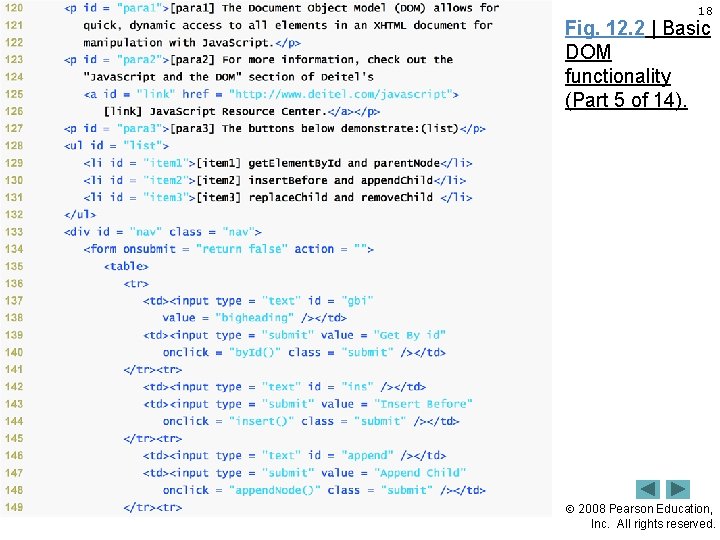
18 Fig. 12. 2 | Basic DOM functionality (Part 5 of 14). 2008 Pearson Education, Inc. All rights reserved.
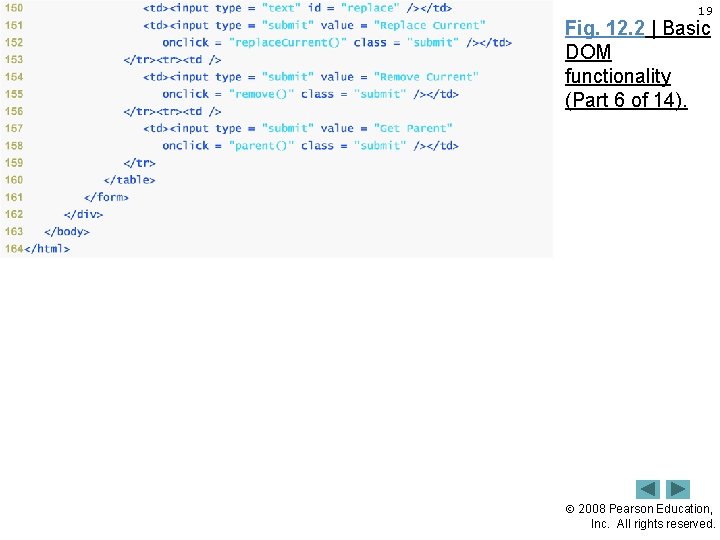
19 Fig. 12. 2 | Basic DOM functionality (Part 6 of 14). 2008 Pearson Education, Inc. All rights reserved.
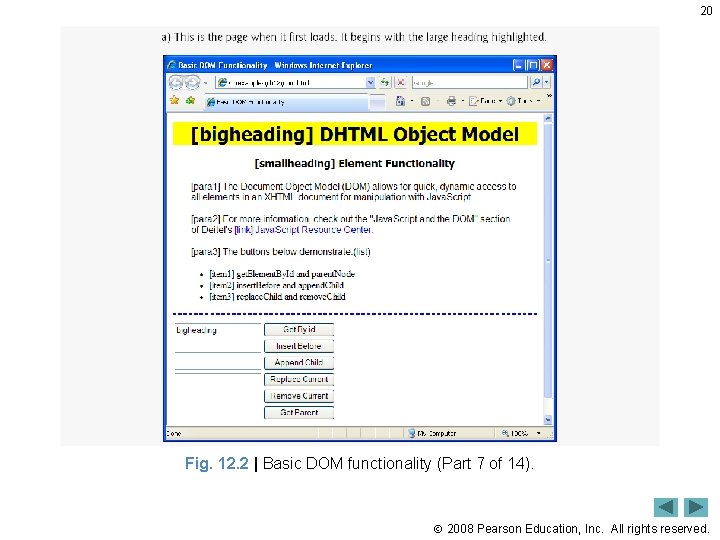
20 Fig. 12. 2 | Basic DOM functionality (Part 7 of 14). 2008 Pearson Education, Inc. All rights reserved.
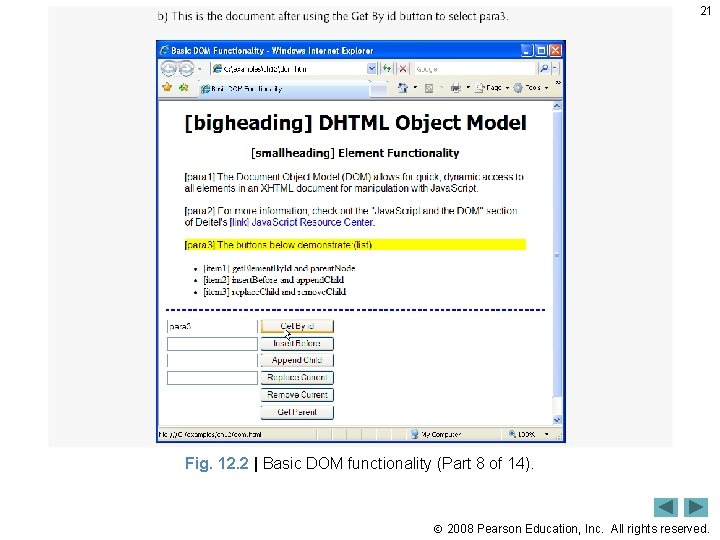
21 Fig. 12. 2 | Basic DOM functionality (Part 8 of 14). 2008 Pearson Education, Inc. All rights reserved.
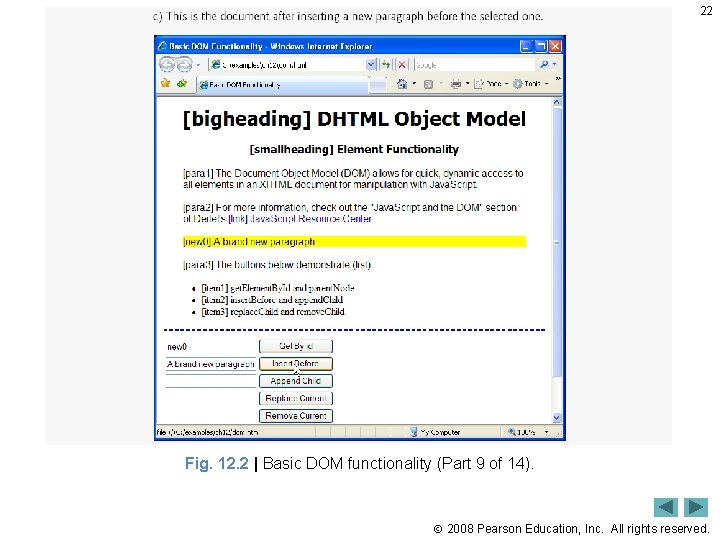
22 Fig. 12. 2 | Basic DOM functionality (Part 9 of 14). 2008 Pearson Education, Inc. All rights reserved.
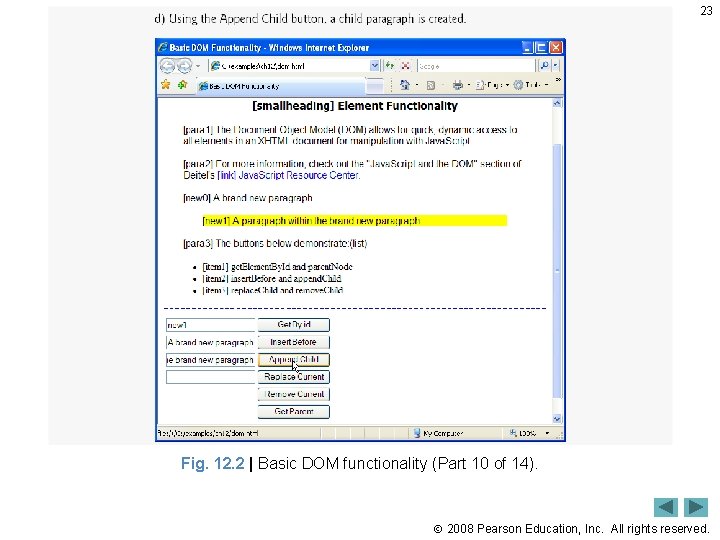
23 Fig. 12. 2 | Basic DOM functionality (Part 10 of 14). 2008 Pearson Education, Inc. All rights reserved.
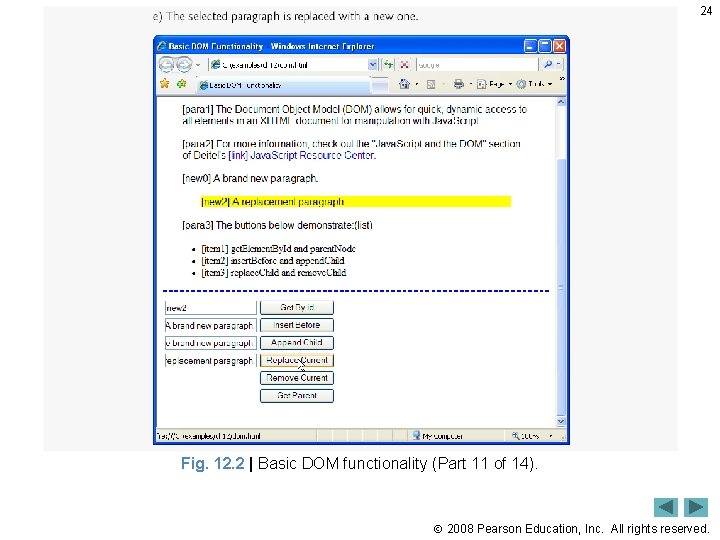
24 Fig. 12. 2 | Basic DOM functionality (Part 11 of 14). 2008 Pearson Education, Inc. All rights reserved.
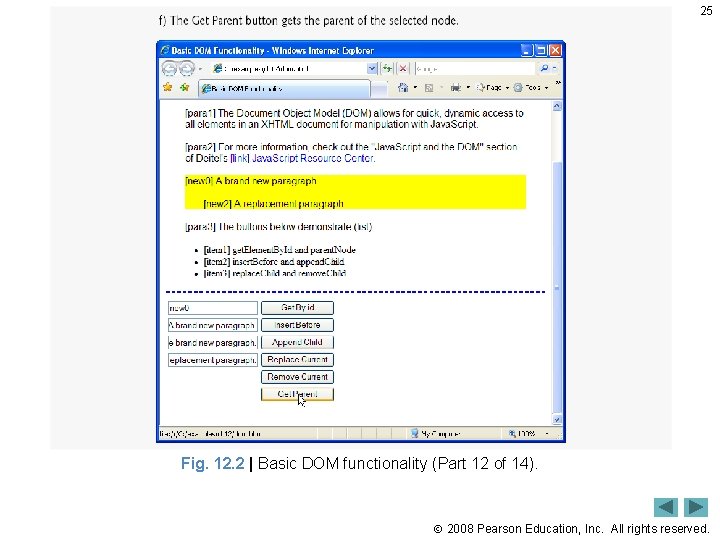
25 Fig. 12. 2 | Basic DOM functionality (Part 12 of 14). 2008 Pearson Education, Inc. All rights reserved.
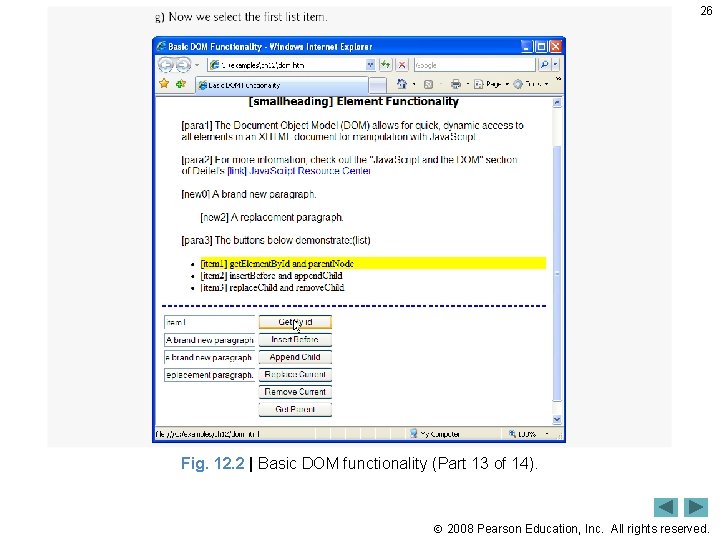
26 Fig. 12. 2 | Basic DOM functionality (Part 13 of 14). 2008 Pearson Education, Inc. All rights reserved.
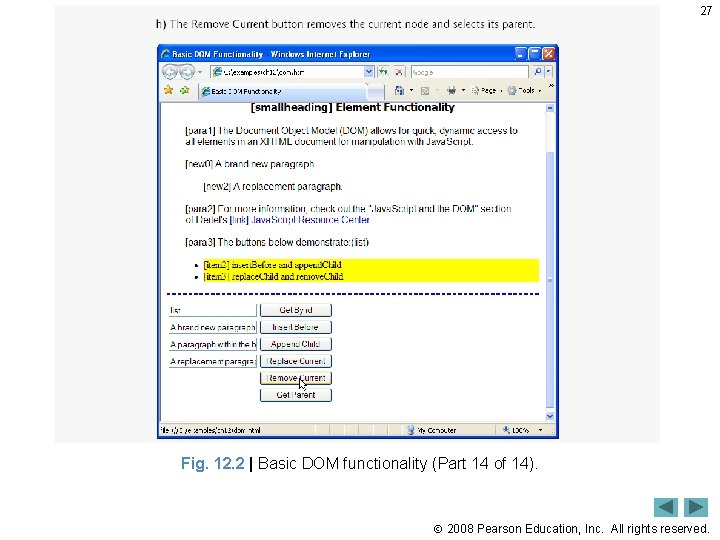
27 Fig. 12. 2 | Basic DOM functionality (Part 14 of 14). 2008 Pearson Education, Inc. All rights reserved.
28 12. 4 DOM Collections • DOM has collections—groups of related objects on a page • DOM collections are accessed as properties of DOM objects such as the document object or a DOM node • The document object has properties containing the images collection, links collection, forms collection and anchors collection – Contain all the elements of the corresponding type on the page • To find the number of elements in the collection, use the collection’s length property 2008 Pearson Education, Inc. All rights reserved.
29 12. 4 DOM Collections (Cont. ) • Access items in a collection via square brackets • item method of a DOM collection – Access specific elements in a collection, taking an index as an argument • named. Item method – takes a name as a parameter and finds the element in the collection, if any, whose id attribute or name attribute matches it • href property of a DOM link node – Refers to the link’s href attribute • Collections allow easy access to all elements of a single type in a page – Useful for gathering elements into one place and for applying changes across an entire page 2008 Pearson Education, Inc. All rights reserved.
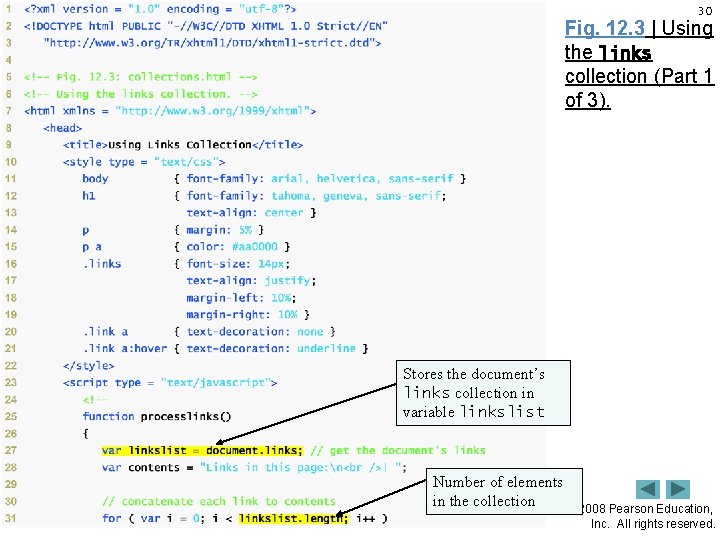
30 Fig. 12. 3 | Using the links collection (Part 1 of 3). Stores the document’s links collection in variable linkslist Number of elements in the collection 2008 Pearson Education, Inc. All rights reserved.
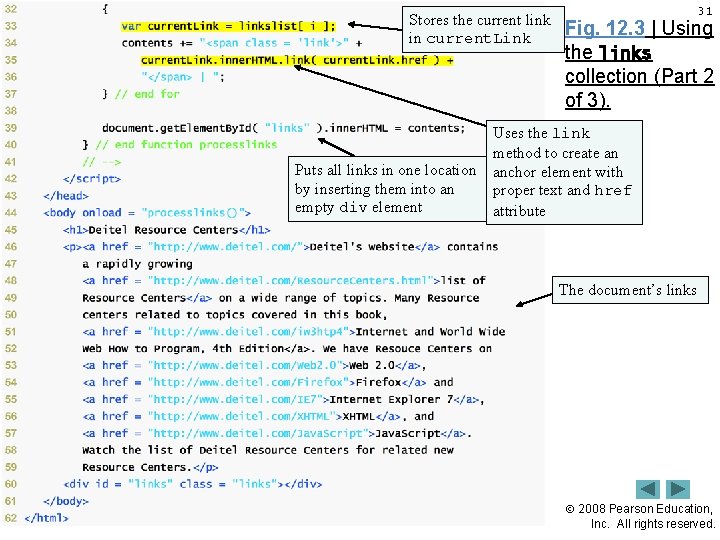
Stores the current link in current. Link Puts all links in one location by inserting them into an empty div element 31 Fig. 12. 3 | Using the links collection (Part 2 of 3). Uses the link method to create an anchor element with proper text and href attribute The document’s links 2008 Pearson Education, Inc. All rights reserved.
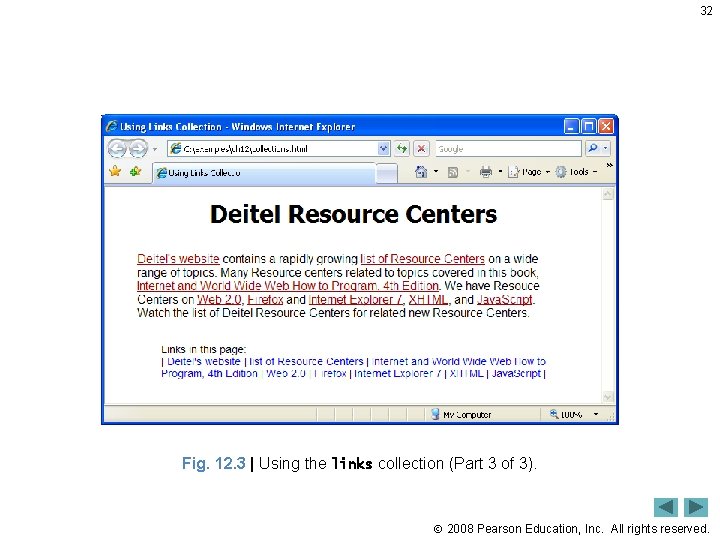
32 Fig. 12. 3 | Using the links collection (Part 3 of 3). 2008 Pearson Education, Inc. All rights reserved.
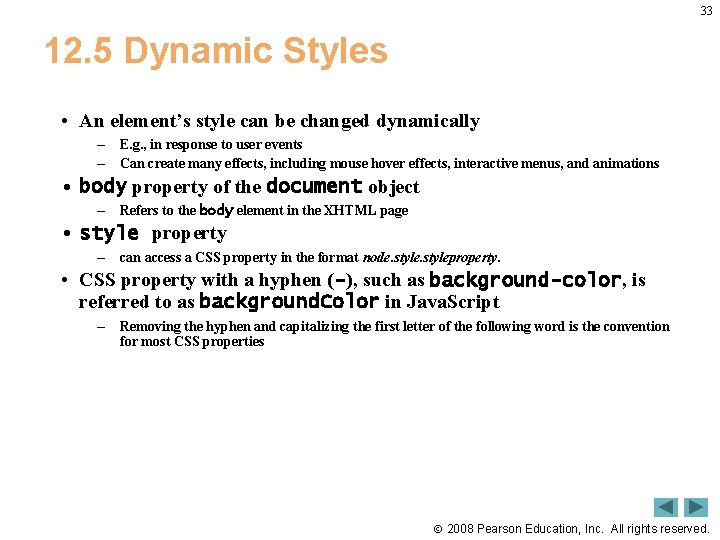
33 12. 5 Dynamic Styles • An element’s style can be changed dynamically – – E. g. , in response to user events Can create many effects, including mouse hover effects, interactive menus, and animations • body property of the document object – Refers to the body element in the XHTML page • style property – can access a CSS property in the format node. styleproperty. • CSS property with a hyphen (-), such as background-color, is referred to as background. Color in Java. Script – Removing the hyphen and capitalizing the first letter of the following word is the convention for most CSS properties 2008 Pearson Education, Inc. All rights reserved.
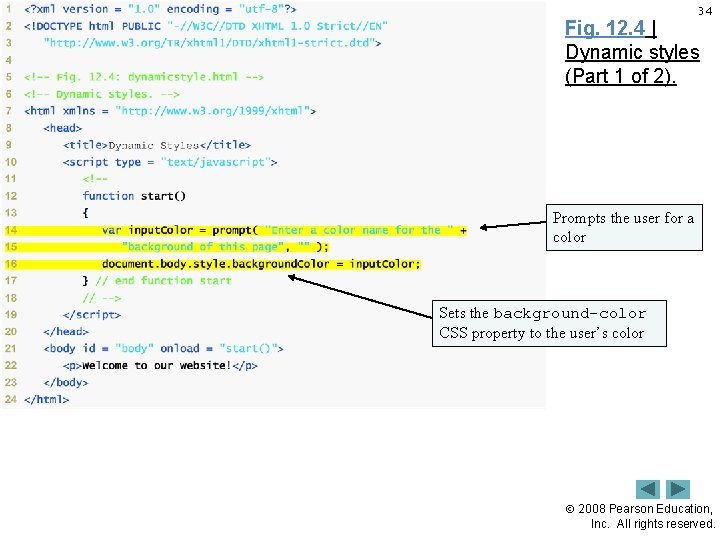
34 Fig. 12. 4 | Dynamic styles (Part 1 of 2). Prompts the user for a color Sets the background-color CSS property to the user’s color 2008 Pearson Education, Inc. All rights reserved.
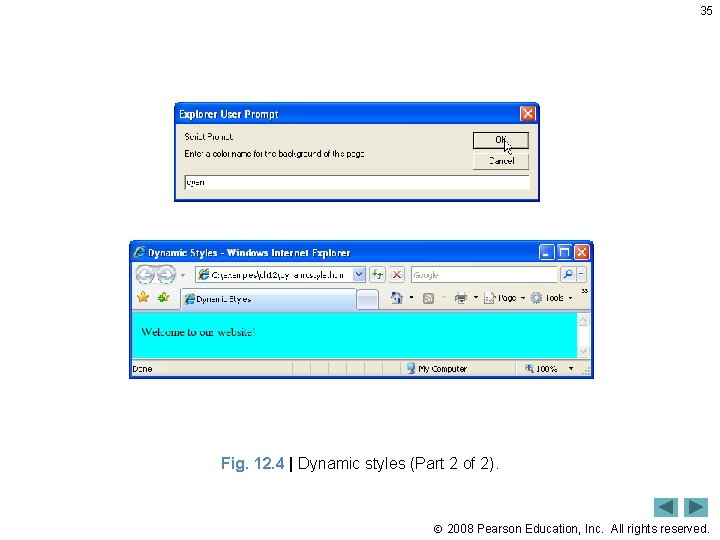
35 Fig. 12. 4 | Dynamic styles (Part 2 of 2). 2008 Pearson Education, Inc. All rights reserved.
36 12. 5 Dynamic Styles (Cont. ) • set. Interval method of the window object – Repeatedly executes a statement on a certain interval – Takes two parameters • A statement to execute repeatedly • An integer specifying how often to execute it, in milliseconds – Returns a unique identifier to keep track of that particular interval. • window object’s clear. Interval method – Stops the repetitive calls of object’s set. Interval method – Pass to clear. Interval the interval identifier that set. Interval returned 2008 Pearson Education, Inc. All rights reserved.
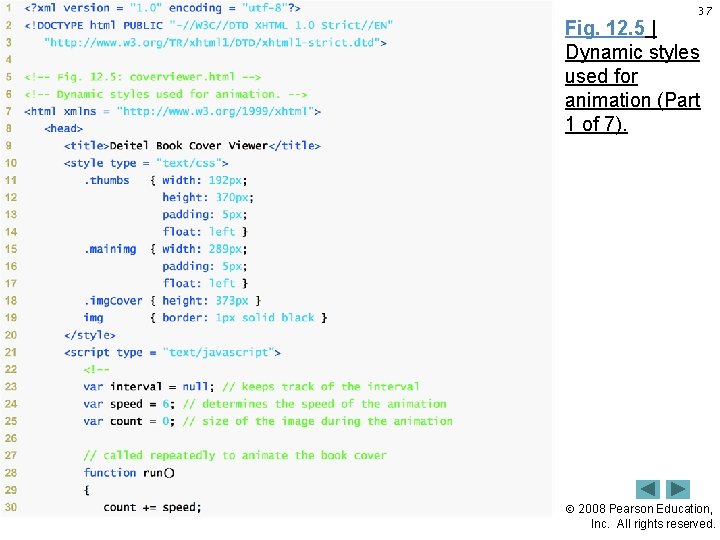
37 Fig. 12. 5 | Dynamic styles used for animation (Part 1 of 7). 2008 Pearson Education, Inc. All rights reserved.
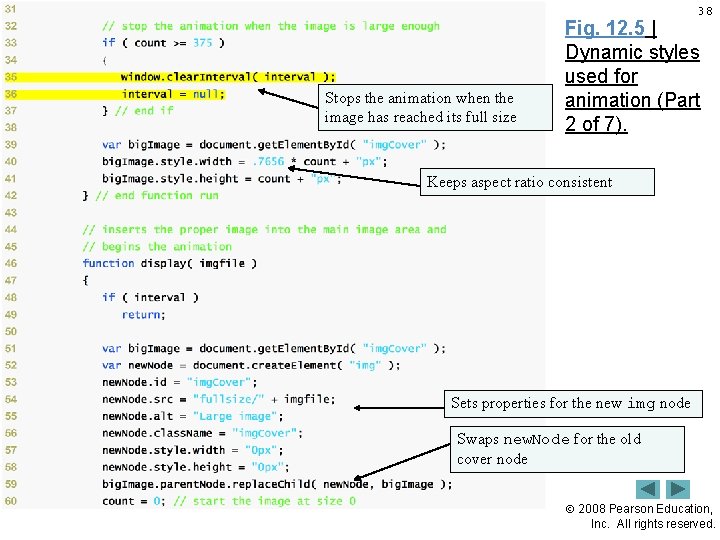
38 Stops the animation when the image has reached its full size Fig. 12. 5 | Dynamic styles used for animation (Part 2 of 7). Keeps aspect ratio consistent Sets properties for the new img node Swaps new. Node for the old cover node 2008 Pearson Education, Inc. All rights reserved.
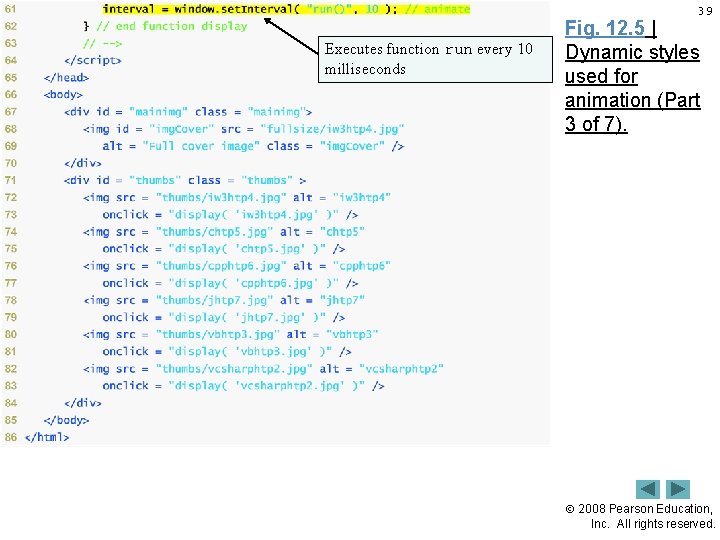
39 Executes function run every 10 milliseconds Fig. 12. 5 | Dynamic styles used for animation (Part 3 of 7). 2008 Pearson Education, Inc. All rights reserved.
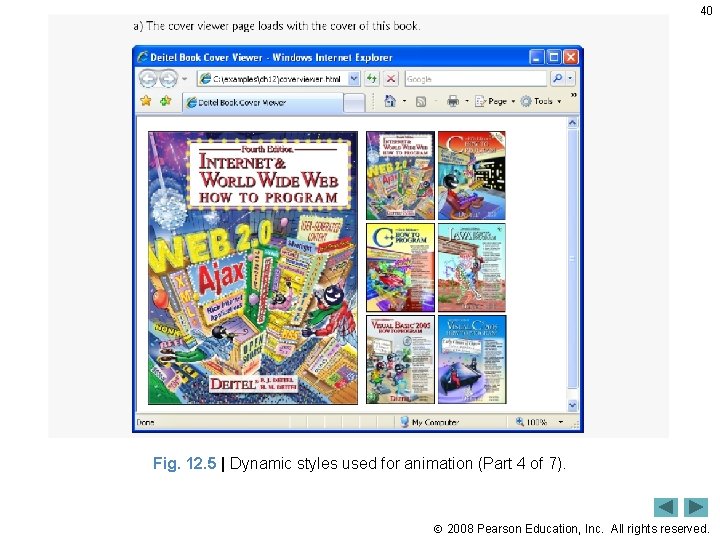
40 Fig. 12. 5 | Dynamic styles used for animation (Part 4 of 7). 2008 Pearson Education, Inc. All rights reserved.
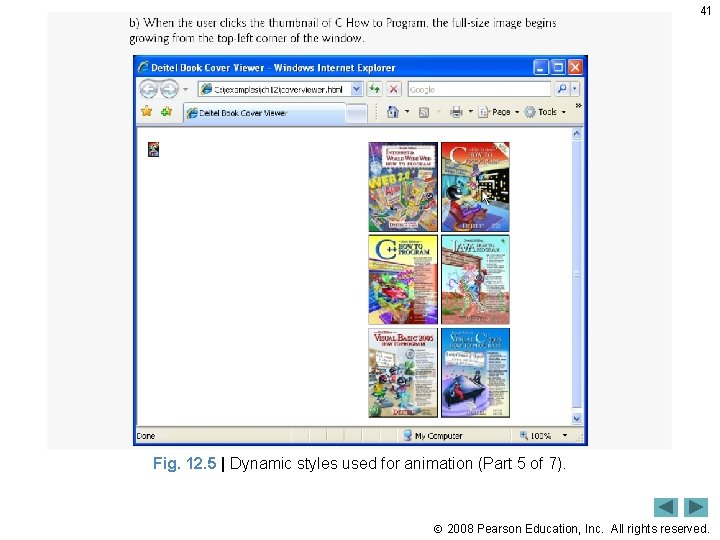
41 Fig. 12. 5 | Dynamic styles used for animation (Part 5 of 7). 2008 Pearson Education, Inc. All rights reserved.
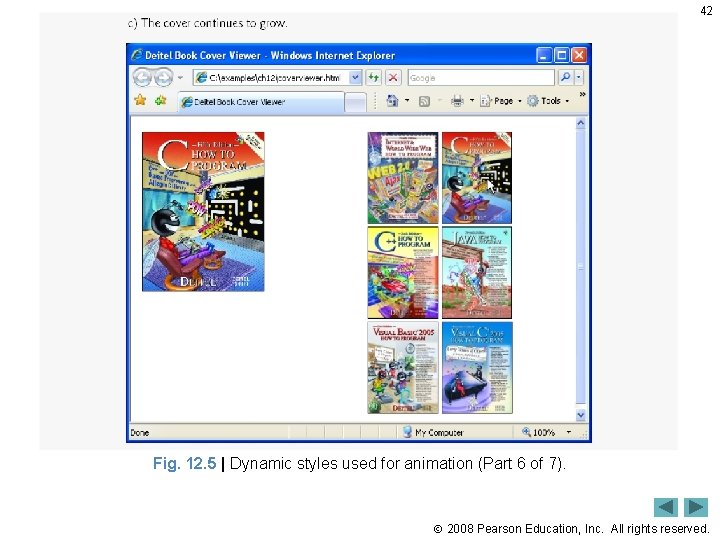
42 Fig. 12. 5 | Dynamic styles used for animation (Part 6 of 7). 2008 Pearson Education, Inc. All rights reserved.
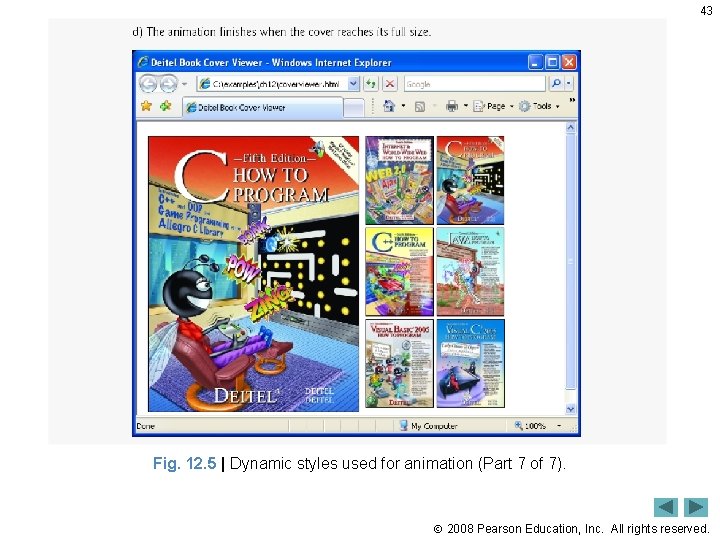
43 Fig. 12. 5 | Dynamic styles used for animation (Part 7 of 7). 2008 Pearson Education, Inc. All rights reserved.
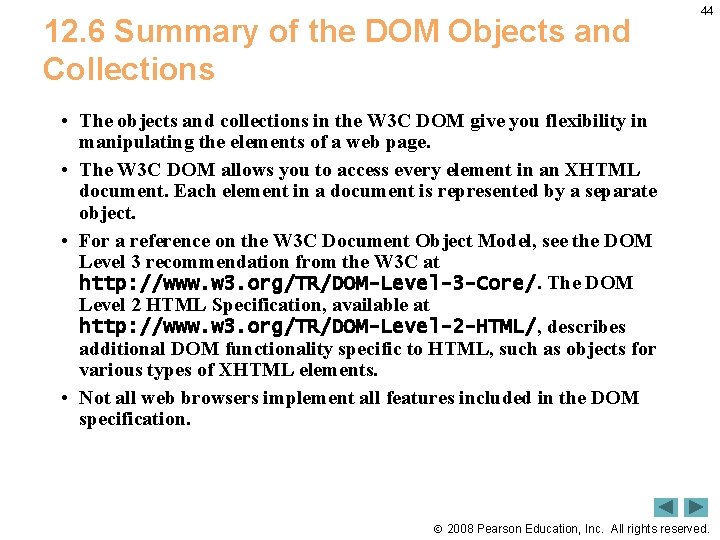
12. 6 Summary of the DOM Objects and Collections 44 • The objects and collections in the W 3 C DOM give you flexibility in manipulating the elements of a web page. • The W 3 C DOM allows you to access every element in an XHTML document. Each element in a document is represented by a separate object. • For a reference on the W 3 C Document Object Model, see the DOM Level 3 recommendation from the W 3 C at http: //www. w 3. org/TR/DOM-Level-3 -Core/. The DOM Level 2 HTML Specification, available at http: //www. w 3. org/TR/DOM-Level-2 -HTML/, describes additional DOM functionality specific to HTML, such as objects for various types of XHTML elements. • Not all web browsers implement all features included in the DOM specification. 2008 Pearson Education, Inc. All rights reserved.
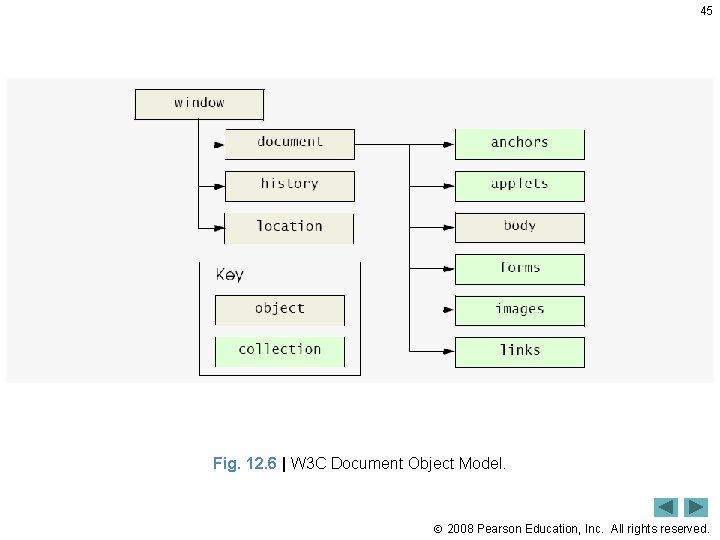
45 Fig. 12. 6 | W 3 C Document Object Model. 2008 Pearson Education, Inc. All rights reserved.
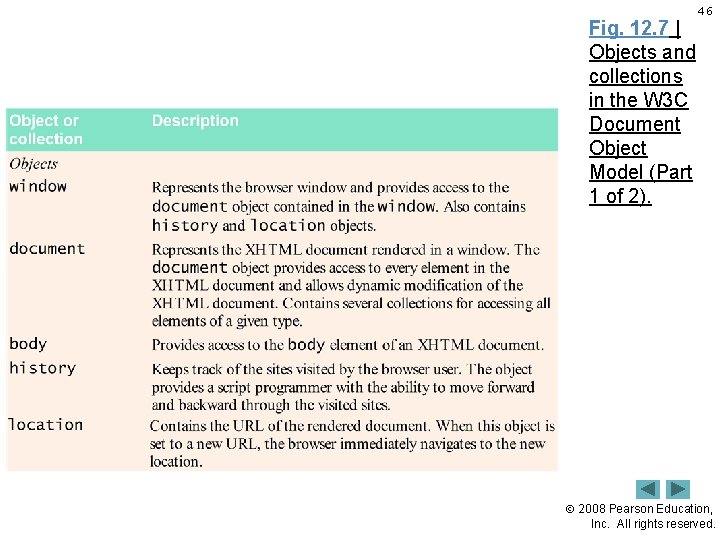
Fig. 12. 7 | Objects and collections in the W 3 C Document Object Model (Part 1 of 2). 46 2008 Pearson Education, Inc. All rights reserved.
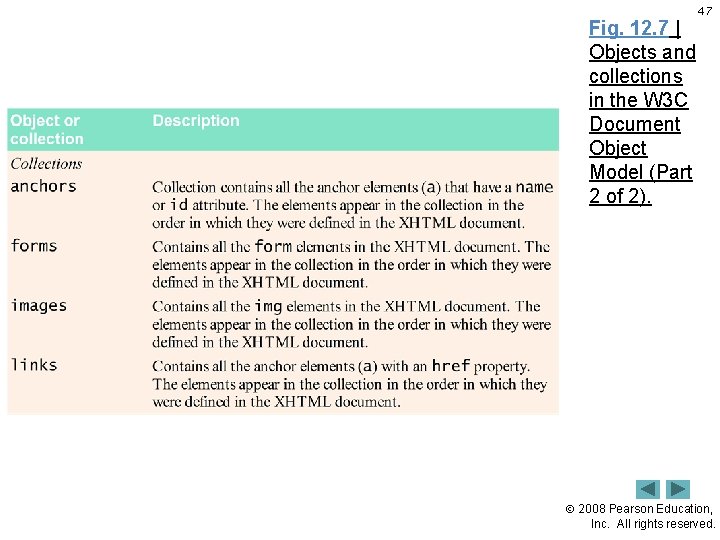
Fig. 12. 7 | Objects and collections in the W 3 C Document Object Model (Part 2 of 2). 47 2008 Pearson Education, Inc. All rights reserved.
- Slides: 47