
1 1 2 8 Intermediate Perl 1 1
- Slides: 23
1. 1. 2. 8 – Intermediate Perl 1. 1. 2. 8. 7 Intermediate Perl – Session 7 · POD – plain old documentation · processing command line parameters · processing configuration files 1. 1. 2. 8. 7 - Intermediate Perl - POD, parameters and configuration 1
1. 1. 2. 8 – Intermediate Perl POD – plain old documentation · embed documentation in your scripts with POD · POD is very simple because it stands for Plain Old Documentation · it is meant to be easy to use – and it is! · POD is a simple markup language · write documentation once and export it to multiple formats · man, html, text · POD formatting codes are embedded in your script · Pod: : Usage module displays documentation for the script when the script is executed · how handy is that? 1. 1. 2. 8. 7 - Intermediate Perl - POD, parameters and configuration 2
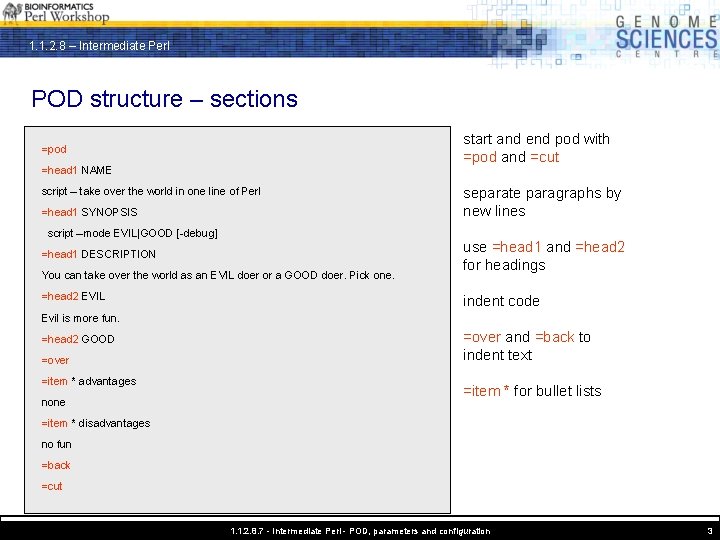
1. 1. 2. 8 – Intermediate Perl POD structure – sections start and end pod with =pod and =cut =pod =head 1 NAME script – take over the world in one line of Perl =head 1 SYNOPSIS script –mode EVIL|GOOD [-debug] =head 1 DESCRIPTION You can take over the world as an EVIL doer or a GOOD doer. Pick one. =head 2 EVIL separate paragraphs by new lines use =head 1 and =head 2 for headings indent code Evil is more fun. =head 2 GOOD =over =item * advantages none =over and =back to indent text =item * for bullet lists =item * disadvantages no fun =back =cut 1. 1. 2. 8. 7 - Intermediate Perl - POD, parameters and configuration 3
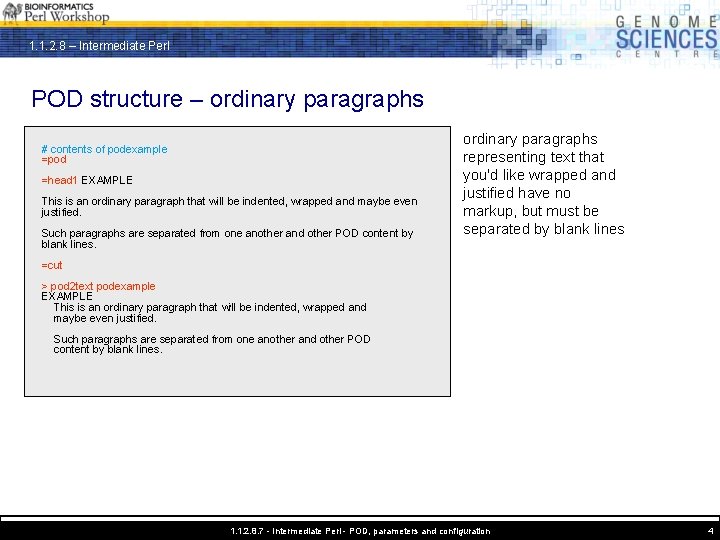
1. 1. 2. 8 – Intermediate Perl POD structure – ordinary paragraphs # contents of podexample =pod =head 1 EXAMPLE This is an ordinary paragraph that will be indented, wrapped and maybe even justified. Such paragraphs are separated from one another and other POD content by blank lines. ordinary paragraphs representing text that you'd like wrapped and justified have no markup, but must be separated by blank lines =cut > pod 2 text podexample EXAMPLE This is an ordinary paragraph that will be indented, wrapped and maybe even justified. Such paragraphs are separated from one another and other POD content by blank lines. 1. 1. 2. 8. 7 - Intermediate Perl - POD, parameters and configuration 4
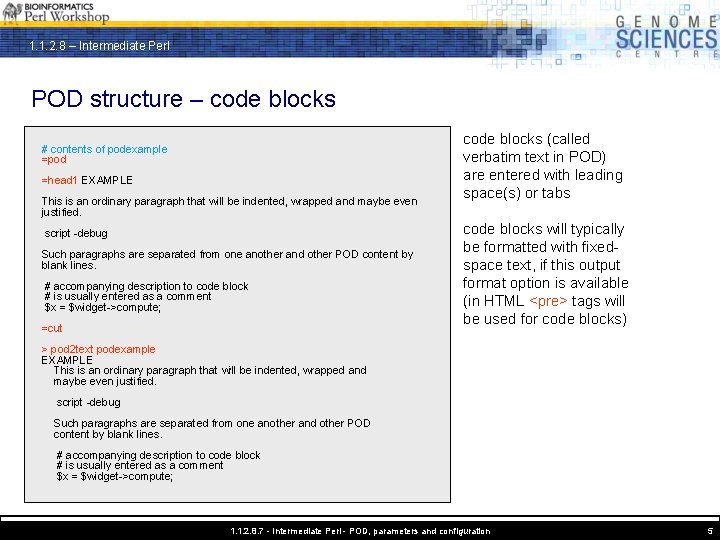
1. 1. 2. 8 – Intermediate Perl POD structure – code blocks # contents of podexample =pod =head 1 EXAMPLE This is an ordinary paragraph that will be indented, wrapped and maybe even justified. script -debug Such paragraphs are separated from one another and other POD content by blank lines. # accompanying description to code block # is usually entered as a comment $x = $widget->compute; =cut code blocks (called verbatim text in POD) are entered with leading space(s) or tabs code blocks will typically be formatted with fixedspace text, if this output format option is available (in HTML <pre> tags will be used for code blocks) > pod 2 text podexample EXAMPLE This is an ordinary paragraph that will be indented, wrapped and maybe even justified. script -debug Such paragraphs are separated from one another and other POD content by blank lines. # accompanying description to code block # is usually entered as a comment $x = $widget->compute; 1. 1. 2. 8. 7 - Intermediate Perl - POD, parameters and configuration 5
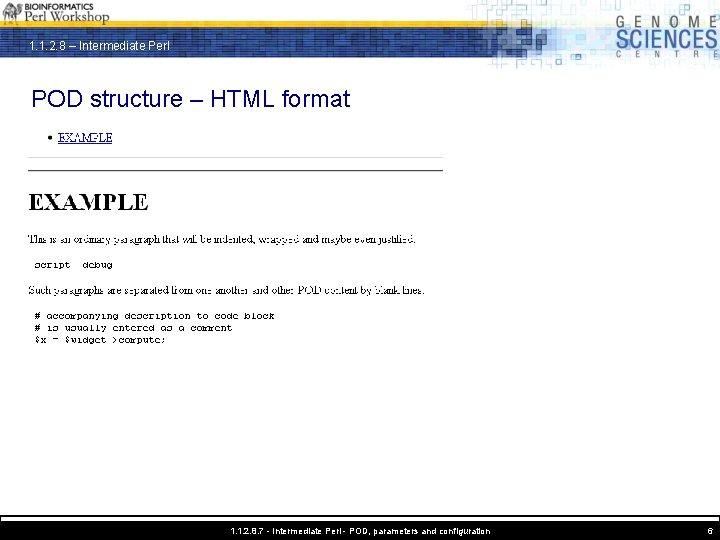
1. 1. 2. 8 – Intermediate Perl POD structure – HTML format 1. 1. 2. 8. 7 - Intermediate Perl - POD, parameters and configuration 6
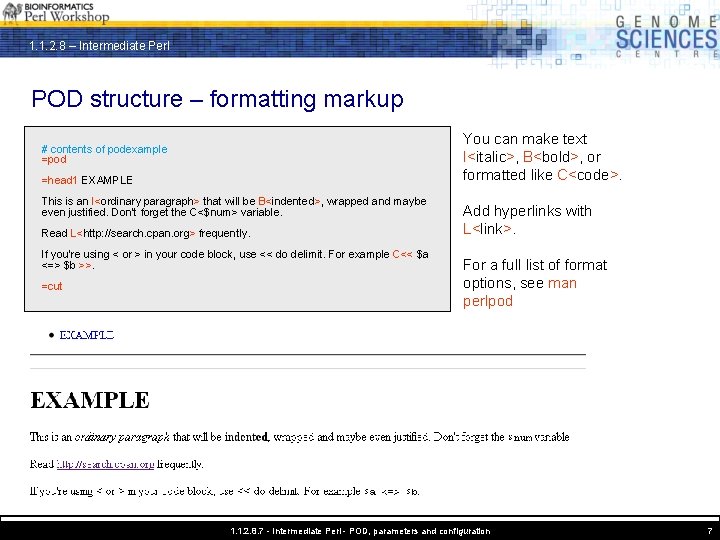
1. 1. 2. 8 – Intermediate Perl POD structure – formatting markup You can make text I<italic>, B<bold>, or formatted like C<code>. # contents of podexample =pod =head 1 EXAMPLE This is an I<ordinary paragraph> that will be B<indented>, wrapped and maybe even justified. Don't forget the C<$num> variable. Read L<http: //search. cpan. org> frequently. If you're using < or > in your code block, use << do delimit. For example C<< $a <=> $b >>. =cut Add hyperlinks with L<link>. For a full list of format options, see man perlpod 1. 1. 2. 8. 7 - Intermediate Perl - POD, parameters and configuration 7
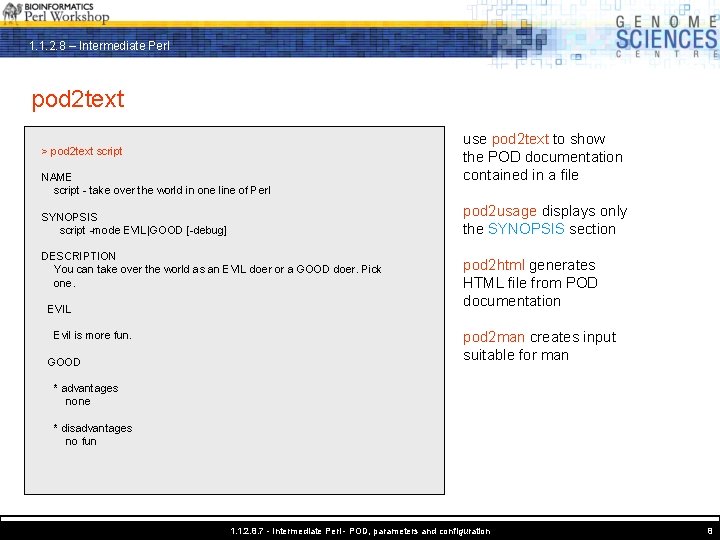
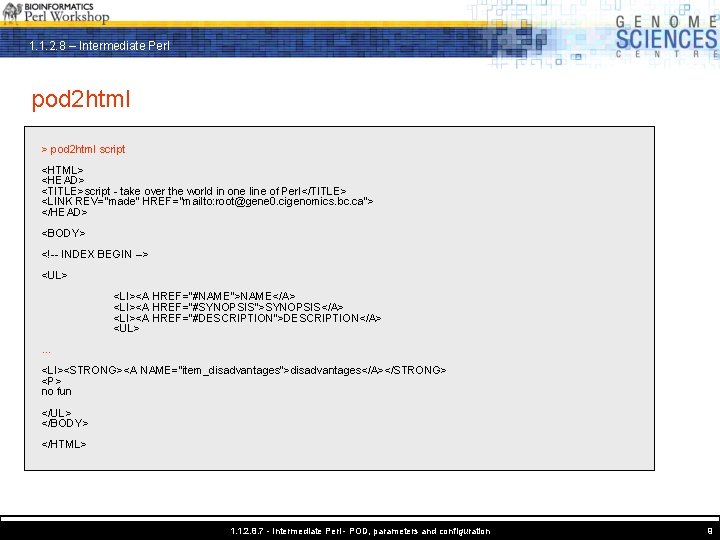
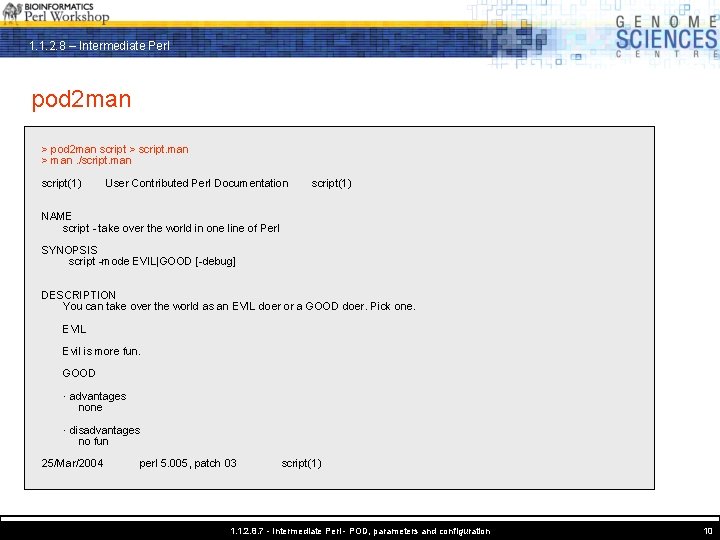
1. 1. 2. 8 – Intermediate Perl pod 2 text > pod 2 text script NAME script - take over the world in one line of Perl pod 2 usage displays only the SYNOPSIS section SYNOPSIS script -mode EVIL|GOOD [-debug] DESCRIPTION You can take over the world as an EVIL doer or a GOOD doer. Pick one. EVIL Evil is more fun. GOOD use pod 2 text to show the POD documentation contained in a file pod 2 html generates HTML file from POD documentation pod 2 man creates input suitable for man * advantages none * disadvantages no fun 1. 1. 2. 8. 7 - Intermediate Perl - POD, parameters and configuration 8
1. 1. 2. 8 – Intermediate Perl pod 2 html > pod 2 html script <HTML> <HEAD> <TITLE>script - take over the world in one line of Perl</TITLE> <LINK REV="made" HREF="mailto: root@gene 0. cigenomics. bc. ca"> </HEAD> <BODY> <!-- INDEX BEGIN --> <UL> <LI><A HREF="#NAME">NAME</A> <LI><A HREF="#SYNOPSIS">SYNOPSIS</A> <LI><A HREF="#DESCRIPTION">DESCRIPTION</A> <UL>. . . <LI><STRONG><A NAME="item_disadvantages">disadvantages</A></STRONG> <P> no fun </UL> </BODY> </HTML> 1. 1. 2. 8. 7 - Intermediate Perl - POD, parameters and configuration 9
1. 1. 2. 8 – Intermediate Perl pod 2 man > pod 2 man script > script. man > man. /script. man script(1) User Contributed Perl Documentation script(1) NAME script - take over the world in one line of Perl SYNOPSIS script -mode EVIL|GOOD [-debug] DESCRIPTION You can take over the world as an EVIL doer or a GOOD doer. Pick one. EVIL Evil is more fun. GOOD · advantages none · disadvantages no fun 25/Mar/2004 perl 5. 005, patch 03 script(1) 1. 1. 2. 8. 7 - Intermediate Perl - POD, parameters and configuration 10
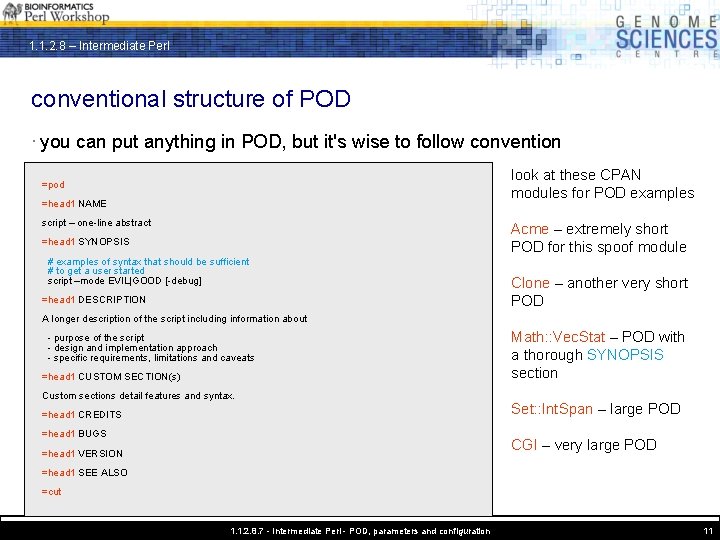
1. 1. 2. 8 – Intermediate Perl conventional structure of POD · you can put anything in POD, but it's wise to follow convention look at these CPAN modules for POD examples =pod =head 1 NAME script – one-line abstract Acme – extremely short POD for this spoof module =head 1 SYNOPSIS # examples of syntax that should be sufficient # to get a user started script –mode EVIL|GOOD [-debug] =head 1 DESCRIPTION Clone – another very short POD A longer description of the script including information about - purpose of the script - design and implementation approach - specific requirements, limitations and caveats =head 1 CUSTOM SECTION(s) Custom sections detail features and syntax. =head 1 CREDITS =head 1 BUGS Math: : Vec. Stat – POD with a thorough SYNOPSIS section Set: : Int. Span – large POD CGI – very large POD =head 1 VERSION =head 1 SEE ALSO =cut 1. 1. 2. 8. 7 - Intermediate Perl - POD, parameters and configuration 11
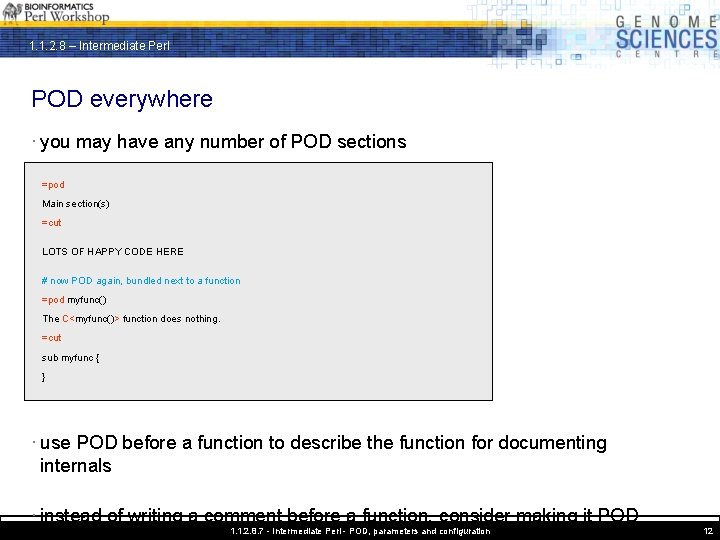
1. 1. 2. 8 – Intermediate Perl POD everywhere · you may have any number of POD sections =pod Main section(s) =cut LOTS OF HAPPY CODE HERE # now POD again, bundled next to a function =pod myfunc() The C<myfunc()> function does nothing. =cut sub myfunc { } · use POD before a function to describe the function for documenting internals · instead of writing a comment before a function, consider making it POD 1. 1. 2. 8. 7 - Intermediate Perl - POD, parameters and configuration 12
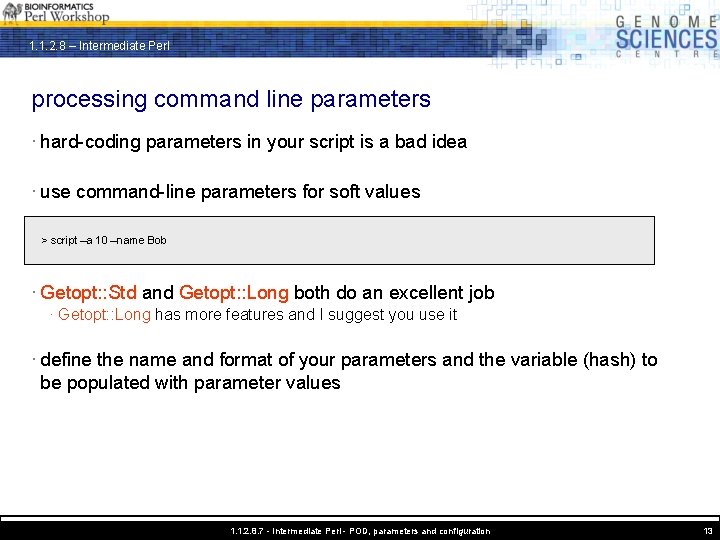
1. 1. 2. 8 – Intermediate Perl processing command line parameters · hard-coding parameters in your script is a bad idea · use command-line parameters for soft values > script –a 10 –name Bob · Getopt: : Std and Getopt: : Long both do an excellent job · Getopt: : Long has more features and I suggest you use it · define the name and format of your parameters and the variable (hash) to be populated with parameter values 1. 1. 2. 8. 7 - Intermediate Perl - POD, parameters and configuration 13
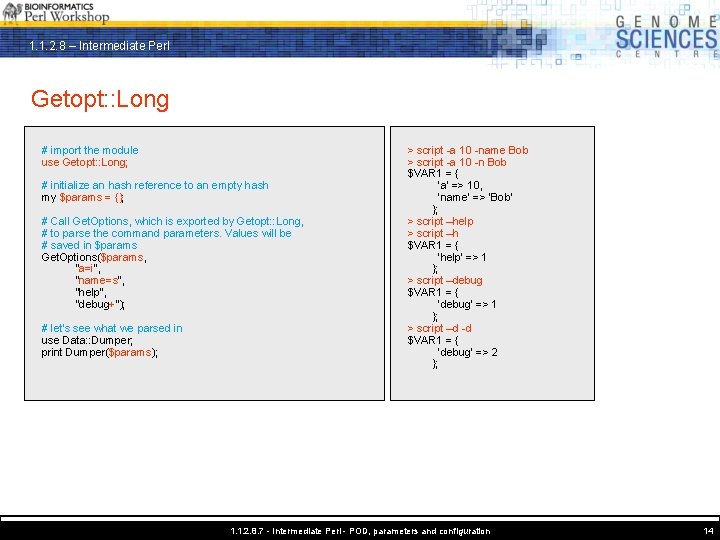
1. 1. 2. 8 – Intermediate Perl Getopt: : Long # import the module use Getopt: : Long; # initialize an hash reference to an empty hash my $params = {}; # Call Get. Options, which is exported by Getopt: : Long, # to parse the command parameters. Values will be # saved in $params Get. Options($params, "a=i", "name=s", "help", "debug+"); # let's see what we parsed in use Data: : Dumper; print Dumper($params); > script -a 10 -name Bob > script -a 10 -n Bob $VAR 1 = { 'a' => 10, 'name' => 'Bob' }; > script –help > script –h $VAR 1 = { 'help' => 1 }; > script –debug $VAR 1 = { 'debug' => 1 }; > script –d -d $VAR 1 = { 'debug' => 2 }; 1. 1. 2. 8. 7 - Intermediate Perl - POD, parameters and configuration 14
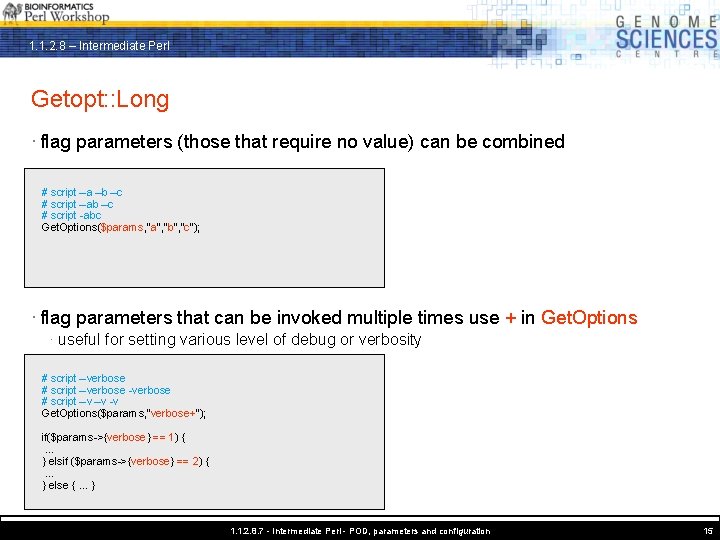
1. 1. 2. 8 – Intermediate Perl Getopt: : Long · flag parameters (those that require no value) can be combined # script –a –b –c # script –ab –c # script -abc Get. Options($params, "a", "b", "c"); · flag parameters that can be invoked multiple times use + in Get. Options · useful for setting various level of debug or verbosity # script –verbose -verbose # script –v –v -v Get. Options($params, "verbose+"); if($params->{verbose} == 1) {. . . } elsif ($params->{verbose} == 2) {. . . } else {. . . } 1. 1. 2. 8. 7 - Intermediate Perl - POD, parameters and configuration 15
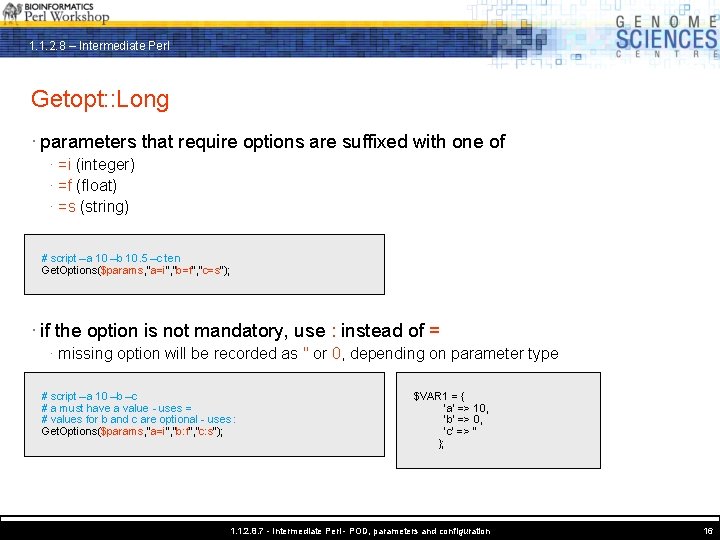
1. 1. 2. 8 – Intermediate Perl Getopt: : Long · parameters that require options are suffixed with one of · =i (integer) · =f (float) · =s (string) # script –a 10 –b 10. 5 –c ten Get. Options($params, "a=i", "b=f", "c=s"); · if the option is not mandatory, use : instead of = · missing option will be recorded as '' or 0, depending on parameter type # script –a 10 –b –c # a must have a value - uses = # values for b and c are optional - uses : Get. Options($params, "a=i", "b: f", "c: s"); $VAR 1 = { 'a' => 10, 'b' => 0, 'c' => '' }; 1. 1. 2. 8. 7 - Intermediate Perl - POD, parameters and configuration 16
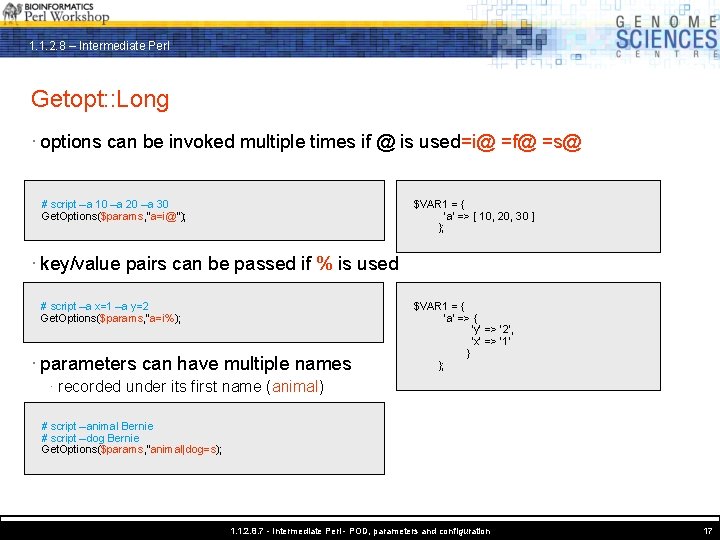
1. 1. 2. 8 – Intermediate Perl Getopt: : Long · options can be invoked multiple times if @ is used=i@ =f@ =s@ # script –a 10 –a 20 –a 30 Get. Options($params, "a=i@"); $VAR 1 = { 'a' => [ 10, 20, 30 ] }; · key/value pairs can be passed if % is used # script –a x=1 –a y=2 Get. Options($params, "a=i%); · parameters can have multiple names $VAR 1 = { 'a' => { 'y' => '2', 'x' => '1' } }; · recorded under its first name (animal) # script –animal Bernie # script –dog Bernie Get. Options($params, "animal|dog=s); 1. 1. 2. 8. 7 - Intermediate Perl - POD, parameters and configuration 17
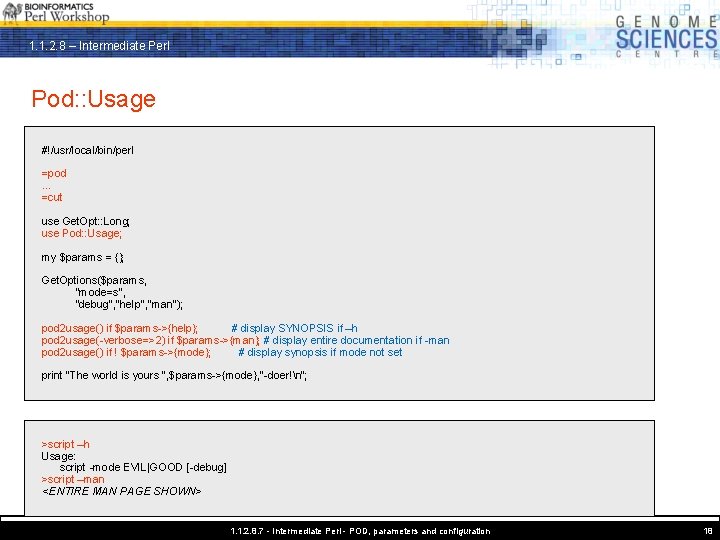
1. 1. 2. 8 – Intermediate Perl Pod: : Usage #!/usr/local/bin/perl =pod. . . =cut use Get. Opt: : Long; use Pod: : Usage; my $params = {}; Get. Options($params, "mode=s", "debug", "help", "man"); pod 2 usage() if $params->{help}; # display SYNOPSIS if –h pod 2 usage(-verbose=>2) if $params->{man}; # display entire documentation if -man pod 2 usage() if ! $params->{mode}; # display synopsis if mode not set print "The world is yours ", $params->{mode}, "-doer!n"; >script –h Usage: script -mode EVIL|GOOD [-debug] >script –man <ENTIRE MAN PAGE SHOWN> 1. 1. 2. 8. 7 - Intermediate Perl - POD, parameters and configuration 18
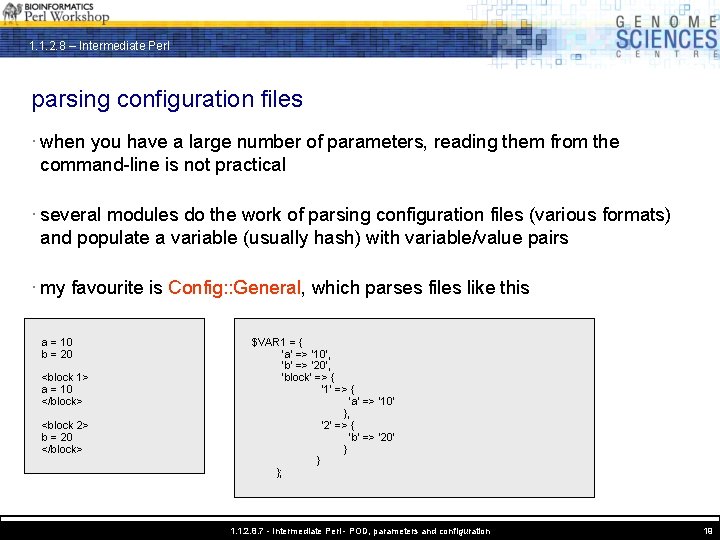
1. 1. 2. 8 – Intermediate Perl parsing configuration files · when you have a large number of parameters, reading them from the command-line is not practical · several modules do the work of parsing configuration files (various formats) and populate a variable (usually hash) with variable/value pairs · my favourite is Config: : General, which parses files like this a = 10 b = 20 <block 1> a = 10 </block> <block 2> b = 20 </block> $VAR 1 = { 'a' => '10', 'b' => '20', 'block' => { '1' => { 'a' => '10' }, '2' => { 'b' => '20' } } }; 1. 1. 2. 8. 7 - Intermediate Perl - POD, parameters and configuration 19
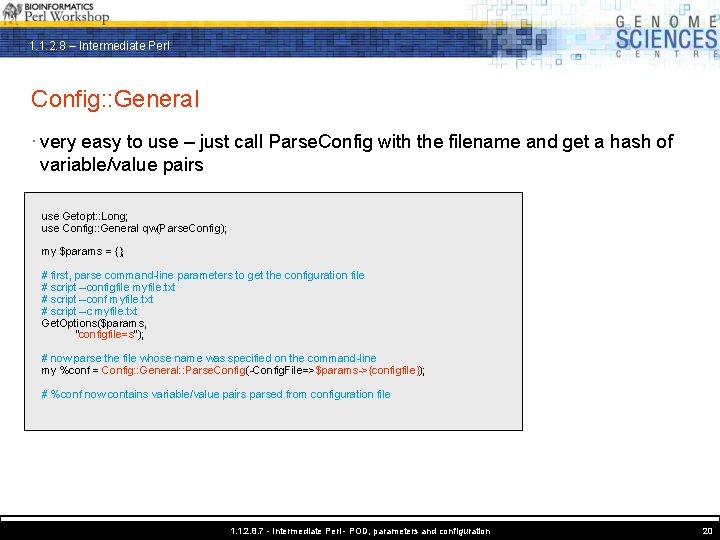
1. 1. 2. 8 – Intermediate Perl Config: : General · very easy to use – just call Parse. Config with the filename and get a hash of variable/value pairs use Getopt: : Long; use Config: : General qw(Parse. Config); my $params = {}; # first, parse command-line parameters to get the configuration file # script –configfile myfile. txt # script –conf myfile. txt # script –c myfile. txt Get. Options($params, "configfile=s"); # now parse the file whose name was specified on the command-line my %conf = Config: : General: : Parse. Config(-Config. File=>$params->{configfile}); # %conf now contains variable/value pairs parsed from configuration file 1. 1. 2. 8. 7 - Intermediate Perl - POD, parameters and configuration 20
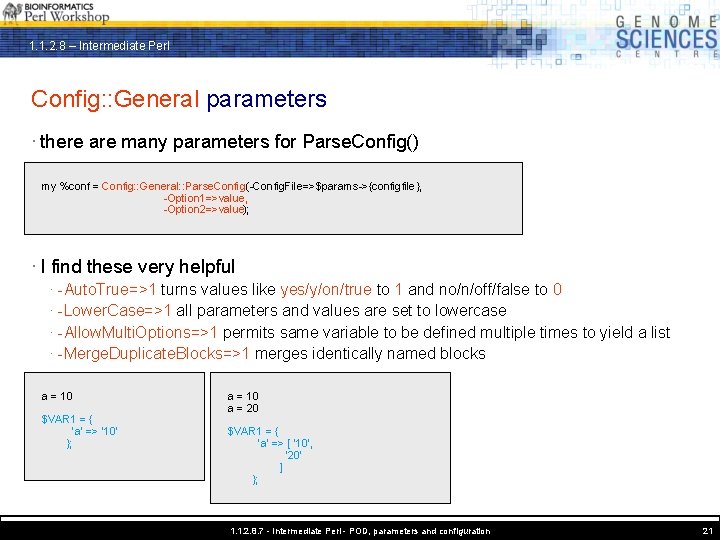
1. 1. 2. 8 – Intermediate Perl Config: : General parameters · there are many parameters for Parse. Config() my %conf = Config: : General: : Parse. Config(-Config. File=>$params->{configfile}, -Option 1=>value, -Option 2=>value); · I find these very helpful · -Auto. True=>1 turns values like yes/y/on/true to 1 and no/n/off/false to 0 · -Lower. Case=>1 all parameters and values are set to lowercase · -Allow. Multi. Options=>1 permits same variable to be defined multiple times to yield a list · -Merge. Duplicate. Blocks=>1 merges identically named blocks a = 10 $VAR 1 = { 'a' => '10' }; a = 10 a = 20 $VAR 1 = { 'a' => [ '10', '20' ] }; 1. 1. 2. 8. 7 - Intermediate Perl - POD, parameters and configuration 21
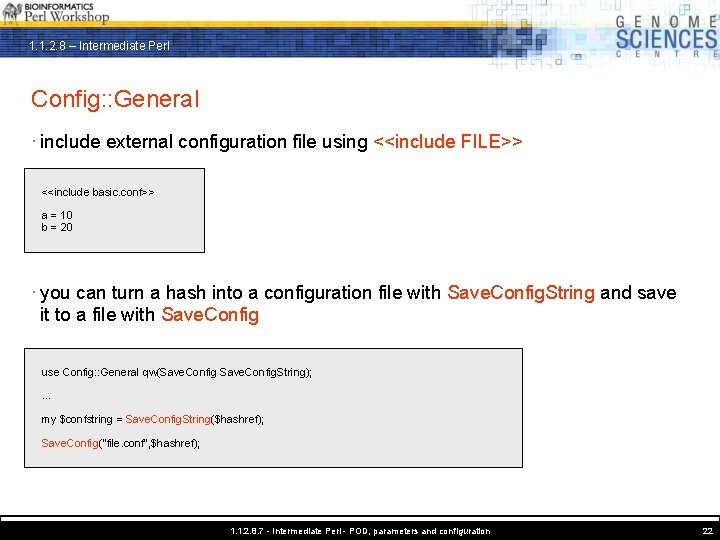
1. 1. 2. 8 – Intermediate Perl Config: : General · include external configuration file using <<include FILE>> <<include basic. conf>> a = 10 b = 20 · you can turn a hash into a configuration file with Save. Config. String and save it to a file with Save. Config use Config: : General qw(Save. Config. String); . . . my $confstring = Save. Config. String($hashref); Save. Config("file. conf", $hashref); 1. 1. 2. 8. 7 - Intermediate Perl - POD, parameters and configuration 22
1. 1. 2. 8 – Intermediate Perl 1. 1. 2. 8. 7 Introduction to Perl – Session 7 · create POD to document your scripts · turn POD into text, HTML and man pages automatically · use Getopt: : Long to parse complex command-line arguments · parse configuration files with Config: : General to keep your scripts flexible 1. 1. 2. 8. 7 - Intermediate Perl - POD, parameters and configuration 23